Instagram Instants: what they are, how to turn them off, and whether a business should use them
Instants are one tap, unedited photos that go to your Close Friends or to the followers you follow back, and disappear once seen. We read Instagram's announcement and both Help Center articles, checked what the popular guides add that Instagram never says, and worked out what the feature means for a business account.

An instant is a photo you take inside Instagram's inbox with one tap, with no filter and no edit, that goes straight to your Close Friends or to the followers you follow back. Each person can open it once, and only within 24 hours. Instagram launched it worldwide on 13 May 2026, in its own words as a way to share casual, everyday photos that disappear after your friends view them.
Our articles are still written by humans!
Get human written articles in your Google feed.
Most people searching for it want one of three things: to know what the new stack of photos in their inbox is, to make it go away, or to know who saw the one they sent by accident. Instagram's pages answer all three, and in one case the answer is not what people hope. Below are the rules with where each is written, the two things everyone repeats that Instagram does not actually say, and what the feature means for an account that sells something.
| Your question | Short answer | Where Instagram says it |
|---|---|---|
| What are Instants? | Unedited photos to Close Friends or mutuals, seen once | Announcement, 13 May 2026 |
| How do I turn them off? | Swipe right on the stack in your inbox | Help Center, inbox article |
| Can I see who viewed my instant? | No | Help Center: information on who viewed isn't available |
| How long do they last? | Viewed once, within 24 hours | Help Center and announcement |
| Can I unsend one? | Undo right away, or delete it from the archive | Help Center and announcement |
| Can people screenshot them? | Not on screen, but a second camera works | Announcement; Help Center warning |
| Can I post a video? | Not documented by Instagram | Nowhere on Instagram's pages |
What are Instagram Instants?
Instagram's announcement describes them like this:
Instants live in the bottom right corner of your Instagram inbox, and with a simple tap of the camera, you can share photos with close friends or mutuals (followers you follow back). No edits, no pressure, just life as it happens.
It is a feature inside Instagram and also a separate app, Instants, which the announcement says is being tried in select countries. TechCrunch reported in April that the app was being tested in Spain and Italy, and the Google Play listing was live in the US when we checked. Instants you send from either show up in the other.
It is not entirely new. Social Media Today describes it as a renamed version of Shots, a feature Instagram tested in 2025, and reads it as Meta's latest answer to Snapchat. Whatever the motive, the design is the opposite of everything else on Instagram: no editing, no upload from your camera roll, no public audience and no view counts.
How do Instagram Instants work?
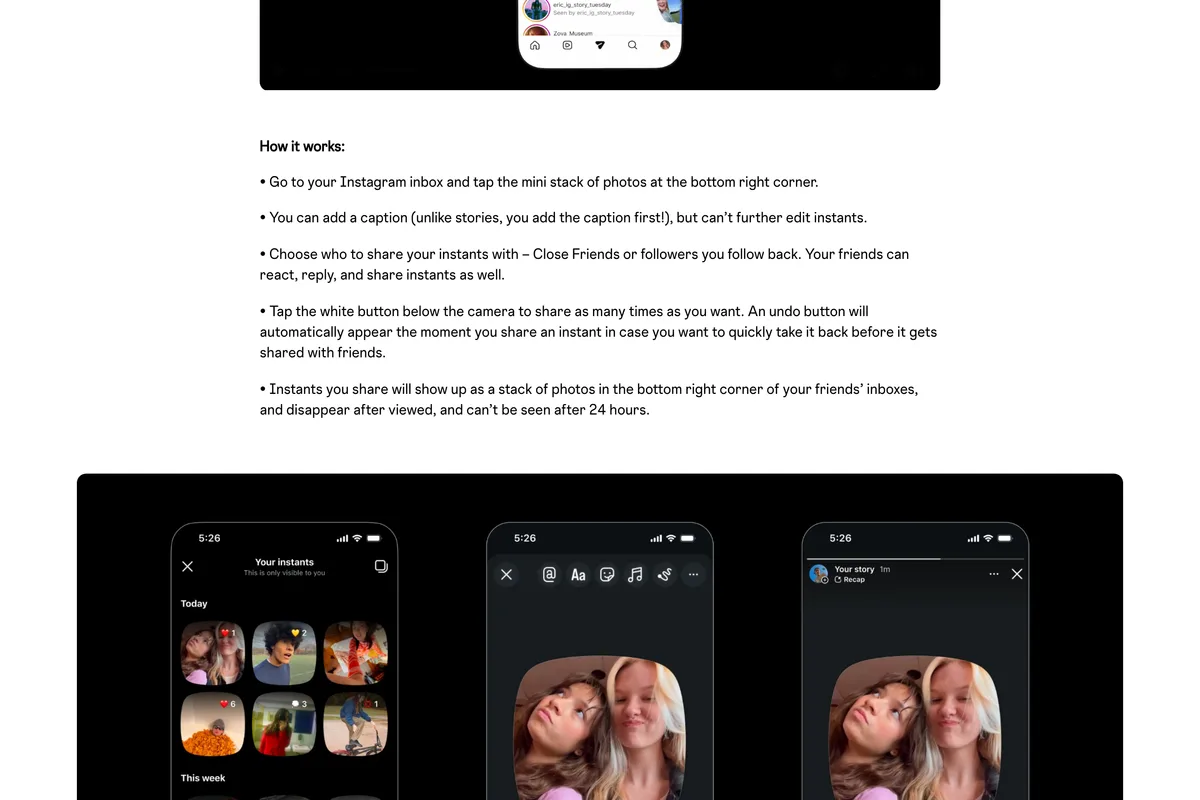
The Help Center gives these steps for the feature inside Instagram:
- Tap Messages at the bottom, then Instants on the right of your inbox.
- Before you take the photo, you can tap Add a caption. Unlike a story, the caption comes first, because there is no editing step afterwards.
- Choose who gets it: tap Close Friends or Friends at the bottom, then a group from the list.
- Tap the camera button. The photo is shared the moment you take it.
- If that was a mistake, tap Undo below the camera straight away.
On the receiving end, instants appear as a stack of photos in the bottom right of the inbox, and Instagram notes that friends see a preview of the photo before opening it. Each person can open an instant once, within 24 hours. They can react, which notifies you, or reply, which arrives as an ordinary message.
The steps explain most of the complaints. The shutter is the send button, so there is no screen on which to change your mind, and TechCrunch's guide published the day after launch noted that many people sent photos by accident because of exactly that.
Instants, Stories and Close Friends compared
| Instants | Stories | Close Friends story | |
|---|---|---|---|
| Who sees it | Close Friends, or followers you follow back | All followers, or anyone if public | Your Close Friends list |
| Edits and uploads | Neither | Both | Both |
| How long | One view, within 24 hours | 24 hours, then Highlights if you add it | 24 hours |
| Who viewed it | Not available | Viewer list | Viewer list |
| Useful for a business | Rarely | Yes | Sometimes, for loyal customers |
How to turn off Instants on Instagram
There is no switch that removes the feature from Instagram for good. There are two ways to hide it, one documented by Instagram and one reported everywhere else.
Swipe it away, the way Instagram describes
The Help Center gives a single method:
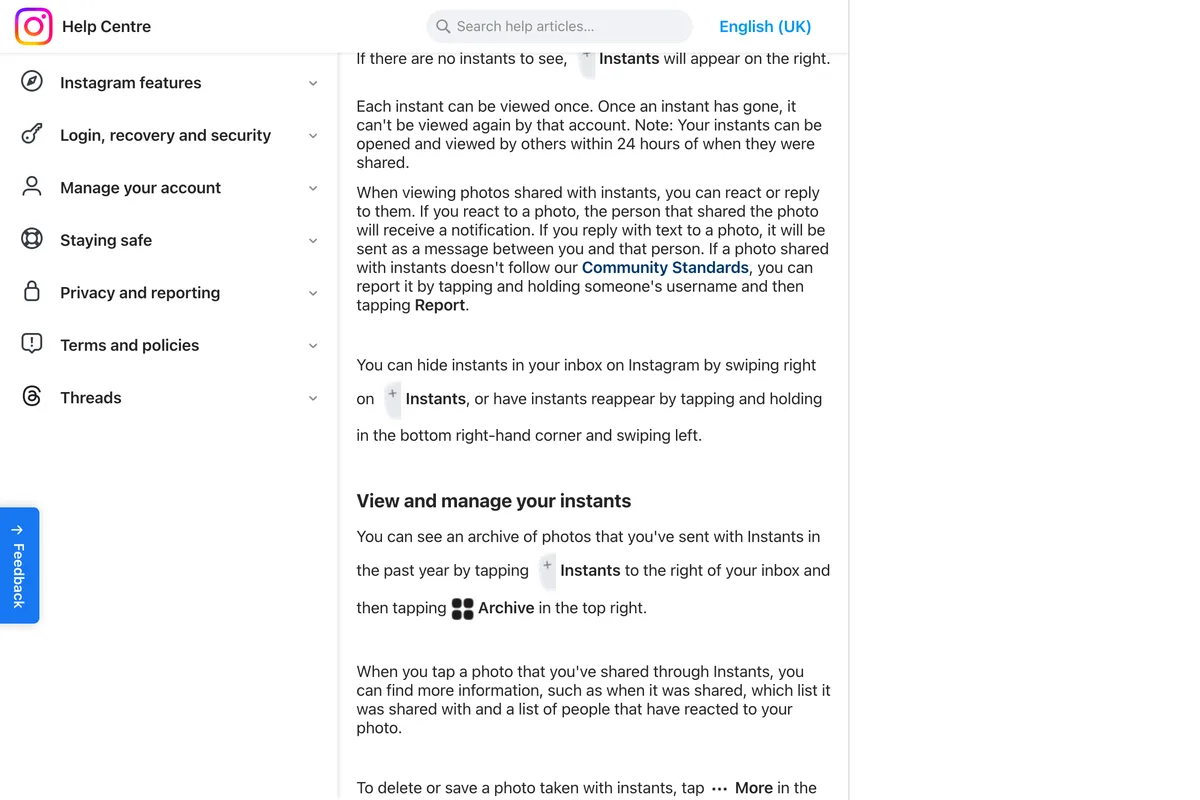
Swipe right on the Instants stack in your inbox and it disappears. To bring it back, tap and hold the bottom right corner of the inbox and swipe left. The announcement calls this Snooze and describes it as temporarily not seeing them, so expect it to be a pause rather than a permanent setting.
The Hide Instants in inbox switch
TechCrunch's guide of 14 May 2026, and most guides since, describe a setting: open your profile, tap the three lines at the top right, go to Content preferences, and turn on Hide Instants in inbox. It is real. In the video below the path starts at about 1:50 and the switch is on screen at about 2:20, and OSXDaily quotes the text under it: when it is on, you won't see new instants in your inbox.
What we cannot give you is Instagram's word on it, because no Instagram page mentions it, and that matters for one question people ask. Tom's Guide says that with the switch on, people can still send you instants and you will never see them or be notified. That is plausible, but Instagram has not said it. If your settings do not show the switch, search Settings for Content preferences, as the video suggests, before assuming it is missing.
We chose this video after reading its full transcript, because K.M. Robinson teaches social media to business owners and the video is blunt about the feature: an instant reaches only people you follow back, and at that point, Robinson asks, are you really marketing to them? The end of the video promotes the channel; the steps stand on their own.
The separate Instants app is a different matter. Instagram says instants you share on the app show up for friends on Instagram and vice versa, so deleting the app does not stop instants from reaching your Instagram inbox. Hiding them there is still the step that counts.
Can you see who viewed your Instants?
No. This is the one answer Instagram puts plainly:
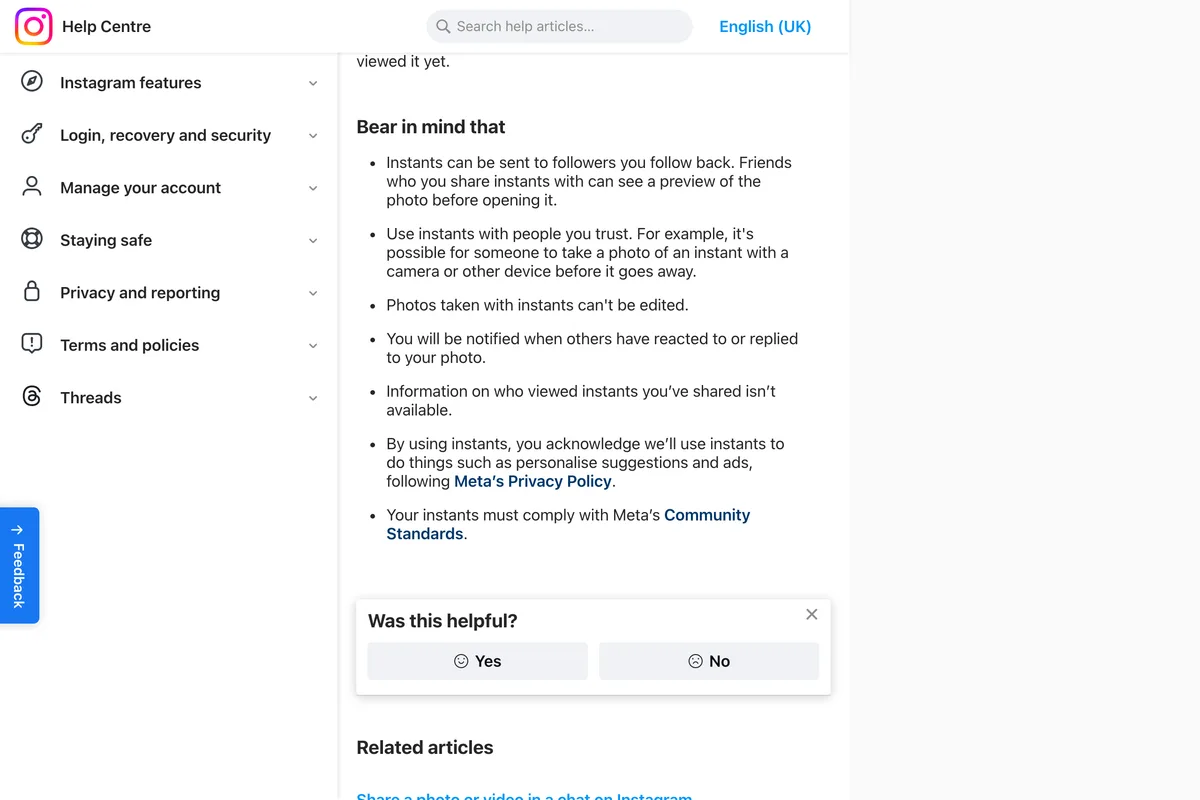
You will be notified if someone reacts or replies, and your archive shows who reacted to each instant. Someone who opens an instant and does nothing leaves no trace you can see. The reverse is also true: if you open someone else's instant without reacting, nothing tells them it was you.
Can people screenshot Instants?
Not with the phone's screenshot button. The announcement lists it among the protections:
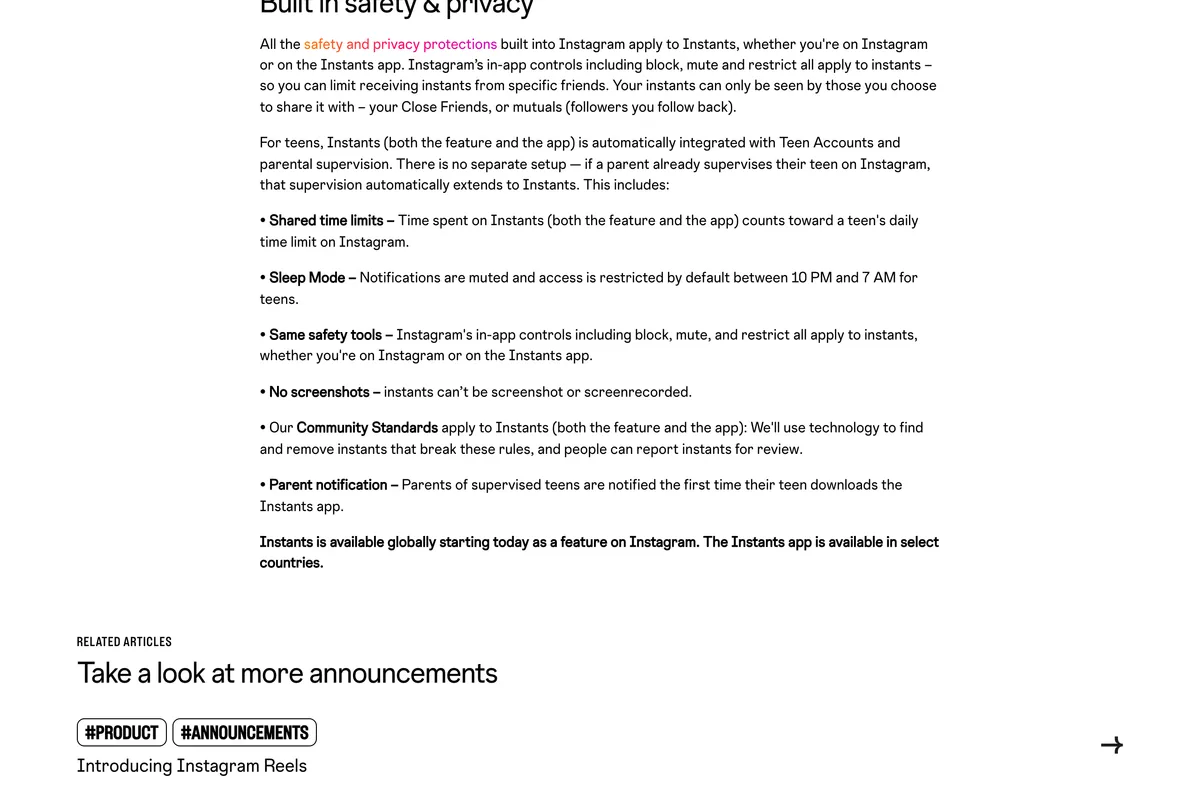
The line sits in a list that is mostly about teen accounts, and TechCrunch reported it as applying to everyone who receives an instant. Either way, the Help Center adds a sentence that matters more: it is possible for someone to take a photo of an instant with a camera or other device before it goes away. Add the preview friends see before opening, and the safe assumption is the old one. Do not send anything in an instant you would mind someone keeping.
How to unsend or delete an instant
- Straight after taking it: tap Undo, which appears below the camera the moment you share.
- Later: open Instants, tap Archive at the top right, open the photo, tap More and delete it. Instagram says this unshares it for anyone who has not opened it yet. Anyone who already has, has seen it.
- Saving one: the same More menu lets you save it. The separate Instants app saves every instant to your camera roll by default; the switch is under your profile photo, Settings, Save to photos.
The archive and the recap to Stories
Instants disappear for the people you send them to, not for you. The Help Center says your archive keeps the instants you have sent in the past year, with when each was shared, to which list, and who reacted. From the archive, Create recap turns a selection into a story, and a story goes to all your followers. That is the only point at which an instant can reach anyone outside your mutuals.
Who can see your instants, and what Instagram does with them
Only the list you pick: Close Friends, or friends, meaning followers you follow back. Block, mute and restrict work on instants as they do elsewhere, and Instagram's Community Standards apply, so an instant can be reported by tapping and holding the sender's name.
One line in the Help Center gets less attention than it deserves: by using instants, you acknowledge we'll use instants to do things like personalize suggestions and ads, following Meta's Privacy Policy. Disappearing for your friends does not mean unused by Instagram.
For teenagers, the announcement says Instants comes under Teen Accounts and parental supervision with no separate setup: time on Instants counts towards the daily limit, Sleep Mode mutes it between 10 PM and 7 AM, and a supervising parent is told the first time their teen downloads the Instants app.
Can you send a video in Instants?
Some guides, Metricool's among them, say Instants now takes short videos as well as photos, rolled out gradually. Instagram has not said so anywhere we could find, and both Help Center articles still describe photos only. The nearest thing to an official word is a Meta spokesperson quoted by TechCrunch during the April test, describing an app to share casual photos and videos. If your camera offers video, it has reached you; if it does not, nothing is wrong with your account.
Should a business use Instagram Instants?
For most businesses, no, and the reasons come straight from the rules rather than from taste. This is our reasoning, not a test on a business account, and Instagram's pages say nothing about account types either way.
- The audience is tiny by design. An instant goes to Close Friends or to followers you follow back. A business account that follows back few of its customers reaches almost nobody, and none of the strangers that Instagram's recommendation system exists to find.
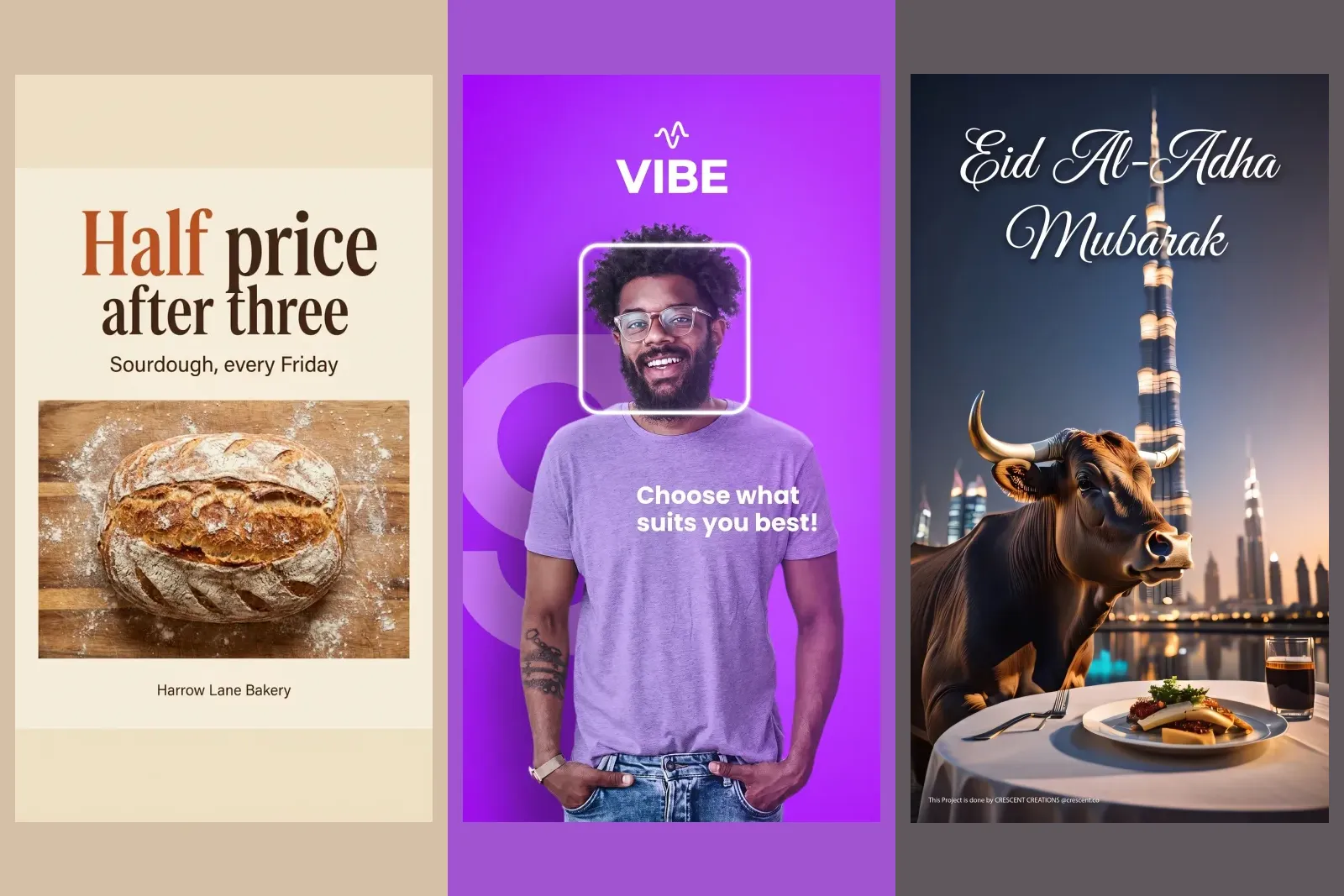
- Nothing you make for a brand fits in it. No upload, no edit, no layout, a caption typed before the shutter. Everything in the posts below is what Instants removes.
- You cannot measure it. No viewer list, and no insights mentioned anywhere on Instagram's pages. Reactions are the only signal.
- It feeds Instagram's ads, not yours. Instagram uses your instants to personalise suggestions and ads.
- It is easy to send by mistake. The shutter sends. On a phone that several staff use to run the shop's account, that is a real risk, and the main reason we would hide it.

There are narrow exceptions. A founder who runs the account as themselves, a small studio whose regulars are on its Close Friends list, or a team that wants a private back channel with its most loyal customers might find a casual photo from the kitchen or the workshop lands well. If you try it, use the Close Friends list deliberately, keep the caption free of offers, and judge it by the replies it gets.
For the everyday, behind the scenes moments Instants is built for, Stories already do the job better for a business: they reach every follower, they can be edited, branded and saved to Highlights, and they come with a viewer list. Our Instagram story ideas for business are a better place to spend those photos, at the right story size, and the highlight covers are where the good ones end up.
If the goal is reaching new people, Instagram's tool for that is the opposite of Instants: a trial reel goes only to people who do not follow you. And if the goal is simply having something to say this week, our list of Instagram post ideas for a small business is a better start than a camera that sends on the first tap.
What other guides get wrong
We read the Instants guides that rank for these searches. These are the claims that go beyond or against Instagram's own pages:
| What a guide says | Who says it | What Instagram's pages say |
|---|---|---|
| You can only send instants to mutual followers | Metricool | Close Friends or friends, meaning followers you follow back |
| You can now record and send short videos | Metricool, August 2026 | Photos only in both Help Center articles; no Instagram announcement of video |
| Turn it off in Settings, Content preferences, as the way to do it | Tom's Guide, OSXDaily, Protect Young Eyes, Gradezilla, Metricool | The switch exists, but Instagram documents only the swipe in your inbox |
| With the switch on, people can still send you instants and you will never be notified | Tom's Guide | Instagram does not say what happens to instants sent to you |
| Instants automatically go to everyone on your Friends list | Protect Young Eyes | You choose Close Friends or Friends before you take the photo; Instagram documents no default |
Most of these are reasonable reports of what the authors saw on their own phones, and the switch in particular is real. The point is narrower: Instagram has written down very little about Instants, so check your own app before treating any guide, including this one, as the rule.
If you run a business account, in order
- Hide Instants on any phone that is logged in to the business account: swipe right on the stack, or turn on Hide Instants in inbox under Content preferences if you have it.
- Tell anyone else who posts for you that the Instants shutter sends immediately, and that Undo and the archive are the only way back.
- Check who is on the business account's Close Friends list before anyone uses Instants or a Close Friends story.
- Put everyday and behind the scenes photos in Stories instead, where every follower can see them and you can see who did.
- Use trial reels, not Instants, when the aim is reaching people who do not follow you yet.
Frequently asked questions
What are Instagram Instants?
Instants are unedited photos you take with one tap in the Instagram inbox and send to your Close Friends or to followers you follow back. Each person can view an instant once, within 24 hours. Instagram launched the feature worldwide on 13 May 2026, along with a separate Instants app in select countries.
How do I turn off Instants on Instagram?
Instagram's Help Center says to swipe right on the Instants stack in your inbox to hide it, and to tap and hold the bottom right corner and swipe left to bring it back. Many accounts also have a Hide Instants in inbox switch under Settings, Content preferences, which is widely reported but not documented on Instagram's own pages.
Can you see who viewed your Instants?
No. Instagram's Help Center says information on who viewed instants you've shared isn't available. You are notified when someone reacts or replies, and your archive shows who reacted.
How long do Instagram Instants last?
Each person can open an instant once, and only within 24 hours of it being shared. Your own copy stays in a private archive, which keeps the instants you have sent in the past year.
How do I unsend an instant?
Tap Undo below the camera immediately after sharing. Later, open your Instants archive, tap the photo, tap More and delete it. Instagram says deleting unshares it for anyone who has not opened it yet.
Can people screenshot Instagram Instants?
Instagram says instants can't be screenshot or screen recorded. Its Help Center also warns that someone can photograph an instant with another camera before it disappears, and that friends see a preview before opening, so do not send anything you would mind someone keeping.
Who can see my Instants?
Only the audience you choose before taking the photo: your Close Friends list, or friends, which Instagram defines as followers you follow back. Blocked, muted and restricted accounts are handled as elsewhere on Instagram.
Can you send videos in Instagram Instants?
Some guides report a gradual rollout of short videos, but Instagram's Help Center describes photos only and we found no Instagram announcement of video. If your Instants camera offers video, it has reached your account.
What is the Instants app?
Instants, an Instagram app, is a separate app that opens straight to the camera. You log in with your Instagram account, and instants sent from either app appear in both. Instagram describes it as available in select countries, and by default it saves your instants to your phone's photos.
Should a business use Instagram Instants?
Rarely. Instants reach only Close Friends or followers you follow back, cannot be edited or uploaded, show no viewer list, and Instagram uses them to personalise ads. Stories reach every follower and suit a business better. On a shared business phone, hiding Instants also prevents accidental sends.
How we researched this
- Every rule here was read on Instagram's own pages on 6 October 2026: the announcement Introducing Instants of 13 May 2026 on about.instagram.com, and the two Help Center articles, Share photos instantly with others in your inbox on Instagram and About Instants by Instagram, the second of which covers the separate app.
- Last time we wrote about a new Instagram feature, its Help Center served different rules in US and UK English. So we compared the inbox article in both, and on iPhone and Android. Apart from spelling the four texts were identical on 6 October 2026, and our screenshots, taken in UK English, say the same as the US page we quote.
- Two things people search for are not on any Instagram page. The Hide Instants in inbox switch under Content preferences is described by TechCrunch and other outlets and shown working on screen in the video we embed, but Instagram's Help Center documents only a swipe. Video in Instants is reported by some guides and not documented by Instagram at all. We say which is which each time.
- We read the Instants guides that rank for these searches, from Metricool, Tom's Guide, OSXDaily, Protect Young Eyes and Gradezilla, and list in a table the claims that go beyond or against Instagram's pages.
- We did not use Instants on a business account for this article, and Instagram says nothing about account types. What we say a business should do is reasoning from the documented rules, and it is labelled as such.
Sources
- 1Introducing Instants: for sharing in the moment
- 2Share photos instantly with others in your inbox on Instagram
- 3About Instants by Instagram
- 4Instagram tests a new 'Instants' app for sharing disappearing photos
- 5Instagram's new 'Instants' feature combines elements from Snapchat and BeReal
- 6How to turn off Instagram's new Instants feature and retract photos you accidentally shared
- 7Meta takes on Snapchat with new Instants app
- 8How To Use (AND TURN OFF) Instagram INSTANTS
- 9Instants, an Instagram app
- 10Instagram Instants: How to Use the New Snapchat-Style Feature
- 11Instagram's new 'instants' feature is driving users crazy. Here's how to disable it
- 12How to Hide Instagram Instants Button on iPhone
- 13How to Turn Off Instagram's New Instants Feature