What are impressions on LinkedIn? What 47 of our own posts show
An impression is one time your post was shown on screen, and members reached is how many different people saw it. That part takes a sentence. We pulled the numbers for 47 posts from one founder's profile and found the rest: why the two never match, why the big posts were all seen by strangers, and why a famous rule about 300 milliseconds is not in LinkedIn's help pages at all.
An impression on LinkedIn is one time your post was shown to someone. LinkedIn's own definition is "Number of times your post was shown on LinkedIn", and it is a count of showings, not of people. If one person scrolls past your post on Monday and again on Wednesday, that is two impressions and one person. The number of people is a separate figure that LinkedIn calls members reached.
Our articles are still written by humans!
Get human written articles in your Google feed.
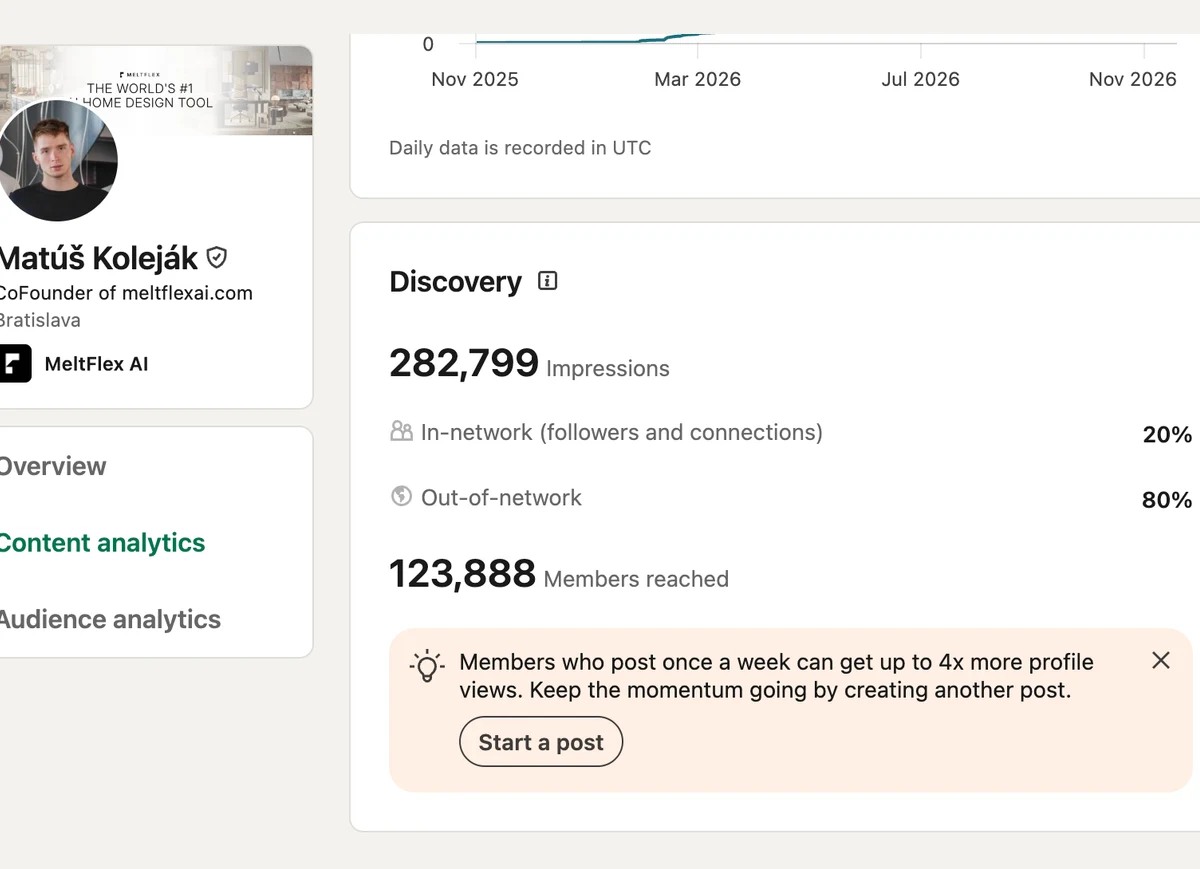
That is the whole definition, and most guides stop there or pad it with benchmarks nobody can trace. So we did the other thing. We opened the analytics for one real profile, the author's, and copied the numbers for all 47 posts it published between February and November 2026. Across the whole account that year: 282,799 impressions, 123,888 people. Here is what they show, and where the popular explanations do not match LinkedIn's own pages.
What do the numbers in LinkedIn analytics actually count?
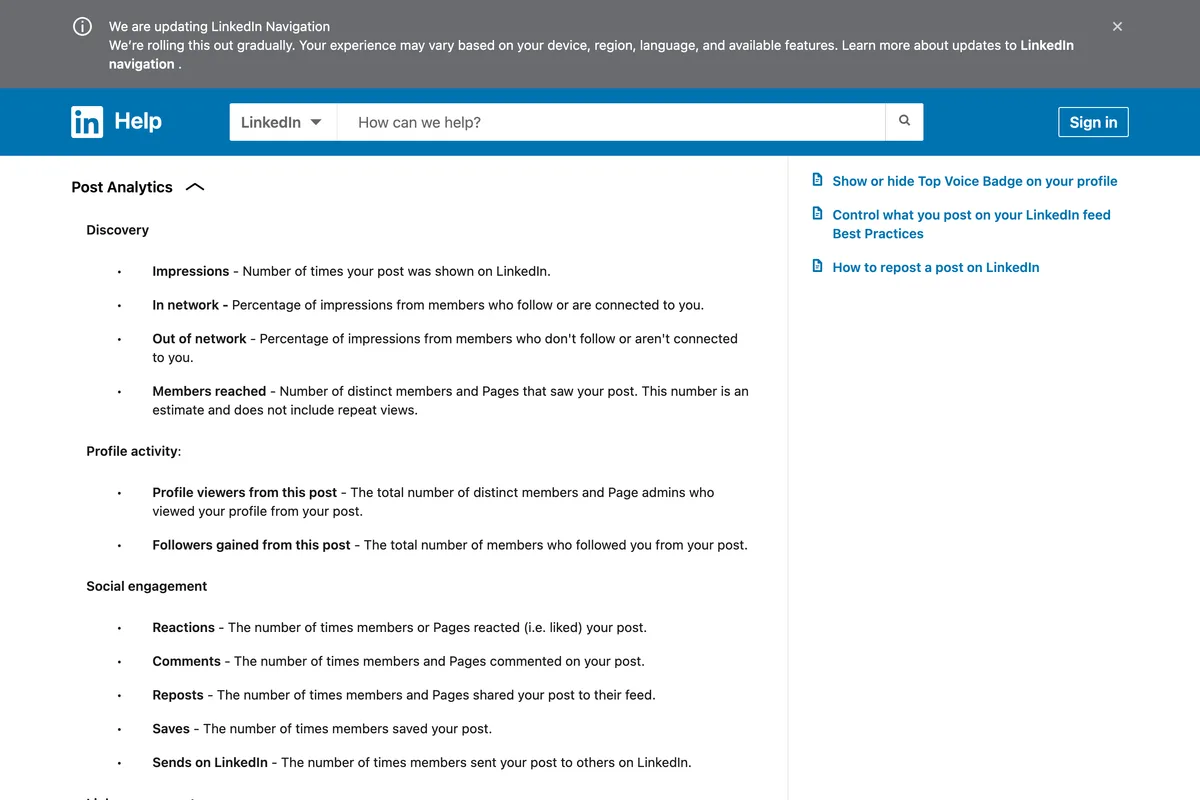
Every number in LinkedIn's post analytics is one of three things: how often the post was shown, how many people it was shown to, or what those people did. This is how LinkedIn defines each one, in its own words, next to what it tells you in practice.
| Metric | What LinkedIn says it counts | What it tells you |
|---|---|---|
| Impressions | "Number of times your post was shown on LinkedIn" | How much screen time the feed gave you. One person can be many impressions. |
| Members reached | "Number of distinct members and Pages that saw your post", without repeat views | How many people. Never higher than impressions; lower on all 47 of our posts. |
| In network | "Percentage of impressions from members who follow or are connected to you" | How much came from your own audience. |
| Out of network | "Percentage of impressions from members who don't follow or aren't connected to you" | How far past your audience the post travelled. In our data, the best single predictor of a big post. |
| Video views | Watched "for two or more continuous seconds, including replays" | A subset of impressions. On our 18 videos, 28 to 47 percent of impressions became a view. |
| Engagement rate (Pages only) | "the ratio of interactions per impressions", where interactions are "clicks, reactions, comments, and shares" | Shown for Company Pages. A personal profile has to work it out. |
What is an impression on LinkedIn, in LinkedIn's words?
LinkedIn defines it in two places, and the wording differs slightly. The member help page says "shown on LinkedIn". The help page about changes to demographics adds the part that matters for comparing the two numbers:
Impressions represent the number of times your post was displayed on screen. Members reached represent the number of members your post was displayed to at least once.
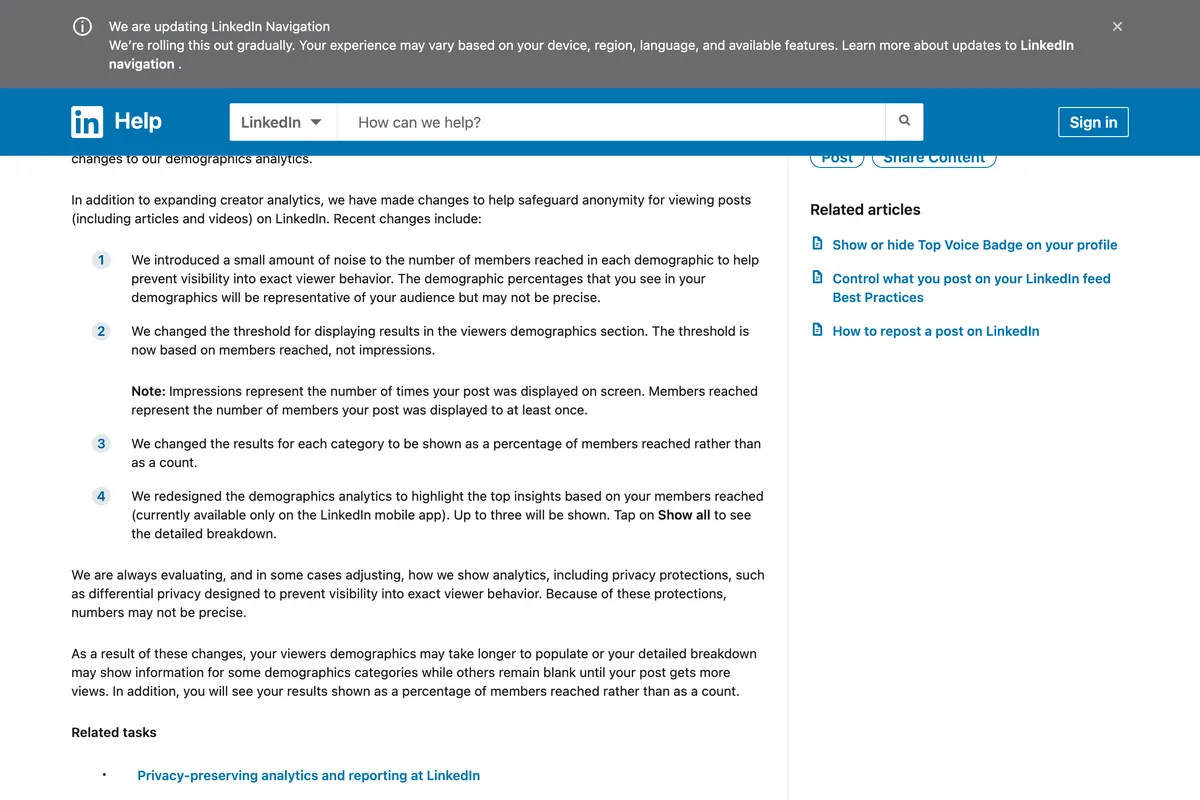
Both numbers carry the same warning on the member analytics page: "the numbers in your post analytics are estimates and may not be precise". The demographics help page adds that LinkedIn introduced "a small amount of noise" to members reached in each demographic, so viewer breakdowns are approximate too. Treat a difference of a few impressions as nothing.
Why are impressions always higher than members reached?
Because LinkedIn shows the same post to the same person more than once, and only the impressions count goes up. On every one of our 47 posts impressions were higher than members reached. The median post was shown 1.79 times per person, half of all posts sat between 1.62 and 1.86, and the full range was 1.25 to 2.88.
The ratio was not random. Posts seen mostly by the author's own network had some of the highest ratios: the three posts with only 8 or 9 percent of impressions from outside the network were shown 2.25, 2.43 and 2.83 times per person. That is a small audience being shown the same post again. The four big posts, seen almost entirely by strangers, sat at 1.49 to 1.84: lots of people, each seeing it about once or twice.
Add the posts up and the ratio climbs. Over 365 days the profile shows 282,799 impressions and 123,888 members reached, 2.28 showings per person. Adding up members reached post by post gives 170,082, about 46,000 more than the yearly figure, because the yearly figure counts each person once however many of the posts they saw. That is a useful thing to know before you add up members reached from several posts and call it your audience: you will count your regulars many times.
Do your own views count as impressions on LinkedIn?
Yes. LinkedIn says so directly on the member analytics page, in a section that is collapsed by default, which may be why it gets missed:
Your own views, social engagements, link engagements, saves, and sends are counted towards the analytics of your content.
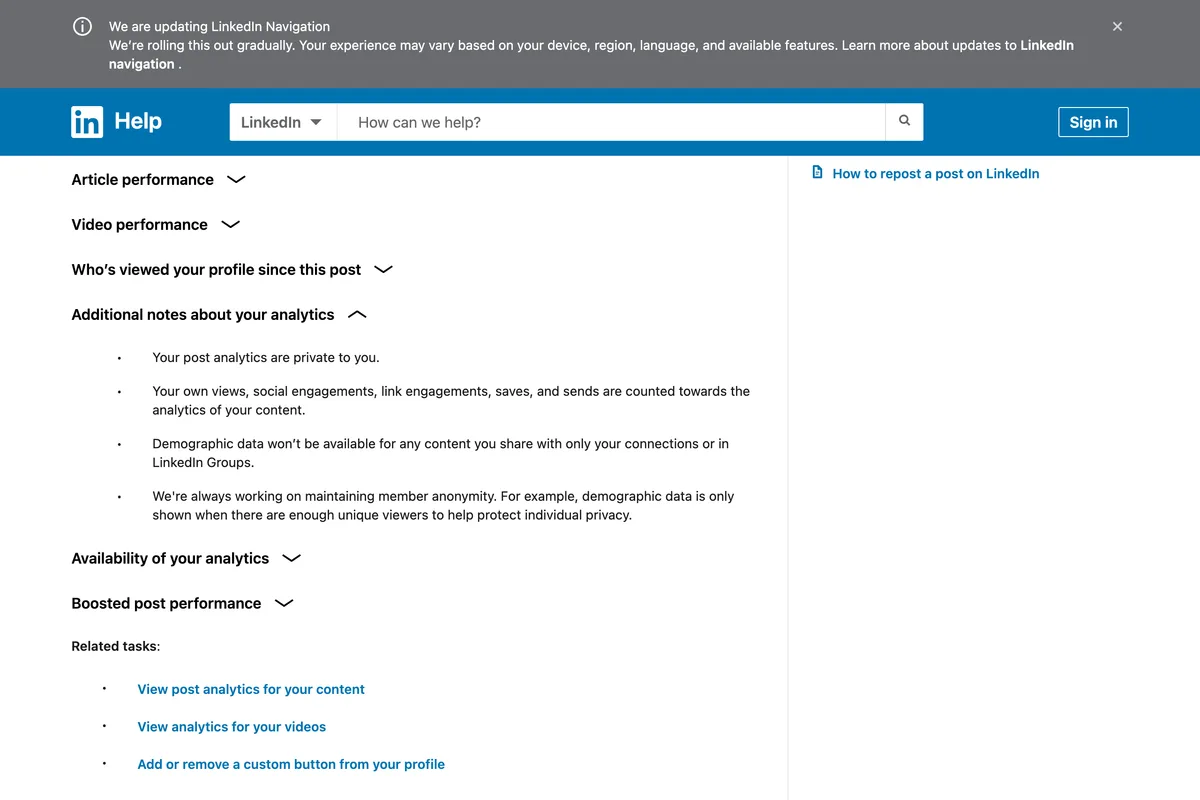
On a post with 20,000 impressions this makes no difference. On a post with 150 it can: our smallest post had 147 impressions from 51 people, and some of those 147 are the author checking it. Supergrow's guide says "Your own views as the post creator are excluded from your impression count", and Factors.ai's lists "Self-views may count" and leans on user reports. LinkedIn's page says plainly that they count.
Is there a 300 millisecond rule for LinkedIn impressions?
Not in LinkedIn's current help pages. Five of the nine ranking guides we read say LinkedIn counts an impression when a post is at least half on screen for 300 milliseconds. Socialinsider puts it as "at least 50% of your post is visible on a signed-in member's screen for 300 milliseconds or longer". Supergrow links to LinkedIn's Page analytics help as its source, and ContentStudio says "the documentation describes" it.
We read that Page analytics page on 13 November 2026. Its definition of impressions is "The number of times your post was shown on LinkedIn. This number is an estimate and may not be precise." There is no time and no percentage. The member page and the combined analytics page do not have one either. The nearest thing on LinkedIn's site is in the ads help, where average dwell time is measured while "at least 50% of the ad is present on the screen", and that is a different metric about ads.
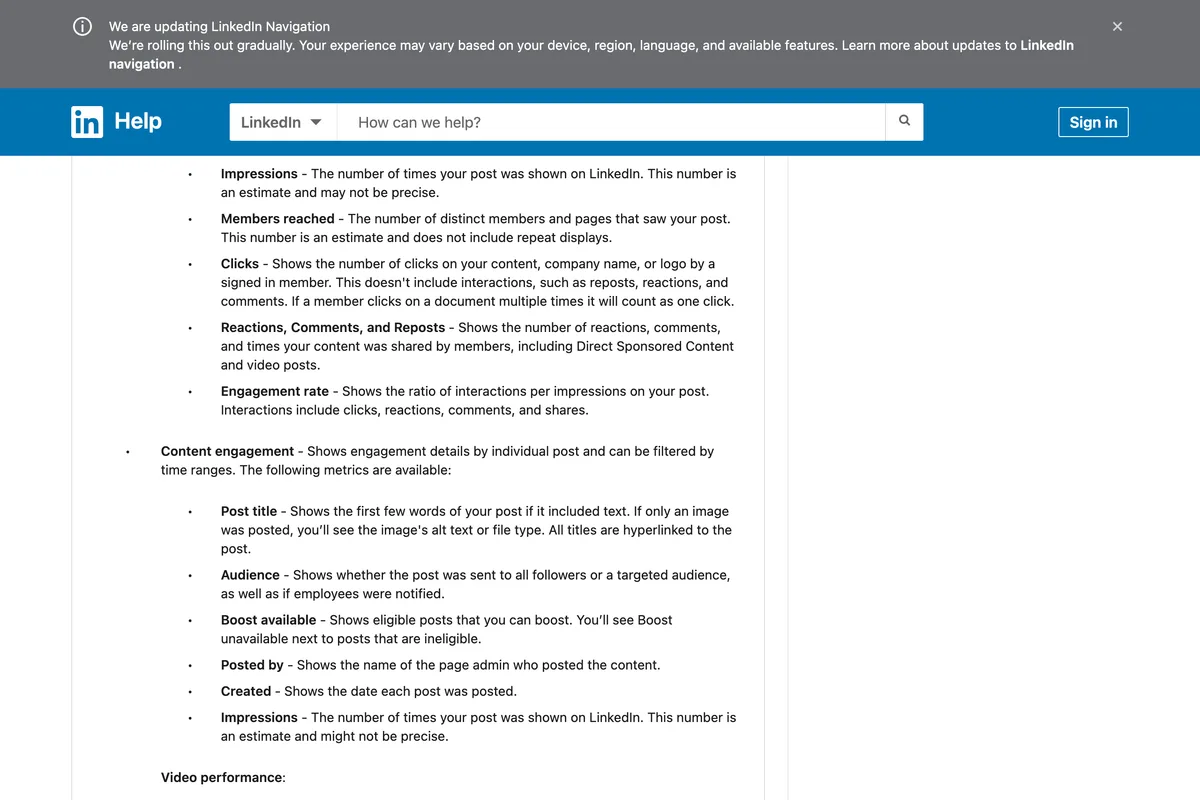
We are not saying the rule is false. Valley attributes it to LinkedIn's Page analytics and dates its LinkedIn sources 6 October 2026, though its link for the rule goes to its own blog. The rule may have been on LinkedIn's page once, and LinkedIn may still use a threshold it does not print. What we can say is that you cannot cite LinkedIn for it today. Ordinal's guide goes the other way and says there is no minimum at all, "as long as your post loads", which LinkedIn's pages do not say either.
What is a good number of impressions on LinkedIn?
A good number is one above your own median, not one from a blog. On our 47 posts the median was 2,125 impressions, and half the posts landed between 1,246 and 4,091. Seven were under 1,000. Four were over 35,000, and those four produced 61.7 percent of all the impressions the 47 posts got. One post in about twelve did most of the work.
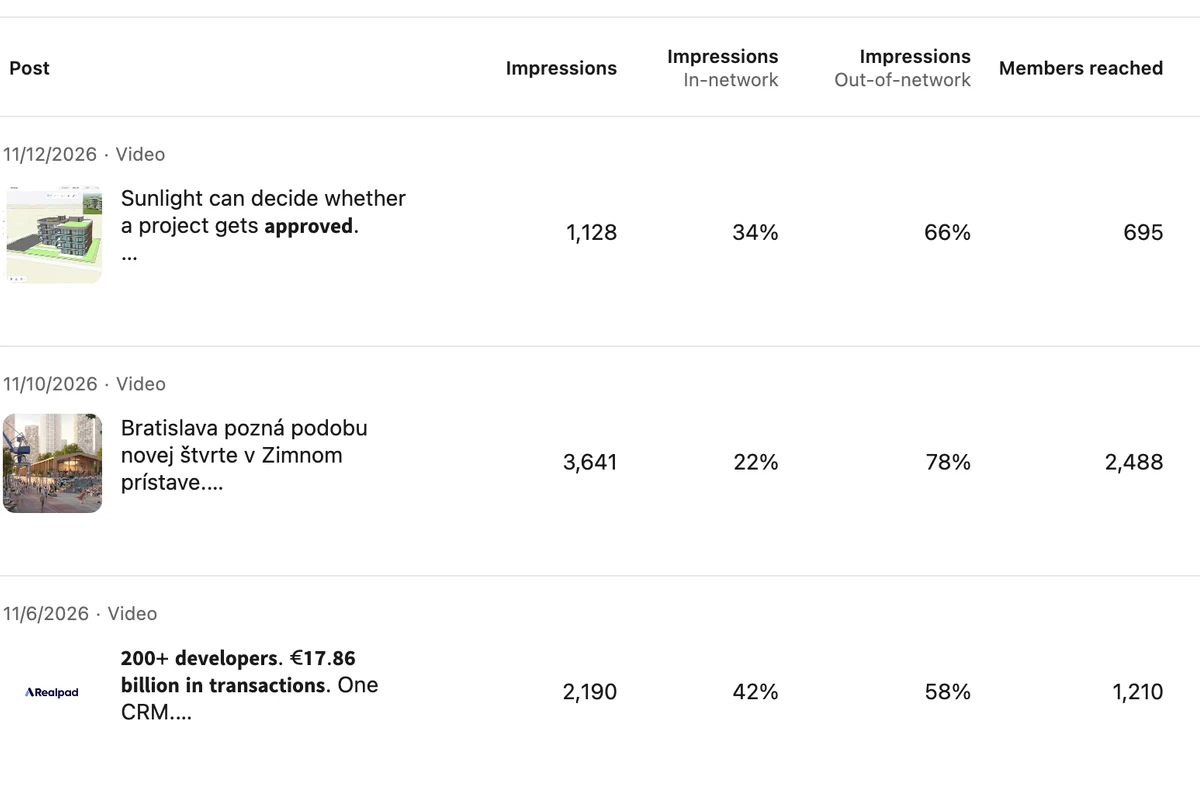
That shape is why an average misleads. The mean of our 47 posts is about 5,900 impressions, nearly three times the median, because four posts drag it up. If you compare a normal post to the average you will think it failed. Compare it to the median, and look at the spread.
The benchmarks in other guides mostly have no source we could find. Factors.ai says "a healthy organic impression count sits between 10% and 30% of your follower count per post" and Supergrow says "a healthy impressions-to-reach ratio for most feed posts is roughly 2:1", neither with a source. Expandi cites a vendor glossary saying personal profiles "should aim for 500-1,000". Where a guide has real data of its own, such as AuthoredUp's median of "about 840 impressions" across its sample, it is a sample of that tool's users, not of LinkedIn.
Why did some posts get ten times more impressions?
In our data, one number separates the big posts from the rest: the share of impressions from outside the network. All four posts over 10,000 impressions got 91, 93, 96 and 96 percent of their impressions from people who neither followed nor were connected to the author. Of the 24 posts that got most of their impressions from inside the network, none went past 4,091, and their median was 1,299.
| Impressions per post | Posts | Median share out of network | Shown per person (median) | Engagement rate (median) |
|---|---|---|---|---|
| Under 1,500 | 15 | 33% | 1.83 | 2.48% |
| 1,500 to 3,000 | 17 | 48% | 1.79 | 2.88% |
| 3,000 to 10,000 | 11 | 69% | 1.69 | 1.84% |
| Over 10,000 | 4 | 94.5% | 1.55 | 0.40% |
This is correlation, not a recipe. It does not mean you should try to be seen by strangers; it describes what a big post is. A post goes big when LinkedIn keeps showing it beyond the people who already follow you, and the out of network share is how you see that happening. Across the 47 posts, the out of network share and the size of the post moved together strongly (a correlation of 0.80 against the logarithm of impressions). What caused LinkedIn to keep showing those four posts we cannot tell you from analytics. The piece on how the LinkedIn algorithm works covers what LinkedIn's engineers have said about that.
Why does engagement rate drop when impressions go up?
Because the people a big post reaches are mostly strangers, and strangers react less. Posts under 3,000 impressions had a median engagement rate of 2.81 percent. The two biggest posts, at 52,110 and 48,053 impressions, had 0.36 and 0.19 percent. The 52,110 post still collected 188 engagements, the second most of any post, so the low rate hides more conversation, not less. One exception is worth noticing: the 27 October video reached 35,020 impressions and kept a 1.96 percent rate, with 687 engagements, the most of any post.
So engagement rate is a fair way to compare two posts of similar size and a bad way to judge a big one. If you run a Company Page, LinkedIn calculates the rate for you as "the ratio of interactions per impressions", where interactions are "clicks, reactions, comments, and shares". A personal profile does not get the figure; we calculated ours with LinkedIn's own engagements, which are reactions, comments, reposts, saves and sends. Valley's guide adds follows to the Page formula and Factors.ai's leaves out reactions; LinkedIn's page has neither version.
Are video views the same as impressions?
No. A video view is counted when the video is "watched for two or more continuous seconds, including replays", and an impression is counted when the post is shown. On our 18 video posts, views were between 28 and 47 percent of impressions, with a median of 39 percent. Most showings of a video end before two seconds of play. If a video post shows 3,637 impressions and 1,533 views, both are correct: the first counts how often the post was shown, the second how often someone watched past two seconds, replays included. Neither counts people.
What do other guides get wrong about LinkedIn impressions?
We read nine of the pages that rank for this question in full on 13 November 2026 and compared each claim with LinkedIn's help pages on the same day. ContentStudio's was the most accurate. These are the errors that came up more than once.
| Claim | Who says it | What LinkedIn's help pages say |
|---|---|---|
| An impression needs 50% of the post on screen for 300 ms | Factors.ai, Valley, Socialinsider, Supergrow, ContentStudio | No time or percentage in the member, combined or Page definitions |
| Your own views do not count, or might not | Supergrow ("excluded"), Factors.ai ("may count") | "counted towards the analytics of your content" |
| Company Pages call it "unique impressions" | Factors.ai | The Page help calls it "Members reached" |
| Engagement rate includes follows, or leaves out reactions | Valley (adds follows), Factors.ai (drops reactions) | "clicks, reactions, comments, and shares" |
| A healthy ratio is 2:1, or 10 to 30 percent of followers | Supergrow, Factors.ai | LinkedIn publishes no benchmark; neither guide gives a source |
| There is no minimum, a post counts as soon as it loads | Ordinal | Not stated; the page says shown, or displayed on screen |
One older claim is worth a word. Several guides say impressions on reposts are added to the original post. Lindsey Gamble reported in May 2024 that "as of April 2024, the impression count for posts now includes impressions from both original posts and any reposts by other users". LinkedIn's current member help page does not mention reposts in its definition, so we would treat it as likely but unconfirmed.
How do you see your impressions on LinkedIn?
For a single post, open the post and select the analytics link under it; you see impressions, members reached and the in and out of network split. For all your posts at once, open your Content analytics. In the desktop version we used it is at linkedin.com/analytics/creator/content, with a date range up to 365 days, a toggle between impressions and engagements, and a Show all posts link to the per post table in this article. LinkedIn says that table is being made available gradually and is "available on desktop only", so you may not have it yet.
- Impressions and engagement counts on image and text posts are available for 1,000 days, so you can look back almost three years.
- Members reached on those posts is available for 400 days, so for anything older than about thirteen months you only have impressions.
- Demographics on those posts are available for 180 days, and are shown as a share of members reached rather than as counts.
- Video analytics and viewer demographics are available for 365 days; article analytics for two years.
If you post as a Company Page, the numbers are in the Page's admin view under Analytics, and Pages get two figures personal profiles do not: clicks and a ready made engagement rate. For a small business, the useful habit is the same either way. Note the median of your last ten posts, and judge the next one against that.
Frequently asked questions
What does impressions mean on LinkedIn?
The number of times your post was shown on screen. LinkedIn defines it as "Number of times your post was shown on LinkedIn". One person seeing your post twice is two impressions. The number of different people is a separate metric called members reached.
What is the difference between impressions and members reached on LinkedIn?
Impressions count showings and members reached counts people, each person once. Impressions are never lower, and on all 47 of our posts they were higher. On 47 posts from one profile the median post was shown 1.79 times per person, and over a full year the profile was shown 2.28 times per person.
Do my own views count as impressions on LinkedIn?
Yes. LinkedIn's help page says "Your own views, social engagements, link engagements, saves, and sends are counted towards the analytics of your content." It matters only on very small posts.
How long does a post have to be on screen to count as an impression?
LinkedIn's current help pages do not say. Many guides quote 50 percent of the post for 300 milliseconds, but the member, combined and Page analytics pages we read on 13 November 2026 define impressions with no time or percentage.
What is a good number of impressions on a LinkedIn post?
One above your own median. On our 47 posts the median was 2,125 and half fell between 1,246 and 4,091, while four posts over 35,000 produced 61.7 percent of all impressions. Published benchmarks rarely cite a source, so compare against your own history.
Why is my LinkedIn engagement rate lower on my best post?
Because big posts are mostly seen by people outside your network, who react less. Our posts under 3,000 impressions had a median engagement rate of 2.81 percent; the two biggest had 0.36 and 0.19 percent, and the bigger of them still had the second most engagements of all 47.
Are LinkedIn video views the same as impressions?
No. A view needs two or more continuous seconds of watching; an impression only needs the post to be shown. On 18 of our video posts, views were 28 to 47 percent of impressions.
How we researched this
- The numbers in this article come from one LinkedIn account, the personal profile of Matúš Koleják, the author. On 13 November 2026 we opened its Content analytics in a desktop browser and read the per post table under Most recent posts performance, which lists every post created in the period with its impressions, in network and out of network share, members reached, video views and engagements. That gave 47 posts published between 12 February and 12 November 2026: 25 image posts, 18 videos, 2 articles and 2 reposts. We copied the table by hand into a text file and computed the medians and ratios with a short Python script. The account level totals for the last 365 days were read from the same page.
- LinkedIn says these numbers are estimates, and they move. The table showed the 12 November post at 1,126 impressions when we copied it and at 1,128 when we photographed it a few minutes later, so small differences between our tables and our screenshots are the post still being shown, not a typing error.
- One account is a sample of one. The posts are about a different company the author founded, MeltFlex AI, a home design tool, and most of the audience is in Europe. Use the shape of these numbers, such as the ratio of impressions to people and the link between big posts and strangers, rather than the counts, which will be nothing like yours.
- Where we say what LinkedIn counts, the wording is quoted from LinkedIn's Help Center pages listed below, read on 13 November 2026, and each quotation has a photograph of the page under it. Where we say what other guides claim, we read nine of the pages that rank for this question in full on the same day and quote them exactly. We tried to check older copies of LinkedIn's Page analytics help in the Internet Archive, and the Archive was offline that day, so we cannot tell you whether the 300 millisecond rule was ever on that page.
- The engagement rates in this article are our own arithmetic: LinkedIn's engagements for a member's post (reactions, comments, reposts, saves and sends) divided by impressions. LinkedIn does not show an engagement rate for personal posts, and its Page formula counts clicks and leaves out saves and sends, so our figures are not comparable with a Page's.
Sources
- 1Post analytics for your content
- 2Content analytics for your LinkedIn Page
- 3Combined post analytics
- 4Recent changes to viewers demographics
- 5Engagement metrics in Campaign Manager
- 6LinkedIn Impressions vs Views: Complete Guide with 2026 Data
- 7LinkedIn Adds Unique Views Metric for Posts
- 8What Are Impressions on LinkedIn? Types, Benchmarks & Tips (2026)
- 9What Are Impressions on LinkedIn and How To Grow Them In 2026
- 10What Are LinkedIn Impressions? How to Track & Improve Them
- 11LinkedIn Impressions: What They Mean, Benchmarks & Tips
- 12What are Impressions on LinkedIn?
- 13What Are Impressions on LinkedIn? Key Factors to Consider + 6 Tips to Get More of Them
- 14LinkedIn impressions: Meaning, reach, and reporting