How to connect Claude to LinkedIn: the three MCP routes that actually post, checked against LinkedIn's own rules
LinkedIn has no MCP server of its own, and the Develop with MCP button in its developer portal points at Microsoft's documentation server. Claude can still publish to LinkedIn three ways: a connector from Claude's directory, a custom MCP connector such as Composio or Zapier, or your own LinkedIn app and an open source server. We read LinkedIn's and Anthropic's pages, searched the directory, ran the Claude Code commands, vetted the tutorials by transcript, and list what every other guide gets wrong.
Claude cannot post to LinkedIn on its own, and LinkedIn does not publish an MCP server. There is a Develop with MCP button in LinkedIn's developer portal, and we pressed it: it points at Microsoft's documentation server, which can read LinkedIn's API reference to Claude but cannot touch your account. What exists instead is a layer of servers, hosted by other companies or run by you, that take a request from Claude and pass it to LinkedIn's posting API. That API is the same one every scheduling tool uses, and it has firm rules: a product called Share on LinkedIn that any developer can switch on, a 150 request per member per day ceiling, a token that dies after 60 days, and a second door, the logged in browser session, that LinkedIn's User Agreement closes.
Our articles are still written by humans!
Get human written articles in your Google feed.
This guide gives the three routes in order of effort, with the exact clicks, the plan each needs, what each can publish, and the limits LinkedIn and Anthropic write down. We searched Claude's own connector directory, ran the Claude Code commands, read the transcripts of the tutorials before embedding them, and read the vendor pages that rank for this search so you do not have to. Where a page contradicts LinkedIn's own documentation, we say so with the sentence from LinkedIn beside it.
| Your question | Short answer | Where it is written |
|---|---|---|
| Is there an official LinkedIn MCP server? | No. The portal's Develop with MCP page registers Microsoft's docs server | LinkedIn Developers, Develop with MCP |
| Can Claude post to LinkedIn at all? | Yes, through a connector that wraps the Share on LinkedIn product | LinkedIn docs, Share on LinkedIn |
| Which Claude plan do I need? | Any. Free gets one custom connector | Claude Support, custom connectors article |
| Do I need LinkedIn's approval? | Not for your own profile. Share on LinkedIn is self-service | LinkedIn docs, Getting Access |
| What about my Company Page? | Needs the Community Management API, which is vetted | LinkedIn docs, Community Management overview |
| How many calls a day? | 150 per member, 100,000 per app, reset at midnight UTC | LinkedIn docs, Share on LinkedIn |
| How long does the token last? | 60 days. Refresh tokens are for approved partners only | LinkedIn docs, Refresh Tokens |
| Can a server use my LinkedIn login instead? | It can, and LinkedIn says that violates the User Agreement | LinkedIn Help, Prohibited software |
Is there an official LinkedIn MCP server?
No, although the developer portal makes it look as if there might be. Next to the Create app button on the My apps page there is a second button, Develop with MCP. We opened it in our own developer account on 10 October 2026. The page is titled Build LinkedIn API integrations with AI and has tabs for VS Code, Visual Studio, Cursor, Claude Code and Copilot CLI. Every tab registers the same server, and it is not LinkedIn's. It is the Microsoft Learn MCP server, which Microsoft describes as a way for agents to bring trusted and up to date information directly from Microsoft's official documentation.
The Microsoft Learn MCP server connects your AI coding agent to LinkedIns full API documentation and schema.
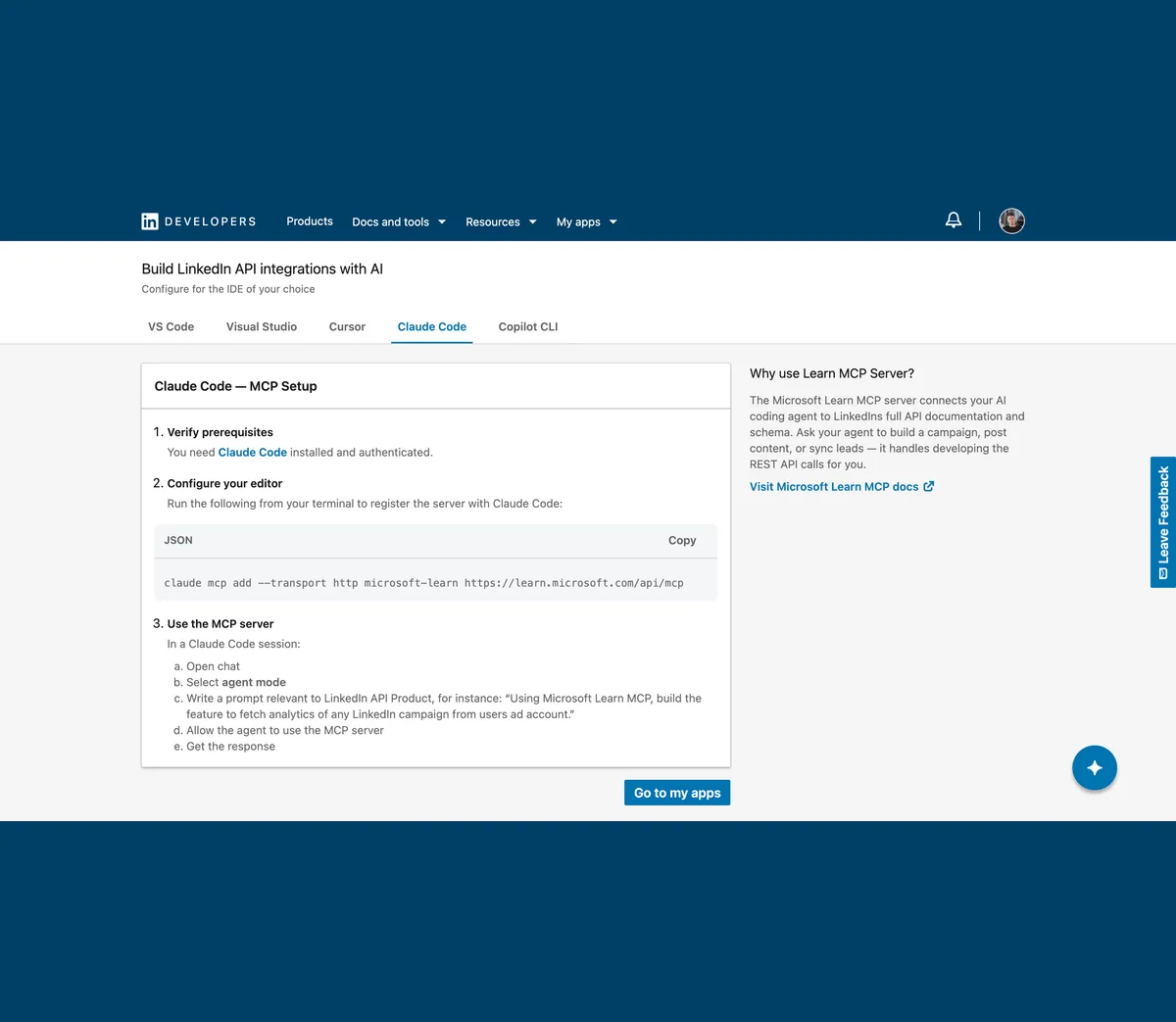
We ran the command the page gives, on Claude Code 2.1.296, to see what it does. It is a documentation search. It can tell Claude what the Posts API expects, which is genuinely useful if you are building route 3 below, but it has no tools that read your profile or publish a post:
- claude mcp add --transport http microsoft-learn https://learn.microsoft.com/api/mcp, which answered: Added HTTP MCP server microsoft-learn with URL: https://learn.microsoft.com/api/mcp to local config.
- claude mcp list, which answered: microsoft-learn: https://learn.microsoft.com/api/mcp (HTTP) - Connected. No sign in was asked for, because the server only serves public documentation.
- claude mcp remove microsoft-learn -s local afterwards, because a docs server is not what anyone searching for a LinkedIn MCP wants.
So the phrase LinkedIn MCP always means a third party, and with LinkedIn there is a second question the Instagram version of this guide never had to ask: which door does the third party use? Some servers hold a token from LinkedIn's official API. Others hold the cookies of your logged in browser session and drive LinkedIn's website as if they were you. The next section is about why that difference matters more than any feature list.
What does a LinkedIn MCP actually connect to?
The official door is a product in LinkedIn's developer portal called Share on LinkedIn. LinkedIn's Getting Access page lists it under Open Permissions, with Sign In with LinkedIn using OpenID Connect, as the only permissions every developer can switch on without applying. The permission it grants is called w_member_social, and LinkedIn describes it as the right to post, comment and like posts on behalf of an authenticated member.
The following permissions are available to all developers, and may be added via self-service through the LinkedIn Developer Portal, under the Products tab on your application page.
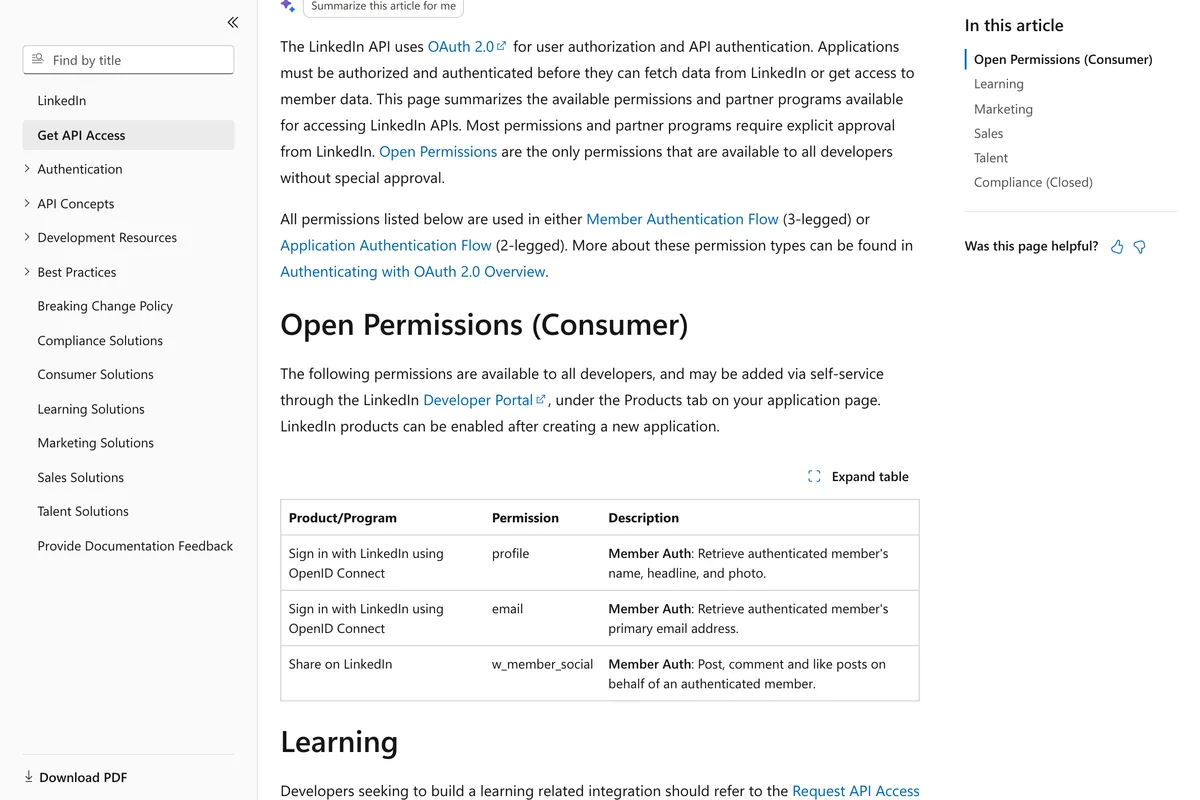
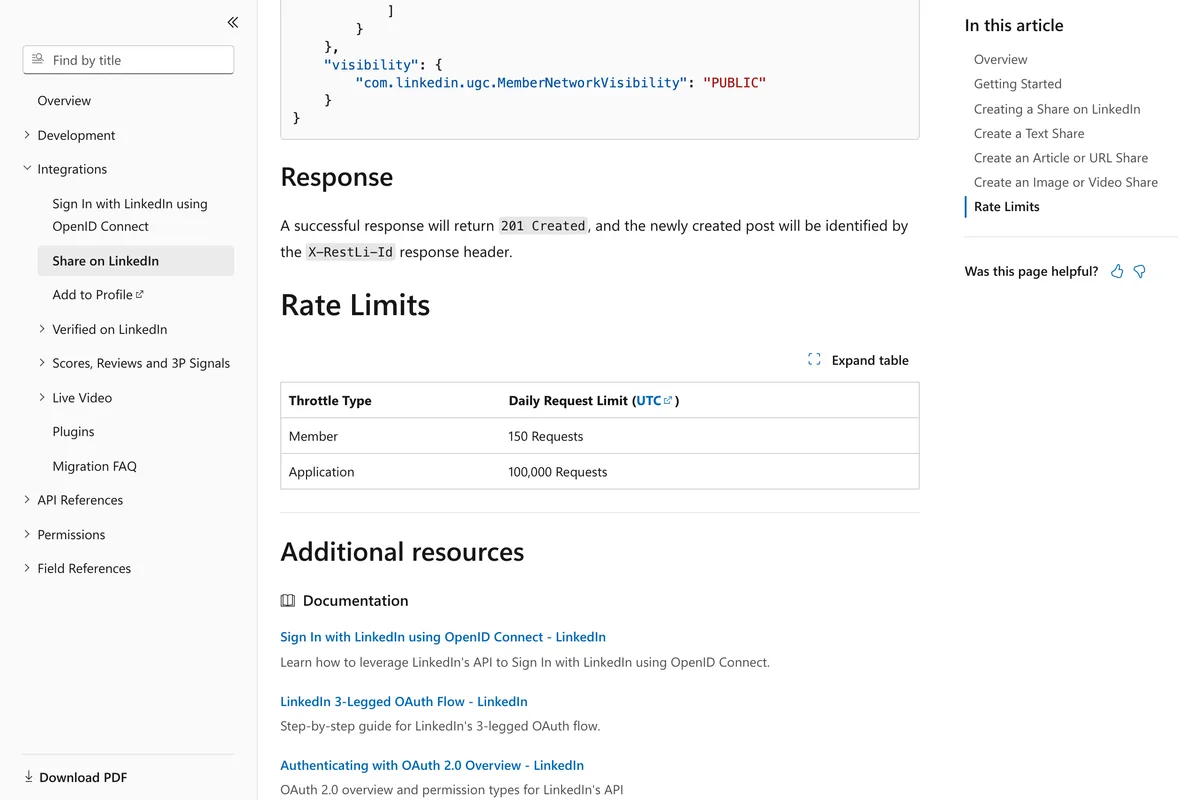
The Share on LinkedIn page itself gives the ceiling: a member may make 150 requests a day through your app and the app 100,000 in total, counted in UTC. It also still documents the older ugcPosts endpoint, while the newer Posts API page says the Posts API replaces the ugcPosts API. Both work with w_member_social as of October 2026, and most of the open source servers below use the old one.
The other door is the one most of the open source LinkedIn MCPs on GitHub use. They open a browser, log in with your cookies, and click around LinkedIn's website on your behalf. It works, it needs no app and no token, and it can do things the official API will not let a small developer do, such as search people or read your inbox. LinkedIn's Help Centre has a page about it, and the page is not ambiguous.
In order to protect our members' data and our website, we don't permit the use of any third party software, including "crawlers", bots, browser plug-ins, or browser extensions that scrape, modify the appearance of, or automate activity on LinkedIn's website.
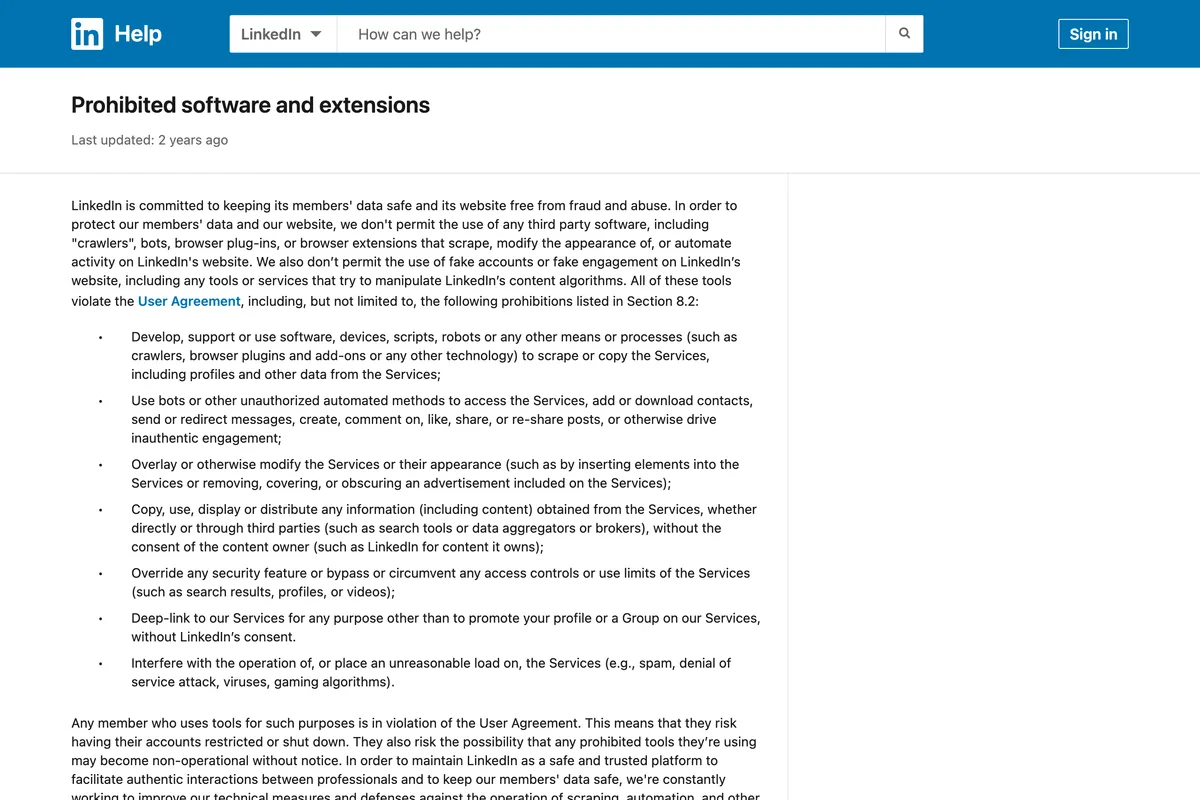
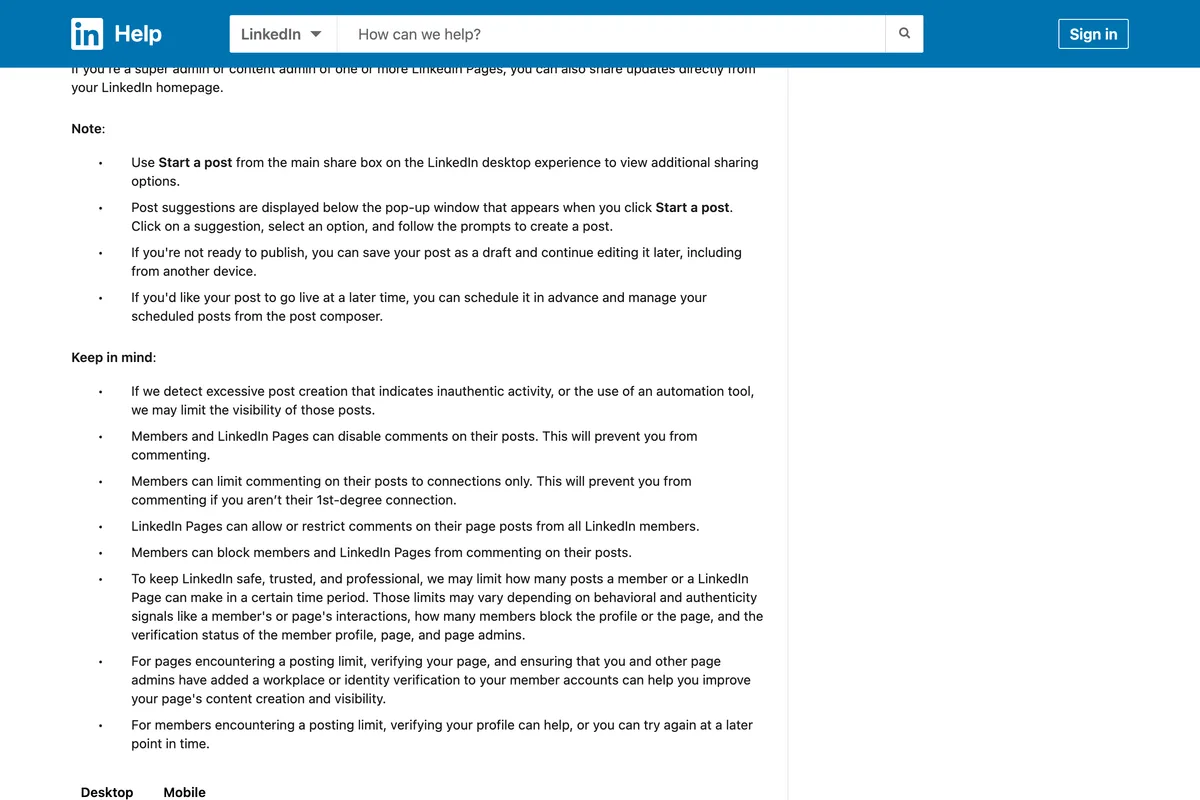
The page goes on: any member who uses tools for such purposes is in violation of the User Agreement, and they risk having their accounts restricted or shut down. A separate Help Centre page on posting adds a softer penalty that applies even to posts that get through: if we detect excessive post creation that indicates inauthentic activity, or the use of an automation tool, we may limit the visibility of those posts. The same page is where the 3,000 character limit on a post is written down.
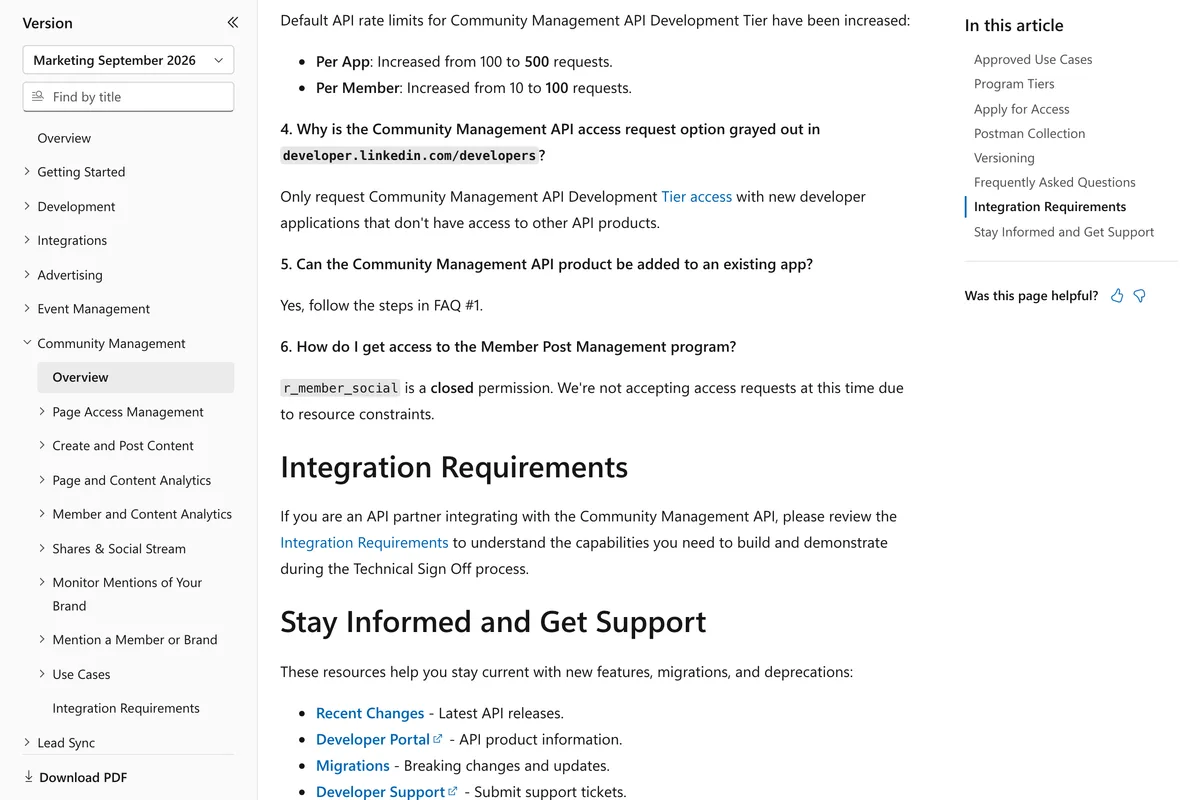
One more thing to know before choosing a route. Reading is harder than writing on LinkedIn's official API. The permission that would let an app read a member's own posts, r_member_social, is marked restricted on the Posts API page, and the Community Management overview says it is closed. So a connector that shows Claude your post analytics is either a vetted Community Management partner, such as the schedulers in the directory, or it is reading the website.
r_member_social is a closed permission. We're not accepting access requests at this time due to resource constraints.
Route 1: Is there a LinkedIn connector in Claude's directory?
Not one made by LinkedIn, and most guides stop there and say the directory has nothing. That was wrong on 10 October 2026. We opened Customize, then Connectors, then Discover in our own account and typed LinkedIn. The directory returned 252 results. Most are ad reporting, prospecting and job search tools that mention LinkedIn in passing. But a real set of them publish, and one of them is built for LinkedIn alone.
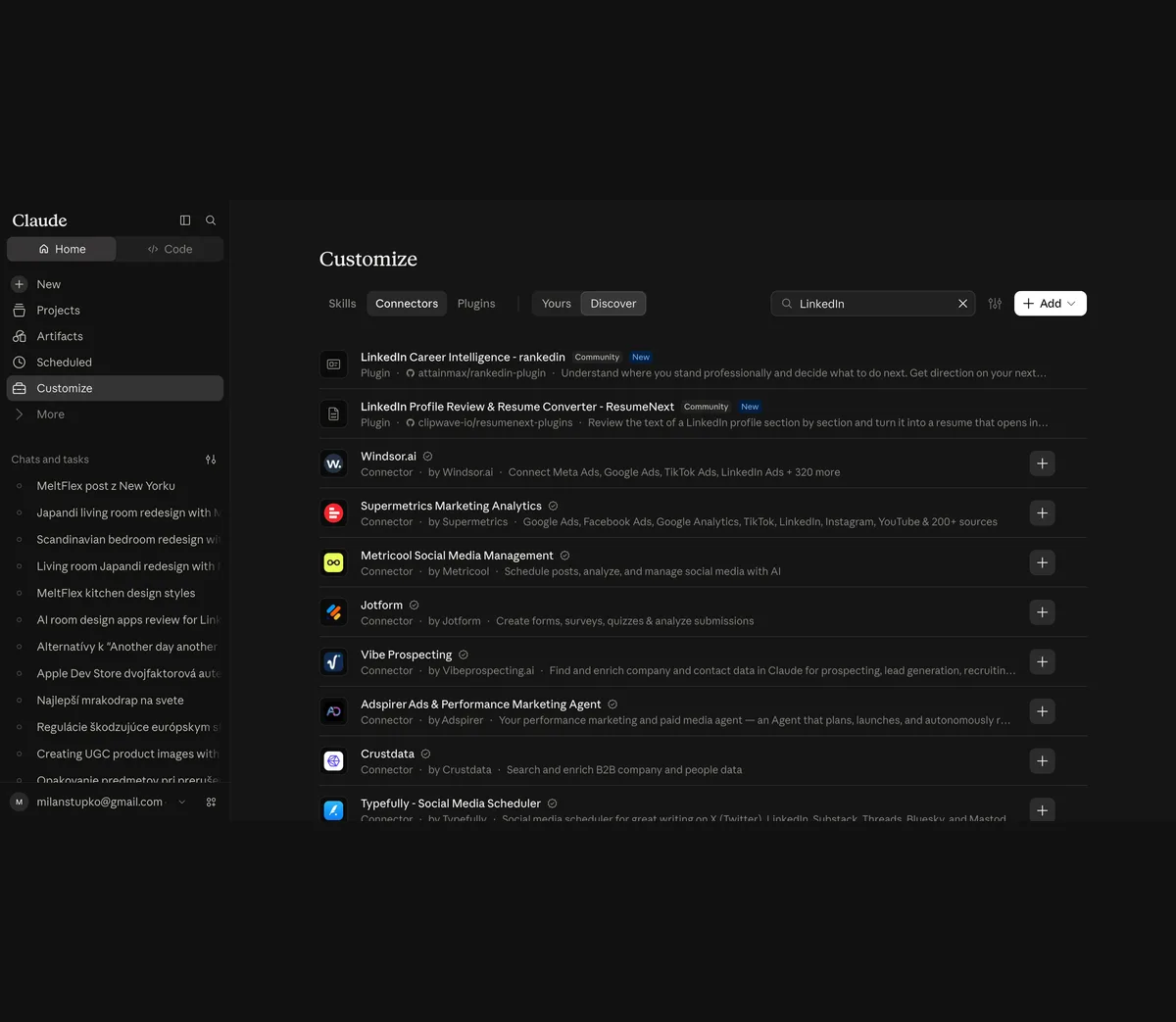
Further down the list is Taplio, a LinkedIn scheduler, with a description that reads: run your LinkedIn by talking to Claude, schedule content, pull inspiration from 5M+ viral posts, and get your analytics as plain answers. Near it are Postiz, Publora, post bridge, Planoly and Windsor.ai for Social Media, all of which list LinkedIn among the networks they publish to. Installing any of them is a plus button and a sign in. The connector then appears in the attachment menu of every chat, and the first time Claude calls one of its tools you approve it.
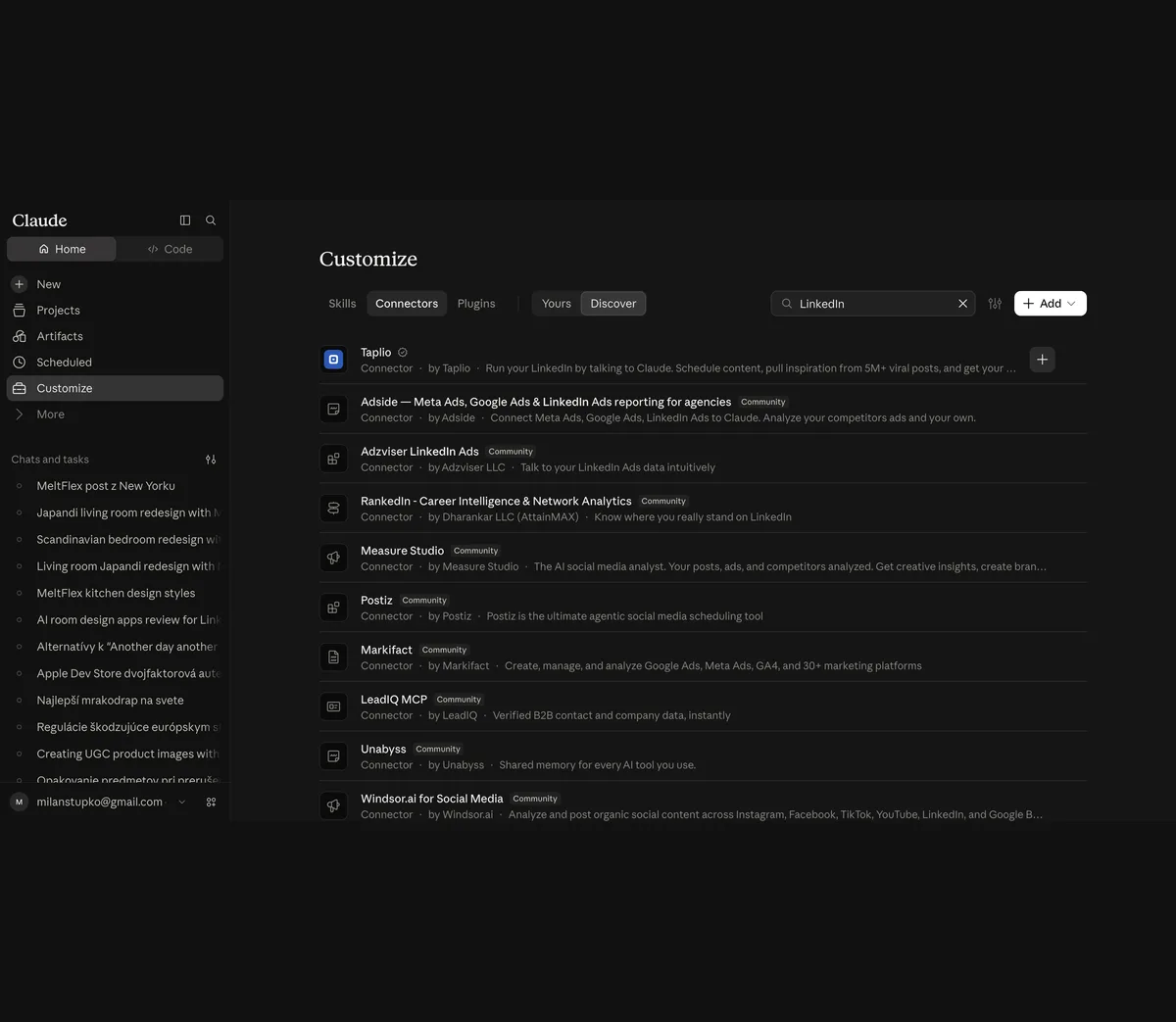
The catch with every directory connector is the same as on Instagram: the connector's own limits sit on top of LinkedIn's. Each of these tools is a LinkedIn Marketing Developer Platform partner or a Community Management applicant, which is why they can show you analytics that a self-service app cannot read, and why each of them has a plan, a post quota and a connected accounts limit of its own. Read the scheduler's pricing page before you read Claude's. Claude is only the keyboard.
Route 2: How do I add Composio, Zapier or a scheduler as a custom connector?
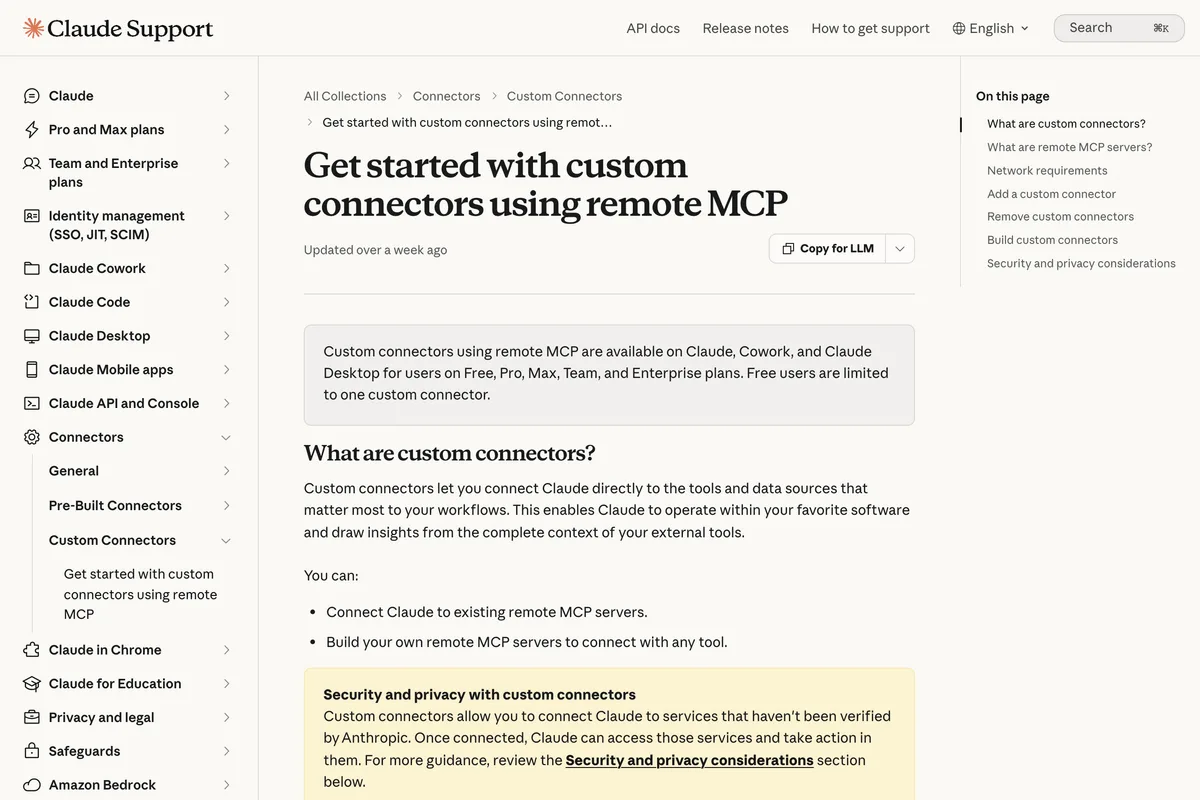
A custom connector is any remote MCP server you point Claude at by URL. Anthropic's support article sets the plan rule, and it is more generous than most guides say:
Custom connectors using remote MCP are available on Claude, Cowork, and Claude Desktop for users on Free, Pro, Max, Team, and Enterprise plans. Free users are limited to one custom connector.
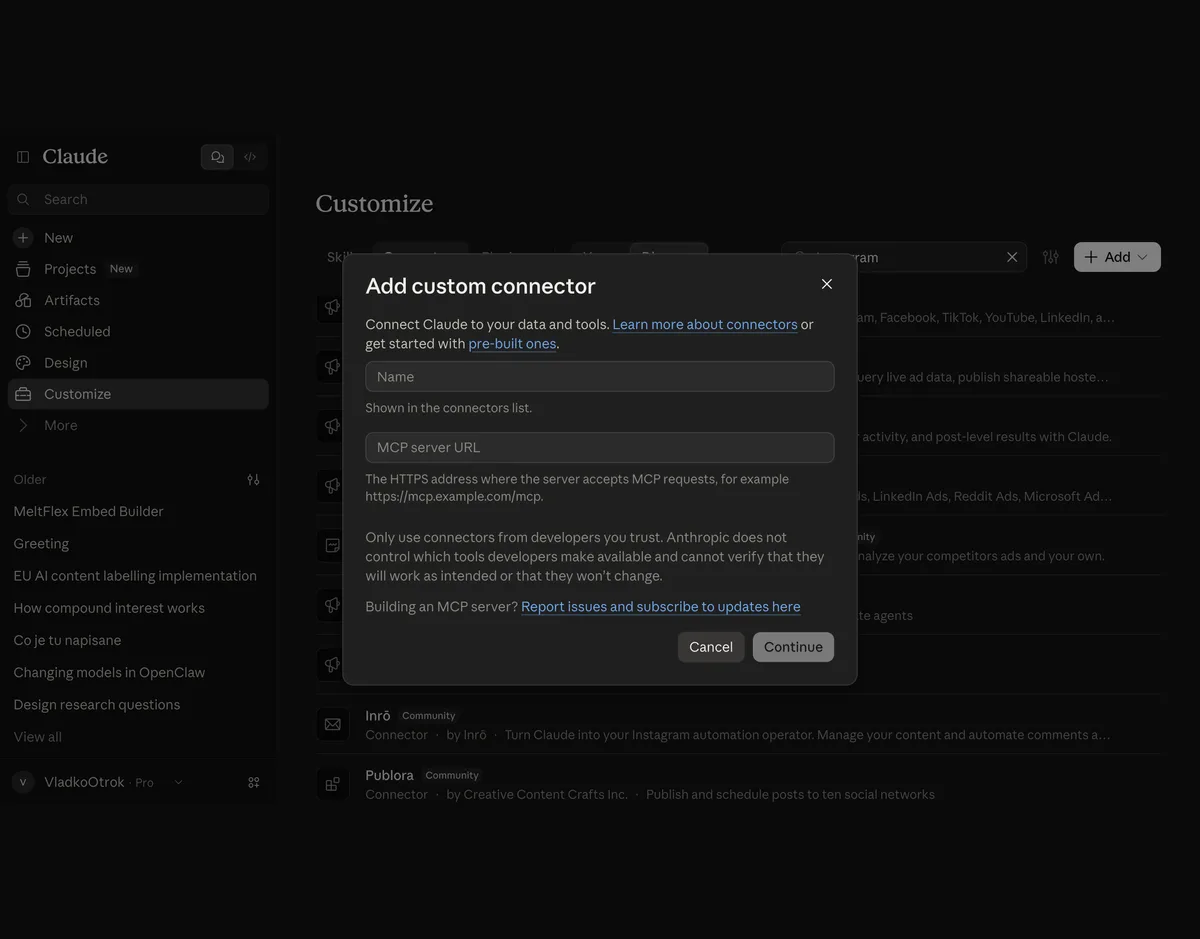
The steps, as Anthropic gives them for Pro and Max, are: open Customize, then Connectors, click Add, then Add custom connector, enter a name, paste the server URL, and click Add. Then click Connect next to the new entry and finish the sign in the server asks for. We opened the dialog in our own account for the Instagram guide; it is identical here.
Composio is the hosted server most tutorials use. You connect LinkedIn inside Composio with LinkedIn's own login, then add Composio's URL to Claude. Composio's LinkedIn toolkit page lists 22 tools, and the posting ones map onto the official API: Create a LinkedIn post, Create article or URL share through the UGC Posts API, Delete Post through the Posts API, and a legacy Delete UGC Post. The sample prompts on the page include Fetch company pages I can manage, which only works for Pages where you hold an admin role and Composio holds the vetted permission. The price is written on the same page:
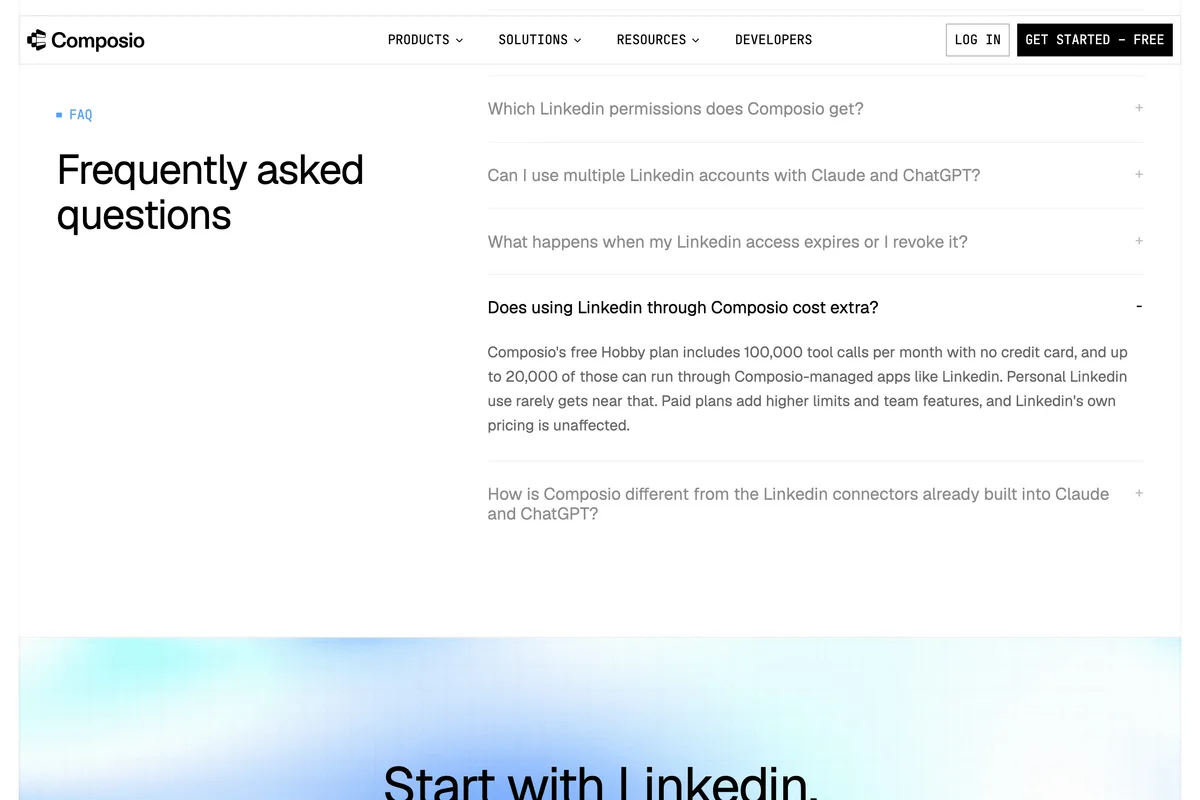
Composio's free Hobby plan includes 100,000 tool calls per month with no credit card, and up to 20,000 of those can run through Composio-managed apps like Linkedin.
The clearest short walkthrough of the custom connector route we found uses a scheduler called GenViral rather than Composio, and we embed it because the transcript shows the whole chain rather than a sales pitch: paste the server URL into Add custom connector, check the permissions Claude has been given under Manage connectors, connect the LinkedIn account inside the scheduler, then dictate a post with an attached photo and watch it land in the scheduler's calendar.
Viktor Automates adds a scheduler as a custom connector in claude.ai, connects LinkedIn inside the scheduler, and schedules an image post by voice. One thing the transcript gets right that many guides miss: the LinkedIn login happens on the scheduler's side, not Claude's.
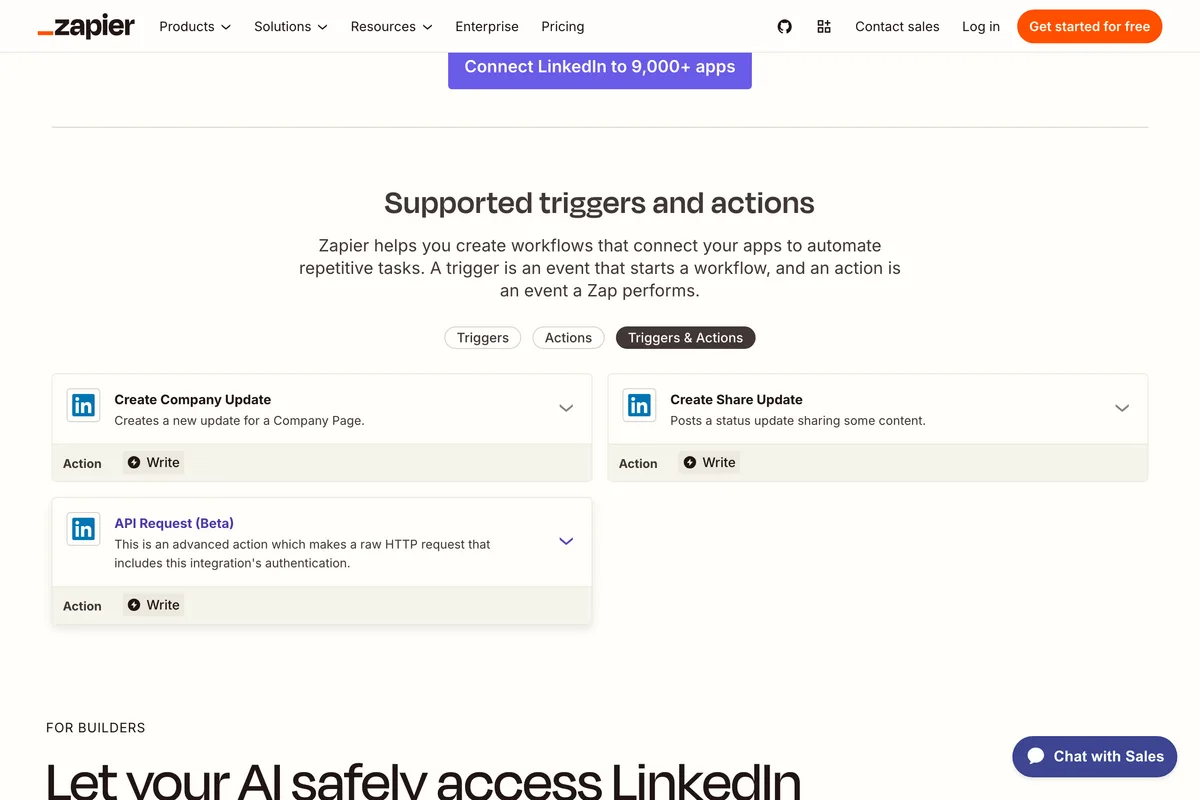
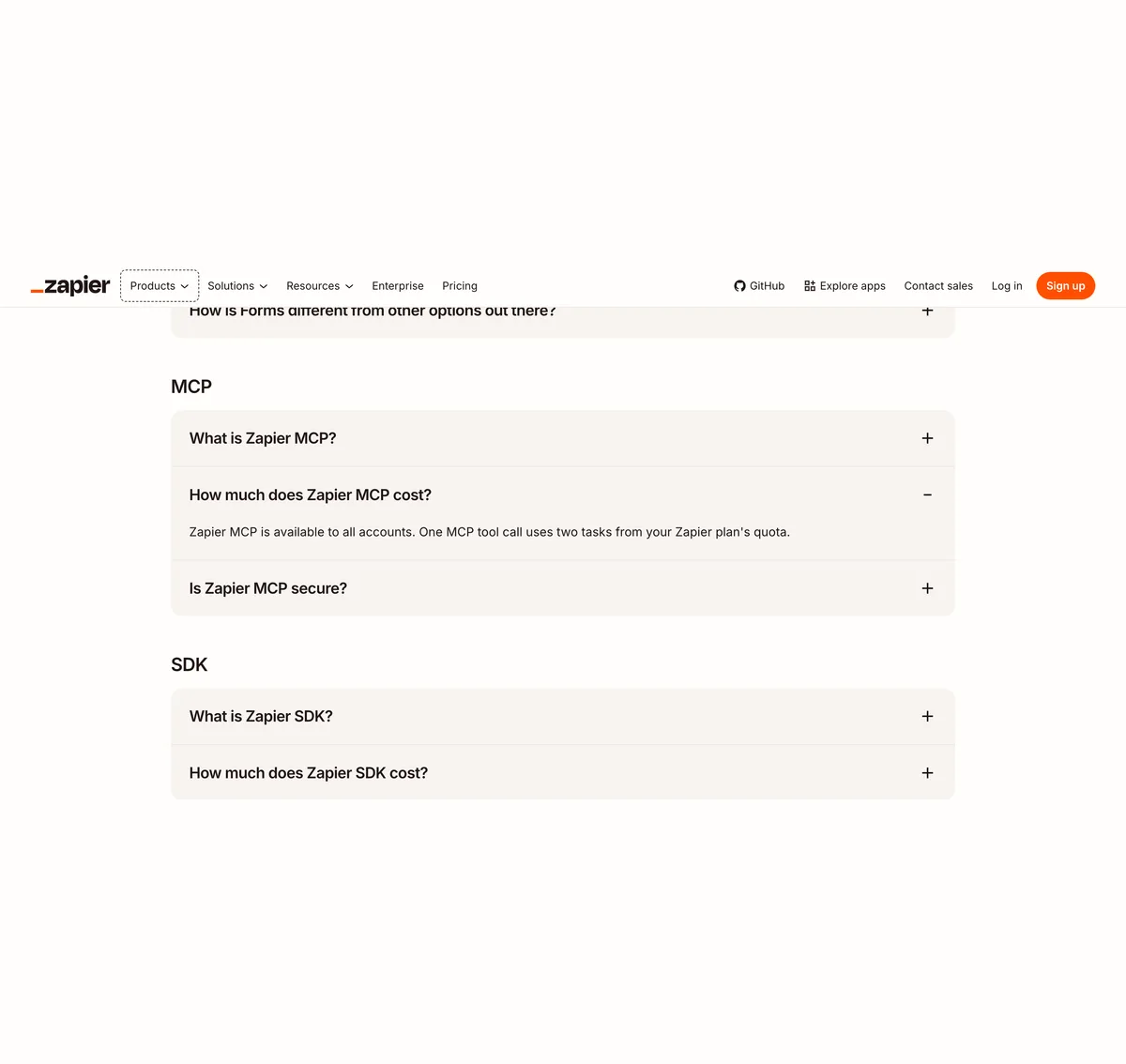
Zapier works the same way, with two numbers that change the arithmetic. Zapier's pricing page says Zapier MCP is available to all accounts and that one MCP tool call uses two tasks from your plan's quota, which on the Free plan is 100 tasks a month. Zapier's LinkedIn integration page lists exactly two write actions: Create Share Update, which posts a status update sharing some content, and Create Company Update, for a Company Page. Both take a comment, a link, and an image by URL. Neither mentions video, documents or polls.
The oldest LinkedIn MCP tutorial on YouTube that actually shows a post appearing is a Zapier one, and it is worth two minutes for the honesty of its last line. The presenter tried the open source servers of the day, none of them posted, and he settled on Zapier's MCP in Claude Desktop. The setup he shows, a config file edited by hand, has since been replaced by the Add custom connector dialog above, and the Claude model in it is Claude 3.7 Sonnet, so treat it as a demonstration of the chain, not of the clicks.
A text post created from Claude through Zapier's Create Share Update action and appearing on a LinkedIn profile. The transcript's closing line, we don't have a direct LinkedIn MCP for now, was true then and is still true on 10 October 2026.
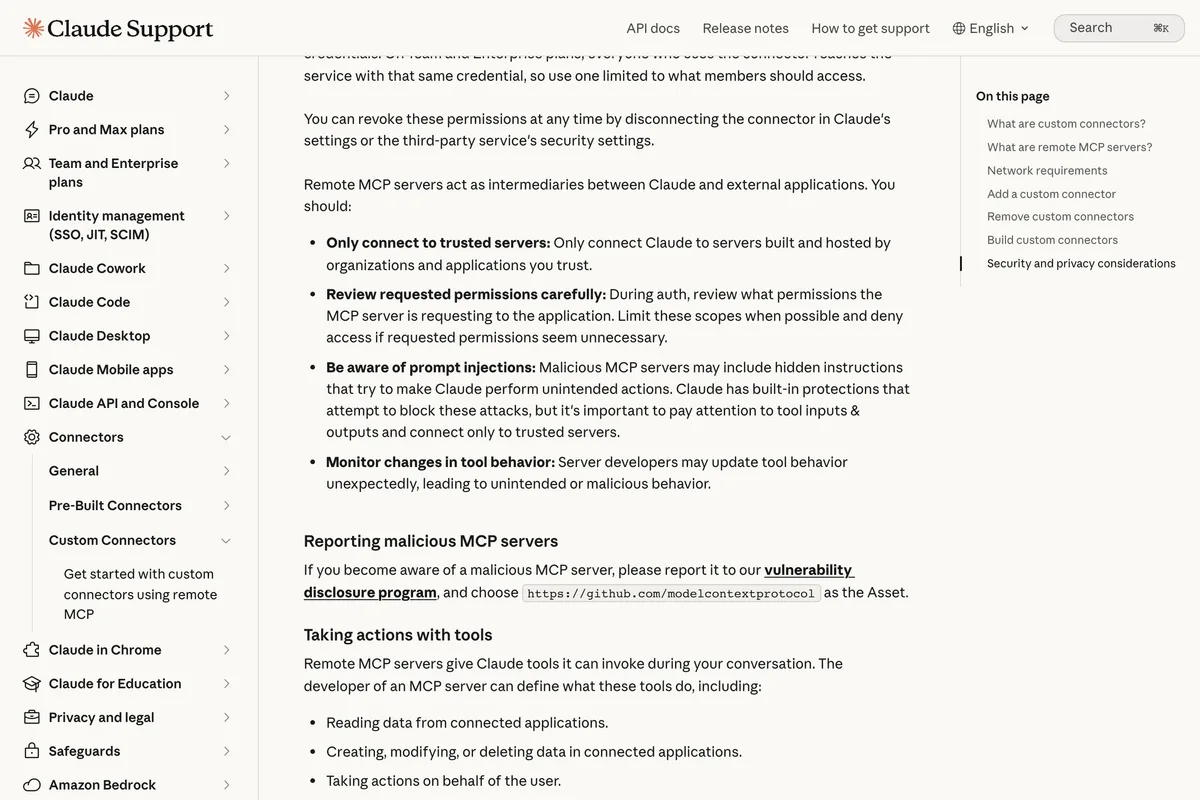
Schedulers with their own MCP servers, such as Postiz, PostFast, Blotato and Publora, are added the same way with their own URL, and their pages are the best source for what each can publish. Whatever server you add, keep one rule in view: everything it posts goes out under your name, and Anthropic's own warning applies to all of them.
Route 3: How do I connect Claude Code to my own LinkedIn app?
This is the route the vendor pages describe as weeks of waiting for LinkedIn's approval, with a Marketing Developer Platform application and a business verification. For posting to your own profile, it is not. The Share on LinkedIn page says what to do in one sentence, and the sentence contains no application form:
If your application does not have this permission, you can add it through the Developer Portal. Select your app from My Apps, navigate to the Products tab, and add the Share on LinkedIn product which will grant you w_member_social.
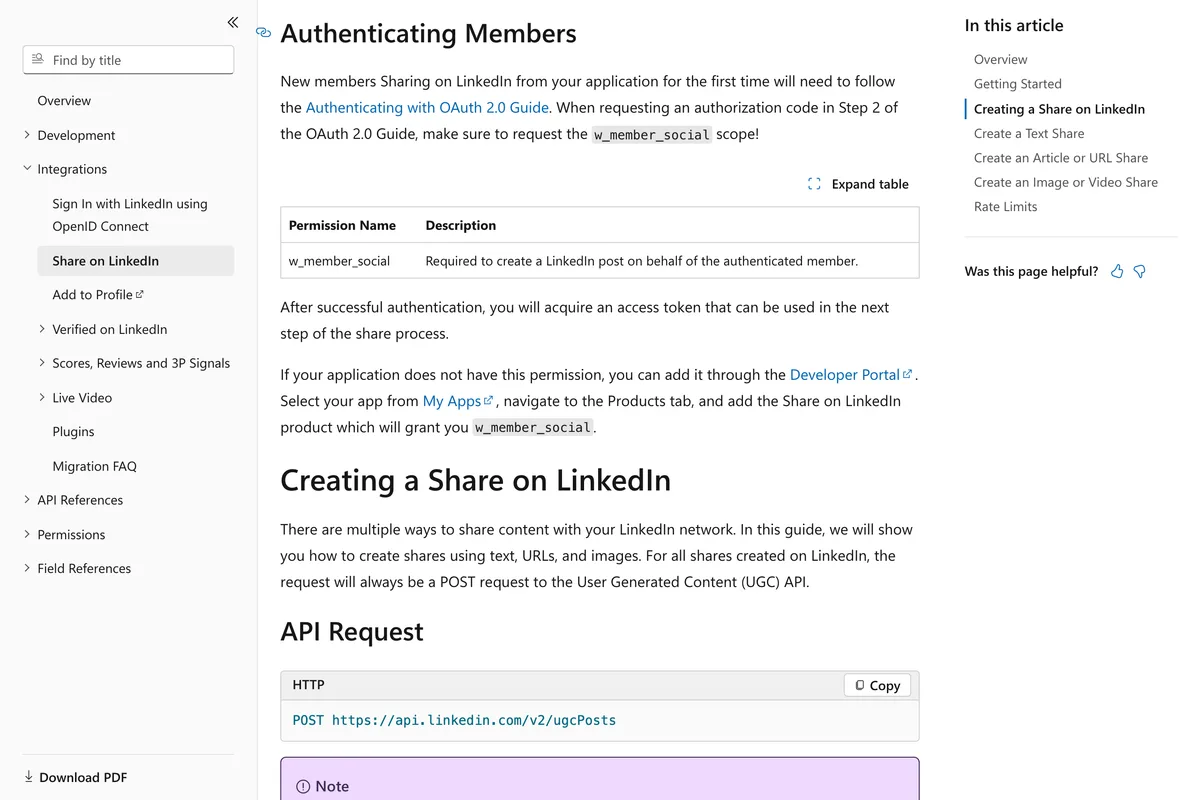
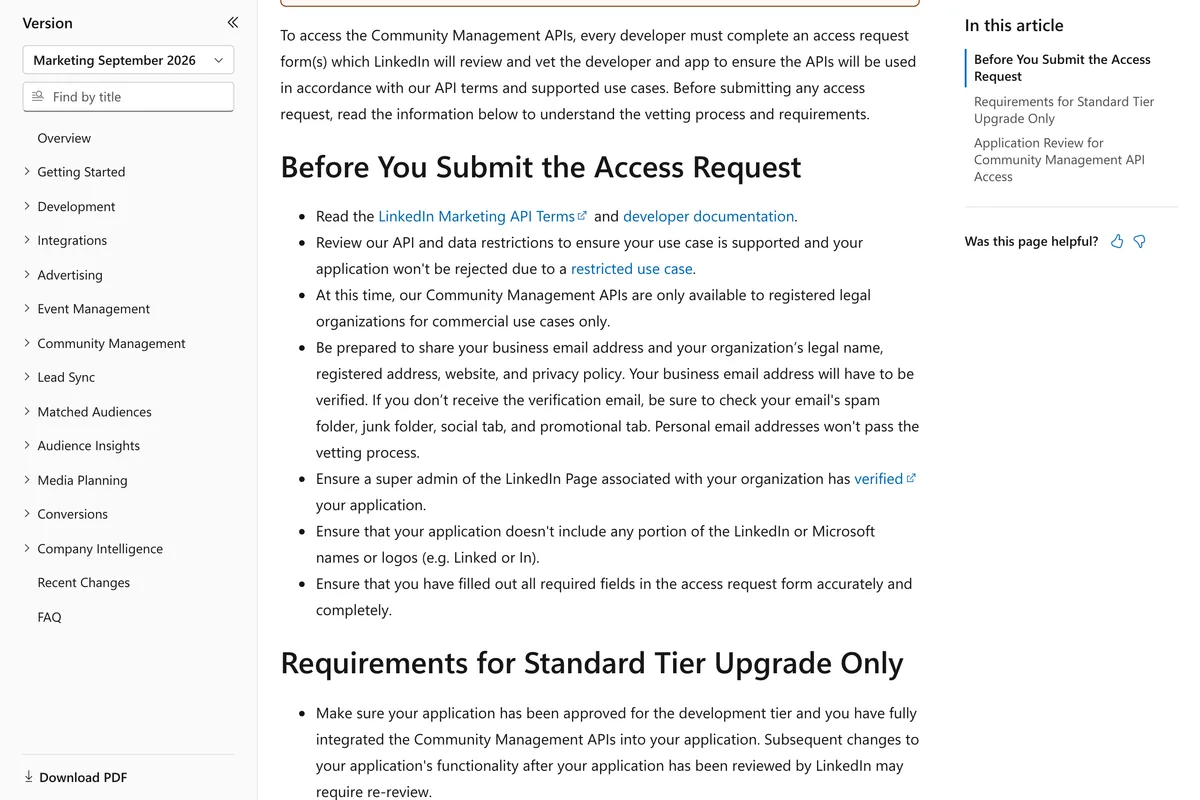
The approval story comes from a different product. LinkedIn's Community Management App Review page is the one with the verified business email, the organisation's legal name and registered address, the screencast of your application and the development and standard tiers. That product is what you need to post to a Company Page or to read analytics, and the page says our Community Management APIs are only available to registered legal organizations for commercial use cases only, and that personal email addresses won't pass the vetting process. If a guide tells you a solo founder needs all that to post to their own profile, it has merged two products into one.
What creating the app does ask for, we can report from the form itself, which we opened in our own developer account without submitting it. It wants an app name, a privacy policy URL, a logo, agreement to the API Terms of Use, and a LinkedIn Page. The form explains the Page in two paragraphs: for third party developers, the LinkedIn Company Page you select will be associated with your app, and this cannot be a member profile page; for individual developers, API products available to individual developers have a default Company page associated with them and you must select that default Company page to proceed. It also warns, in bold, that this action can't be undone once the app is saved, which is why we stopped there.
After the app exists, LinkedIn's own steps for a single account are short. Add the Share on LinkedIn product and the Sign In with LinkedIn using OpenID Connect product from the Products tab. Under Auth, add a redirect URL. Then run the Authorization Code Flow: open the authorization URL with the scopes openid, profile and w_member_social, sign in, exchange the code for a token within 30 minutes, and call the userinfo endpoint to get your member id, which the API calls a person URN. That token is what an open source server holds.
Currently, all access tokens are issued with a 60-day lifespan.
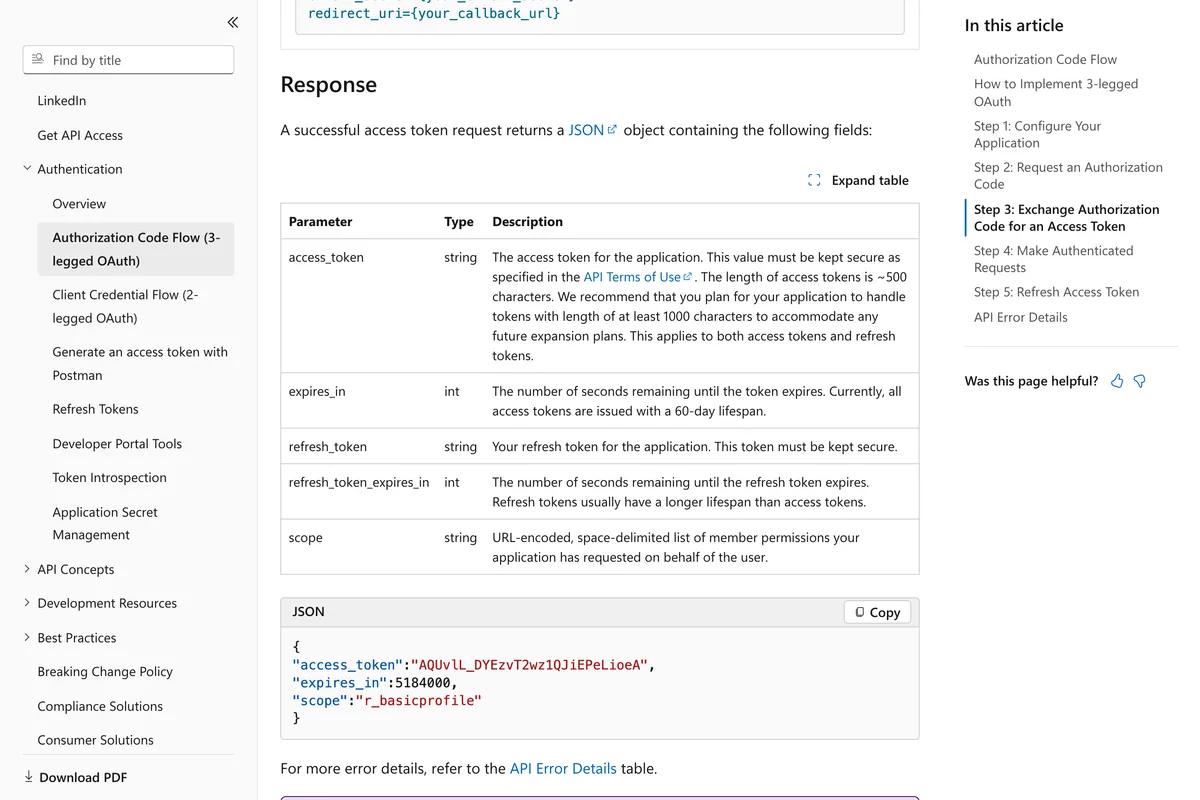
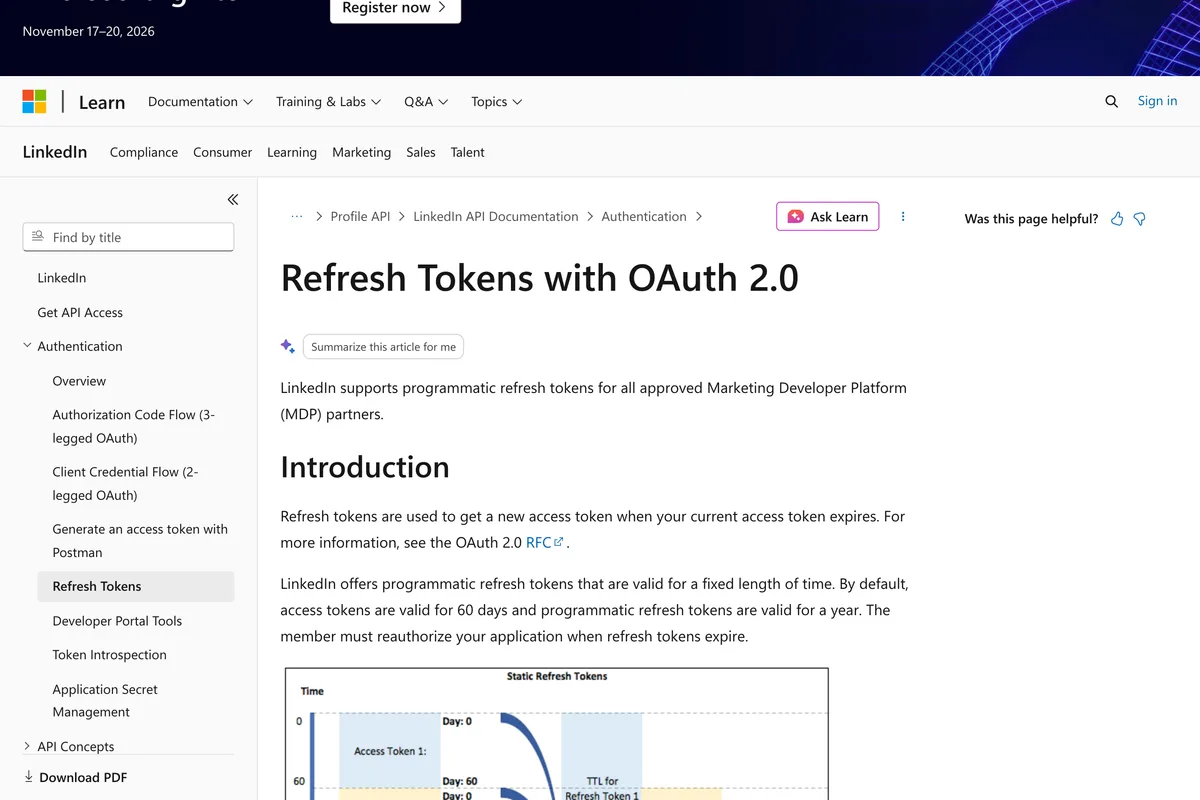
The part no tutorial mentions is what happens on day 61. LinkedIn does issue refresh tokens that last a year, but the Refresh Tokens page opens with who gets them, and it is not a self-service app:
LinkedIn supports programmatic refresh tokens for all approved Marketing Developer Platform (MDP) partners.
With a token and your person URN, an open source server is one command in Claude Code. The MCP documentation gives the shape for a local server: claude mcp add, then the environment variables, then the transport, the name, two dashes, and the command that starts the server. Add the flag for user scope if you want it in every project. Then type /mcp inside Claude Code to see the server's status and its tools.
- claude mcp add --env LINKEDIN_ACCESS_TOKEN=... --env LINKEDIN_PERSON_URN=urn:li:person:... --transport stdio linkedin -- npx -y <the server's package>, with the variable names the server's README gives.
- claude mcp list then shows the server as connected or as needing authentication, and /mcp inside a session lists its tools.
- claude mcp remove linkedin takes it out again, which you will do on day 61 when the token expires, before adding it back with a new one.
Which server? We read the READMEs of twelve and sorted them by which door they use, not by stars, because the stars point the wrong way. The most starred LinkedIn MCP on GitHub, by a factor of twenty, cannot post. Its twenty tools read profiles, search people and jobs, read your feed and your inbox, and send messages, all by driving a Patchright browser with your saved LinkedIn session, and its own FAQ says LinkedIn's User Agreement prohibits automated access, and accounts using automated tools can be restricted. The servers that post through the official API are small, older, and mostly text only.
| Server | Door it uses | Can it post? | Stars and last push, 10 Oct 2026 |
|---|---|---|---|
| stickerdaniel/linkedin-mcp-server | Your browser session via Patchright; cookies imported or a manual login | No. Reads, searches, connects, messages | 3,811, pushed 10 Oct 2026 |
| eliasbiondo/linkedin-mcp-server | Browser scraping via Patchright | No. Profiles, companies, jobs | 194, pushed 8 Mar 2026 |
| felipfr/linkedin-mcpserver | Says LinkedIn API; tools are profile search, job search and messaging, none of which Share on LinkedIn grants | No post tool listed | 90, pushed 28 Mar 2025 |
| alinaqi/mcp-linkedin-server | Playwright browser automation with encrypted cookies | Browser automation; README says educational use only | 55, pushed 18 Feb 2025 |
| Dishant27/linkedin-mcp-server | Official OAuth app with client id and secret | README lists search and profile tools, no post tool | 53, pushed 10 Oct 2026 |
| southleft/linkedin-mcp | Official OAuth app for posting; browser cookies optional for messaging | Yes, text posts, through w_member_social | 42, pushed 4 Aug 2026 |
| fredericbarthelet/linkedin-mcp-server | Official OAuth, with a draft MCP third party authorization flow | Yes, a create-post tool | 40, pushed 19 Mar 2025 |
If you want to see the popular one set up on screen, this is the walkthrough to watch, because it is the only one we found that says what the server is before showing how to install it: a local browser automation adapter that drives a web session, not an official sanctioned LinkedIn API. The presenter recommends read only use and points at the server's own issue tracker for why.
The stickerdaniel server installed with uvx, registered in Claude Desktop's config file, and logged in through a separate browser window. The transcript's warning, that automated access directly violates LinkedIn's terms of service, matches LinkedIn's Help Centre page above. Two issues it cites, 483 and 573, are messages sent to the wrong thread.
The video everyone else links to, with 52,000 views on 10 October 2026, takes a fourth path we do not recommend: Claude's Chrome extension driving your logged in LinkedIn tab. The transcript says this is very, very unlikely to get flagged by LinkedIn because it mimics normal human activity. LinkedIn's prohibited software page names browser plug-ins, or browser extensions that automate activity on LinkedIn's website in its first paragraph. We would rather you read that sentence than take the presenter's word.
What can Claude post once it is connected?
Whatever the connector, the ceiling is LinkedIn's Posts API. Its first table says which content types an organic post may carry, and the answer is wider than most guides admit and narrower in one place that surprises people:
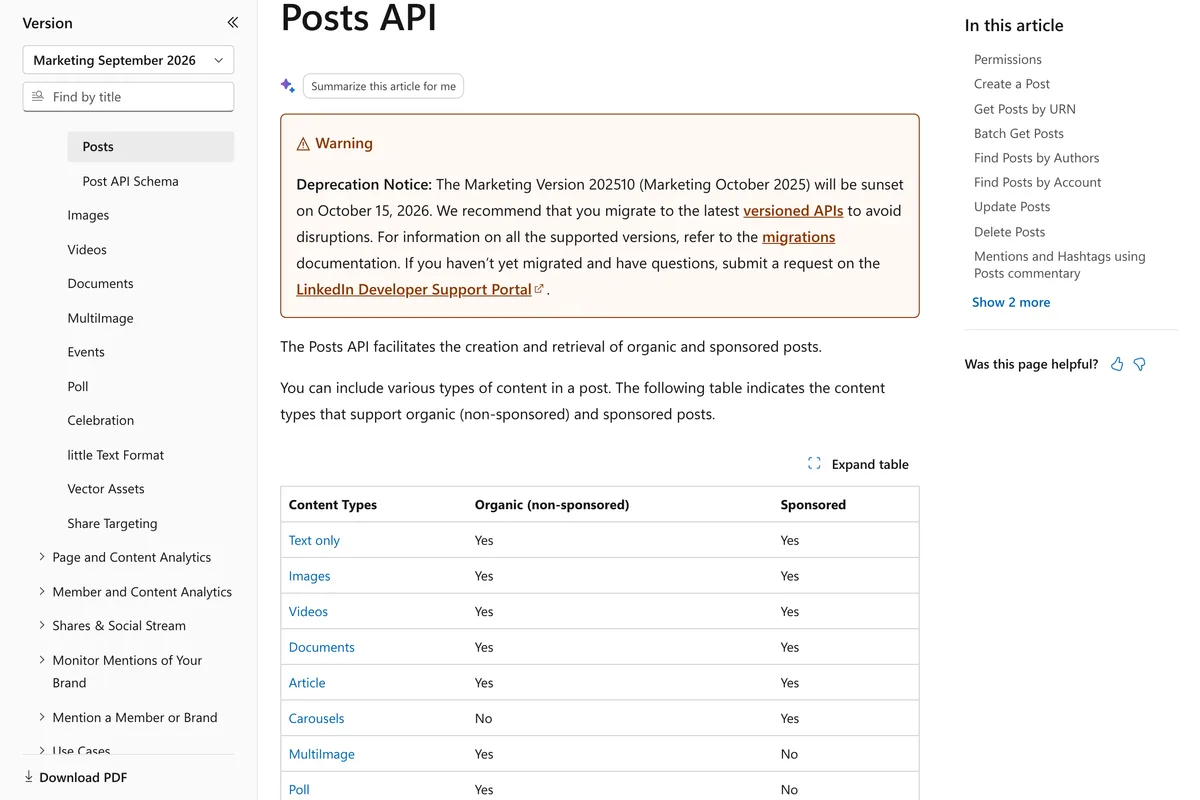
| Post type | Organic post from Claude | The rule, in LinkedIn's words |
|---|---|---|
| Text | Yes, up to 3,000 characters | Posts can contain up to 3,000 characters, Help Centre |
| Link with preview | Yes | Article: Yes for organic, Posts API |
| Single image | Yes, JPG, GIF or PNG under 36,152,320 pixels | Images with less than 36,152,320 pixels; JPG, GIF, and PNG formats, Images API |
| Several images | Yes, through the Posts API | MultiImage: Yes for organic, Posts API |
| Swipeable carousel | Yes, as a PDF document | Documents: Yes for organic; Carousels: No for organic, Posts API |
| Video | Yes, uploaded first | Videos: Yes for organic, Posts API |
| Poll | Yes, through the Posts API | Poll: Yes for organic, Posts API |
| Company Page post | Only with a vetted product | w_organization_social, restricted to Page admins, Community Management API |
| Reading your own post stats | Not with a self-service app | r_member_social is a closed permission, Community Management FAQ |
Two practical rules follow. First, the carousel people see in their feed is a document post, so a server that wants to publish one has to turn the slides into a single PDF and upload it through the Documents API before creating the post; the tutorials that do this from Claude Code generate the slides, stitch them into a PDF, and hand it to a scheduler rather than to LinkedIn directly. Second, the image limit is a pixel count, not a file size, and it is large: a 4,000 by 5,000 image is 20 million pixels, well inside it.
If the image itself is the problem rather than the connection, the sizes are in our LinkedIn image size guide, and the text that goes with it is the subject of our LinkedIn algorithm notes, which read LinkedIn's engineering posts rather than guessing.
What do the other guides get wrong?
We read the pages that rank for connect Claude to LinkedIn and LinkedIn MCP, and checked each claim against LinkedIn's and Anthropic's pages. Most of them are written by companies selling one of the routes, which is not a reason to distrust them, but it is a reason to check. The claims below are the ones that do not survive the check.
| Claim found in guides | What the source says | Where it is written |
|---|---|---|
| Custom connectors need a paid Claude plan (Carly, Taplio, Contentin) | Available on Free, Pro, Max, Team and Enterprise; Free users are limited to one custom connector | Claude Support, custom connectors article |
| Anthropic's directory does not include LinkedIn, so a custom server is the only way (Carly, Taplio) | 252 results for LinkedIn on 10 October 2026, including Taplio's own connector, Typefully, Metricool, Postiz and Publora, all installed with a plus button | Claude connector directory, our screenshots |
| Your own developer app takes days to weeks, gated by LinkedIn's approval, or a Marketing Developer Platform application (Blotato) | Share on LinkedIn is listed under permissions available to all developers via self-service from the Products tab; approval belongs to the Community Management product | LinkedIn docs, Getting Access and Share on LinkedIn |
| LinkedIn does not publish a standard rate limit for the Share API (Contentin) | A Rate Limits table on the Share on LinkedIn page: Member 150 requests, Application 100,000 requests, per day in UTC | LinkedIn docs, Share on LinkedIn |
| Fifty posts a day to a personal profile (Blotato) | The figure is the vendor's own cap. LinkedIn's published ceiling is 150 requests per member per day, and its Help Centre says posting limits vary with authenticity signals | LinkedIn docs, Share on LinkedIn; LinkedIn Help, Post and share updates |
| A Zapier create LinkedIn post action posts text (Taplio) | Zapier's Create Share Update takes a comment, a link and an image by URL; Create Company Update takes an image too | Zapier, LinkedIn integrations |
| The Taplio connector can upload an image or attach one from a URL (Taplio, connector page) | Taplio's own comparison page a week later: it is text-only, you cannot upload images, video, or PDF carousels through the MCP yet | Taplio, two pages dated 17 and 24 September 2026 |
| The Taplio LinkedIn MCP is an official server, the only one built by the platform it connects to (Taplio) | Official here means built by Taplio. LinkedIn's portal registers Microsoft Learn's documentation server and publishes no LinkedIn MCP | LinkedIn Developers, Develop with MCP |
| Hosted LinkedIn MCP: search profiles, post updates, and manage messages (Composio toolkit headline) | The 22 tools on the same page include no message tool and no profile search; LinkedIn's self-service products grant neither | Composio, LinkedIn toolkit; LinkedIn docs, Getting Access |
| The LinkedIn connectors already built into Claude (Composio FAQ heading) | There is no built-in LinkedIn connector in Claude; every entry in the directory is a third party's | Claude connector directory |
| Claude's Chrome extension driving your LinkedIn tab mimics normal human activity, so it is very unlikely to get flagged (Harry Long, 52,000 views) | LinkedIn does not permit browser plug-ins, or browser extensions that automate activity on LinkedIn's website, and members using them risk restricted or shut down accounts | LinkedIn Help, Prohibited software and extensions |
| Scraping your own posts and comments through Apify is a connector to LinkedIn (Duncan Rogoff) | Scraping or copying the Services, including profiles and other data, is the first prohibition LinkedIn's page lists; the official permission to read a member's posts is closed | LinkedIn Help, Prohibited software; Community Management FAQ |
What have we learned publishing to LinkedIn ourselves?
Should a small business connect Claude to LinkedIn at all?
It depends on which door and what for. For drafting, Claude needs no connection: paste your last ten posts and ask for the next one in the same voice, which is what the best tutorials actually do, connector or not. For scheduling to your own profile, the directory route is ten minutes and sits on LinkedIn's official API through a partner, which is the arrangement LinkedIn itself designed for. For analytics, be aware that the only servers that can read your post performance are the vetted partners and the website scrapers, and you want the former.
What we would not do is hand a browser session or a LinkedIn password to a server because it has the most stars, or because a video says it has never caused a problem. LinkedIn's Help Centre is explicit about what that is, the penalties start with reduced visibility and end with a restricted account, and a LinkedIn account is harder to replace than an Instagram one. If the goal is the posts themselves, finished and on brand, the connection is the wrong end to start from. We built AI Social Media Now to make the posts from your website and publish them to LinkedIn through the same official product, without you holding a token or pasting a URL into anything.
Frequently asked questions
Does LinkedIn have an official MCP server?
No. On 10 October 2026 the Develop with MCP page in LinkedIn's developer portal registered the Microsoft Learn MCP server at learn.microsoft.com/api/mcp, which searches Microsoft's documentation, including LinkedIn's API reference. It has no tools that read a profile or publish a post. Every LinkedIn MCP that posts is built by a third party on top of LinkedIn's API or on top of a logged in browser session.
Can I connect Claude to LinkedIn on the free plan?
Yes. Anthropic's support article says custom connectors are available on Free, Pro, Max, Team and Enterprise plans, with Free users limited to one custom connector. Directory connectors such as Taplio, Typefully and Metricool install with a plus button on any plan. The limits that bite are the connector's own plan and LinkedIn's 150 requests per member per day.
Do I need LinkedIn's approval to post to my own profile from Claude?
No. LinkedIn's Getting Access page lists Share on LinkedIn, which grants w_member_social, under the permissions available to all developers via self-service from the Products tab. The application forms, business verification and screencast belong to the Community Management API, which you need to post to a Company Page or read analytics.
Can Claude post to my LinkedIn Company Page?
Only through a connector whose maker holds the Community Management API, because posting as an organisation needs w_organization_social, which is restricted to Page admins on a vetted product. The directory schedulers and Composio can, where you are an admin of the Page. A self-service app of your own cannot. Zapier offers a Create Company Update action through its own vetted app.
How many posts can Claude publish to LinkedIn per day?
LinkedIn's Share on LinkedIn page sets 150 requests per member per day and 100,000 per app, counted in UTC. That is calls, not posts, and an image post is two or three calls. LinkedIn's Help Centre adds that it may limit how many posts a member can make in a period and may limit the visibility of posts it attributes to an automation tool.
Why did my Claude to LinkedIn connection stop working after two months?
LinkedIn's access tokens last 60 days. Refresh tokens, which last a year, are issued to approved Marketing Developer Platform partners only, so a connector built on a self-service app has to send you through LinkedIn's sign in again every 60 days. A hosted partner's connector refreshes quietly until the partner's own refresh token expires after a year.
Is a LinkedIn MCP that uses my cookies or password safe?
LinkedIn says no. Its Help Centre page on prohibited software says it does not permit third party software, including bots, browser plug-ins or browser extensions, that automate activity on its website, and that members using such tools risk having their accounts restricted or shut down. The most starred LinkedIn MCP on GitHub works this way and says so in its own FAQ.
Can Claude post a carousel to LinkedIn?
Yes, as a document. LinkedIn's Posts API lists Documents as supported for organic posts and Carousels as sponsored only, so the swipeable post is a PDF uploaded through the Documents API. Several images in one post are a MultiImage post, also supported. Zapier's two LinkedIn actions take text, a link and a single image URL only.
How we researched this
- Every rule about what LinkedIn's API accepts was read on LinkedIn's developer documentation, which lives on Microsoft Learn, on 10 October 2026: the Share on LinkedIn page, the Getting Access page, the Authorization Code Flow and Refresh Tokens pages, the Posts API, the Images API, and the Community Management overview and app review pages. The two rules about automation were read in LinkedIn's Help Centre the same day. Every rule about what Claude allows was read on Anthropic's support article on custom connectors and in the Claude Code documentation. The sentences we rely on are photographed under the quotations.
- The Claude screenshots are of our own Max account, taken on 10 October 2026: the connector directory searched for LinkedIn, twice, at the top of the results and at the entry for Taplio. The LinkedIn screenshots are of our own developer account the same day: the Develop with MCP page, with the Claude Code tab open. The Claude Code output is from running the commands on our own machine, version 2.1.296, against the one server LinkedIn's portal points to.
- We did not create a LinkedIn app for this article. Our developer account had no app on 10 October 2026, and creating one associates a LinkedIn Page with it in a way the form says cannot be undone, so the steps in the do it yourself section are LinkedIn's own numbered steps, quoted, plus what the Create app form itself says. The video we embed for that route shows the open source server being set up on screen.
- The three videos were chosen after reading their transcripts, not their titles. We rejected the most viewed results because they either describe a browser extension driving your logged in LinkedIn, which LinkedIn's Help Centre says is prohibited, or do not show a connection being made. Where a video says something LinkedIn's pages do not, we say so under it.
- The GitHub figures are star counts and last push dates from the GitHub API on 10 October 2026. We read each README but did not run any of these servers, because the most popular ones work by driving a logged in browser session with your LinkedIn cookies, which is exactly the risk this article warns about.
- We read the vendor and community pages that rank for these searches, from Composio, Zapier, Blotato, Postiz, PostFast, Contentin, Carly, Breakcold, Ligo, Linked API, HeyReach, Apidog and others, and list in a table the claims that contradict LinkedIn's or Anthropic's pages. Our own product publishes to LinkedIn through the same Share on LinkedIn product, and the section on what we learned is first hand, with the limits of that said plainly.
Sources
- 1Share on LinkedIn
- 2Getting Access to LinkedIn APIs
- 3Authorization Code Flow (3-legged OAuth)
- 4Refresh Tokens with OAuth 2.0
- 5Posts API
- 6Images API
- 7Community Management: Overview
- 8Community Management App Review
- 9Rate Limits
- 10Develop with MCP
- 11Microsoft Learn MCP Server overview
- 12Prohibited software and extensions
- 13Post and share updates
- 14Get started with custom connectors using remote MCP
- 15Connect Claude Code to tools via MCP
- 16LinkedIn integrations
- 17Plans and pricing
- 18LinkedIn toolkit
- 19stickerdaniel/linkedin-mcp-server
- 20fredericbarthelet/linkedin-mcp-server
- 21southleft/linkedin-mcp
- 22eliasbiondo/linkedin-mcp-server
- 23Dishant27/linkedin-mcp-server
- 24Automate Your LinkedIn Posting With Claude
- 25LinkedIn MCP: Automate LinkedIn posting with AI
- 26LinkedIn MCP Server Tutorial: Claude Desktop Setup, UVX Login, and Safe Job Research
- 27How To Connect Claude To LinkedIn (Step by Step)
- 28I Connected Claude Code to LinkedIn! (what it found was wild)
- 29Claude + LinkedIn: What the Integration Can (and Can't) Do in 2026
- 30How to Connect Claude (or ChatGPT) to LinkedIn: 4 Methods, Honestly Rated
- 31The LinkedIn Connector for Claude: Setup, Safety, and Limits (2026)
- 32Best LinkedIn MCP Server in 2026: Honest Comparison
- 33How to Post to LinkedIn with Claude (No Developer App)
- 34How to connect Linkedin to Claude (Claude Cowork)