How to add an admin to a Facebook Page, and what to do when it won't work
Facebook no longer has an Admin role. It has Facebook access with full control, and a Page in a business portfolio is managed somewhere else entirely. The steps from Meta's own pages, which access to give whom, and the six reasons the invite fails.

To add an admin to a Facebook Page, switch into the Page, open Settings & privacy, then Settings, then Page setup, then Page access. Next to People with Facebook access, click Add New, type the person's name or email address, choose full control, click Give Access and confirm with your own Facebook password. The person then has to accept the invite before anything changes.
Our articles are still written by humans!
Get human written articles in your Google feed.
That is the whole answer for a Page you run on your own. It stops working in two common cases, and they are why most people end up searching this: the Page sits inside a business portfolio, where Meta says access can only be managed from Meta Business Suite, or the invite goes out and the other person never sees it. Both are below, along with which level of access you should actually give, because "admin" is no longer a word Facebook uses for Pages.
Which access to give whom
| Who it is | What to give | What they can do |
|---|---|---|
| A co-owner or the person who would take over if you left | Facebook access, full control | Everything, including adding and removing people (you included) and deleting the Page |
| A freelancer or employee who posts and answers messages | Facebook access, partial control | Post, reply, run ads and read insights as the Page on Facebook, but not change settings or access |
| Someone who only works in Business Suite or Ads Manager | Task access, with only the tasks they need | The ticked tasks from Meta's business tools. They cannot switch into the Page on Facebook |
| An agency with its own business portfolio | Partner access, through Meta Business Suite | Whatever level you set; in our reading, they then assign their own staff within it |
| Someone who only moderates your live videos | Community Manager access | Delete, report and pin comments in live chat, and suspend or ban viewers from it |
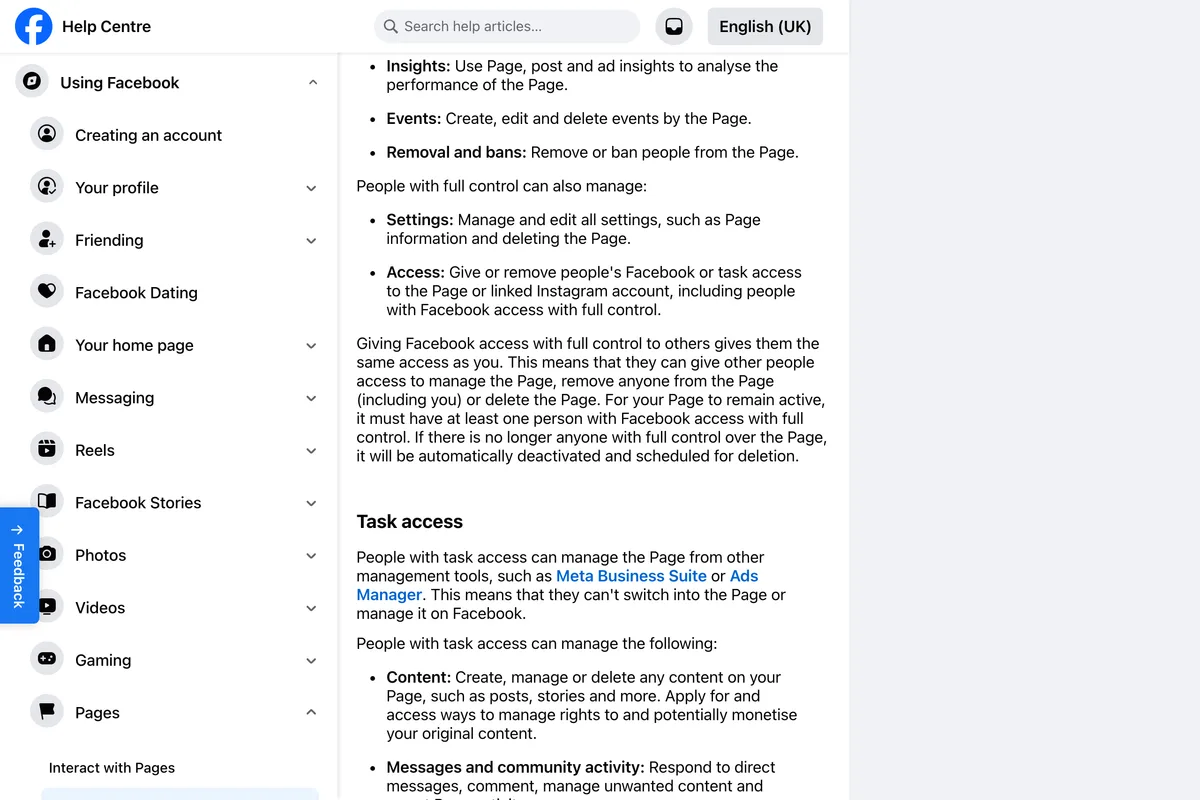
The reason to be stingy with full control is in Meta's own description of it. It is not a bigger version of partial control. It is the same power you have, and Meta spells out what that means:
Giving Facebook access with full control to others gives them the same access as you. This means that they can give other people access to manage the Page, remove anyone from the Page (including you) or delete the Page.
How do I add an admin to a Facebook Page on a computer?
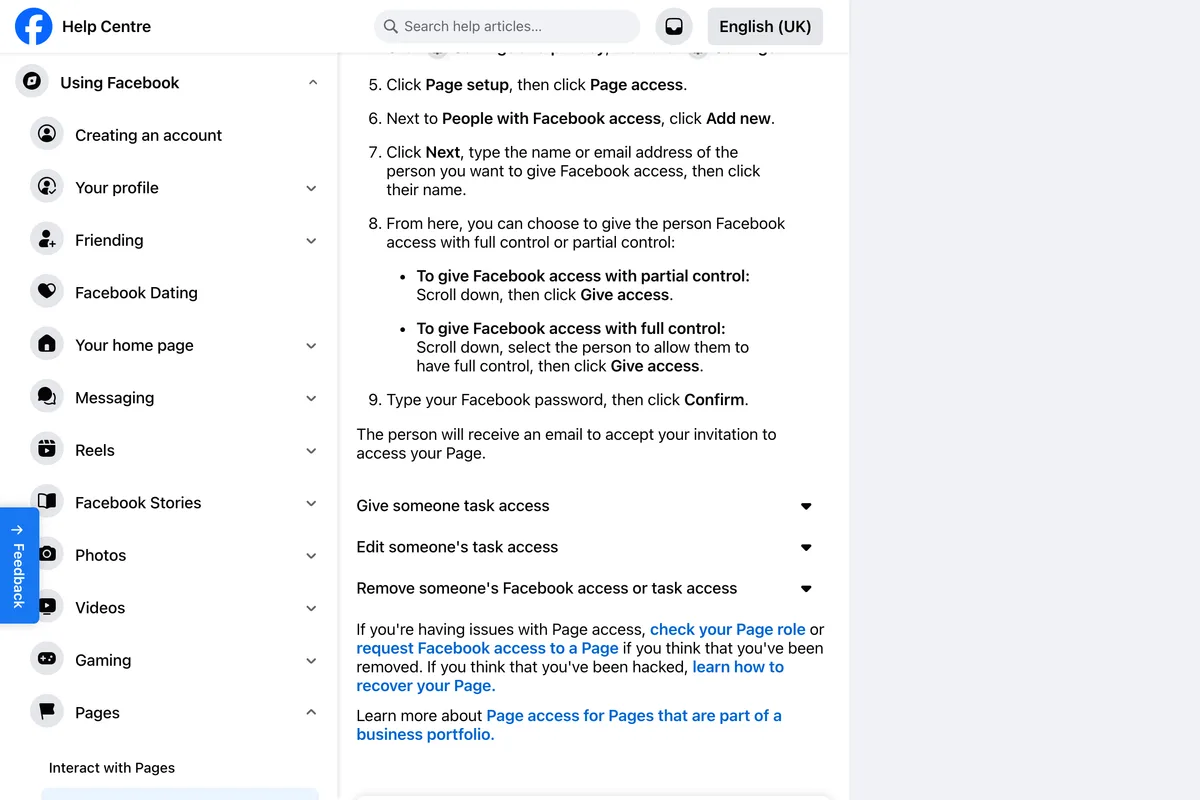
These are Meta's steps for a Page that is not in a business portfolio, which is most Pages a small business set up from a personal profile. You need full control yourself to do any of this.
- Log in to Facebook, click your profile photo in the top right, click See all profiles and select the Page to switch into it.
- Click the Page's profile picture in the top right to go to the Page.
- Click Settings & privacy, then Settings.
- Click Page setup, then Page access.
- Next to People with Facebook access, click Add New.
- Click Next, type the person's name or email address, then click their name.
- For full control, select the option that lets them have full control. For partial control, leave it off. Then click Give Access.
- Type your own Facebook password and click Confirm.
On the Facebook app the path is the same once you are inside the Page: open the menu, tap Pages, pick the Page, tap Switch, then Settings and privacy, Settings, Page setup, Page access, Add New. Meta's iPhone instructions say the option is labelled Allow this person to have full control.
The password is yours. Pages do not have passwords of their own, which is a point Reddit threads have to explain to people again and again, and a few guides still muddle it by telling you to "log in to the business page". If the confirmation keeps rejecting a password you know is right, see the troubleshooting section below.
Is your Page in a business portfolio? Then the steps are different
A business portfolio is what Meta used to call Business Manager: a container in Meta Business Suite that owns Pages, Instagram accounts and ad accounts. If anyone ever claimed your Page into one, for ads, for an agency, or to connect Instagram, the rules change, and Meta says so at the top of its page for these Pages:
You can only manage access to the Page from your portfolio in Meta Business Suite.
- Go to Meta Business Suite on a desktop computer and click Settings.
- Under Profiles (in our account it is listed under Accounts), click Pages and select the Page.
- Click Assign people.
- Under Add people, select the person. Only people already in your portfolio are listed.
- Pick the level: partial access (business tools only), partial access (business tools and Facebook) or full access. For the first, tick the tasks they need.
- Click Assign.
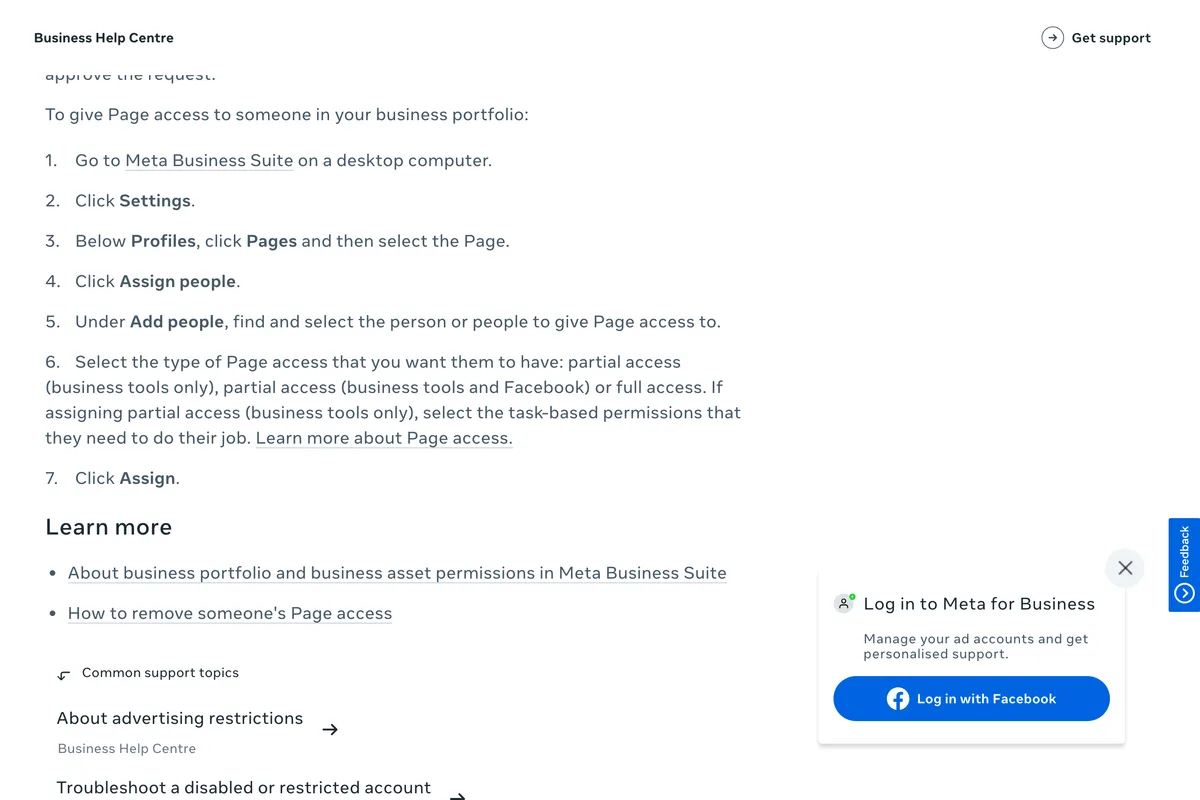
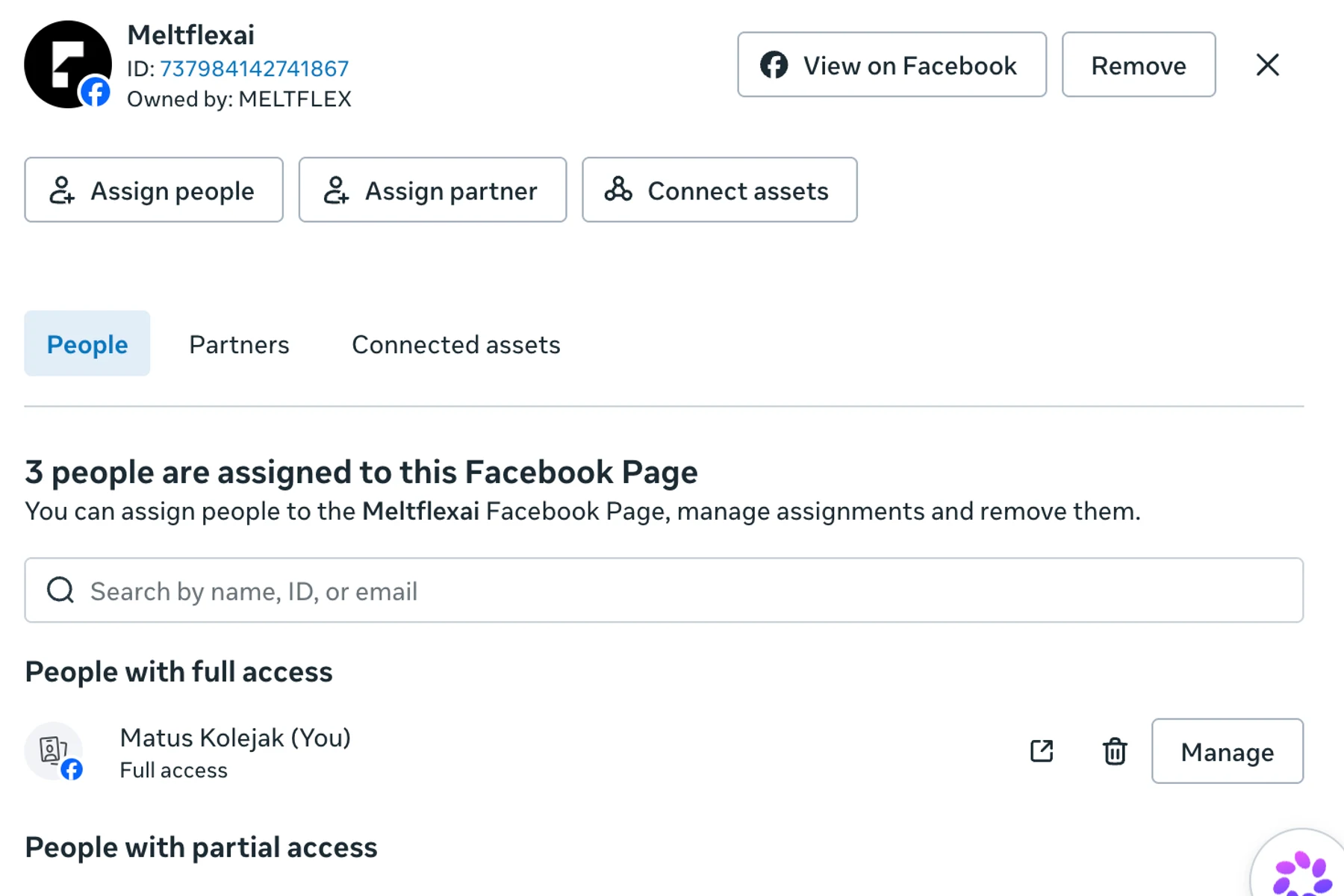
The catch is step four. Someone who is not yet in your portfolio does not appear in that list at all. Meta's page says you can request that they be invited to the portfolio and given Page access, and that someone with full access to the portfolio must approve that request first. In our own account the same dialog shows everyone already assigned, marked "Already assigned", and a separate link to invite people to the portfolio.
There is a dissenting voice worth knowing about. In a Reddit thread about invites that never arrive, the most upvoted fix, still confirmed working by someone on 8 October 2026, is the reverse of Meta's advice: give access through Facebook's own Settings, Page setup, Page access, not through Business Suite. We could not test that without sending a real invite. If the Business Suite route is failing you, it costs nothing to try, but Meta's documentation points the other way.
Adding an agency: make it a partner, not a person
If you are handing your Page to an agency, the right tool is not Page access at all. Meta has a separate route for one business giving another access to its assets. In our reading it has two practical advantages over adding an agency employee as a person: the agency, not you, decides which of its staff get in, and staff turnover at the agency is its problem rather than yours. Meta itself adds a third: a partner with full control still cannot share your Page with another business.
- Ask the agency for its business portfolio ID. Meta says the partner must have a portfolio and must tell you the ID.
- In Meta Business Suite, open Settings, then Partners under Users. If you cannot see Partners, you do not have full control of the portfolio.
- Click Add, then Give a partner access to your assets, and enter the ID.
- Choose the Page and the level of access, and if it is partial, the tasks.
- Click Assign assets. Someone else with full control of your portfolio may have to approve it.
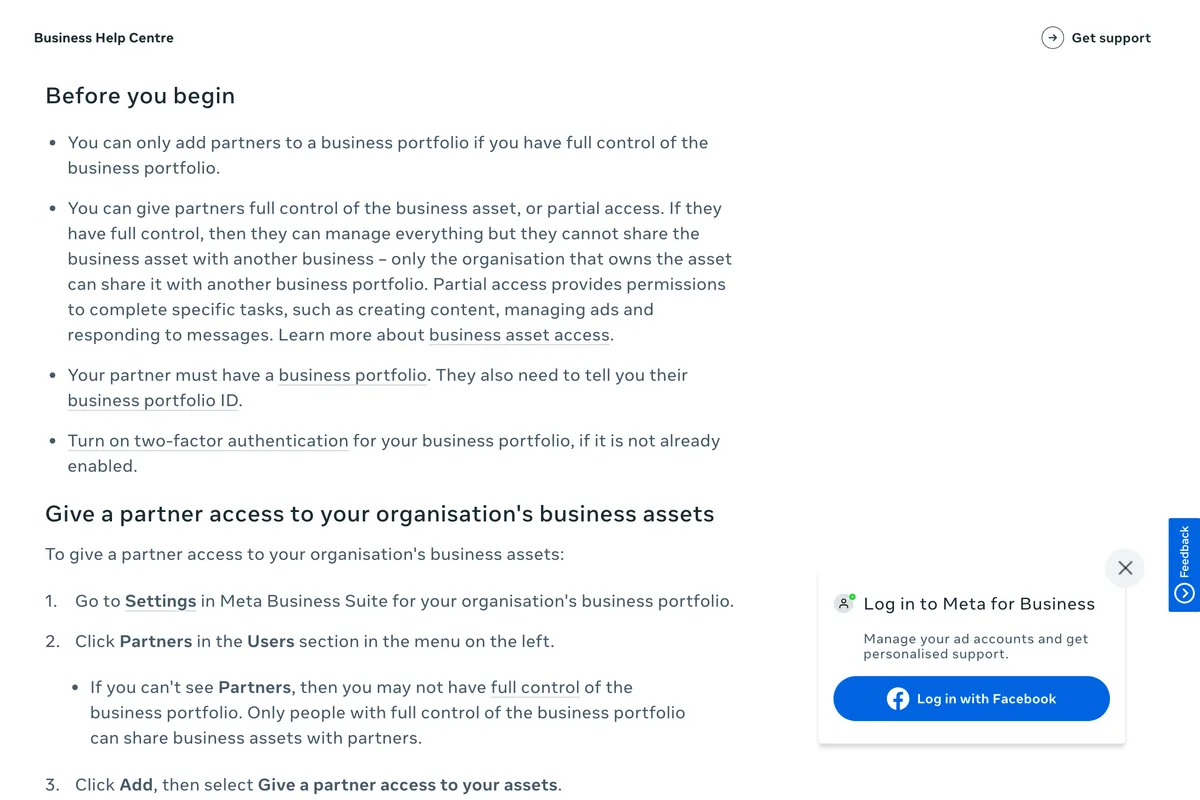

If the agency only needs to publish and answer comments, partial access is enough, and that is also the safer setting if you ever part ways. If you are working out what that relationship should cost, we wrote up what social media management costs from published price lists.
Why can't I add an admin to my Facebook Page?
Here are the failures people describe most often, matched against what Meta's pages actually say. Where the only evidence is a Reddit post, the table says so.
| What happens | Most likely cause | What to try |
|---|---|---|
| You cannot find Page access or Add New at all | You do not have full control, or the Page is in a business portfolio | Ask someone with full control, or use Meta Business Suite, Settings, Pages, Assign people |
| The person does not come up in the search | Name search did not find them | Type their email address instead, which Meta's steps allow. Reddit replies blame under-18 accounts or not being friends; Meta's pages we read say neither |
| They are not listed in Business Suite | They are not in your business portfolio yet | Invite them to the portfolio first; someone with full portfolio access must approve |
| Your password is rejected | It wants your personal Facebook password, not a Page password | Reset your own password. Reddit users suggest a computer, and report needing two-factor authentication and a wait; Meta's pages we read do not mention either |
| You have full access but are told you are not an admin | A business portfolio owns the Page and controls it from there (a Reddit reply's explanation) | Check who owns the Page in Business Suite and ask for access there |
| Nobody has full control any more | The last full-control person was removed or lost their account | Meta says contact someone with full control; if that is no one, contact former staff and contractors who worked on the Page and ask them to check their access |
The last row is the one that does real damage, and it has a second half people do not expect. Meta writes that a Page must keep at least one person with full control, and that if there is no longer anyone, it will be automatically deactivated and scheduled for deletion. The usual way a small business gets there is an employee who set up the Page, kept full control, and left.
Why can't I find the invite to manage a Facebook Page?
This is the other side of the same search, and the most active thread on it has been going since 2022 with replies into October 2026. Meta's page on accepting access says only this much about where the invite lands:
After you've been invited to have access on a Page, you'll receive either a notification or an email.
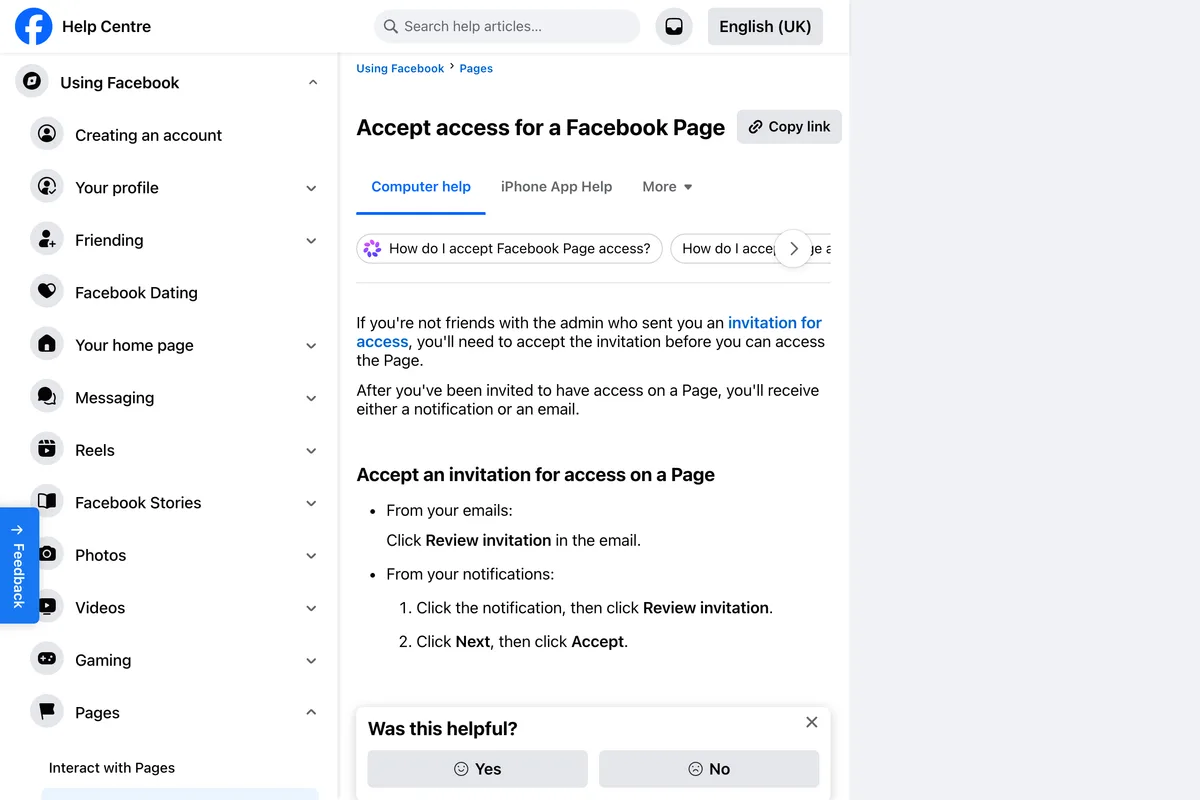
To accept, click Review Invite in the email, or click the notification and then Review Invite, then Next and Accept. When neither arrives, these are the places people in that thread report finding it. None of them is in Meta's documentation, so treat them as tips rather than rules:
- The Pages invites list at facebook.com/pages/?category=invites, logged in as the profile that was invited.
- The Page itself: several people found the invite on the Page itself when they opened it from the invited profile.
- The Social tab in Gmail, for the email version.
- A computer instead of the app, or anything but Facebook Lite, which one 2022 reply says did not show it.
Two more checks from the sender's side. Make sure you picked the right person, not someone with the same name, which is the reason to search by email. And note the odd sentence at the top of Meta's page: it says that if you are not friends with the admin who sent the invitation, you need to accept it before you can access the Page. It does not say what happens when you are friends, and we would not rely on it either way.
How do I remove an admin from a Facebook Page?
On the same Page access screen, click the options next to the person and choose Remove access. Meta adds a condition that is easy to miss and matters when you are removing someone who has full control:
If you want to remove another admin, they may need to approve your request before they can be removed. If the request is not actioned within 30 days, it may be auto-approved.
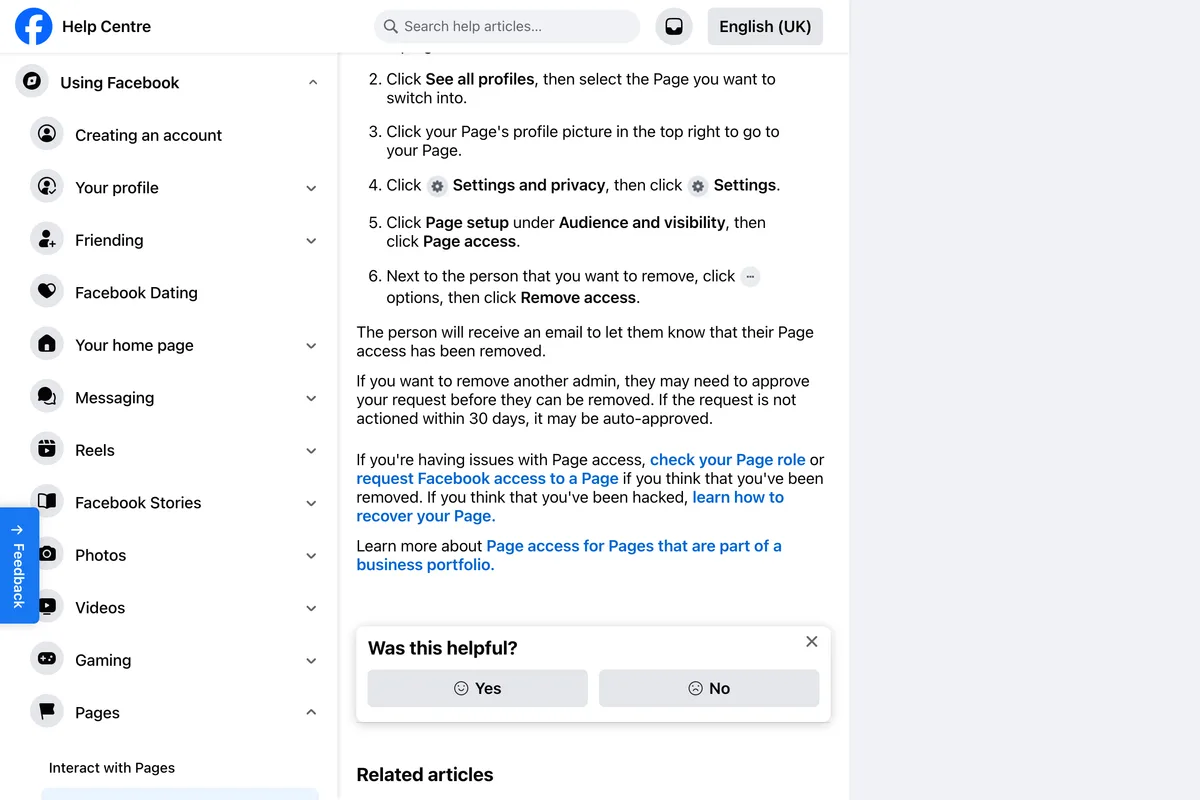
Do it in this order: add the new person, wait until they have accepted and you can see them under People with Facebook access, then remove the old one. One reply in the long invite thread describes a charity that removed its old admin before the new ones had accepted and ended up with nobody able to manage the Page.
What other guides still tell you
We read the guides that rank for this search on 22 October 2026. The steps are mostly fine. The vocabulary is not, and the vocabulary is what you are trying to find on the screen.
| Guide | What it says | What Meta's pages say now |
|---|---|---|
| LyfeMarketing, updated 11 Aug 2026 | "Facebook offers 5 page roles: Admin, Advertiser, Analyst, Editor, Moderator", and FAQs that send you to Page Roles | No Page Roles screen. Facebook access (full or partial control), task access, Community Manager |
| wikiHow, updated 8 Dec 2025 | Two Classic methods through Page Roles, and "classic pages experience will be upgraded to new pages very soon" | The steps on Meta's page are for Page access only |
| Business Insider, modified 2022 | "click 'Page roles'" and "Assign a New Page Role" | Neither exists in Meta's current steps |
| YesToTech, Jan 2026 | Says full control is not ownership, then gives the add-full-control steps under transferring ownership, and names Creator Studio and Business Manager | Business Manager is now the business portfolio. Full control is access, ownership sits with the portfolio |
| Aginto, Jan 2025 | Talks about the login and password of the business page | Pages have no login. The password asked for is your own |
One more inconsistency is Meta's own. Its Page access instructions describe "three types of Facebook Page access: Page access, task access and Community Manager access", while the page those words link to calls the first one Facebook access. They mean the same thing.
We checked our own Page. It has one person with full control.

The same Meta page has a warning worth repeating to anyone who manages Pages for other people. Strangers can request access to your Page through Business Suite, and some of them pretend to be Meta:
Facebook never asks for access to a Page: If you receive a request from a business that claims it's Facebook, it's not a legitimate request.
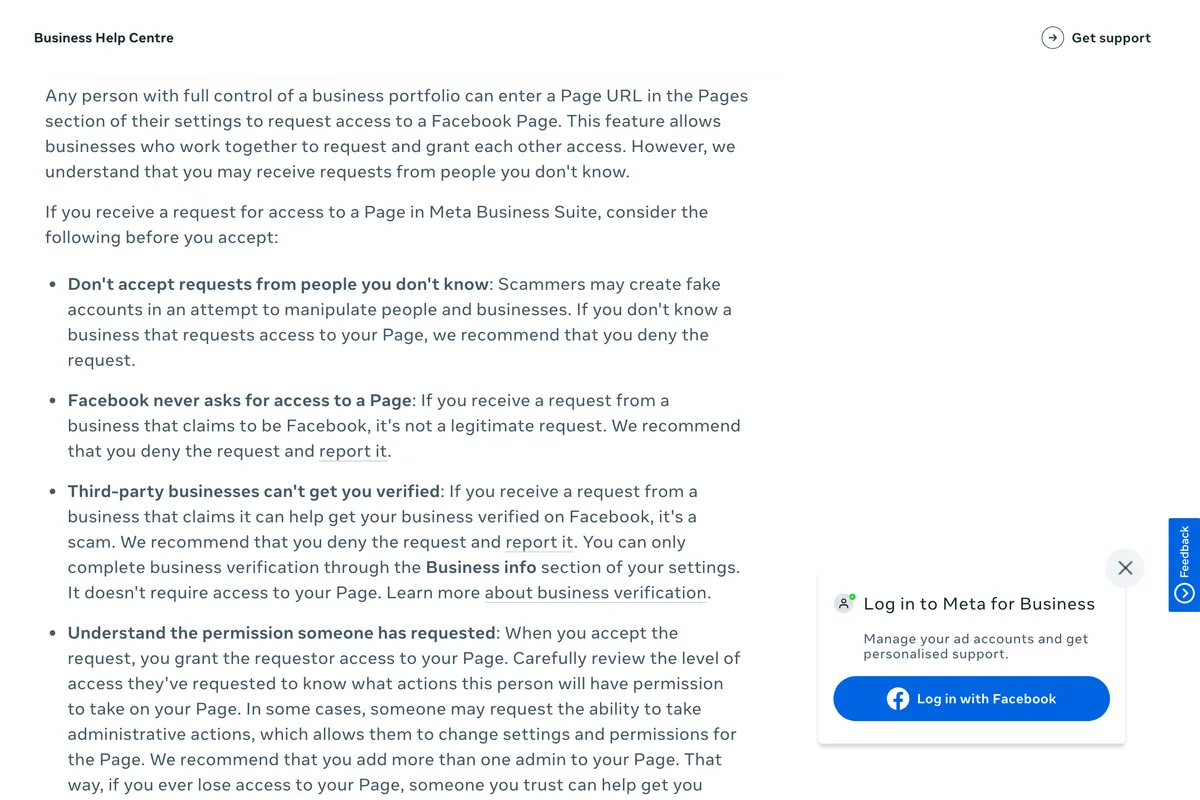
Meta adds that a business claiming it can get you verified is a scam too, because verification never needs access to your Page. If an access request arrives from someone you do not recognise, deny it.
A two minute checklist
- Open Page access (or Business Suite, Settings, Pages) and count the people with full control. Fewer than two is a risk.
- Give full control only to people who could own the business. Everyone else gets partial control or task access.
- Add agencies as partners with their portfolio ID, not as people.
- When someone leaves, add their replacement first, wait for the accept, then remove them. Allow up to 30 days if they had full control.
- Deny any access request from a business you do not know, and any that claims to be Facebook.
Once the right people have access, the next things that go wrong are usually about posting rather than permissions: Meta Business Suite not publishing to Instagram, why you can't schedule Instagram posts, and why a post can't be shared on Facebook. For when to post once it all works, see the best time to post on Facebook.
Frequently asked questions
How do I add an admin to my Facebook Page?
Switch into the Page, then go to Settings & privacy, Settings, Page setup, Page access. Next to People with Facebook access click Add New, type the person's name or email, select full control, click Give Access and confirm with your Facebook password. They must accept the invite. If the Page is in a business portfolio, Meta says to do it in Meta Business Suite instead: Settings, Pages, Assign people.
Is there still an Admin role on Facebook Pages?
Not by that name. Pages using Meta's current access model have Facebook access with full or partial control, task access and Community Manager access. Facebook access with full control is the equivalent of the old Admin role, and Meta still uses the word admin loosely on some of its own help pages.
What is the difference between Facebook access and task access?
People with Facebook access can switch into the Page and act as it on Facebook, with full or partial control. People with task access cannot switch into the Page; they work only through tools such as Meta Business Suite and Ads Manager, on the tasks you tick for them.
Why can't I add someone as an admin on my Facebook Page?
The most common reasons are that you do not have full control yourself, that the Page is in a business portfolio and has to be managed from Meta Business Suite, or that the person does not come up in the name search. Try their email address, and if the Page is in a portfolio, invite them to the portfolio first.
How do I give an agency access to my Facebook Page?
Add the agency as a partner in Meta Business Suite: Settings, Partners, Add, Give a partner access to your assets, then enter the agency's business portfolio ID and choose the Page and access level. The agency can then give its own people access within the level you set; a partner on partial access, Meta says, can only assign the tasks you assigned it.
What happens if no one has full control of a Facebook Page?
Meta says the Page will be automatically deactivated and scheduled for deletion. Separately, Meta recommends adding more than one admin, so someone you trust can help you back in if you lose access.
How we researched this
- Every step and rule on this page was read on Meta's own Help Centre and Business Help Centre on 22 October 2026, and the passages the article rests on are photographed in place. Our screenshots were taken by a browser set to UK English, so a few words differ from what US readers see (Meta's US page says Review Invite where ours says Review invitation). Meta edits these pages without notice: if yours differs, trust the page.
- We read six guides that rank for this search and four Reddit threads where people describe the invite failing, on the same day. Claims that come only from Reddit are labelled as such. We looked at the access screen of a Page we run in Meta Business Suite and photographed it, but we did not send or accept an invite for this article, so the failure modes below are other people's reports checked against Meta's text, not errors we reproduced.
Sources
- 1Give, edit or remove Facebook Page access
- 2About Facebook Page access
- 3Accept access for a Facebook Page
- 4Request Facebook access to a Page
- 5How do I give someone access to my Facebook Page?
- 6About Page access (Pages in a business portfolio)
- 7Give a partner access to business assets in your business portfolio
- 8Best practices for giving people access to your Page in Meta Business Suite