How to add a collaborator on Instagram, before and after posting
Tag people, Invite collaborator, and wait for them to accept. That part is easy. Adding someone after the post is live is where it breaks, and two of Instagram's own help pages disagree about whether you can. The steps, the rules and the reasons the invite fails.

To add a collaborator on Instagram, do it before you share: on the last screen before posting, tap Tag people, then Invite collaborator, search for the account, tap it, and tap Done. The account gets the invite as a message, and only when they accept does the post appear on their profile and in their followers' feeds. You can invite up to 5 collaborators to one post. Reels work the same way.
Our articles are still written by humans!
Get human written articles in your Google feed.
That is the whole answer for a new post. Most of the searching happens after it goes wrong: the post is already live and the person was forgotten, the invite option is not there, or the other account comes up greyed out. Instagram's own help pages are not even consistent about the first of these, so below is what each page says, photographed, and what people report actually works.
Collaborator, tag, mention: what is the difference?
| What you add | Shows on their profile? | Goes to their followers? | Do they have to accept? |
|---|---|---|---|
| Collaborator | Yes, once they accept | Yes | Yes |
| Tag (Tag people) | In their tagged tab, automatically unless they approve tags by hand | No | Only if they turned on manual approval |
| @mention in the caption | No | No | No |
| Paid partnership label | No, it marks the post as branded content | No | Their approval depends on their branded content settings |
Instagram's own comparison is short. If someone tags or mentions you, the post is not shared with your followers and you are not listed as an author. If you accept a collab invite, you are listed as an author, the post is shared with your followers, and you can see all its likes and comments. For a brand working with a creator, that last part is the point of the feature: one post, one set of likes and comments, two audiences.
How to add a collaborator before you post
These are Instagram's steps for the iPhone and Android apps. Instagram's help page says the feature is not available on computers, which matters later.
- Create the post or reel as usual, up to the last screen with the caption.
- Tap Tag people.
- Tap Invite collaborator (on a reel it reads Invite collaborators).
- Search for the account you want, then tap it.
- Tap Done, and share the post.
Who you can invite depends on your own account's privacy, and Instagram puts it plainly:
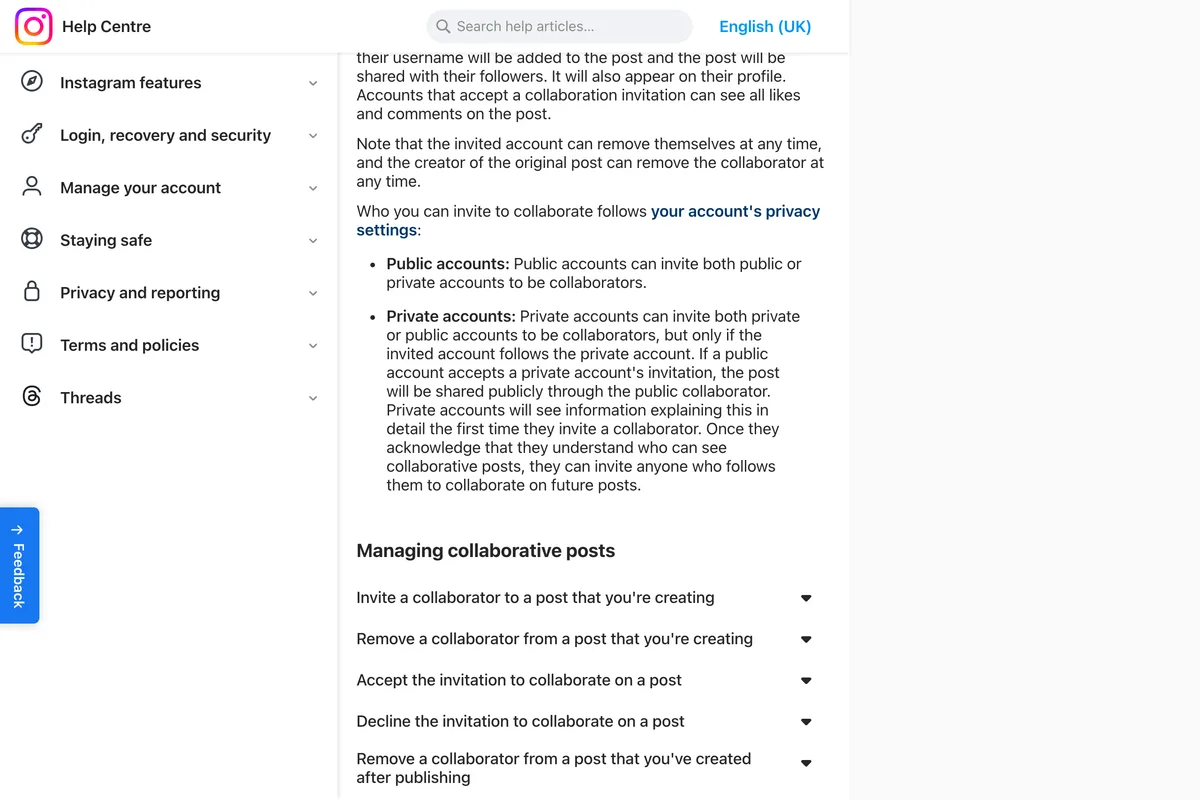
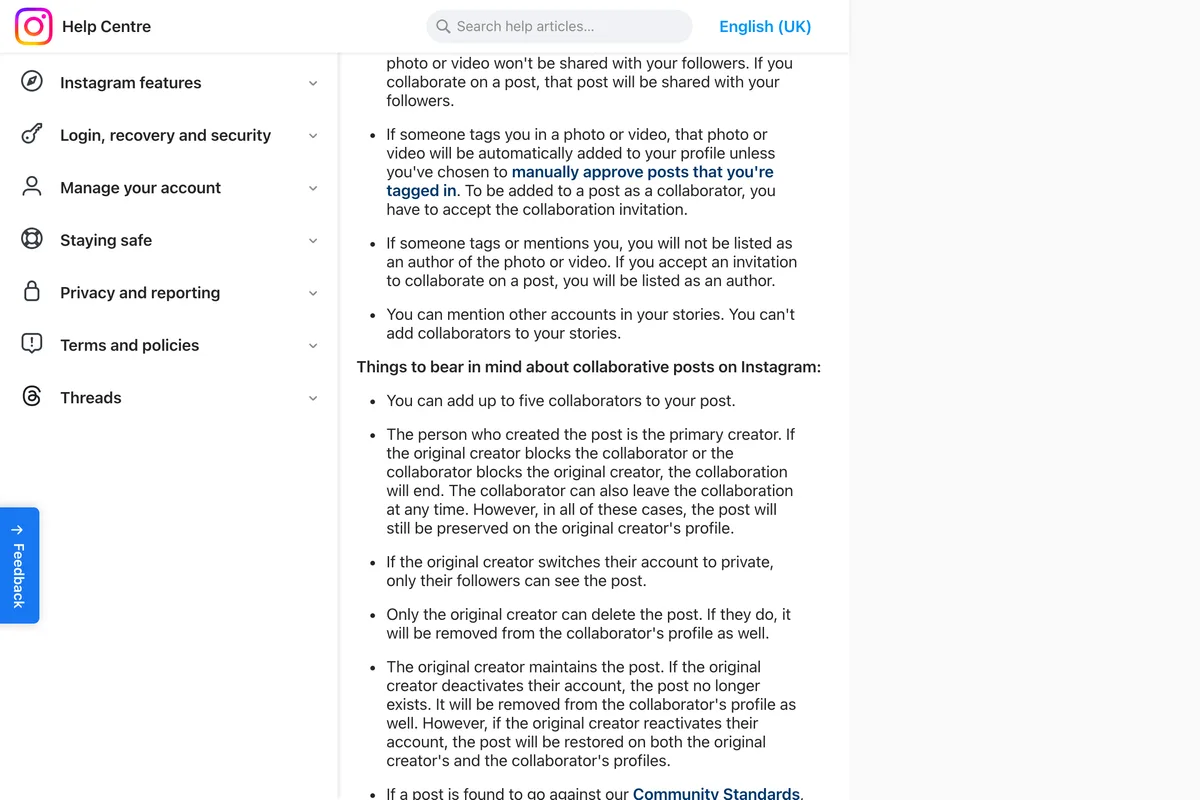
And the limit on numbers is in the list of things to keep in mind further down the same page:
You can add up to 5 collaborators to your post.
The page about collab reels says only that you can add multiple collaborators, without a number. We would not count on reels allowing more than five.
How to accept a collab invite
Instagram sends the invite as a message. To accept it, tap Messages, open the conversation the invite came in, tap the invite, tap Review and then Accept. Decline is on the same screen. If you are the one sending the invite and nothing happens, ask the other account to look in their chats before you resend it.
Can you add a collaborator after posting?
Instagram contradicts itself here. Its how-to page says the creator of the original post can remove the collaborator at any time. Its short page about collab posts says, in the same kind of sentence, that the original author can add or remove one at any time:
Note that the original author can add or remove a collaborator at any time.
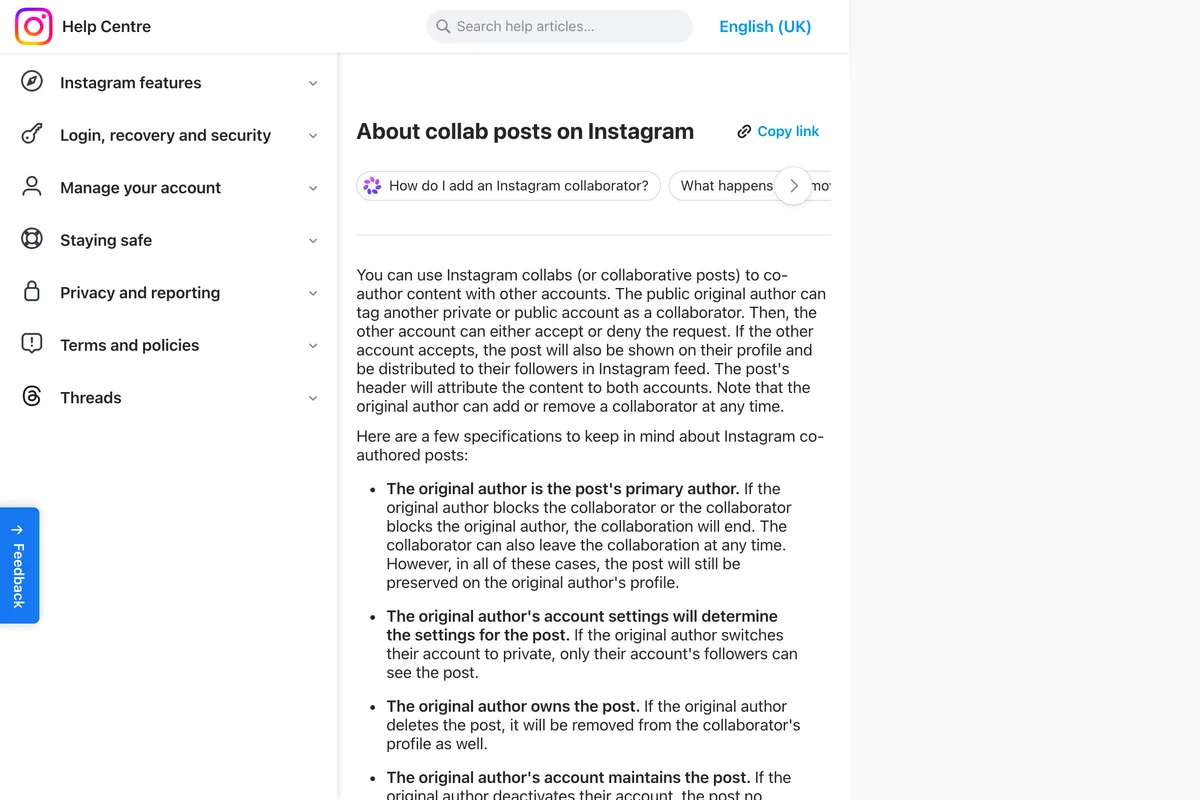
Its longer how-to page, the one with the steps, has instructions for removing a collaborator after publishing and none for adding one:
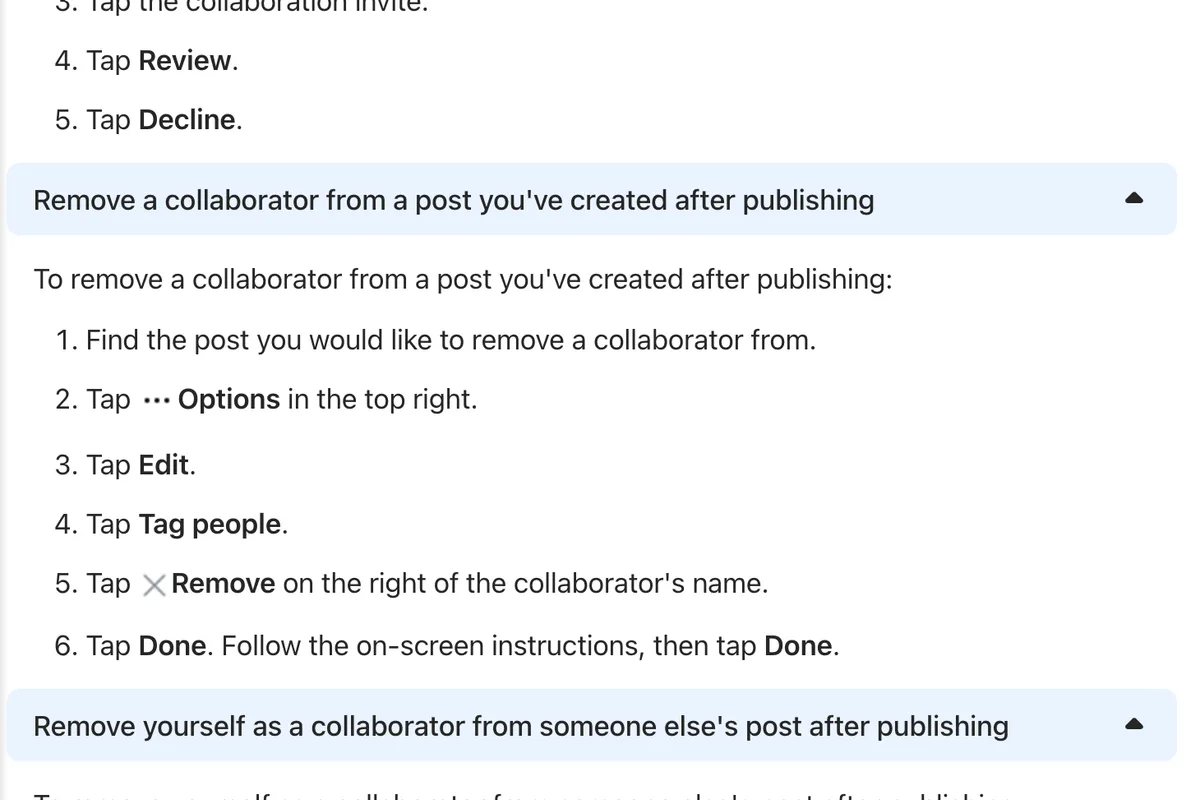
What people report fills the gap, and it explains why the guides that rank for this search give a confident yes while so many people cannot find the button. In a Reddit thread from October 2024, someone who runs several accounts found they could add collaborators after posting on several accounts they run but not on their main one; others in the thread put it down to a gradual rollout, and the original poster later updated that it had reached all their profiles. In a thread from April 2026, people describe the opposite failure: the option is there, they go through the steps, and the person ends up tagged, not invited.
The fix that comes up in both threads, and in a third about re-adding a collaborator who was removed by mistake, is to do it on the website, not in the app: open the post on instagram.com in a desktop browser, click the three dots, Edit, and use the collaborator option beside the tags and location. Many people say that worked when the app would not; at least four said the website showed no option either. One commenter says it can be done from the Meta Business Suite app; another says Business Suite did not work for them. We could not test either route, because the account we tried has no posts to edit, so treat these as reports, not instructions from Instagram.
- Try the app first: open the post, tap the three dots, Edit (on a reel: Options, Manage, Edit), Tag people, and look for Invite collaborator.
- If it is missing, or the person only appears as a tag, open the same post on instagram.com in a desktop browser and edit it there.
- Check the other account actually got an invite in their messages. A tag sends no invite.
- If none of that works, the only route Instagram fully documents is a new post with the collaborator added before sharing. Deleting the old post loses its likes and comments, so decide whether the reach is worth that.
Why can't I invite a collaborator?
| What you see | Likely reason | Where that comes from |
|---|---|---|
| The account is not in the search, or is greyed out | Your account is private and they do not follow you | Instagram Help Centre (the rule); the symptom is our reading |
| You cannot add another person | The post already has 5 collaborators | Instagram Help Centre |
| No collaborator option at all on a story | Stories cannot have collaborators | Instagram Help Centre |
| The option vanished from your account | Instagram says accounts that have gone against its guidelines may not have access to Collabs | Instagram Help Centre |
| The post will not schedule | Collab posts are not compatible with scheduling | Instagram Help Centre |
| "This account can't be invited as a collaborator yet" | Not explained by Instagram. In a 2022 thread, typing the full username instead of using autofill worked for one person and failed for two | |
| One account you run can do it, another cannot | Features reach accounts at different times | Reddit, our reading |
| After posting, the person becomes a tag instead of a collaborator | Edit the post on instagram.com in a desktop browser |
Instagram is specific about the guidelines one. In its words, if a post goes against its Community Standards, it will remove it and may take action against the original creator's and the collaborators' accounts, and "accounts that have gone against our guidelines may not have access to Instagram Collabs". It publishes no list of which violations do this or for how long. If the option disappeared from an account that used to have it, check Account Status in settings before anything else.
What a business should know before it collabs
The rules that matter to a brand are not the ones about tapping buttons. They are about who owns the post, and Instagram is clear that it is whoever made it:
- Only the original creator can delete the post. If they do, it is removed from the collaborator's profile as well.
- If the original creator deactivates their account, the post no longer exists on either profile. It comes back if they reactivate.
- If either account blocks the other, the collaboration ends, and the post stays only on the original creator's profile. The collaborator can also leave at any time.
- The original creator's settings decide who sees it. If they switch to private, only their followers can see the post.
- Both accounts see all the likes and comments. There is no separate comment thread per profile.
So the question to settle before a brand and a creator collab is whose post it is. If the post is part of a paid campaign and the brand wants it to stay up, the brand should publish it and invite the creator, not the other way round. If the creator publishes, the brand's copy of the post lives and dies with the creator's account.
Plan the timing too. Instagram's scheduling page lists collaborative posts among the features that are not compatible with scheduled content, so a collab has to be published live. We covered that in why you can't schedule Instagram posts. If the post uses music, the rules for business accounts apply to whoever publishes it.
Can you boost a collab post?
Yes, as what Meta calls partner content, and it needs your partner's permission first. Meta's page lists Instagram Collabs among the ways a partner can be tagged for this, alongside the paid partnership label, @mentions, people tags and product tags. The permission part is where boosts stall:
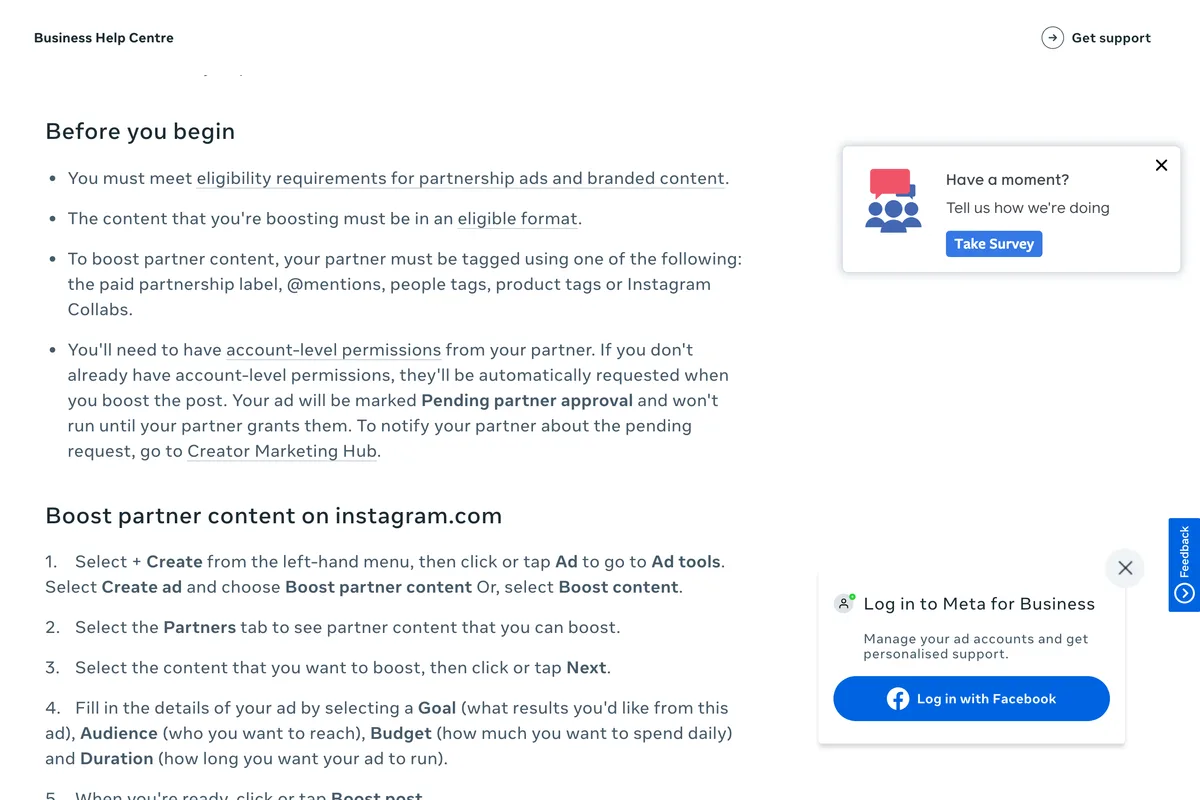
On instagram.com the route is + Create, Ad, Create ad, Boost partner content, then the Partners tab. In Meta Business Suite it is Ads, Create ad, Boost content, Partner content. Meta says the boosting account appears first in the ad's header and the partner second, and that in Meta Business Suite, if a post has several partners, you can choose which one appears second.
- Decide whose post it is before you start. The original creator owns it.
- Add the collaborator before sharing: Tag people, Invite collaborator.
- If your account is private, make sure they follow you first.
- Tell them the invite is in their messages.
- Publish it live. Collab posts cannot be scheduled.
- Forgot someone? Try Edit in the app, then Edit on instagram.com in a desktop browser.
- To boost it, expect a Pending partner approval step until the other account grants permission.
Collabs are only one part of getting a post seen. For the rest, see how the Instagram algorithm ranks posts, the best time to post on Instagram, the right Instagram post size and the Instagram safe zone for reels. If a post will not publish from Meta Business Suite at all, start with Meta Business Suite not posting to Instagram.
Frequently asked questions
How do I add a collaborator on Instagram?
Before you share the post or reel, tap Tag people, then Invite collaborator, search for the account, tap it and tap Done. The account receives the invite as a message and has to accept it before the post appears on their profile.
Can you add a collaborator on Instagram after posting?
Instagram's About collab posts page says the original author can add or remove a collaborator at any time, but its step-by-step page only explains removing one after publishing. People on Reddit report the option reached accounts gradually, and that when the app only adds the person as a tag, editing the post on instagram.com in a desktop browser often works, though not for everyone.
How many collaborators can you add on Instagram?
Up to 5 on a post, according to Instagram's Help Centre. The reels page says only that you can add multiple collaborators. Stories cannot have collaborators.
Why can't I invite someone as a collaborator on Instagram?
The usual reasons Instagram gives are that your account is private and they do not follow you, the post already has 5 collaborators, it is a story, or your account has lost access to Collabs after going against Instagram's guidelines. If the account is greyed out, one Reddit user suggested typing the full username instead of picking it from the suggestions; others said it did not help.
Can you schedule a collab post on Instagram?
No. Instagram says collaborative posts are not compatible with scheduled content, along with product tagging, sponsored posts and fundraisers. Publish it live, or schedule it without the collaborator.
Can you boost a collab post on Instagram?
Yes, as partner content, from instagram.com or Meta Business Suite. You need account-level permissions from your partner; if you do not have them, Meta requests them when you boost and the ad stays Pending partner approval until the partner grants them.
How we researched this
- Every rule and step on this page was read on Instagram's Help Centre and Meta's Business Help Centre on 22 October 2026, and the passages the article rests on are photographed in place. Most of our screenshots were taken by a browser set to UK English, so a few words differ from what US readers see (the US page says up to 5 collaborators where the UK one says five). Meta edits these pages without notice: if yours differs, trust the page.
- We read four Reddit threads where people describe adding a collaborator after posting, and the guides that rank for this search, on the same day. Claims that come only from Reddit are labelled as such. We did not send or accept a collab invite for this article, so the failures below are other people's reports checked against Instagram's text, not errors we reproduced.
Sources