Can't schedule Instagram posts? Why the option is missing, and the fix
Instagram's own help page sets the rules: a public account, 30 days ahead, 25 a day, and no stories, collabs, product tags or paid partnerships. Most guides still say 75 days. Here is the page, photographed, and each reason the toggle disappears.

If you can't schedule a post on Instagram, the reason is almost always one of these: your account is private, the post uses a feature that cannot be scheduled (a collaborator, product tags, a paid partnership label or a fundraiser), it is a story rather than a post or reel, or you have asked for a date more than 30 days away. Instagram's own help page lists every one of these, and the 30 days is not a typo. Most guides still say 75.
Our articles are still written by humans!
Get human written articles in your Google feed.
Below is the page, photographed, then each reason with what to do about it, where to find a post once it is scheduled, and what to use when the app cannot do what you need.
Instagram's scheduling rules, word for word
| Rule | What Instagram's help page says |
|---|---|
| Who can schedule | You must have a public account on Instagram. |
| How many | You can schedule up to 25 posts a day |
| How far ahead | up to 30 days in advance |
| What can be scheduled | scheduling reels, photos and carousel posts from the Instagram app |
| What cannot | product tagging, collaborative posts, sponsored posts and fundraisers aren't compatible with scheduled content at this time |
| Where the toggle is | Tap More options. Turn on Schedule this post or Schedule this reel, then choose a date and time. |
| Privacy | Your scheduled content will retain the same privacy and audience settings that were configured at the time of scheduling. |
| Managing a scheduled post | Select Delete, Edit post, Reschedule or Share now. |
What does Instagram's help page say today?
Instagram's page is called How to create and manage scheduled posts and Reels on Instagram. Its opening sentence is the part that has changed most:
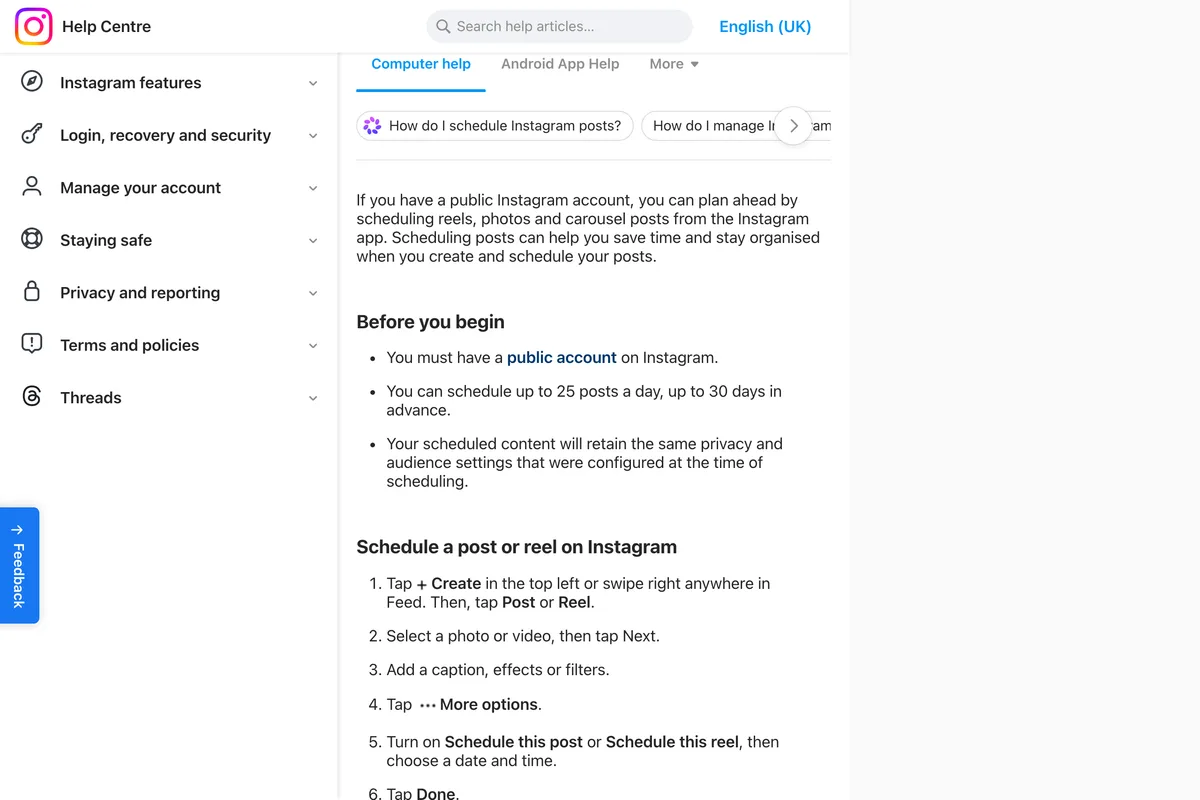
If you have a public Instagram account, you can plan ahead by scheduling reels, photos and carousel posts from the Instagram app.
It then gives three conditions under Before you begin.
Reason 1: your account is private
This is the cause behind most of the toggles that simply are not there. Instagram's first condition is you must have a public account on Instagram, and a private account does not get the option at all. A lot of advice still tells you to switch to a business account first. The current page does not ask for one. What it asks is that the account is public.
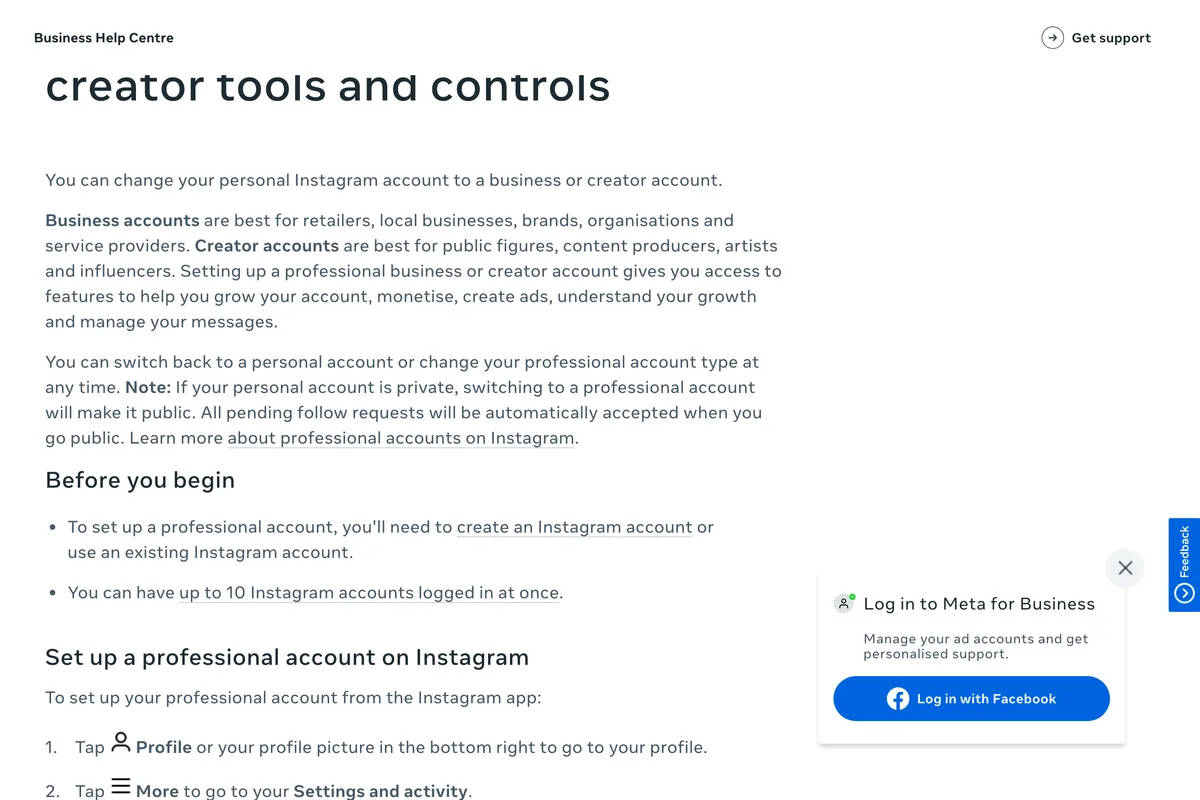
If you run the business from a professional account this will rarely be the problem, because Meta's page on setting up a professional account says that if your personal account is private, switching to a professional account will make it public. It is the small business run from somebody's personal account that meets this one: a bakery account that was set to private years ago so only friends could see it, and now cannot schedule.
Note: If your personal account is private, switching to a professional account will make it public.
Reason 2: the post uses something that cannot be scheduled
Instagram lists four features, in a note under the steps:
Note: Features such as product tagging, collaborative posts, sponsored posts and fundraisers aren't compatible with scheduled content at this time.
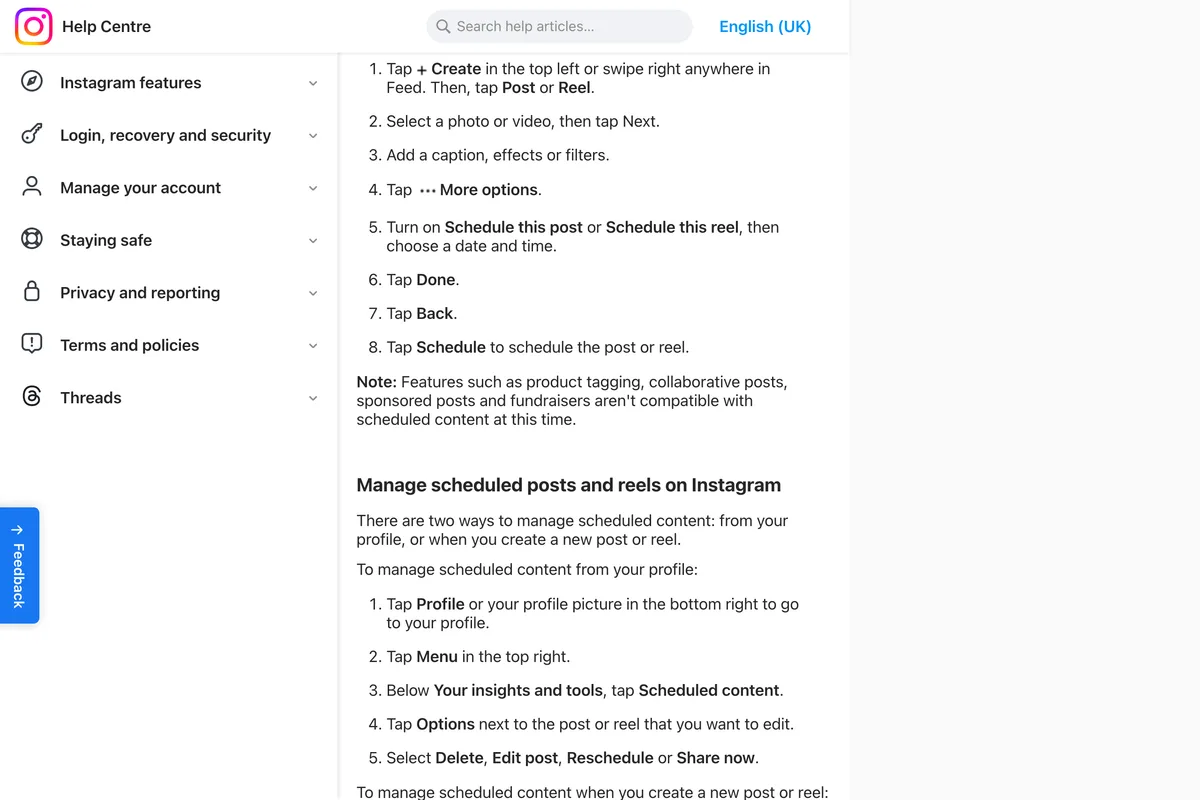
Sponsored here means a post carrying the paid partnership label. Instagram says only that these are not compatible, not what the app does when you try, so if a post will not schedule, check it for all four before anything else.
- Product tags. Remove them and schedule the post, or publish it live when the time comes.
- A collaborator. Publish the collab post live, or schedule it without the collaborator.
- The paid partnership label. Same rule. A post that must carry the label is published live.
- A fundraiser. Not schedulable. Publish it live.

Reason 3: it's a story
The Instagram app schedules reels, photos and carousel posts, and that list is the whole list. A story is not on it. If you want stories on a timer, Meta's own answer is Meta Business Suite: its help page for the mobile app lists posts, reels and stories as content you can schedule for Facebook and Instagram, as long as you have at least partial access to the accounts. If you are designing stories to schedule, the safe area is in our guide to Instagram story size.
Reason 4: too far ahead, or too many in a day
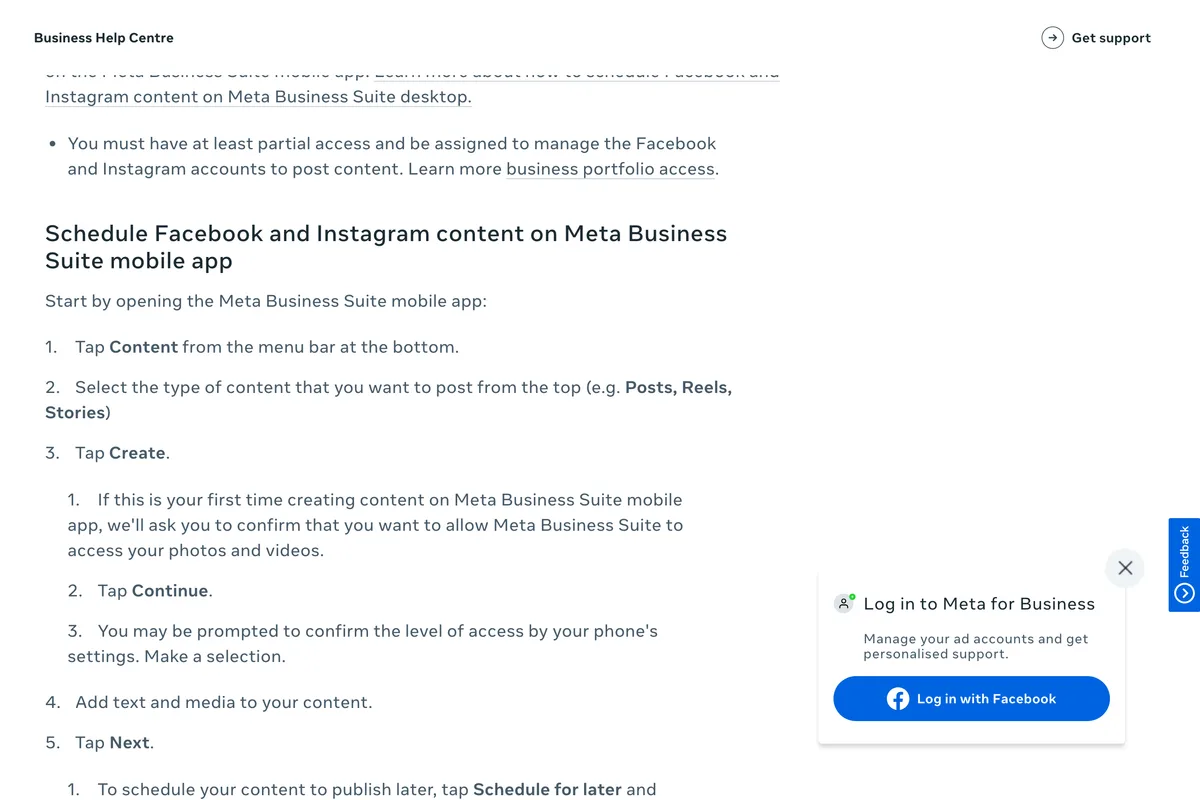
Instagram allows up to 25 posts a day, up to 30 days in advance. The 25 is a limit very few small businesses will meet. The 30 days is the one that catches people planning a month or a season in one sitting, and older guides told them it would go to 75. Black Friday is 27 November this year, so in the app its post cannot be scheduled before 28 October. Plan in four week blocks and the problem goes away. If you are wondering whether you need anything like 25 a day, you do not, and how often a small business should post has the numbers.

Reason 5: you are looking in the wrong place
The toggle has moved, and the name of the menu it lives in has changed. Instagram's current steps are these.
- Tap Create in the top left, or swipe right anywhere in Feed, then tap Post or Reel.
- Select a photo or video and tap Next.
- Add a caption, effects or filters.
- Tap More options.
- Turn on Schedule this post or Schedule this reel, then choose a date and time.
- Tap Done, then Back, then Schedule.
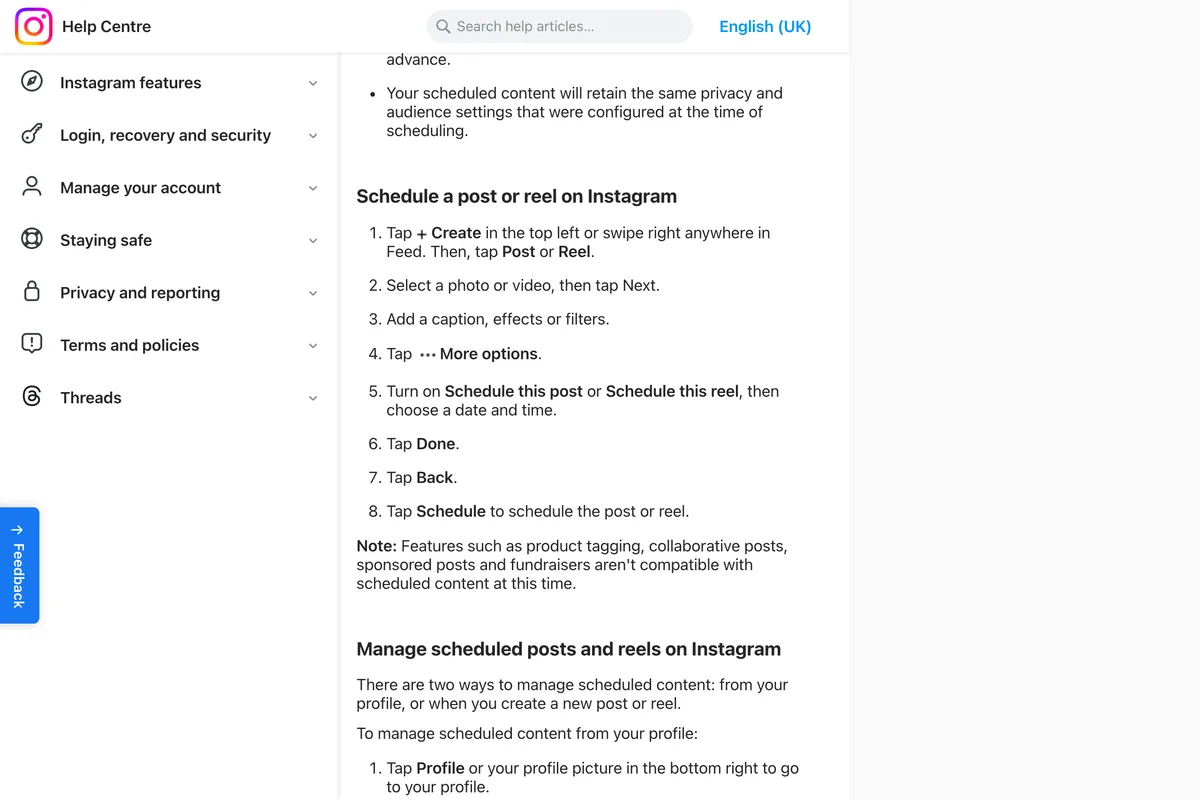
Most guides still say Advanced settings, which is what the menu used to be called. If your app shows neither, update it first. That is our suggestion rather than Instagram's, because the help page only describes the current version, but a menu that has been renamed is a menu an old version of the app does not have.

Where do scheduled Instagram posts go?
Instagram gives two ways in. From your profile, tap the menu in the top right and, under Your insights and tools, tap Scheduled content. Or start a new post or reel and tap Scheduled. Either way, tap Options next to a post and you get four choices: Delete, Edit post, Reschedule or Share now. Instagram also says scheduled content keeps the privacy and audience settings it had when you scheduled it, so change those before you schedule, not after.
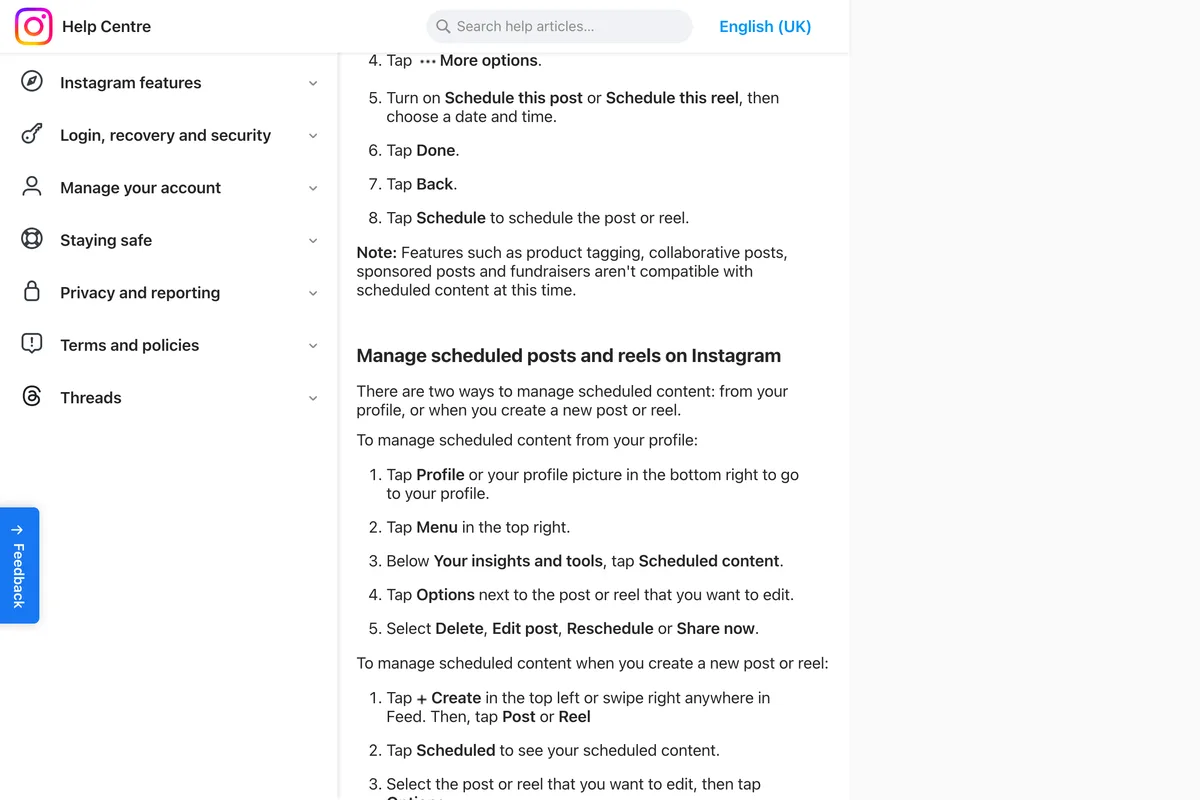
If a post is in Scheduled content and never appeared at its time, that is a different fault from a missing toggle. The most common versions of it, and the ones Meta itself lists, are covered in Meta Business Suite not posting to Instagram.
What to use when the Instagram app can't schedule it

| You need to | Instagram app | Meta Business Suite | Another scheduling app |
|---|---|---|---|
| Schedule a feed post or carousel | Yes, up to 30 days ahead | Yes | Yes |
| Schedule a reel | Yes | Yes | Usually |
| Schedule a story | No | Yes | Depends on the app |
| See the week as a calendar | Not in the help page | Yes, Planner | Usually |
| Schedule from a computer | The help page describes the app only | Yes | Yes |
| Use a 3:4 image, 1080 x 1440 | Yes | Not documented | Meta's API documentation says 4:5 is the tallest |
Meta Business Suite is the free step up. Its desktop version needs full control of the Instagram account or content permission for it, and it adds a calendar view called Planner. Other scheduling apps, ours among them, publish through Meta's API, and the API has rules the app does not. The one most worth knowing is the shape: Meta's media reference says an image must be between 4:5 and 1.91:1, so the 3:4 portrait the app now accepts is outside it. Our guide to Instagram post size has the dimensions.
Every reason in one table
| What happens | Why | What to do |
|---|---|---|
| No schedule option at all | The account is private | Make the account public |
| Option disappears on one post | Product tags, a collaborator, a paid partnership label or a fundraiser | Remove it, or publish that post live |
| Cannot schedule a story | The app schedules reels, photos and carousels only | Use Meta Business Suite |
| Date picker stops short | 30 days is the limit | Plan in four week blocks |
| Cannot find the toggle | It is under More options now | More options, then Schedule this post |
| Scheduled, but never appeared | A publishing fault, not a scheduling one | See Meta Business Suite not posting to Instagram |
Frequently asked questions
Why can't I schedule posts on Instagram?
The most common reasons are that the account is private, the post includes a feature that cannot be scheduled (product tags, a collaborator, a paid partnership label or a fundraiser), it is a story rather than a post or reel, or the date is more than 30 days away. Instagram's help page lists all of these.
How far in advance can you schedule Instagram posts?
Up to 30 days, according to Instagram's help centre as of 24 September 2026, with up to 25 scheduled posts a day. Many guides still say 75 days, which does not match Instagram's current page.
Do I need a business account to schedule on Instagram?
Instagram's current help page says you must have a public account, and does not mention needing a business or creator account. A private account cannot schedule. Switching a private personal account to a professional one makes it public, which is why switching often appears to fix the problem.
Can you schedule Instagram Stories?
Not in the Instagram app, which schedules reels, photos and carousel posts. Meta Business Suite can: its mobile app lets you schedule posts, reels and stories for Instagram and Facebook.
Where is the schedule option on Instagram?
Start a post or reel, choose your media, tap Next, then tap More options and turn on Schedule this post or Schedule this reel. Pick a date and time, tap Done, then Back, then Schedule. Older guides call the menu Advanced settings.
Where do I find my scheduled Instagram posts?
Go to your profile, tap the menu in the top right, and under Your insights and tools tap Scheduled content. You can also start a new post and tap Scheduled. From there you can delete, edit, reschedule or share a post now.
Why can't I schedule a collab post on Instagram?
Instagram says collaborative posts are not compatible with scheduled content at this time, along with product tagging, sponsored posts and fundraisers. Publish a collab post live, or schedule it without the collaborator.
How we researched this
- The rules on this page were read on Instagram's and Meta's own help pages on 24 September 2026, and the one that most guides get wrong is photographed in place. Instagram edits its help centre without notice and shows slightly different wording to different devices, so the date matters. We read the computer and Android versions of the scheduling page and they matched.
- We did not try every combination on a live account to see which one hides the toggle. The reasons are the ones Instagram publishes. Where the article adds a cause Instagram does not list, it says so and says why we think it.
Sources
- 1How to create and manage scheduled posts and Reels on Instagram
- 2Set up a professional Instagram account to access business or creator tools and controls
- 3Schedule Facebook and Instagram content on Meta Business Suite mobile app
- 4Create and manage posts in Meta Business Suite on desktop
- 5Instagram Platform: IG User Media reference