How to hide followers on Instagram, and what we limit certain things means
There is no setting that hides your followers or following list on a public account. Going private is the only switch, it is not available to business accounts, and Instagram's own pages disagree about how much it hides. Here is every option, with Instagram's own words where it has them, and why you sometimes cannot see someone else's list.
You can't hide your followers or following list on a public Instagram account. There is no setting for it, and none of the Instagram help pages we read describes one. The only switch is making the account private, which makes people send a follow request before they can see your lists, and even that has two catches: a business account cannot go private, and Instagram's own comparison table says the public accounts in your lists stay visible to everyone. Beyond that you can remove or block individual people.
Our articles are still written by humans!
Get human written articles in your Google feed.
If you came here because Instagram said we limit certain things you can see when you tried to open someone else's list, that is a different thing, and Meta has never fully explained it. What it has published is further down.
Who can see your followers and following list?
| Who is looking | Public account | Private account |
|---|---|---|
| Anyone on Instagram | Both lists | Public accounts in your lists, per Instagram's table; nothing, per its privacy tips |
| Your approved followers | Both lists | Both lists |
| Someone you removed | Both lists, as anyone | As anyone on Instagram |
| Someone you blocked | Nothing | Nothing |
| A parent supervising a teen | Both lists, in Family Center | Both lists, in Family Center |
| An adult Instagram considers suspicious | Both lists, minus teen accounts | As anyone, minus teen accounts |
| An account Meta flags as a likely scammer | Neither list | Neither list |
Can you hide your followers on a public account?
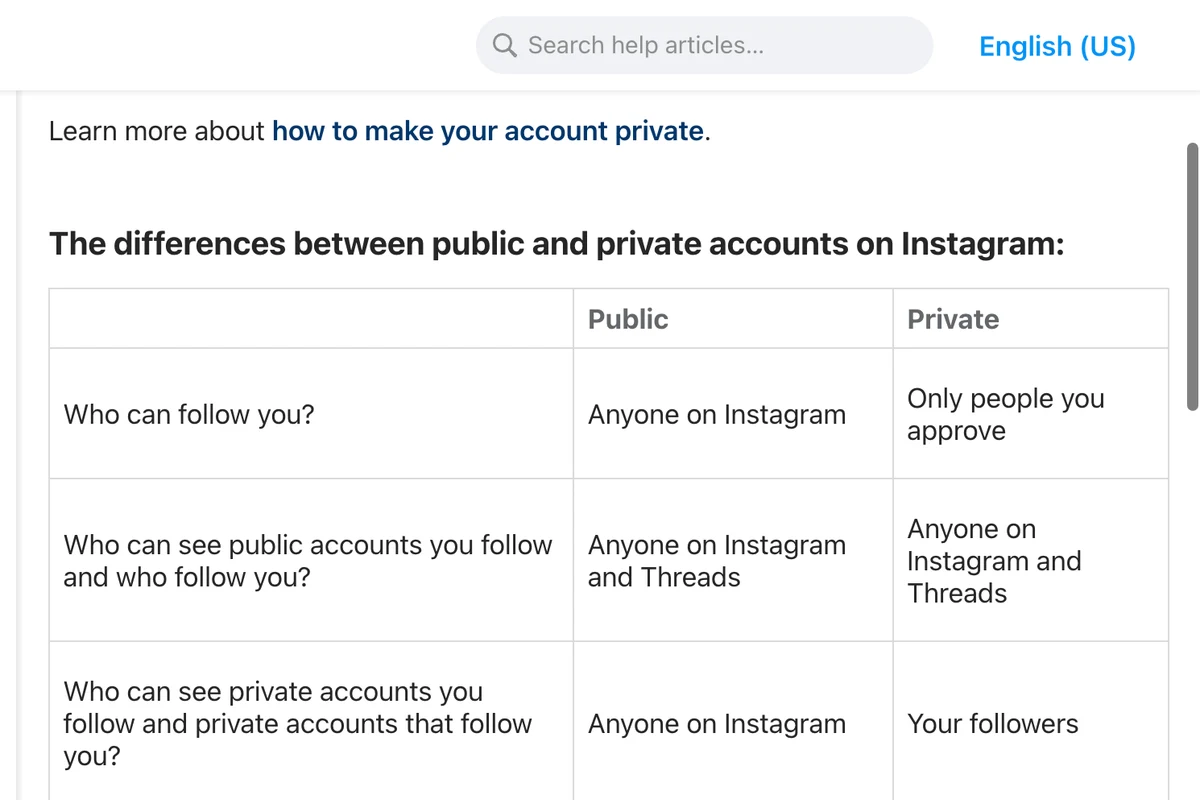
No. Instagram's comparison of public and private accounts is the closest thing to a definitive list, and for a public account it says anyone on Instagram can see the accounts you follow and the accounts that follow you. Nothing on the page, or on any other Instagram help page we read, offers a way to change that while the account stays public.
The workarounds in circulation do not work. Restrict limits someone's comments and messages. Mute hides their posts from you. Close Friends decides who sees a story. None of the Instagram pages we read describes any of them as touching your lists. The one list Instagram does let you hide is your likes: under Menu, then Likes you've made, you can choose everyone, people you follow, close friends or no one. That covers the posts you liked, not the people you follow.
What does making your account private hide?
Instagram's privacy tips page puts it simply:
When you set your posts to private, anyone who wants to see your posts, followers or following list will have to send you a follow request first.
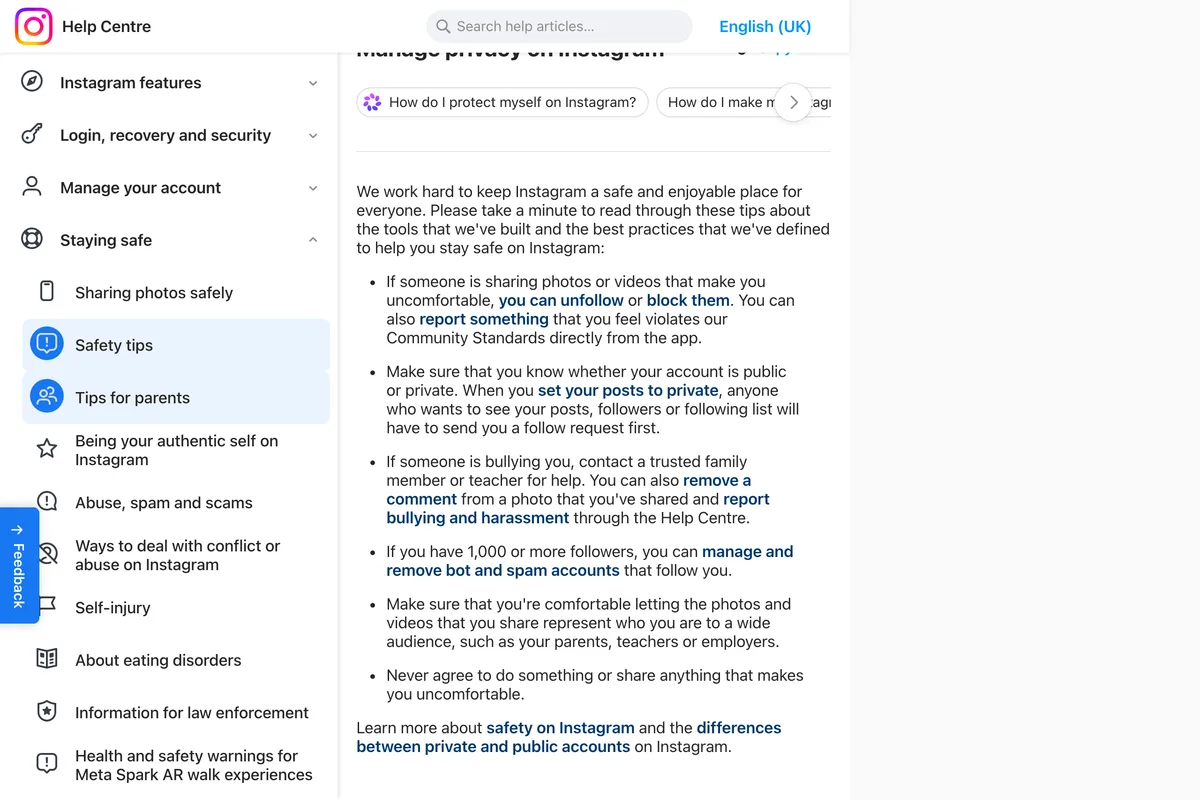
Instagram's comparison table, on another page, is more specific, and it does not say the same thing. It splits your lists into public and private accounts. For a private account, it says the private accounts you follow and that follow you can be seen by your followers only, but the public accounts you follow and that follow you can be seen by anyone on Instagram and Threads.
To make an account private, Instagram's steps are: go to your profile, tap Menu, and under Who can see your content tap Account privacy, then turn on Private account and tap Switch to private. Accounts for people under 18 are private by default. Two things to know before you do it. Existing followers keep seeing everything, so going private hides nothing from people already on your list. And Instagram warns that switching between public and private too often can earn a temporary limit on your account. Afterwards, open your profile from a second account that does not follow you to see what a stranger sees.
Can a business account hide its followers?
No, and it cannot go private either. Instagram's page on making an account private ends with this:
Keep in mind that business profiles aren't able to make their accounts private. If you want to make your business account private, first switch back to a personal account.
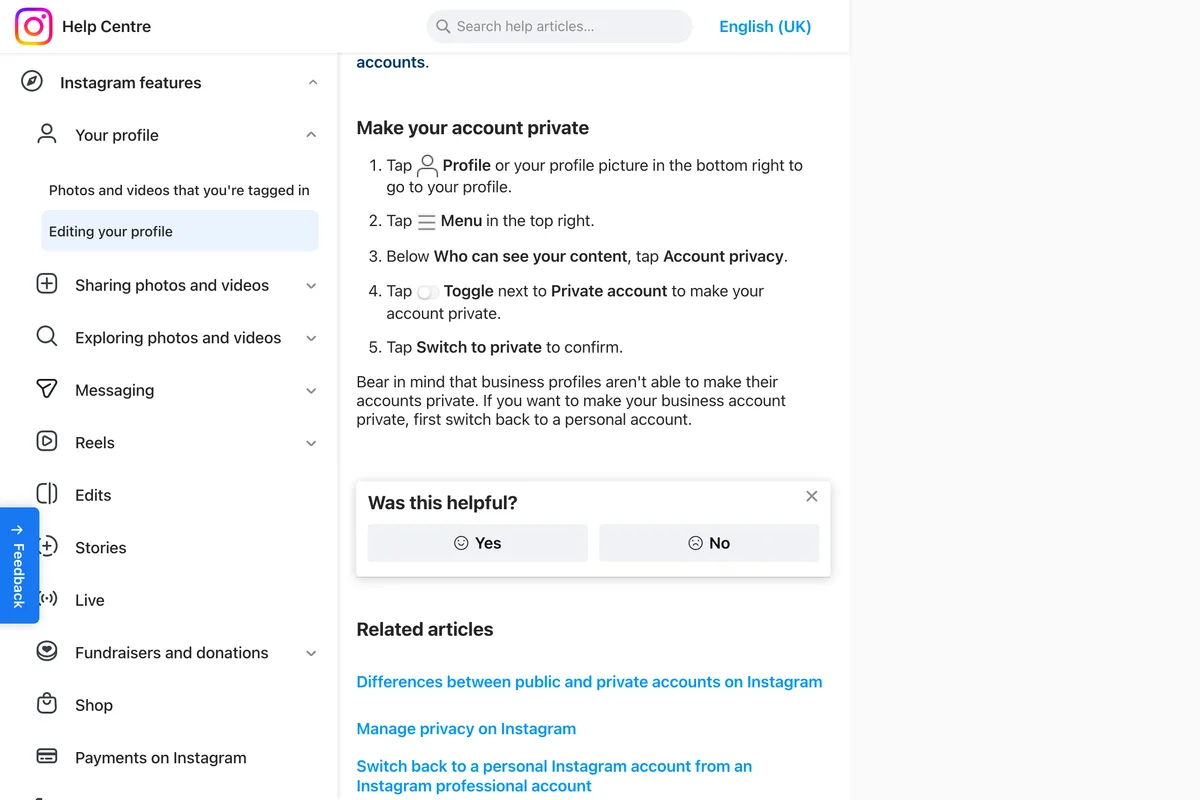
Instagram's note names business profiles. It does not say the same of creator accounts, and we have not seen a help page that does, so treat guides that say every professional account must stay public as going further than Instagram does. For a business, switching back to a personal account to hide a follower list means you would likely lose insights and the other professional tools, which is almost never a good trade.
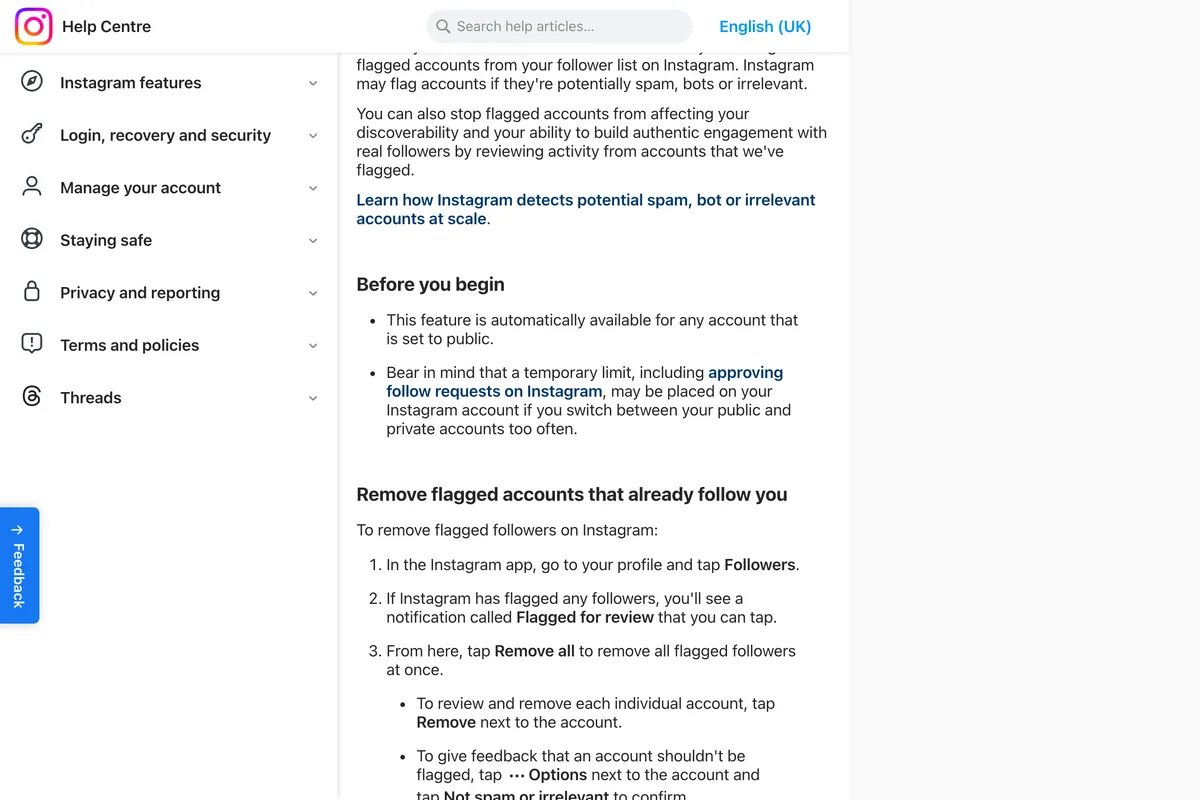
It is also rarely what a business actually needs. Your follower list is social proof, and a competitor can see it, but it can also see your posts, your prices and your stories, all of which are worth more to it. If a particular account bothers you, block it. If a lot of your followers are bots, Instagram offers a better tool than hiding them: public accounts can review flagged followers, which Instagram describes as potentially spam, bots or irrelevant, and remove them all at once from the Flagged for review notice on the Followers list. Instagram says the feature may not be available to you yet, and its privacy tips mention it for accounts with 1,000 or more followers.
How to remove a follower or block someone
To take one person off your list, Instagram gives two tools, and neither notifies the person. Its remove a follower page describes removal for accounts that are set to private:
- Go to your profile and tap Followers at the top.
- Tap X next to the follower, then Remove to confirm. They are not told.
- Or block them, which also stops them following you. Instagram says people aren't notified when you block them.
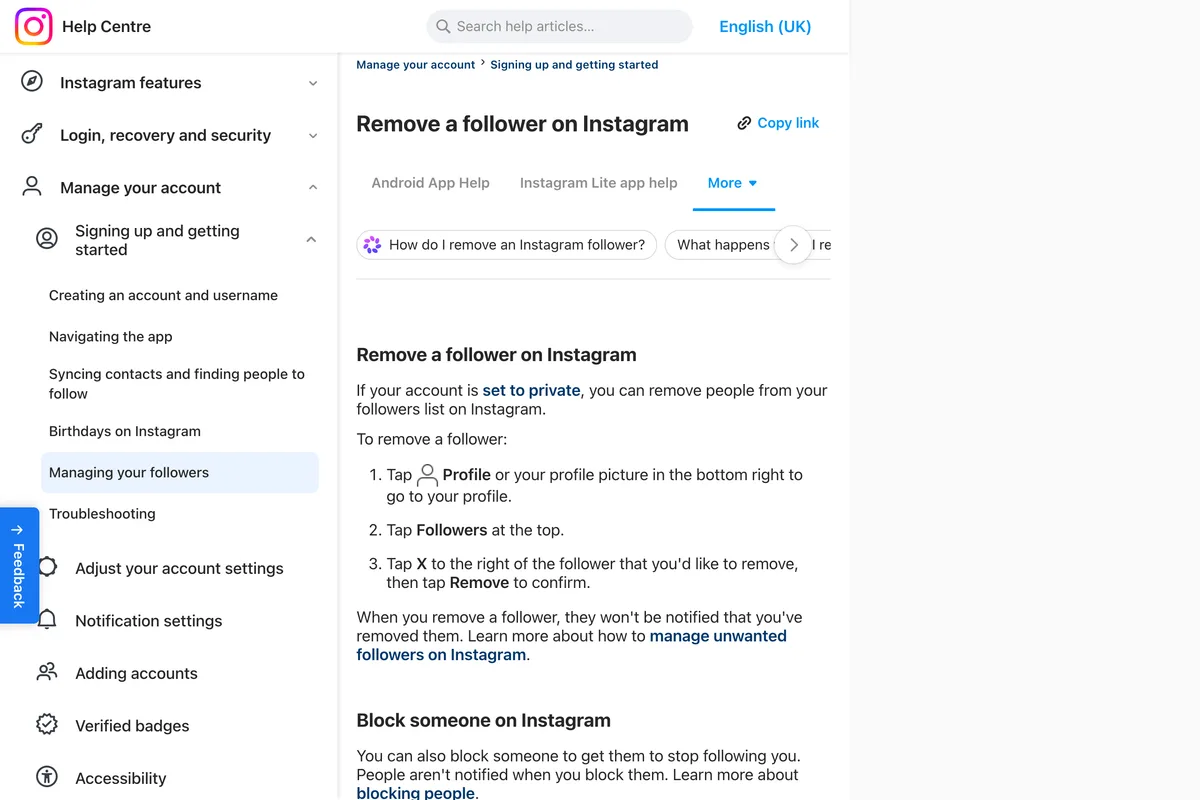
Instagram describes Remove only for private accounts, where a removed follower has to request again to see your posts. On a public account anyone can see your lists, so removing someone would not hide them anyway. Instagram says a block stops someone following you.
Why does Instagram say we limit certain things you can see?
Meta has not said. The message, as people quote it, reads we limit certain things you can see, such as someone's followers or following lists, to protect our community, and it appears when you tap a follower or following count and the list does not open. We found no Instagram help page that explains it. The closest rule Meta has published is from October 2024, one of its measures against sextortion, and it is about the account doing the looking:
Sextortion scammers often use the following and follower lists of their targets to try and blackmail them. Now, accounts we detect as showing signals of scammy behavior won't be able to see people's follower or following lists, removing their ability to exploit this feature.
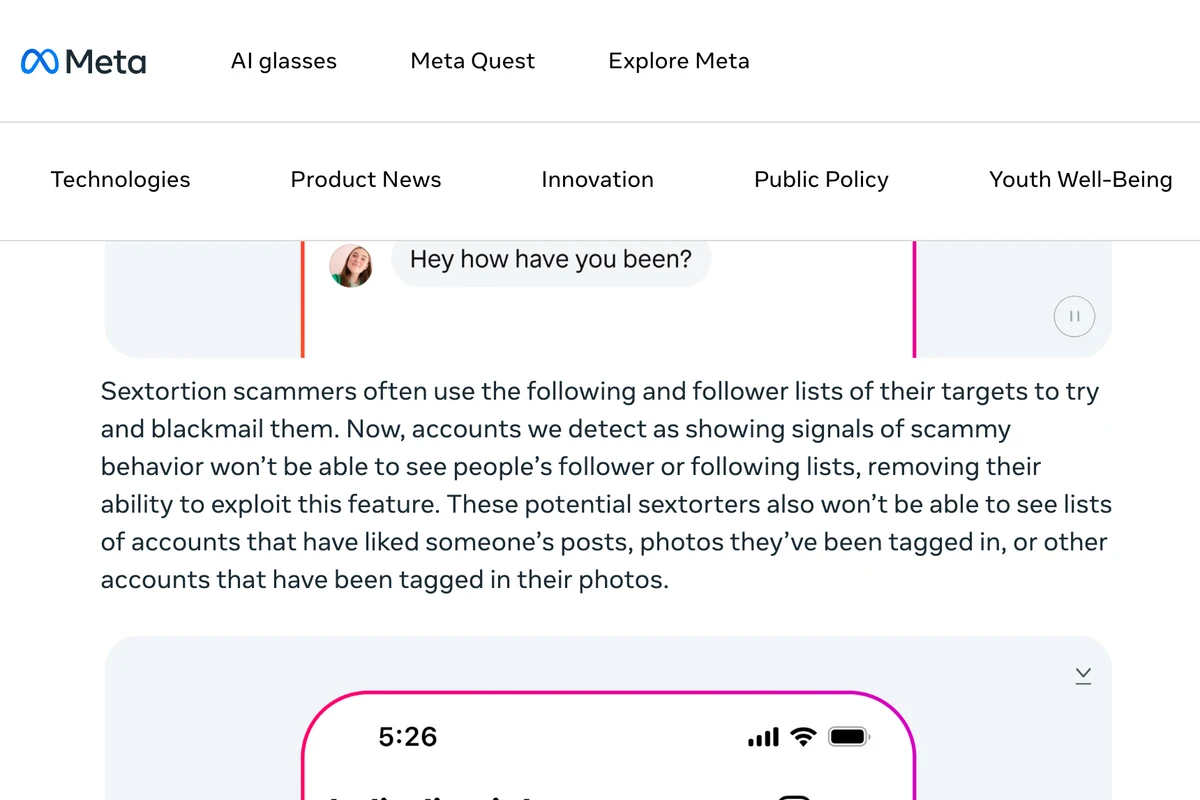
Meta does not publish the signals. In a neighbouring measure in the same announcement it names one, how new an account is, which decides whether a follow request to a teen is blocked or sent to spam. It is not the only list rule either, and the others are about the account being viewed. Instagram's page on teen safety says adults it considers suspicious are not able to see teen accounts when scrolling through an account's Followers or Following list. And in January 2026 Newsweek, updating its story with information from Meta, reported that follower and following lists were limited for all accounts identified as based in Iran. People who post the message online often say they see it on one profile and not others. So it can be about you, or about the account you are looking at, and the message does not say which.
If you think it is your account
Test it first: if you see the message on every profile you open, your account is the likely cause; if you see it on one profile only, it is more likely about that account, and there is nothing to fix on your side. If it is yours, Instagram publishes what makes an account look automated on its page about accounts restricted for data scraping. It lists automating access, giving your username and password to a third party app or website, like apps that offer likes or followers on Instagram, and using an app or service to interact with Instagram in unauthorized ways. Our guess is that a follower tracker or growth app a business signed up for years ago is the commonest way a real account meets this.
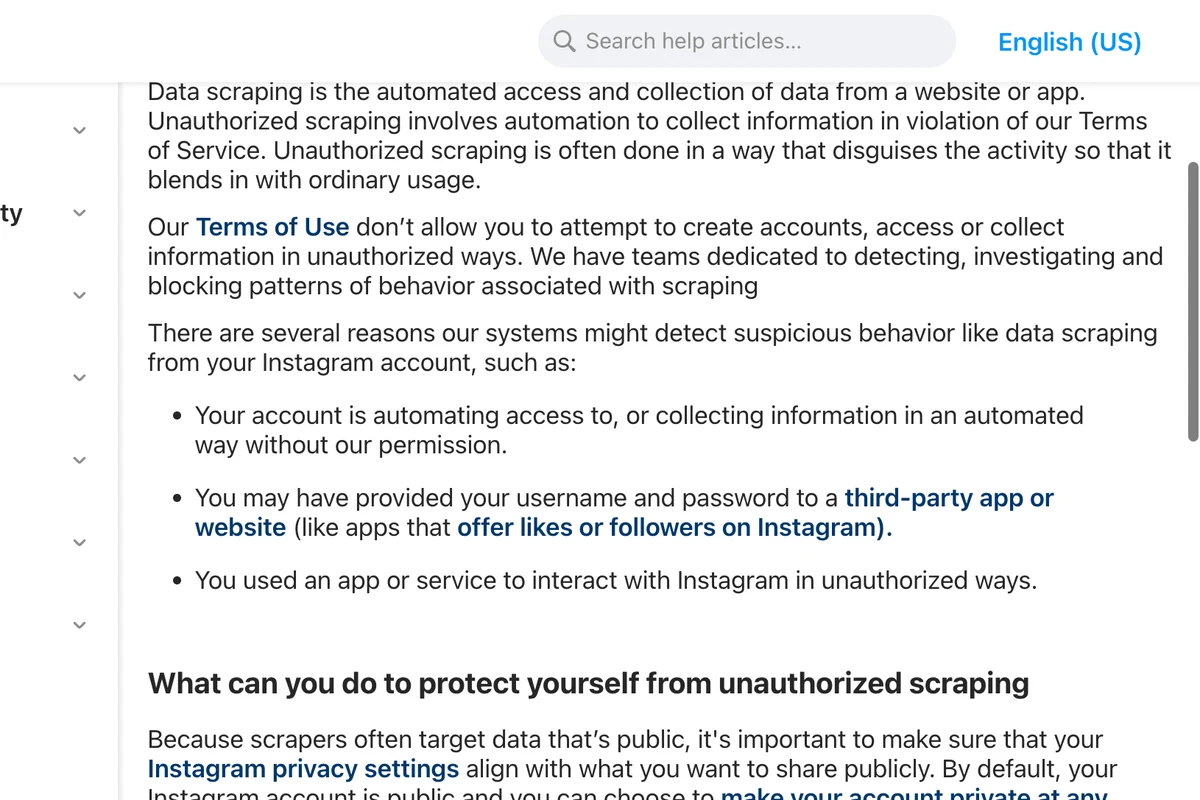
Instagram does not say how to lift the list limit or how long it lasts, and anyone who gives you a number of days is guessing. Its advice to accounts restricted for data scraping is a sensible start, though Instagram does not say it applies here:
- Remove any suspicious third party app's access to your account. We would remove ones you no longer use too.
- Check recent login activity and remove logins you don't recognize.
- Change your password if you see anything suspicious, which logs out every device.
- Turn on two factor authentication.
- Then use the account the way a person does: no mass following, unfollowing or rapid browsing of other people's lists. That point is our advice, not Instagram's.
A related message, we restrict certain activity to protect our community, appears when an action such as following, liking or commenting is blocked rather than a list. Instagram's help pages do not explain that wording either. Guides attribute it to spam-like activity, and Instagram publishes no duration for it.
Can parents see a teen's followers?
Yes, if they supervise the account. Instagram's Family Center page says a parent who supervises a teen's account can see which accounts the teen follows and which follow them, and is notified of new follower or following activity from the past week. Teen accounts are private by default, and teens under 16 need a parent's permission to switch to public.
What other guides get wrong
| What many guides say | What Instagram's pages say |
|---|---|
| Restrict or Close Friends hides your lists | Neither is described as affecting your lists |
| Creator and business accounts can't go private | Instagram's note names business profiles only |
| Going private hides both lists from everyone | Two Instagram pages disagree; the table says public accounts in your lists stay visible |
| Unfollow someone to take them off your followers (SocialBu) | Unfollowing changes who you follow; Remove takes someone off your followers |
| Lists you can't open are private, blocked or still loading | None mention Meta's 2024 rule hiding lists from accounts showing signals of scammy behaviour |
| Clear the cache, turn off your VPN or wait a few days | Instagram publishes no fix or time limit for the list message |
Frequently asked questions
Can you hide your followers on Instagram without going private?
No. Instagram has no setting that hides your followers or following list on a public account. You can remove or block individual people, but the only switch that limits who sees your lists is making the account private.
Who can see my followers list if my account is private?
Your approved followers can see both lists. Instagram's privacy tips say everyone else must send a follow request first, but its comparison table says the public accounts in your lists can still be seen by anyone on Instagram and Threads. To check your own account, open your profile from a second account that does not follow you and tap the counts.
Can a business account on Instagram be private?
No. Instagram says business profiles aren't able to make their accounts private, and that you must first switch back to a personal account. That costs you insights and the other professional tools.
What does we limit certain things you can see mean on Instagram?
Meta has not explained the message. The closest published rule is from October 2024: accounts showing signals of scammy behaviour can't see follower and following lists. Other limits apply to the account being viewed, such as accounts in Iran in 2026. If you see it on every profile, look at your own account first; if on one profile, it is likely about that account.
Can I hide my following list but not my followers on Instagram?
No. Instagram treats the two lists the same way: on a public account both are visible, and going private applies to both. The only way to shorten your following list is to unfollow accounts. We know of no setting that hides the follower and following counts on your profile either.
Does someone know if I remove them as a follower on Instagram?
No. Instagram says people aren't notified when you remove them as a follower, and aren't notified when you block them either.
Does Restrict hide my followers list on Instagram?
Not according to any Instagram page we read. Restrict limits someone's interactions with you, and none of the Instagram pages we read describes Restrict, Mute or Close Friends as affecting your followers or following lists.
How we researched this
- Every rule on this page comes from Instagram's Help Center and Meta's newsroom, read on 19 October 2026. Instagram's Help Center serves a different article body per device, so we read the iPhone version of each page in US English and checked the Android version where it existed. Four of our screenshots were taken by a script that Instagram served in UK English; the wording differs only in spelling and small phrasing, and each caption says which edition it shows.
- Two of Instagram's own pages disagree about what a private account hides, and we could not settle it from a desk. We say so where it matters and tell you how to check your own account. We did not see the we limit certain things message on our own account, so its wording is as people report it; Meta's explanation of why lists are hidden from some accounts is quoted and photographed.
Sources
- 1Manage privacy on Instagram
- 2Differences between public and private accounts on Instagram
- 3Make your Instagram account private
- 4Remove a follower on Instagram
- 5Manage unwanted followers on Instagram
- 6Manage who can see your likes on content on Instagram
- 7See a teen's followers and who they're following on Instagram
- 8Why your account has been restricted for data scraping and what can you do
- 9About Instagram teen privacy and safety settings
- 10The surprising way Meta supports Iran protests (26 January 2026, updated with information from Meta)
- 11Our New Education Campaign to Help Protect Teens From Sextortion Scams (17 October 2024)