How to connect Claude to Instagram: the three MCP routes that actually post, checked against Meta's own rules
Meta has no Instagram MCP server, but Claude can still publish to Instagram three ways: a connector from Claude's directory, a custom MCP connector such as Composio or Zapier, or your own Meta app and an open source server. We read Meta's and Anthropic's pages, searched the directory, ran the Claude Code commands, vetted the tutorials by transcript, and list what every other guide gets wrong.

Claude cannot post to Instagram on its own, and Meta does not publish an Instagram MCP server. What exists instead is a layer of servers, hosted by other companies or run by you, that take a request from Claude and pass it to Meta's Instagram publishing API. That API is the same one every scheduling tool uses, and it has firm rules: a professional account, a JPEG at a public web address, and at most 100 posts a day. Whichever route you pick, those rules are what you are connecting to.
Our articles are still written by humans!
Get human written articles in your Google feed.
This guide gives the three routes in order of effort, with the exact clicks, the plan each needs, what each can publish, and the limits Meta and Anthropic write down. We searched Claude's own connector directory, ran the Claude Code commands, read the transcripts of the tutorials before embedding them, and read the fifteen vendor pages that rank for this search so you do not have to. Several of those pages say you need Meta app review, business verification or a Facebook Page before Claude can post to your own account. Meta's pages say otherwise, and the sentences are photographed below.
| Your question | Short answer | Where it is written |
|---|---|---|
| Is there an official Instagram MCP from Meta? | No. Meta's ads server only | Meta Business Help Centre, ads MCP page |
| Can Claude post to Instagram at all? | Yes, through a connector that wraps Meta's API | Meta Content Publishing guide |
| Which Claude plan do I need? | Any. Free gets one custom connector | Claude Support, custom connectors article |
| Do I need a Facebook Page? | Not with Instagram Login. Yes with Facebook Login, Zapier, and most schedulers | Meta Platform Overview |
| Do I need Meta app review? | Not for your own account. Standard Access is enough | Meta Business Login for Instagram |
| How many posts a day? | 100 API-published posts per 24 hours, carousels count once | Meta Content Publishing guide |
| How long does the token last? | 60 days, refreshable once it is 24 hours old | Meta Business Login for Instagram |
| Can it post PNG files? | No. JPEG is the only image format supported | Meta Content Publishing guide |
Is there an official Instagram MCP server from Meta?
No. Meta announced its first MCP server on 29 April 2026, and it is for advertising. The Meta for Business announcement describes it as a way to create, manage and analyse campaigns from the AI tools you already use, and the Business Help Centre names the four agents it supports and the one address they all use:
The remote MCP server URL for our ads MCP server across all currently supported AI agents is https://mcp.facebook.com/ads
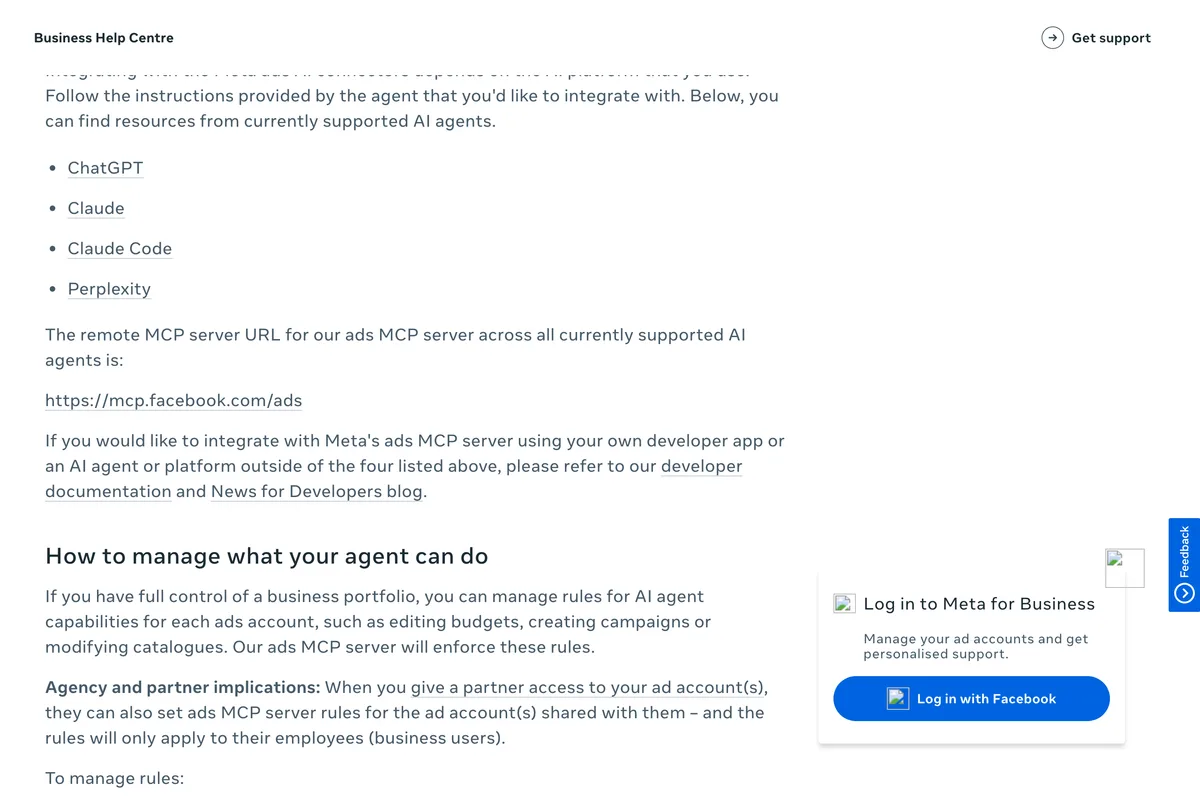
We added it to Claude Code to see what a Meta made server looks like from the inside. The command is one line, and the status it reports before you sign in is the same one every remote server reports:
- claude mcp add --transport http meta-ads https://mcp.facebook.com/ads, which answered: Added HTTP MCP server meta-ads with URL: https://mcp.facebook.com/ads to local config.
- claude mcp list, which answered: meta-ads: https://mcp.facebook.com/ads (HTTP) - ! Needs authentication.
- /mcp inside Claude Code then opens the Meta login in a browser. We stopped there, because the server has no tools for feed posts, and removed it with claude mcp remove meta-ads.
So the phrase Instagram MCP always means a third party. There is nothing wrong with that, as long as you know what the third party is doing: taking your request from Claude, holding a token for your Instagram account, and calling Meta's Instagram API with it. The next section is about that API, because its rules apply to every route below.
What does an Instagram MCP actually connect to?
Meta's Content Publishing guide is the document every Instagram scheduler, and every Instagram MCP, is built on. Publishing is two calls: one creates a media container from a URL and a caption, the next publishes it. The rules that matter for Claude are these, in Meta's words:
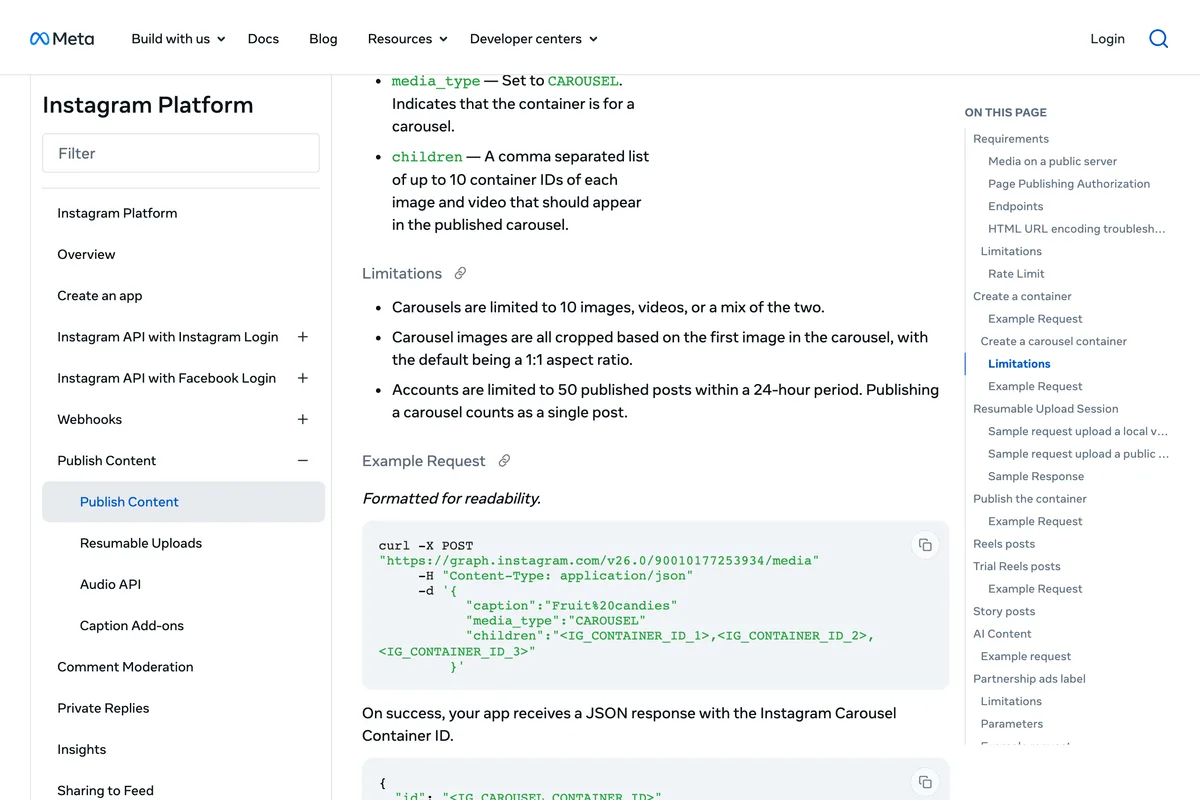
Instagram accounts are limited to 100 API-published posts within a 24-hour moving period. Carousels count as a single post.
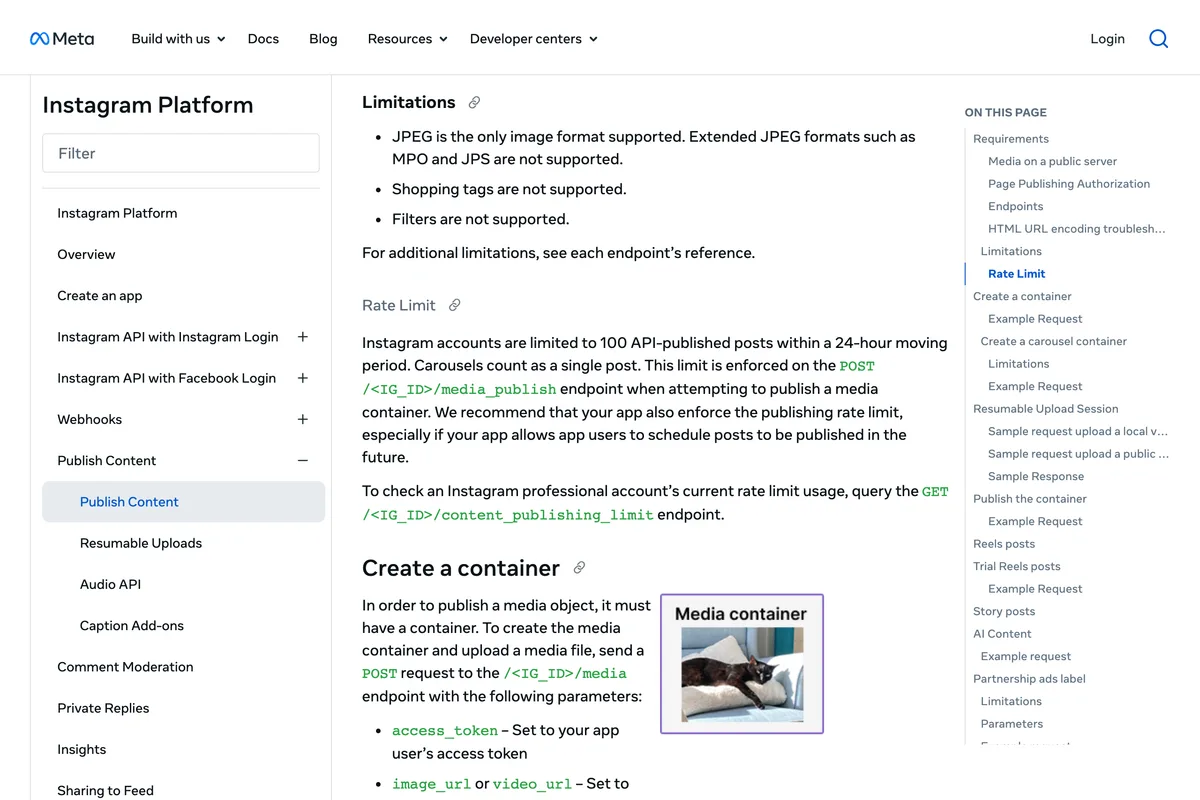
- JPEG only. Meta's page says JPEG is the only image format supported. A PNG that Claude or a design tool hands over has to be converted first, which the better servers do and the worse ones do not.
- A public URL. Meta fetches the file itself: we cURL media used in publishing attempts, so the media must be hosted on a publicly accessible server at the time of the attempt. A file on your laptop, or a private Google Drive link, cannot be posted. The Metricool video below makes the same point in passing.
- A professional account. The Platform Overview says your app users must have an Instagram professional account, business or creator. A personal account has no API at all, so any tool promising to post to one is either switching it or using something other than the API.
- Carousels of up to 10 images, videos or a mix, and a container that is not published within 24 hours expires.
One thing worth knowing if you ever read Meta's page yourself: it contradicts itself. The rate limit section says 100, and the carousel section further down still says 50. We photographed both. The 100 is the current figure, it is the one enforced on the publish endpoint, and the content_publishing_limit endpoint will tell you where you stand on a given day. Several vendor guides quote 50, and two of the most starred open source servers quote 25, which was the limit years ago.

Route 1: Is there an Instagram connector in Claude's directory?
Not one made by Meta, and several guides stop there and tell you the directory has nothing. That was wrong on 10 October 2026. We opened Customize, then Connectors, in our own Claude account and typed Instagram into the search box. It returned 244 entries. Most are analytics tools that read your account, and a handful publish. The ones whose directory description says they post are Metricool (schedule posts, analyze, and manage social media with AI), Windsor.ai for Social Media (analyze and post organic social content across Instagram, Facebook, TikTok, YouTube, LinkedIn, and Google Business Profile), Postiz and Publora.
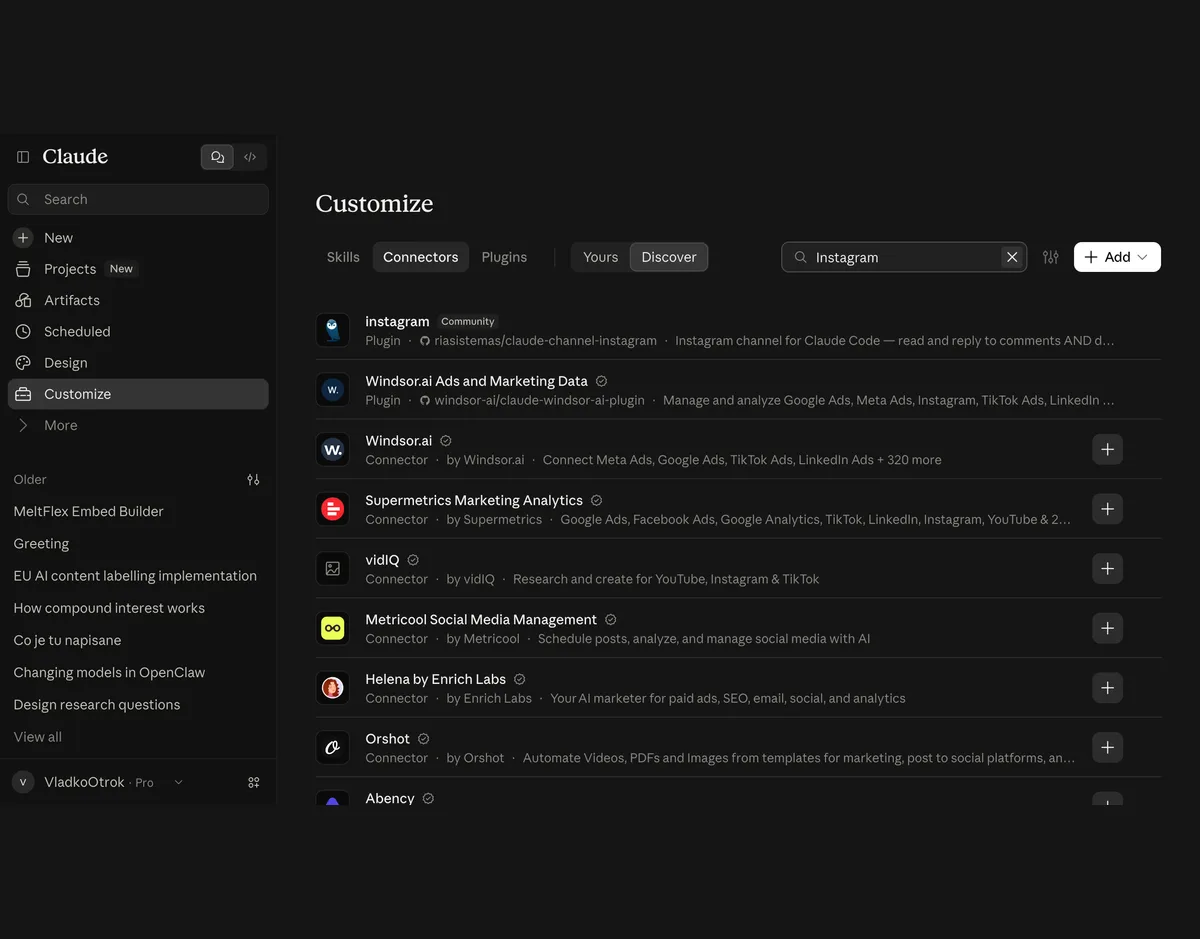
Installing one is a plus button and a sign in. The connector then appears in the attachment menu of every chat, and the first time Claude calls one of its tools you are asked to allow it. Here is the route end to end, from Metricool's own video, which we chose because it shows a real account, a real plan and the scheduler afterwards, and because the posts went into a calendar for review before anything was published:
Two things the transcript says that are worth repeating. The design files handed to Claude came from Google Drive and the final link you share from Drive has to be public, which is Meta's public URL rule showing up in practice. And the posts were reviewed in the planner before going out, which is how any of this should be run. The video does not show a post publishing immediately, because that is not what the connector is for.
The catch with every directory connector is that the connector's own limits sit on top of Meta's. Windsor.ai's connector, by its own launch post, publishes a single image feed post and not yet carousels, reels or stories. Each tool also needs its own account and, for publishing, usually its own paid plan. Read the connector's page before you count on carousels.
Route 2: How do I add Composio, Zapier or a scheduler as a custom connector?
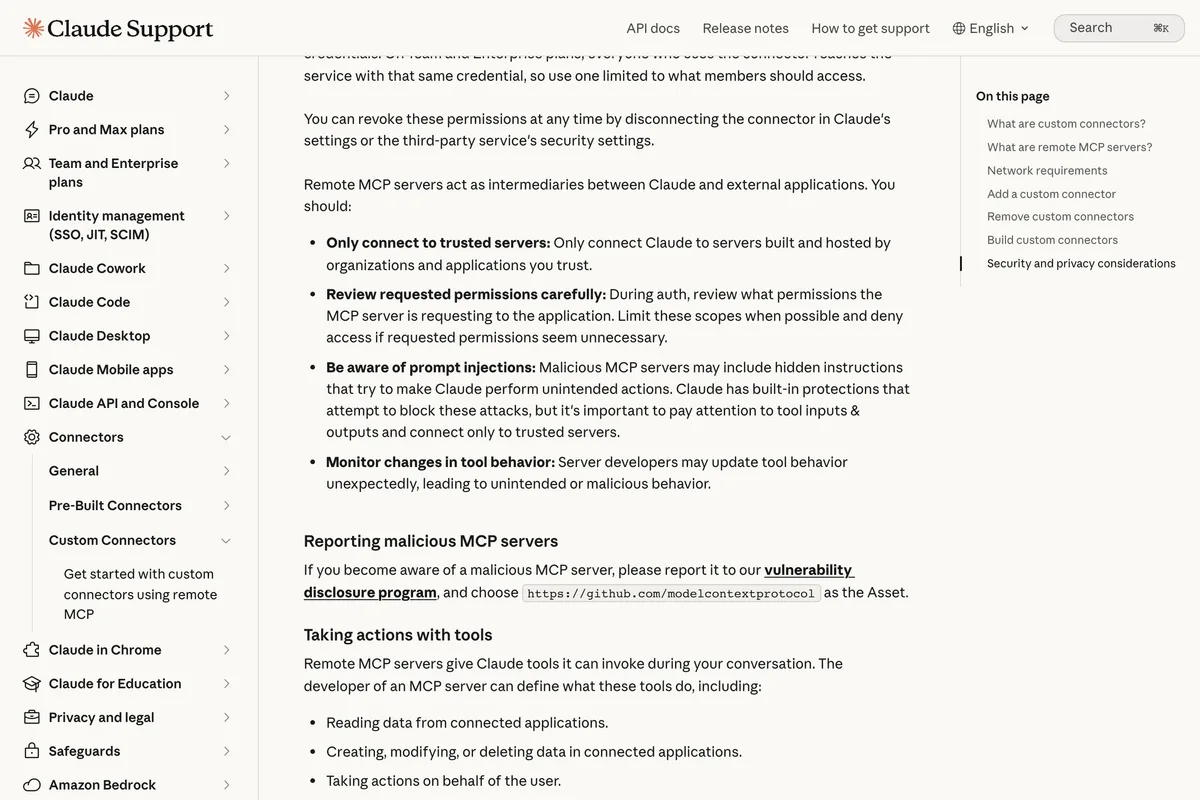
A custom connector is any remote MCP server you point Claude at by URL. Anthropic's support article sets the plan rule in one sentence, and it is more generous than most vendor pages claim:
Custom connectors using remote MCP are available on Claude, Cowork, and Claude Desktop for users on Free, Pro, Max, Team, and Enterprise plans. Free users are limited to one custom connector.
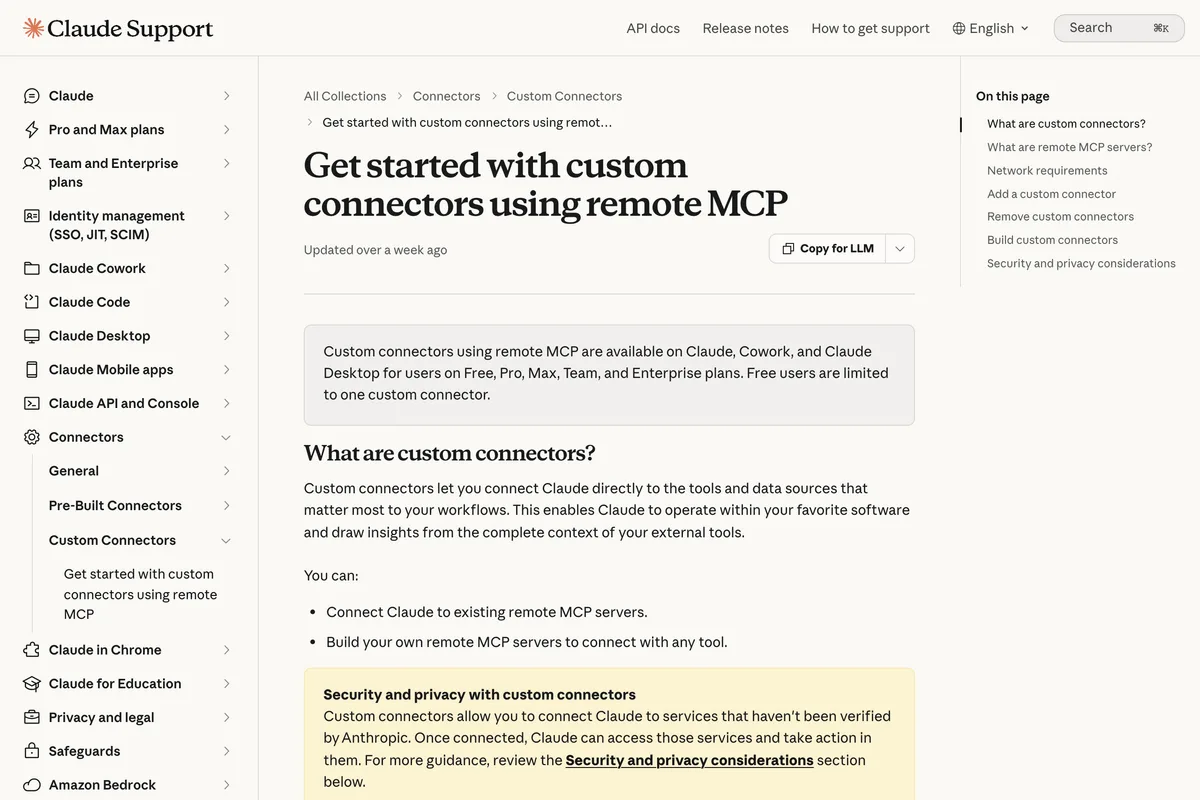
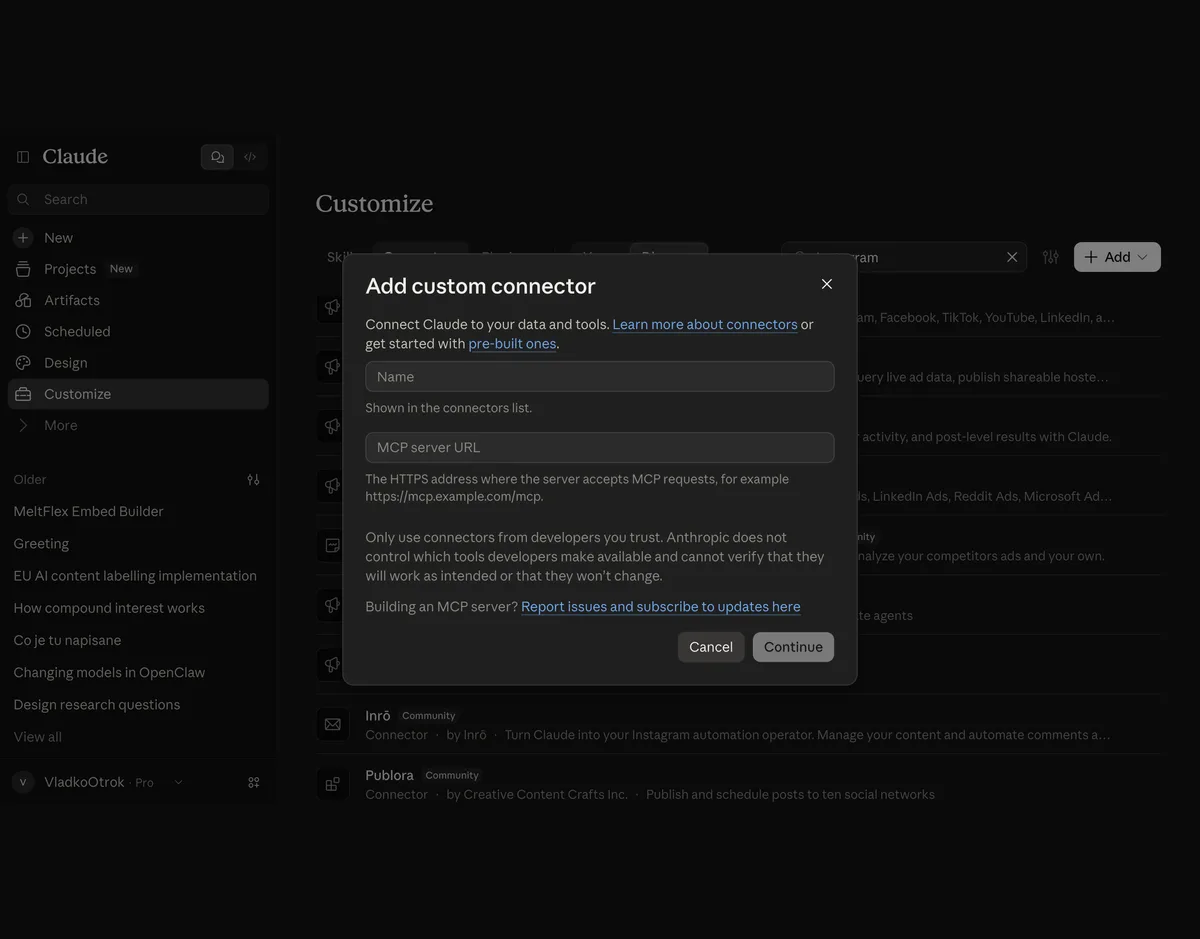
The steps, as Anthropic gives them for Pro and Max, are: open Customize, then Connectors, click Add, then Add custom connector, enter a name, paste the server's remote MCP server URL, review the detected authentication settings, choose when to sign in, and click Add. The server must be reachable over the public internet, so a server on your own laptop does not qualify here. That is what Claude Code and Claude Desktop are for, in route 3.
Composio is the hosted server most of the YouTube tutorials use. You connect Instagram inside Composio with Meta's login, then add Composio's URL to Claude. Its own two and a half minute video shows every click, including the moment Claude asks permission before the first tool call, and ends with follower and post counts pulled from a real account:
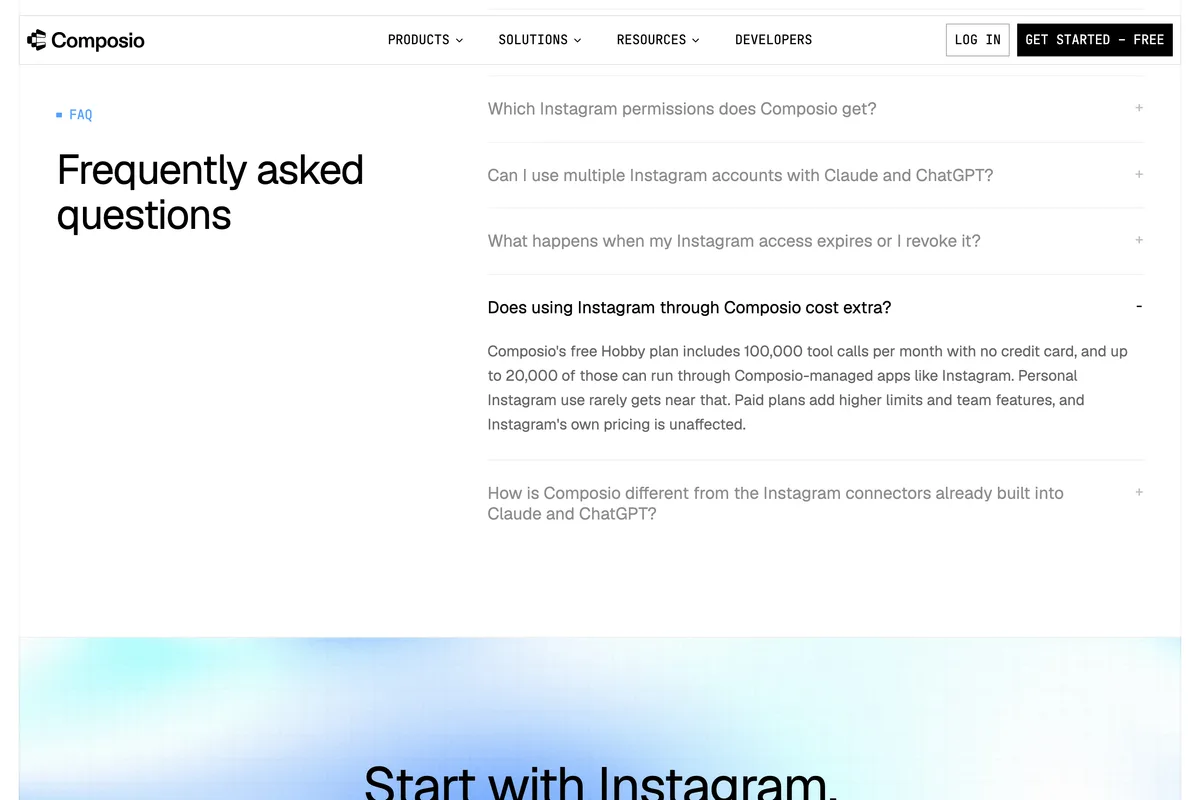
Composio's Instagram toolkit page lists the tools, and they map one to one onto Meta's API: Create Carousel Container, Publish IG User Media, Get IG User Content Publishing Limit, and so on. The pricing line on the same page is the one to know, because it is the reason this route is free for a small account:
Composio's free Hobby plan includes 100,000 tool calls per month with no credit card, and up to 20,000 of those can run through Composio-managed apps like Instagram.
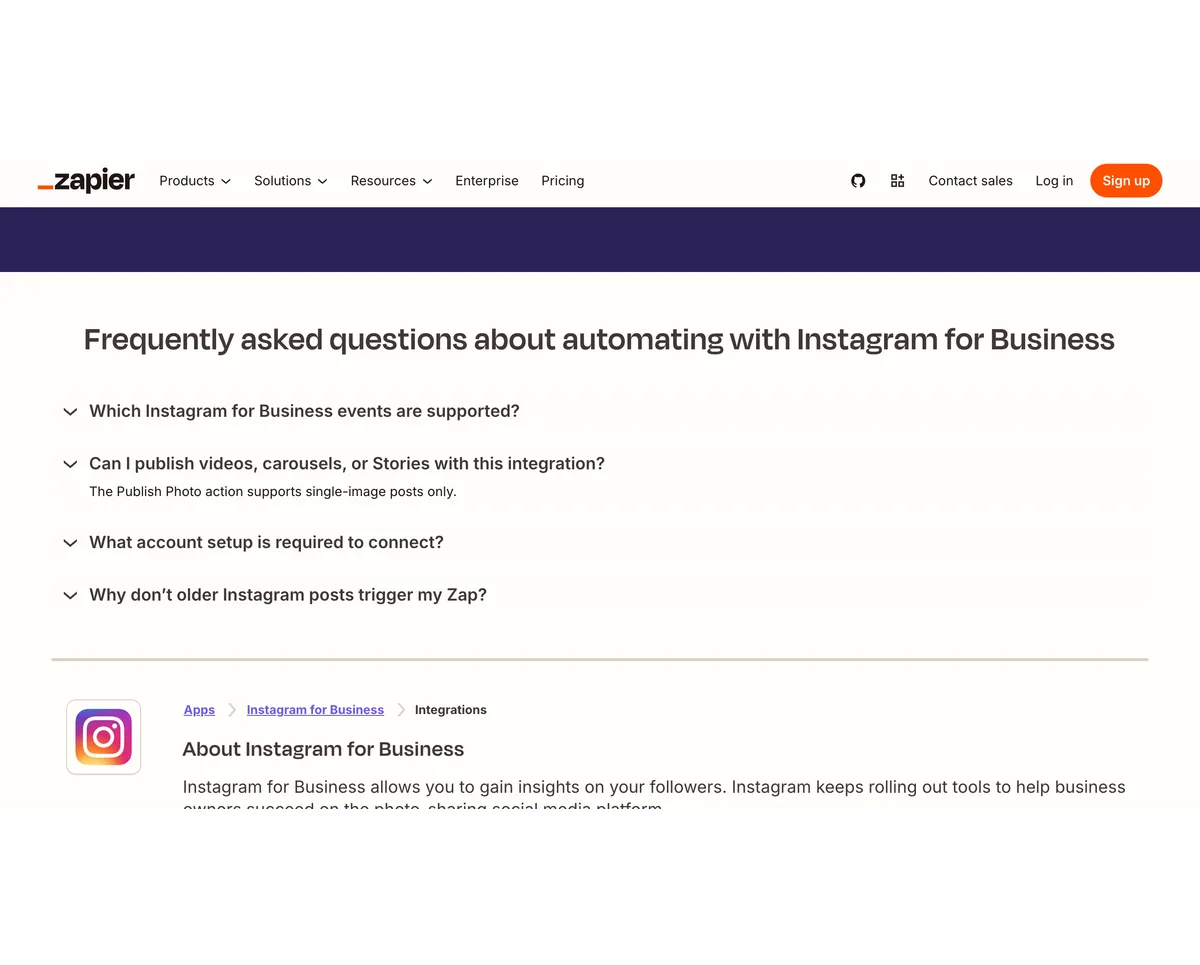
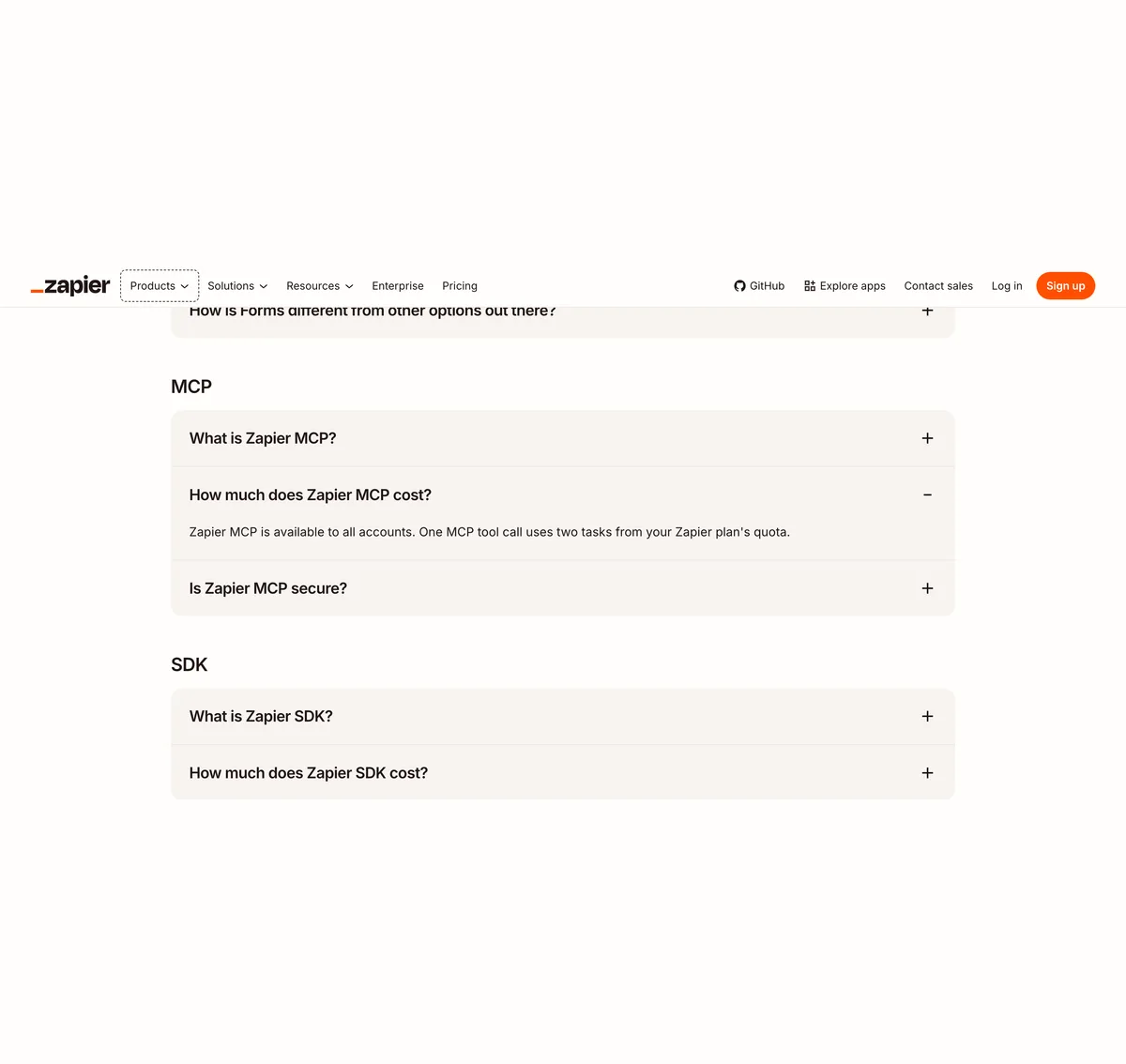
Zapier works the same way, with two numbers that change the arithmetic. Zapier's pricing page says Zapier MCP is available to all accounts and that one MCP tool call uses two tasks from your plan's quota. The free plan has 100 tasks a month, so that is 50 Claude actions. And the Instagram for Business app, by Zapier's own FAQ, publishes single images only:
The Publish Photo action supports single-image posts only.
Schedulers with their own MCP servers, such as PostFast, Postiz, Blotato and Markifact, are added the same way with their own URL, and their pages are the ones that rank for this search. They are fine tools. Just read their numbers as their numbers: a cap of 50 posts a day, or 250 MB per video, is the vendor's own ceiling below Meta's, not an Instagram rule.
Route 3: How do I connect Claude Code to my own Meta app?
This is the route the vendor guides describe as days to weeks, gated by app review, with business verification. For your own account, it is not. Meta's Business Login for Instagram page sets out the two access levels, and the second one is the one a business connecting its own account needs:
Standard Access if your app serves Instagram professional accounts you own or manage and have added to your app in the App Dashboard
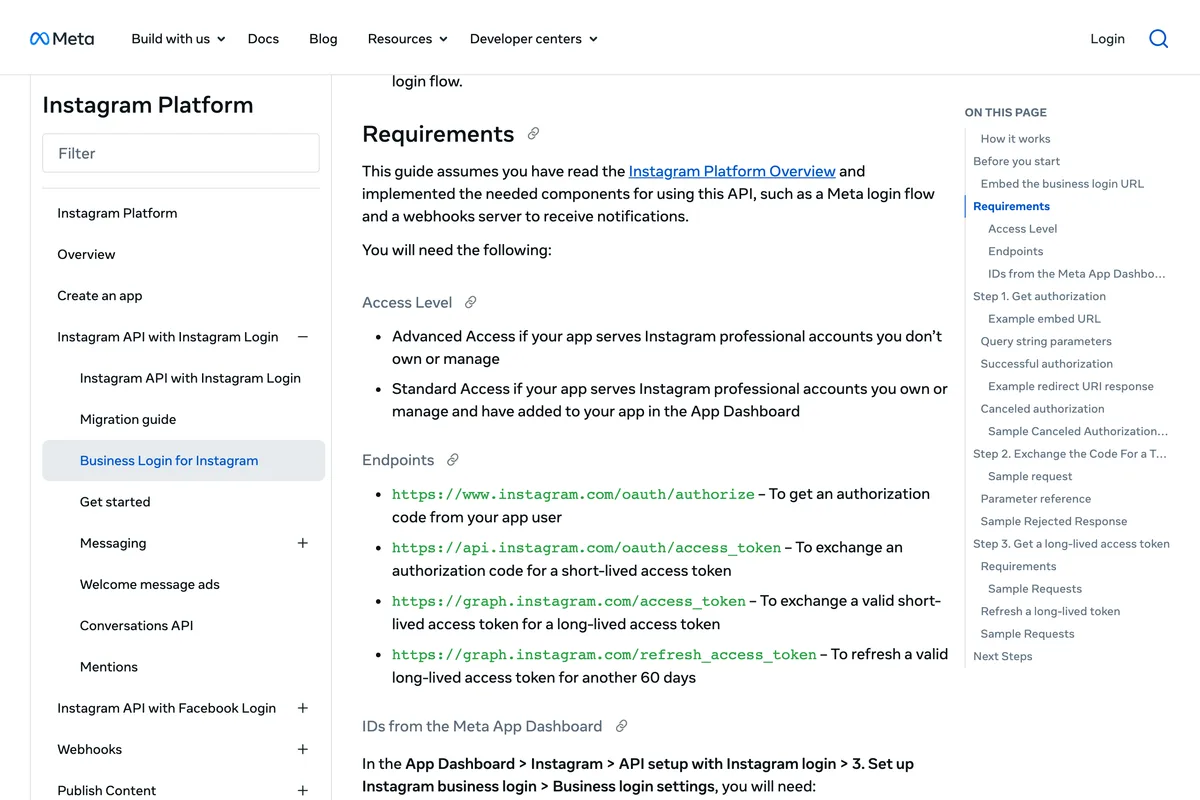
The Platform Overview says the same thing from the other side: Advanced Access is the level required if your app serves Instagram professional accounts that you don't own or manage, and your app must complete Meta App Review to be granted it. If the only account is yours, you never meet that sentence.
There are two ways to build the app, and they differ in one thing that matters. Instagram API with Instagram Login, in Meta's words, serves Instagram professional accounts with a presence on Instagram only, and the overview's comparison table marks a Facebook Page as not required for it. Instagram API with Facebook Login requires a Page, and gives you hashtag search, product tagging and messaging through Messenger in return. Most tutorials, including the one below, use the Facebook Login path, which is why they tell you to connect a Page. You can skip that with Instagram Login.
For a single account there is no login flow to build at all. Meta's Get started page gives four steps for getting a token straight out of the App Dashboard:
- In your app dashboard, click Instagram > API setup with Instagram business login in the left side menu.
- Click Generate token next to the Instagram account you want to access.
- Log into Instagram.
- Copy the access token.
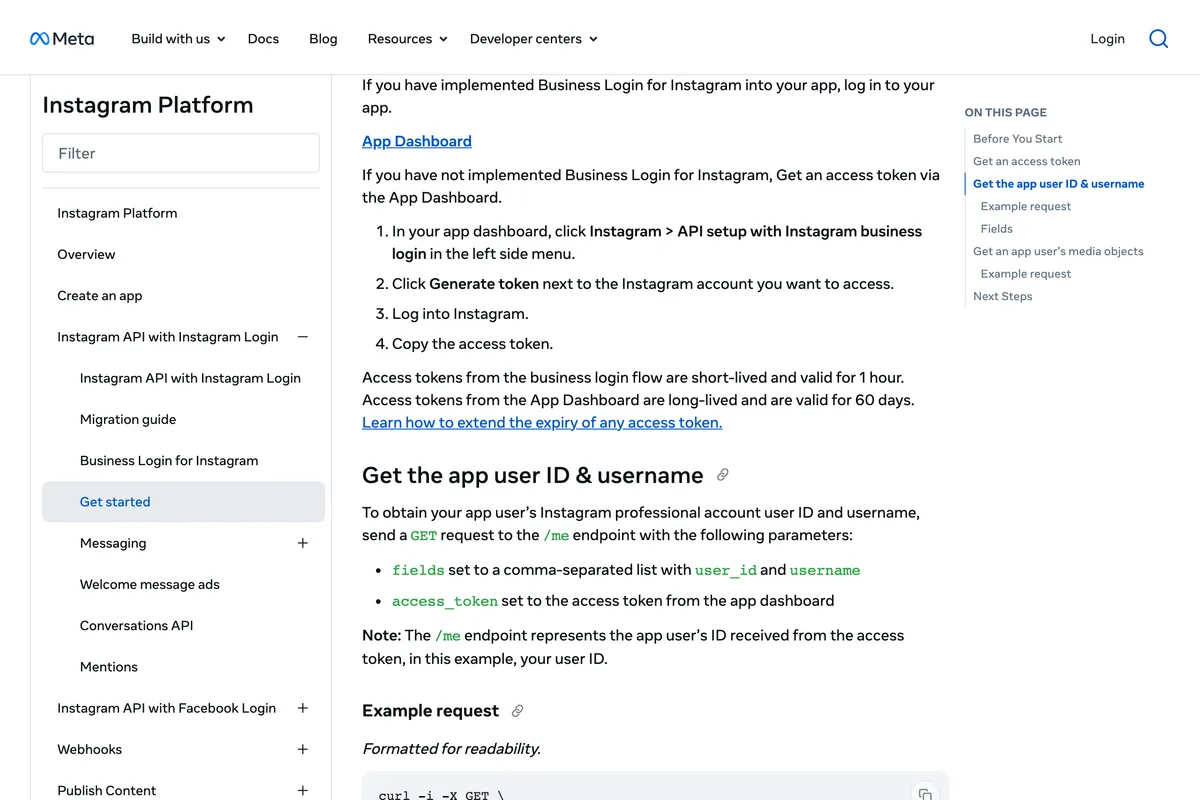
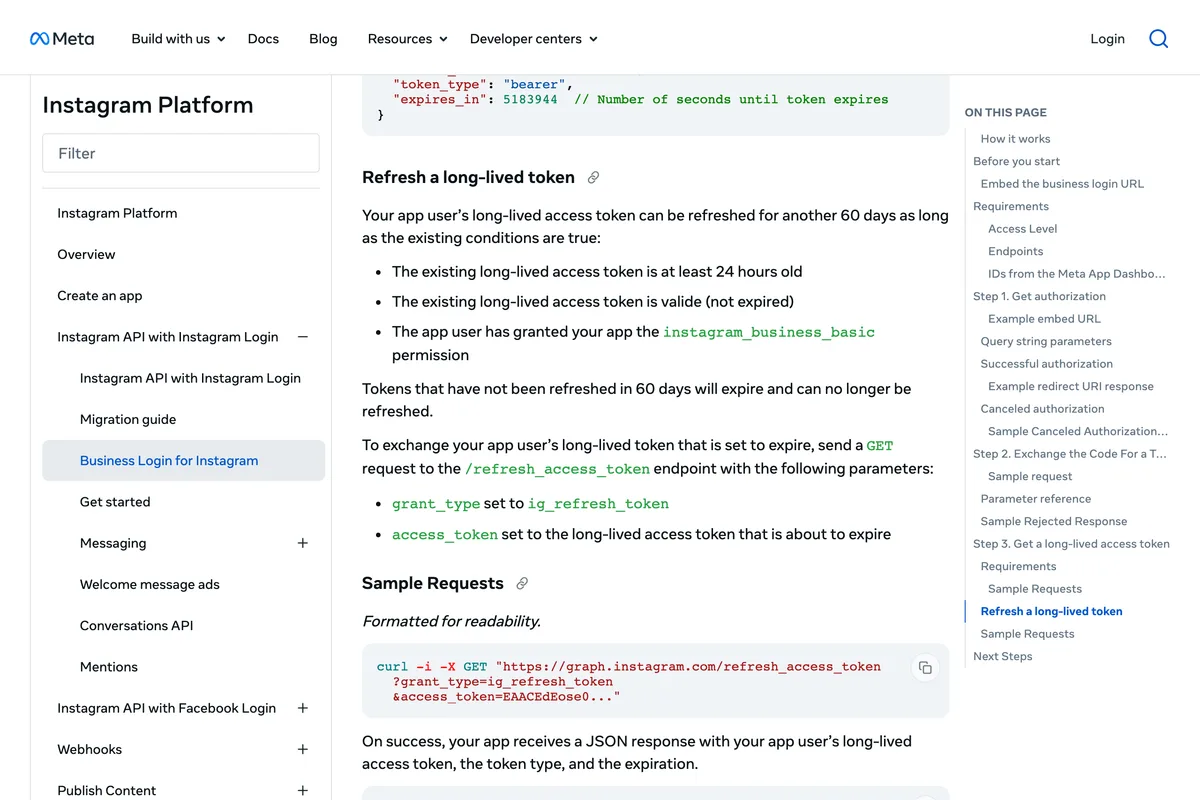
The token from that button is valid for 60 days. It can be refreshed for another 60, as long as the existing long-lived access token is at least 24 hours old and has not expired. Meta's page then adds the sentence that explains most broken automations: tokens that have not been refreshed in 60 days will expire and can no longer be refreshed. A server you run yourself has to do that refresh, or you do it by hand, or the posting stops in two months.
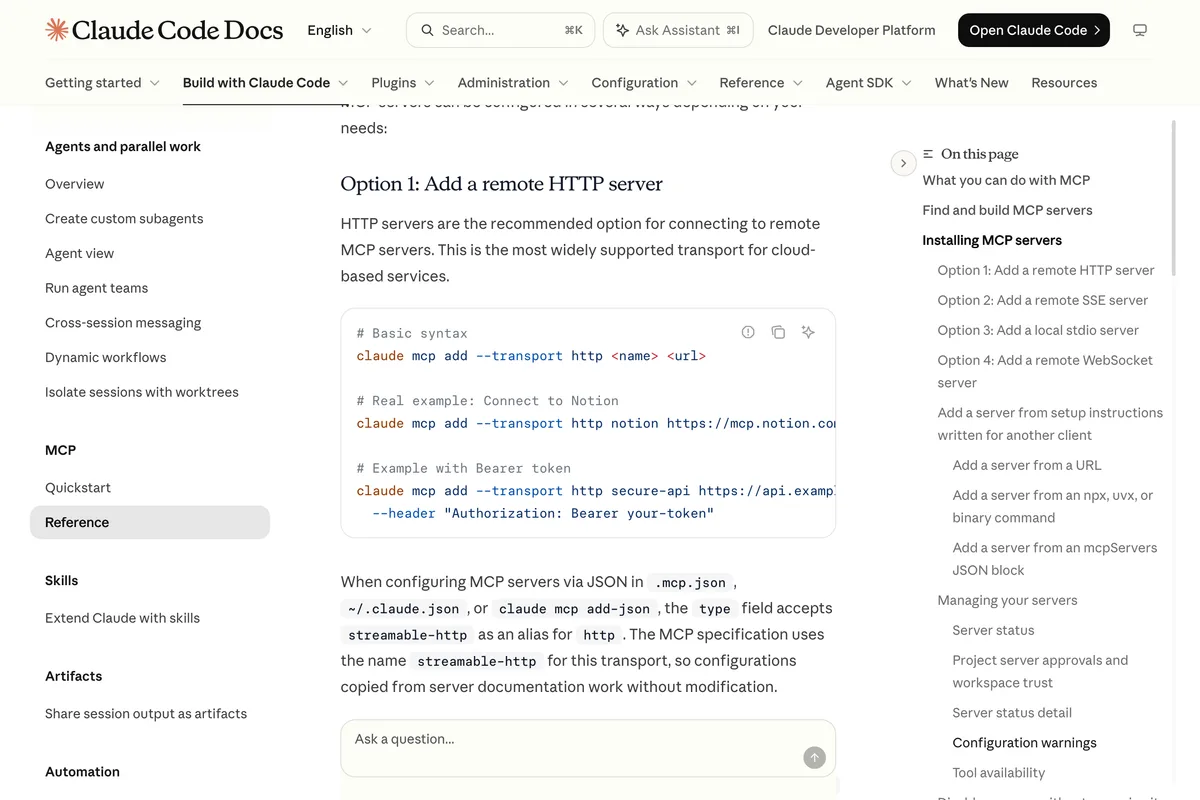
With a token and your account's numeric ID, an open source server is one command in Claude Code. The MCP documentation gives the syntax for both kinds of server:
- A remote server: claude mcp add --transport http <name> <url>, then /mcp inside Claude Code to sign in if it uses OAuth.
- A local server, which is what the open source Instagram servers are: claude mcp add --env INSTAGRAM_ACCESS_TOKEN=... --transport stdio instagram -- npx -y <package>. The two dashes separate Claude's options from the server's command, and the docs warn that the server name must not follow --env directly or it is read as another variable.
- Add --scope user to have it in every project, or leave the default, which is private to the folder you ran it in.
- Claude Desktop reads the same servers from a file instead: claude_desktop_config.json under Application Support on macOS, edited through Settings, Developer, Edit Config.
Which server? We read the READMEs of seventeen and ranked them by what they use, not by stars, because the stars point the wrong way. The two most starred are the ones to avoid.
| Server | What it uses | Stars, last push | Publishes? | Note |
|---|---|---|---|---|
| jlbadano/ig-mcp | Meta API, Facebook Login | 197, 9 Feb 2026 | Yes | README still says 25 posts a day and lists the Basic Display product Meta retired in December 2024 |
| trypeggy/instagram_dm_mcp | Your username and password | 183, Aug 2025 | DMs only | Not the API. The route Reddit ban reports come from |
| mcpware/instagram-mcp | Meta API, Facebook Login | 52, 13 Sep 2026 | Yes | A copy of ig-mcp's README, same 25 a day and Basic Display errors |
| mikusnuz/meta-mcp | Meta API, 57 tools | 29, 8 Oct 2026 | Yes, incl. reels, stories, carousels | Actively maintained, includes a token refresh tool |
| AleemHaider/instagram-mcp | Meta API v21.0 | 6, 29 May 2026 | Yes | Quotes the 100 a day limit correctly and explains development mode roles |
| William-Gao/instagram-mcp | Meta API, Instagram Login | 2, 22 Jun 2026 | Yes, full container fields | The one README that uses the no Facebook Page path. Fewest stars, most accurate |
If you want to see the whole developer route on screen, from creating the Meta app to a post appearing on Instagram, this is the clearest walkthrough we found. It uses the Facebook Login path with a Business portfolio and a Page, builds the posts as HTML rendered carousels, holds them in Notion for approval, and publishes on a schedule with a Claude routine:
Two notes from the transcript. The presenter needed the pages_read_engagement permission before the connected Instagram account would show, which is the Facebook Login path demanding its Page. And his first token expired in 57 minutes until he extended it in Meta's token debugger to two months, which is exactly the one hour and 60 days in Meta's documentation above. He also says getting the token took him longer than the rest of the build put together, which matches our experience.
What can Claude post once it is connected?
Whatever the connector, the ceiling is Meta's IG User Media reference, read on 10 October 2026. These are the figures to give Claude in the prompt, so it does not send a file Meta will refuse:
| Post type | Meta's rule | Where it bites |
|---|---|---|
| Feed image | JPEG, 8 MB maximum, aspect ratio within 4:5 to 1.91:1 | A 9:16 image is refused; a PNG is refused |
| Carousel | Up to 10 items, images or video, all cropped to the first item's ratio | Caption goes on the carousel, not on the children |
| Reel | MP4 or MOV, 3 seconds to 15 minutes, 300 MB maximum, 9:16 recommended | A published reel reports media_type VIDEO when read back |
| Story | Image JPEG 8 MB; video 3 to 60 seconds, 100 MB maximum | No collaborators; user tags added in July 2025 |
| Caption | Maximum 2200 characters, 30 hashtags, and 20 @ tags | Hashtags count toward the 2,200 |
| Extras | alt_text up to 1,000 characters, up to 3 collaborators, location_id, user_tags, is_ai_generated | Not every server exposes these fields |
Two rules that no vendor page we read mentions. First, Meta says an Instagram professional account connected to a Page that requires Page Publishing Authorization cannot be published to until PPA has been completed, which is a Facebook Login path problem that shows up as a mysterious refusal. Second, the call budget: Meta's overview gives it as calls within 24 hours = 4800 times the number of impressions your account had in the last 24 hours, so a brand new account with no views has a small budget for insights calls, and an MCP server that polls container status every few seconds can burn it.
If the image itself is the problem rather than the connection, the sizes are in our Instagram post size guide, and the 4:5 upper bound is why the posts in our gallery are mostly that shape. If you want Claude to write the posts as well as send them, the prompts that work are in 25 Claude prompts for Instagram posts. And if your posts come out of an image model, the is_ai_generated flag in the table is the honest way to tell Instagram, which is covered in the AI info label article.
What do the other guides get wrong?
We read the fifteen pages that rank for connect Claude to Instagram and Instagram MCP, and checked each claim against Meta's and Anthropic's pages. The pattern is the same as in our scheduling article: the numbers are copied from the last guide, and nobody opens the Meta page. Here are the ones that would cost you time or money.
| Claim | Who says it | What the source says |
|---|---|---|
| You need business verification to use the publishing endpoints | Nick Winder's blog | Meta: Standard Access is all your app needs for accounts you own or manage |
| The developer route needs Meta app review, days to weeks | Blotato, RobinReach, Windsor.ai | Meta: App Review is for Advanced Access, which serves accounts you don't own or manage |
| A Facebook Page is required | Carly, Windsor.ai, Blotato, Markifact, RobinReach | Meta: not required with Instagram API with Instagram Login |
| Limit is 25 posts a day | jlbadano and mcpware READMEs, mcpmarket | Meta: 100 API-published posts per 24 hours |
| Limit is 50 posts a day | Markifact | Meta's rate limit section says 100; the 50 is a stale line in the carousel section |
| 400 container creations per 24 hours | Truto | Not on any Meta page we could find |
| Reels must be between 4:5 and 1.91:1 | Blotato | Meta: that is the image rule; reels accept 0.01:1 to 10:1, 9:16 recommended |
| Personal accounts have fewer API features | Postiz | Meta: personal accounts have none, a professional account is required |
| A paid Claude plan is required for custom connectors | Carly | Anthropic: Free, Pro, Max, Team and Enterprise, one connector on Free |
| Claude's directory has no Instagram connector | Carly and others | 244 results on 10 October 2026, including Metricool, Windsor.ai and Postiz |
| Instagram allows up to 5 hashtags per post | PostFast | Meta's API: 30 hashtags and 20 @ tags per caption; 5 is a Help Centre suggestion |
What have we learned publishing to Instagram ourselves?
Should a small business connect Claude to Instagram at all?
It depends on what you want Claude to do. For analysis, the directory route is a ten minute install and a genuinely good use: Claude reading your reach, saves and best times out of Metricool or Windsor and drafting next week's plan is the part of the Metricool video that holds up. For publishing, every route still ends with a JPEG at a public URL and a caption, so the work Claude cannot do is making the image. Claude will write you a caption and a plan. It will not design the post.
If the goal is the posts themselves, finished and on brand, the connection is the wrong end to start from. We built AI Social Media Now to make the posts from your website and publish them, through this same API, without a token, a server or a URL to paste. If the goal is a Claude workflow you control, route 2 with a company you trust is the sensible middle, and route 3 is for people who enjoy the Meta developer dashboard, which the video above shows honestly is not many.
Frequently asked questions
Does Meta have an official Instagram MCP server?
No. On 10 October 2026 Meta's only MCP server was the ads server at mcp.facebook.com/ads, in open beta since April 2026, and it manages ad campaigns rather than organic posts. Every Instagram MCP is built by a third party on Meta's Instagram API.
Can I connect Claude to Instagram on the free plan?
Yes. Anthropic's support article says custom connectors are available on Free, Pro, Max, Team and Enterprise plans, with Free users limited to one custom connector. Directory connectors such as Metricool install with a plus button on any plan, though the connector's own service may need a paid account to publish.
Do I need a Facebook Page to connect Claude to Instagram?
Not with Meta's Instagram API with Instagram Login, which Meta's overview marks as not requiring a Page. You do need one on the Facebook Login path, which Zapier and most schedulers use, and for direct messages, hashtag search and product tagging.
Do I need Meta app review to post to my own account?
No. Meta's Business Login for Instagram page says Standard Access applies if your app serves Instagram professional accounts you own or manage and have added to your app in the App Dashboard. App review and business verification are for Advanced Access, which serves accounts you do not manage.
How many posts can Claude publish to Instagram per day?
Meta limits an Instagram account to 100 API-published posts within a 24-hour moving period, with a carousel counting as one. The limit is per account and shared by every tool posting to it. Meta's content_publishing_limit endpoint reports the current count.
Can Claude post to a personal Instagram account?
No. Meta's platform overview says app users must have an Instagram professional account, business or creator. Tools that claim to post to a personal account are using your login rather than Meta's API, which Meta's terms do not allow and which is the route behind most ban reports.
Why did my Claude to Instagram connection stop working after two months?
Meta's long-lived tokens last 60 days and can only be refreshed while still valid. Meta's page says tokens that have not been refreshed in 60 days will expire and can no longer be refreshed. Hosted connectors refresh for you; with your own Meta app you must refresh the token yourself or reconnect.
Can Claude post PNG images or files from my computer?
No. Meta's Content Publishing guide says JPEG is the only image format supported, and that media must be hosted on a publicly accessible server at the time of the attempt. Convert to JPEG and put the file on a public URL, or use a connector that does both for you.
How we researched this
- Every rule about what the API accepts was read on Meta's developer pages on 10 October 2026: the Content Publishing guide, the Instagram Platform overview, the Business Login for Instagram page, the Get started page for Instagram API with Instagram Login, and the IG User Media reference. Every rule about what Claude allows was read on Anthropic's support article on custom connectors and the Claude Code documentation the same day. The sentences we rely on are photographed under the quotations.
- The Claude screenshots are of our own Pro account, taken on 10 October 2026: the connector directory searched for Instagram, and the Add custom connector dialog. The Claude Code output is from running the commands on our own machine the same day, version 2.1.296, against Meta's ads server, which is the only MCP server Meta publishes.
- We could not photograph Meta's App Dashboard for the do it yourself route. Our own developer account was showing an Account confirmation needed screen on 10 October 2026, so the steps in that section are Meta's own numbered steps, quoted, and the screenshots are of the documentation that gives them. The video we embed for that route shows the dashboard on screen.
- The three videos were chosen after reading their transcripts, not their titles. We rejected the most viewed results because they were either sales pitches for one tool or did not show a connection being made. Where a video says something Meta's pages do not, we say so under it.
- The GitHub figures are star counts and last push dates from the GitHub API on 10 October 2026. We read each README but did not run any of these servers on our machine, because running an unknown npm or pip package with a token to your Instagram account is exactly the risk this article warns about.
- We read the fifteen vendor pages that rank for these searches, from Windsor.ai, Blotato, Markifact, Truto, PostFast, Postiz, Composio, Porter Metrics, RobinReach, Shapeless, Gumloop and Carly, plus one personal blog, and list in a table the claims that contradict Meta's or Anthropic's pages. Our own product publishes to Instagram through the same Meta API, and the section on what we learned is first hand, with the limits of that said plainly.
Sources
- 1Instagram Platform: Content Publishing
- 2Instagram Platform: Overview
- 3Business Login for Instagram
- 4Get started with Instagram API with Instagram Login
- 5IG User Media reference
- 6Introducing Meta Ads AI Connectors
- 7Manage ads from an AI agent with Meta ads AI connectors
- 8Get started with custom connectors using remote MCP
- 9Connect Claude Code to tools via MCP
- 10Connect to local MCP servers (Claude Desktop)
- 11Plans and pricing
- 12Instagram for Business integrations
- 13Instagram toolkit
- 14jlbadano/ig-mcp
- 15mikusnuz/meta-mcp
- 16William-Gao/instagram-mcp
- 17AleemHaider/instagram-mcp
- 18trypeggy/instagram_dm_mcp
- 19Connect Claude to Instagram in 2 Clicks
- 20How to Automate Instagram Posts with Claude Code (Step-by-Step)
- 21How to Connect Claude to Instagram and Turn Your Data Into Your Next Posts
- 22Instagram publishing with Claude browser automation
- 23Claude + Instagram: What the Integration Can (and Can't) Do in 2026
- 24Post to Instagram with Claude
- 25Connect Instagram to Claude: Manage Comments and User Interactions
- 26How to post to Instagram with Claude
- 27Connect Claude to Instagram
- 28Instagram for Claude Cowork
- 29Search results for instagram mcp claude, read for the ban reports and the production failure thread