How to connect Claude to TikTok: the official Ads MCP, the three routes that post, and what TikTok's audit really allows
TikTok is the first platform in this series with an official MCP server, and it is listed in Claude's directory. It runs ads. Not one of its roughly 400 tools publishes an organic video, so posting still goes through TikTok's Content Posting API, where every new app starts private, five users a day, and TikTok's own guidelines say a tool for uploading to accounts you manage is not acceptable. We read TikTok's pages, searched the directory, ran the Claude Code commands, vetted the tutorials by transcript, and list what every other guide gets wrong.
TikTok is the first platform in this series that publishes an MCP server of its own, and it is already in Claude's connector directory under the name TikTok for Business. We added it to Claude Code and it connected. It is also the wrong server for most people who type connect Claude to TikTok, because it wraps TikTok's advertising API: the available tools page lists campaigns, ad groups, catalogs, audiences and Business Center billing, and not one tool that publishes an organic video to a profile. Posting still goes through the Content Posting API, which Claude can only reach through a third party server, and where every new app starts with three rules written on TikTok's own pages: posts from an unaudited app are private, at most five users may post through it in a day, and a utility tool to help upload contents to the account(s) you or your team manages is listed as not acceptable.
Our articles are still written by humans!
Get human written articles in your Google feed.
This guide gives the three routes in order of effort, with the exact clicks, the plan each needs, what each can publish, and the limits TikTok and Anthropic write down. We searched Claude's own connector directory, ran the Claude Code commands against TikTok's server, read TikTok's developer pages and MCP documentation, photographed the clauses, vetted the tutorials by their transcripts, and checked the vendor guides that rank for these searches against TikTok's text. The Instagram and LinkedIn versions of this guide follow the same method.
| Your question | Short answer | Where it is written |
|---|---|---|
| Is there an official TikTok MCP server? | Yes, TikTok for Business MCP Server. It runs ads, not organic posts | TikTok API for Business, MCP Server overview |
| Is it in Claude's directory? | Yes, as TikTok for Business, by TikTok, added August 2026 | claude.ai connector directory |
| Can Claude post a video to my TikTok? | Only through a third party server on the Content Posting API | TikTok for Developers, Content Posting API |
| Which Claude plan do I need? | Any. Free gets one custom connector. TikTok's Claude page says Pro or Max | Claude Support; TikTok API for Business, Claude page |
| Do I need TikTok's approval? | Not to post privately. Public posts need an audited app | TikTok for Developers, Direct Post |
| Can I audit an app that only posts to my own accounts? | TikTok lists exactly that use as not acceptable | TikTok for Developers, Content Sharing Guidelines |
| How many calls and posts a day? | 6 requests a minute per token, around 15 posts a day per creator, 5 users a day while unaudited | TikTok for Developers, Direct Post and Content Sharing Guidelines |
| How long does the token last? | 24 hours. The refresh token lasts 365 days | TikTok for Developers, User Access Token Management |
| Can a server use my TikTok login or cookies instead? | It can, and TikTok's Community Guidelines say automation tools can get the account banned | TikTok Community Guidelines, Integrity and Authenticity |
Is there an official TikTok MCP server?
Yes, and it is a genuine one, unlike LinkedIn's Develop with MCP button that points at Microsoft's documentation server. TikTok for Business announced the server at TikTok World in May 2026 and its 30 June 2026 blog post says it is now available as a connector across several AI platforms and registries, including Claude. The documentation lives on TikTok API for Business, and its overview is explicit about what the server is for.
The server is a standardized bridge, built on the Model Context Protocol (MCP), that connects your AI agents directly to the TikTok Ads platform. It packages approximately 400 TikTok API for Business endpoints as structured, discoverable MCP tools
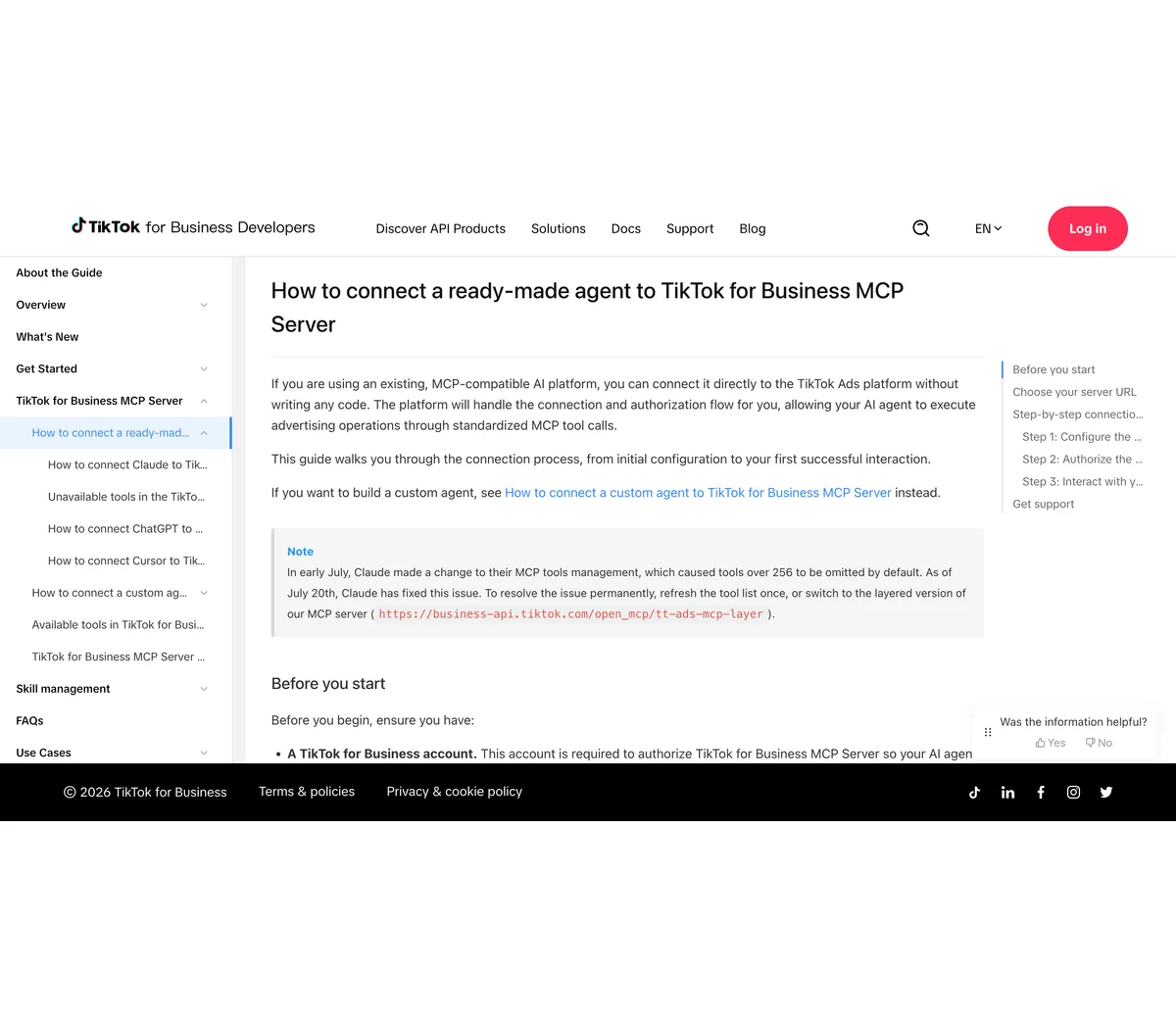
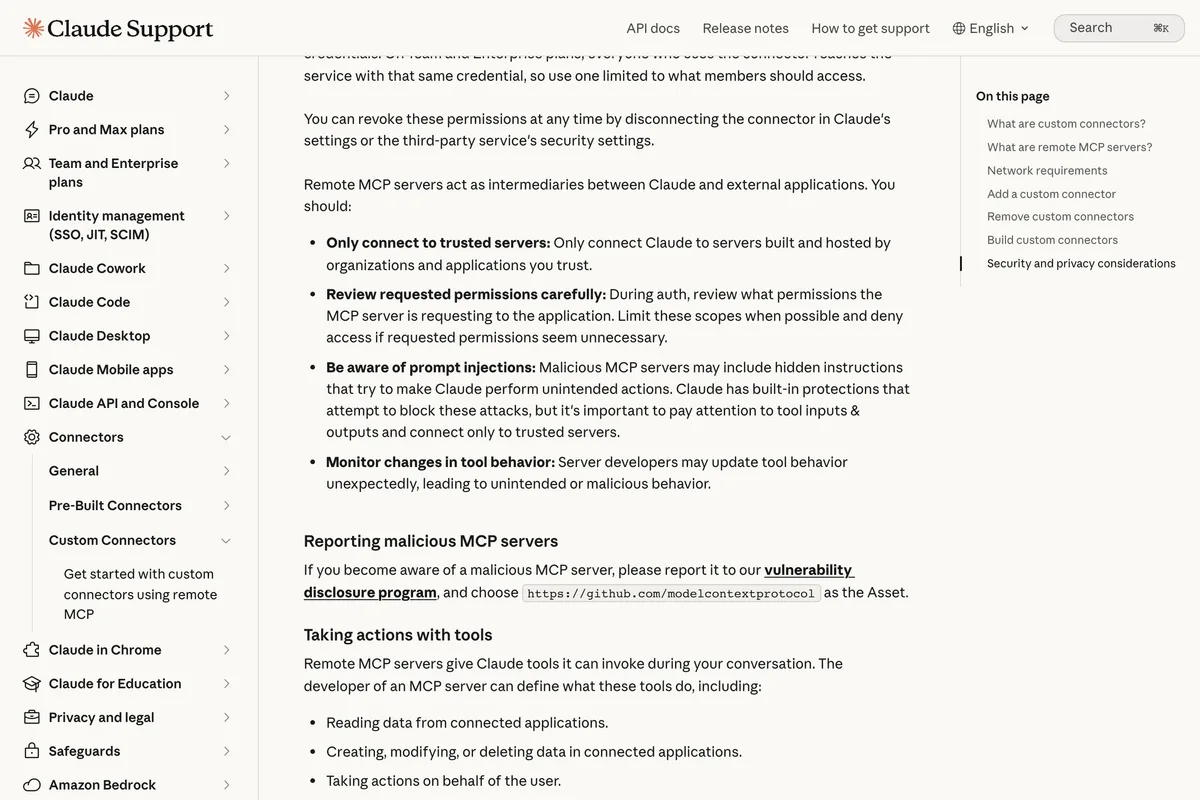
The connection rules are short and we quote them because the vendor pages get them wrong in both directions. The overview's limitations section gives the rate limit and the lifetime of your authorization.
Rate limit: 3 queries per second (QPS) per tool per TikTok for Business user. ... Authorization lifespan: User authorization for the TikTok for Business MCP Server connection remains valid for a 30-day window. After 30 days, you will need to reauthorize the connection using the same TikTok for Business account.
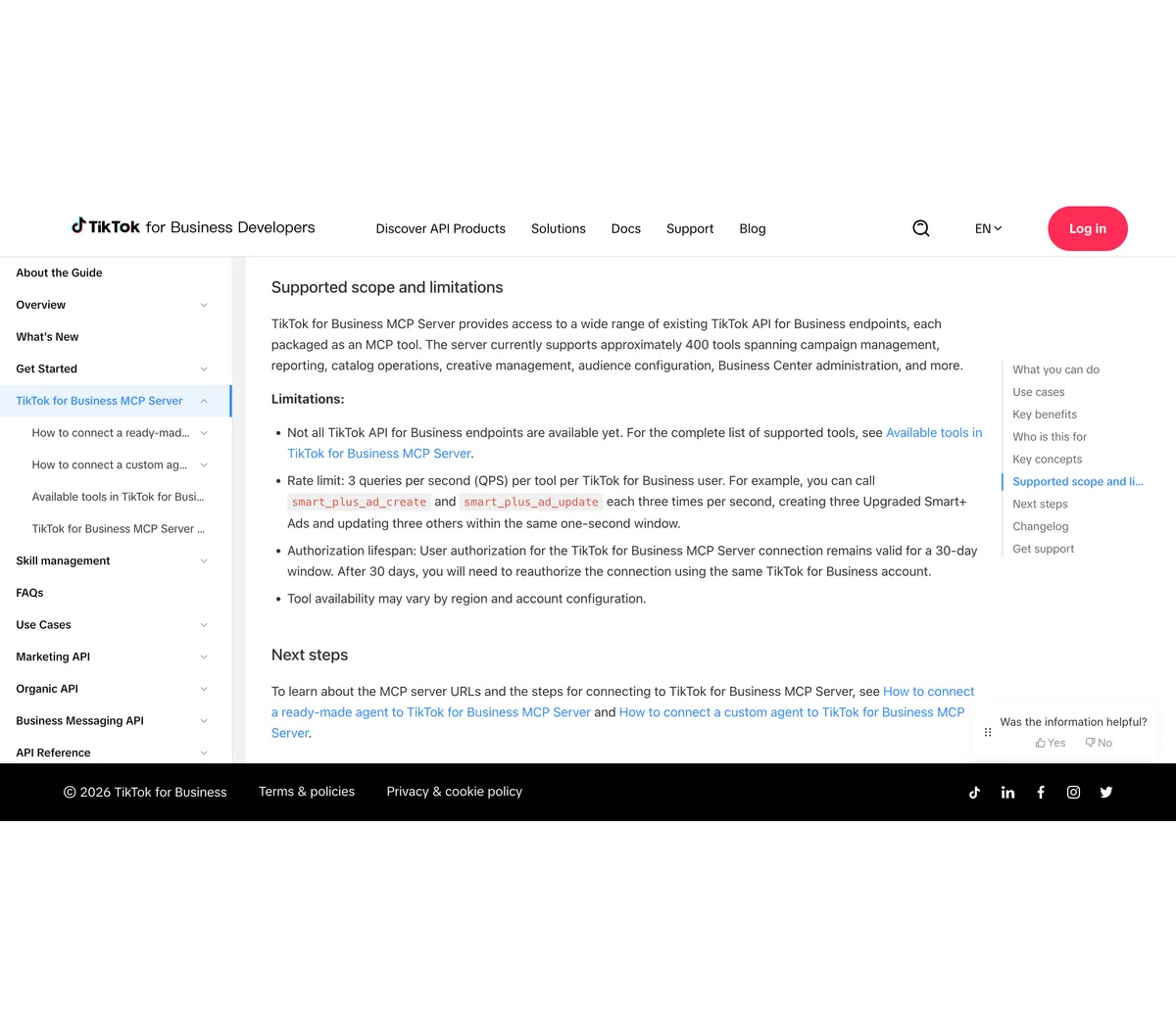
We ran the commands on Claude Code 2.1.296 against the layered URL to see what happens before any sign in, and removed the server afterwards. The answer is the same one Meta's ads server gave in the Instagram guide: it registers, it asks for authentication, and nothing is read until you authorize it with a TikTok for Business account.
- claude mcp add --transport http tiktok-ads https://business-api.tiktok.com/open_mcp/tt-ads-mcp-layer, which answered: Added HTTP MCP server tiktok-ads with URL: https://business-api.tiktok.com/open_mcp/tt-ads-mcp-layer to local config.
- claude mcp list, which answered, among our other servers: tiktok-ads: https://business-api.tiktok.com/open_mcp/tt-ads-mcp-layer (HTTP) - ! Needs authentication.
- claude mcp remove tiktok-ads -s local afterwards, because an ads server is not what someone searching for a way to post from Claude wants.
Then we read the available tools page and counted. It lists 378 tool names on 10 October 2026, grouped under Ad, Ad Group, Advertiser, Audience, Business Center, Campaign, Catalog, Creative, GMV Max, Pixel, Reporting, Split test, TikTok Shop and a few more. The nearest things to organic content are the Spark Ads Using Authorized Posts tools, which turn a post that already exists on a creator's profile into an ad, and the Ad Comments tools, which manage comments on ads. There is no tool that takes a video and publishes it to a profile, and the server's own overview never claims one. So the phrase TikTok MCP has two meanings now, and the official one is the one that does not post.
What does a TikTok MCP that posts actually connect to?
The Content Posting API, which lives on the other TikTok developer site, developers.tiktok.com, and needs a registered app. It has two products: Direct Post, which publishes to the profile under the scope video.publish, and Upload, which sends a video to the user's TikTok inbox as a draft under video.upload, and a photo endpoint that does both for up to 35 images. Three rules apply to every new app, and they are the rules the rest of this guide keeps returning to. The first is on the Direct Post page.
All content posted by unaudited clients will be restricted to private viewing mode. Once you have successfully tested your integration, to lift the restriction on content visibility, your API client must undergo an audit to verify compliance with our Terms of Service.
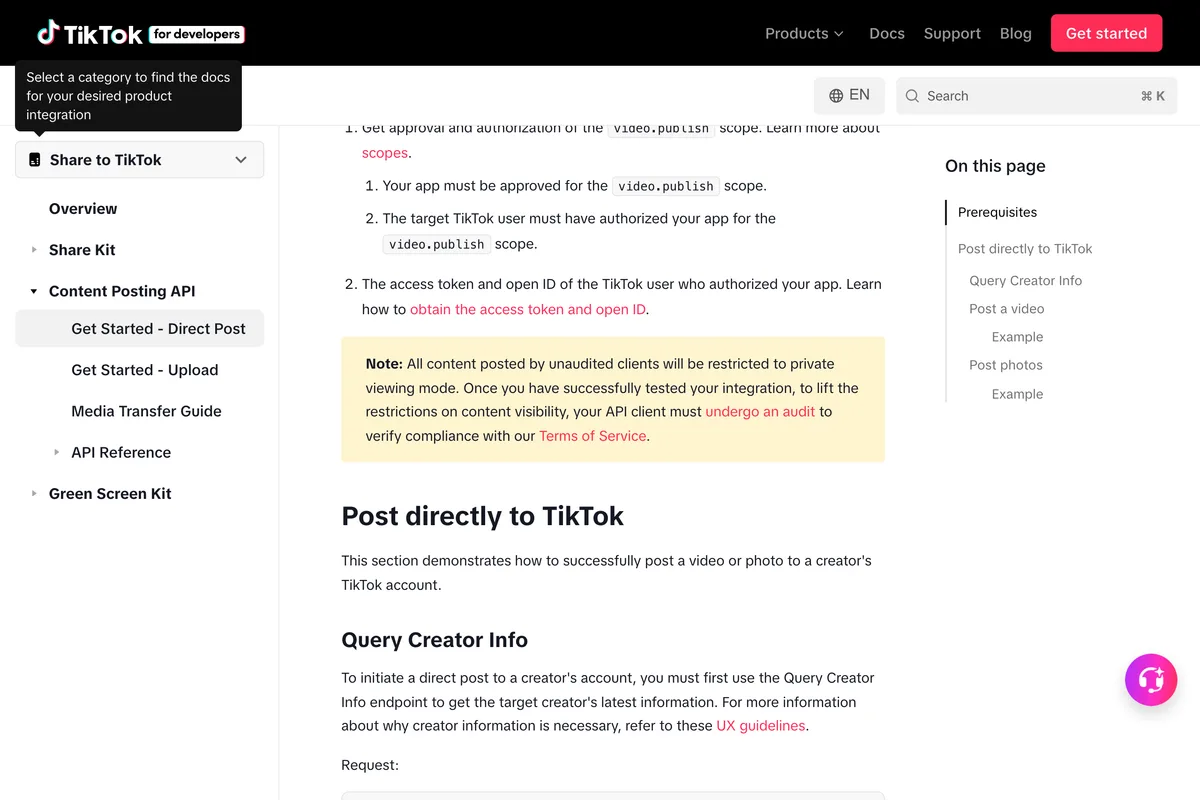
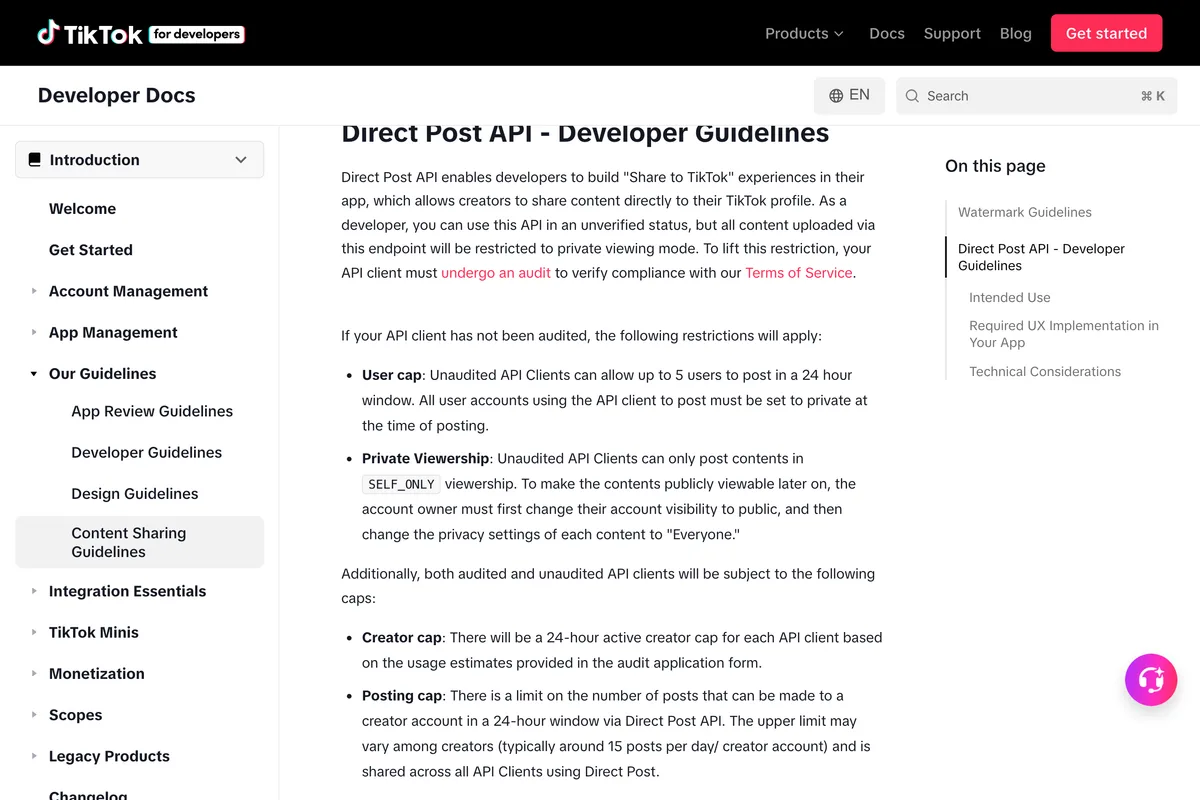
The second and third rules are in the Content Sharing Guidelines, under Direct Post API, Developer Guidelines. The user cap is the one most vendor pages repeat. The intended use rule is the one none of them quote, and it matters more for a small business than the cap does.
User cap: Unaudited API Clients can allow up to 5 users to post in a 24 hour window. All user accounts using the API client to post must be set to private at the time of posting. ... Private Viewership: Unaudited API Clients can only post contents in SELF_ONLY viewership.
2) API Clients must not be limited to test applications and should be intended for a wide audience, not limited to internal groups/private use. Not acceptable: A utility tool to help upload contents to the account(s) you or your team manages.
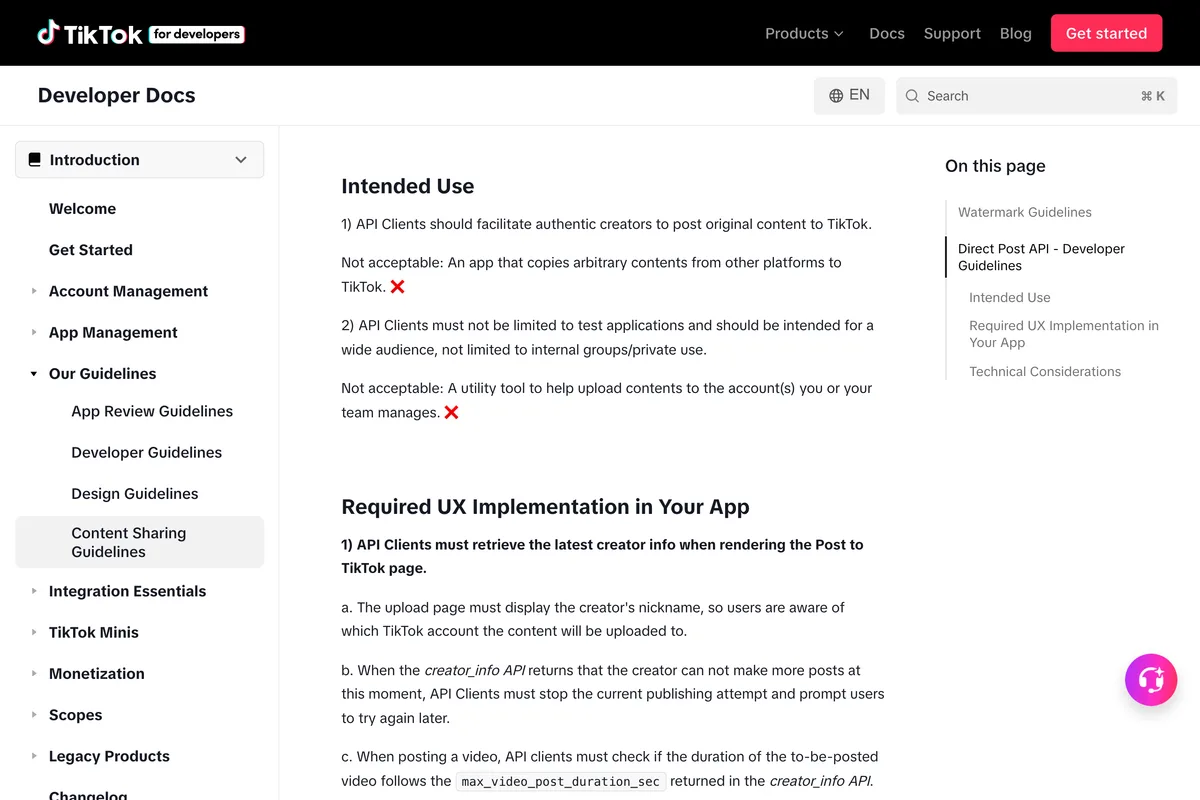
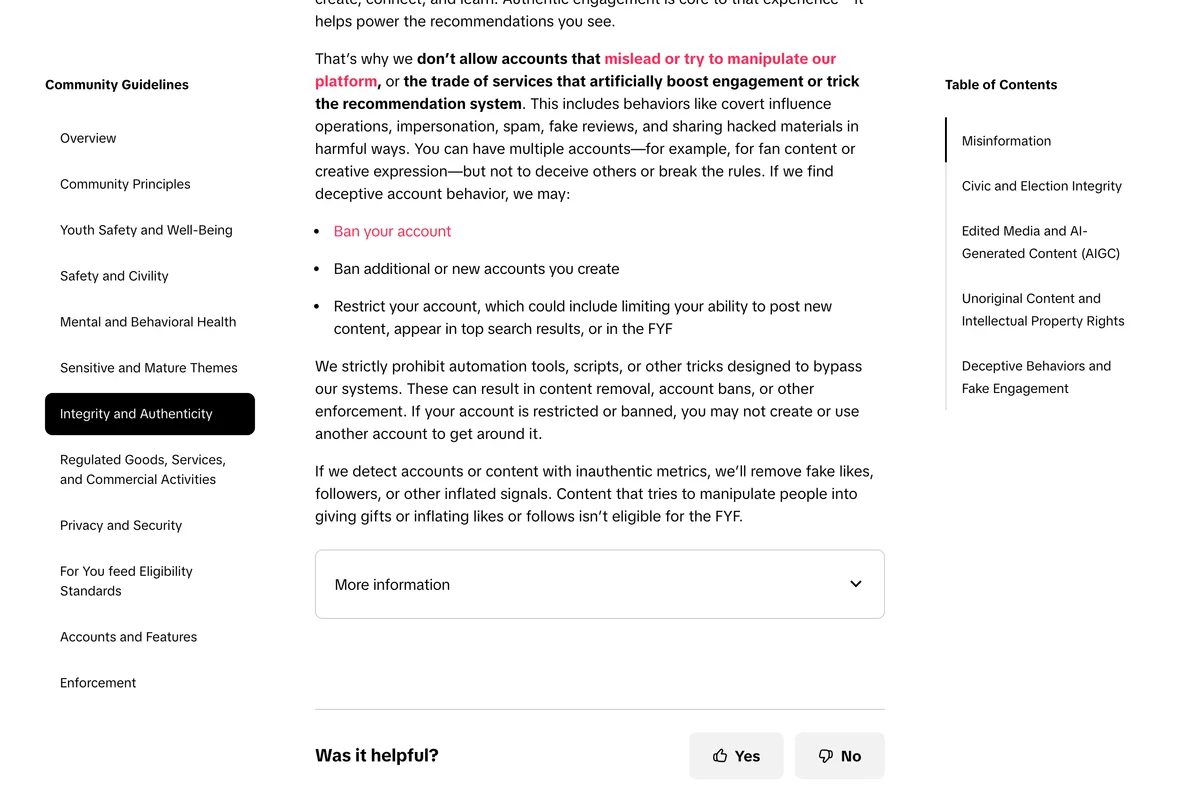
Put the three together and the shape of the market follows. A tool that posts publicly to TikTok on your behalf must hold an audited app, and TikTok will only audit an app meant for a wide audience. That is why every TikTok MCP with any traction, Blotato, Postiz, Publora, Markifact, Metricool, Taisly, is a scheduling product with its own audited app, and why the open source servers that work through your own app post privately, or do not post at all. There is a second door, as on LinkedIn: servers that drive TikTok through your cookies or a headless browser. TikTok's Community Guidelines are the shortest statement of the risk.
We strictly prohibit automation tools, scripts, or other tricks designed to bypass our systems. These can result in content removal, account bans, or other enforcement.
Route 1: Is there a TikTok connector in Claude's directory?
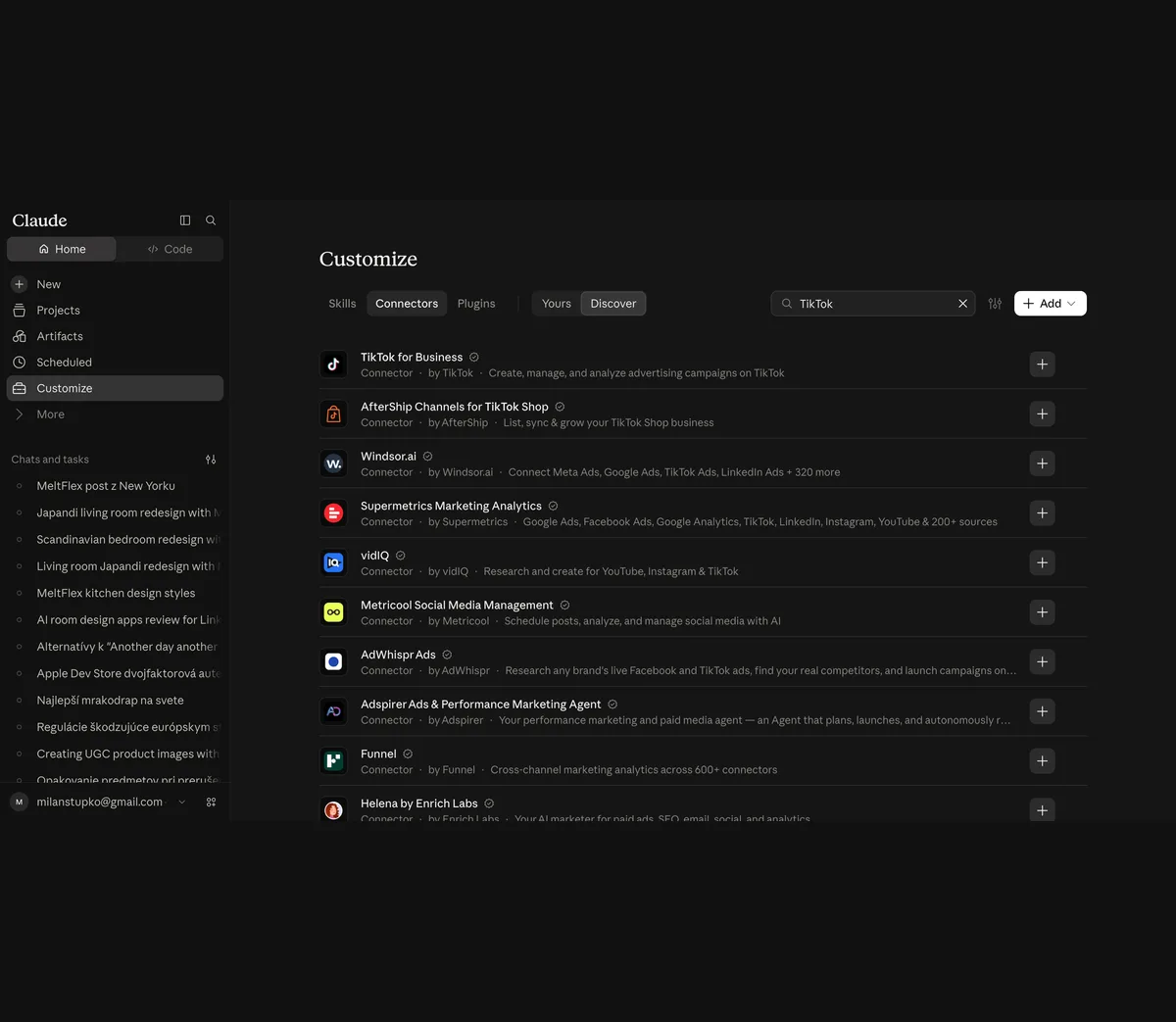
Yes, and the first result is TikTok's own. On 10 October 2026 we opened Customize, then Connectors, then Discover in our Max account and searched for TikTok. The directory returned 232 results. The top entry is TikTok for Business, by TikTok, with a verified badge and the description Create, manage, and analyze advertising campaigns on TikTok. The rest of the first screen is advertising and analytics: Windsor.ai, Supermetrics, vidIQ, AdWhispr, Adspirer, Funnel.
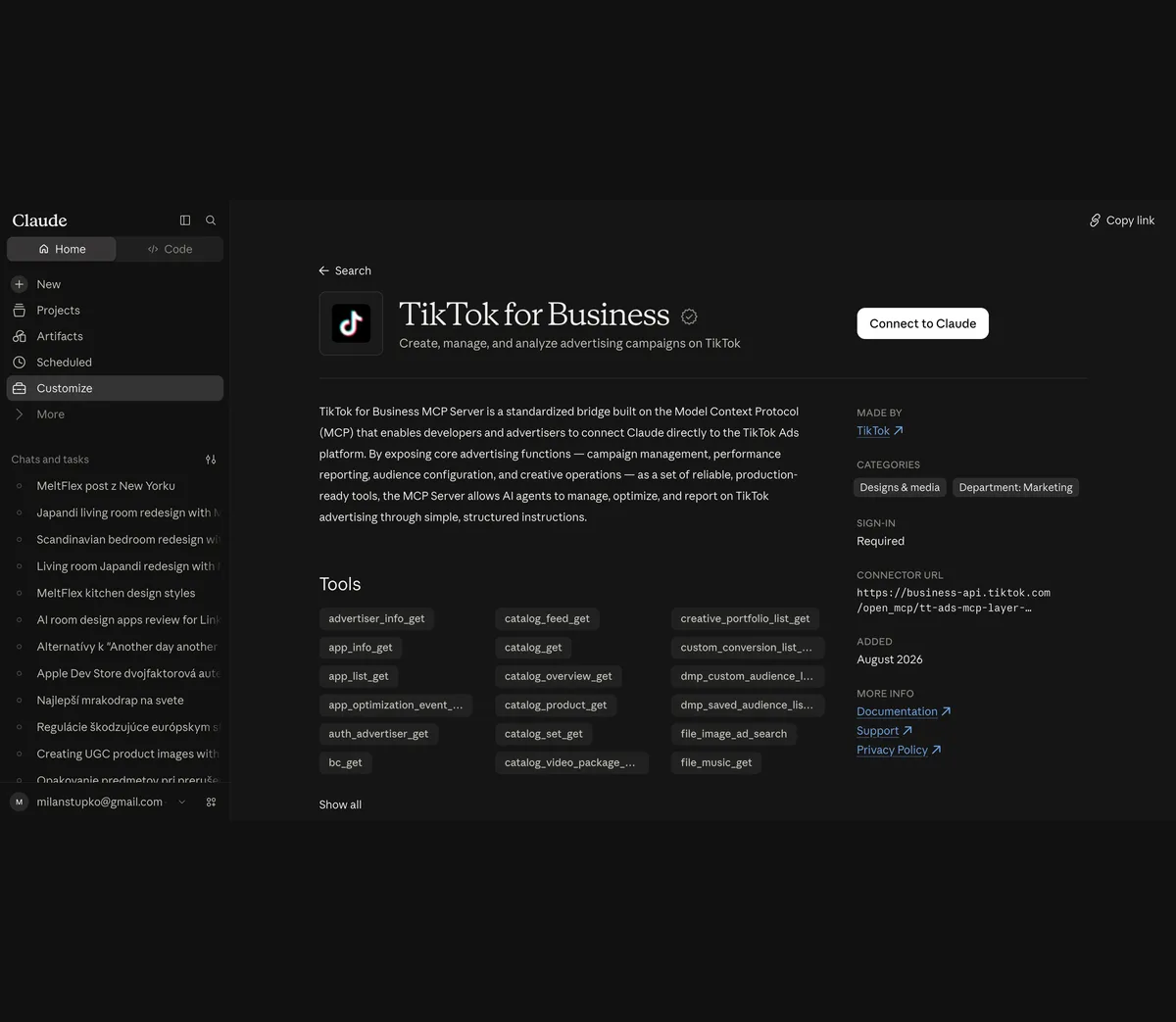
We opened the TikTok for Business entry. Its page lists the tools, shows Sign-in Required, gives the connector URL as a third endpoint, business-api.tiktok.com/open_mcp/tt-ads-mcp-layer-anthropic, and says Added August 2026. TikTok's own Claude page recommends this directory route over pasting a URL, with one caveat it documents on a separate page: the directory version leaves out the finance tools, 25 of them around Business Center balances, invoices and payment portfolios, plus the diagnosis agent. If you need those, add the server URL manually.
For organic posting, scroll past the advertising entries. These are the directory connectors whose descriptions say they publish, as of 10 October 2026: Metricool Social Media Management (Schedule posts, analyze, and manage social media with AI), Postiz, Publora (Publish and schedule posts to ten social networks), post bridge (Social media scheduling for Instagram, TikTok, YouTube ...), Planoly, Windsor.ai for Social Media (Analyze and post organic social content across Instagram, Facebook, TikTok ...) and InsightfulPipe, which adds a social media scheduler to its analytics. Each one holds its own audited TikTok app, which is the only way a directory connector can make a public post. Connecting is a sign in to the vendor, then a sign in to TikTok inside the vendor. The clicks are the same as for the Instagram guide, and the video below shows the official server being added, which is the same dialog.
ZoCo Marketing adds TikTok's server as a custom connector in claude.ai, chooses the full disclosure URL, walks through the authentication settings, authorizes with a TikTok for Business account, then asks Claude for a GMV Max report and builds a campaign. Two things worth adding. The video pastes the URL by hand although the directory entry already existed, so that step is optional: TikTok's own Claude page says to search the directory first. And the whole video is about ads, which the title says and which is correct. Nothing in it posts a video to a profile, because the server has no tool for that.
Route 2: How do I add Composio, a scheduler or TikTok's own URL as a custom connector?
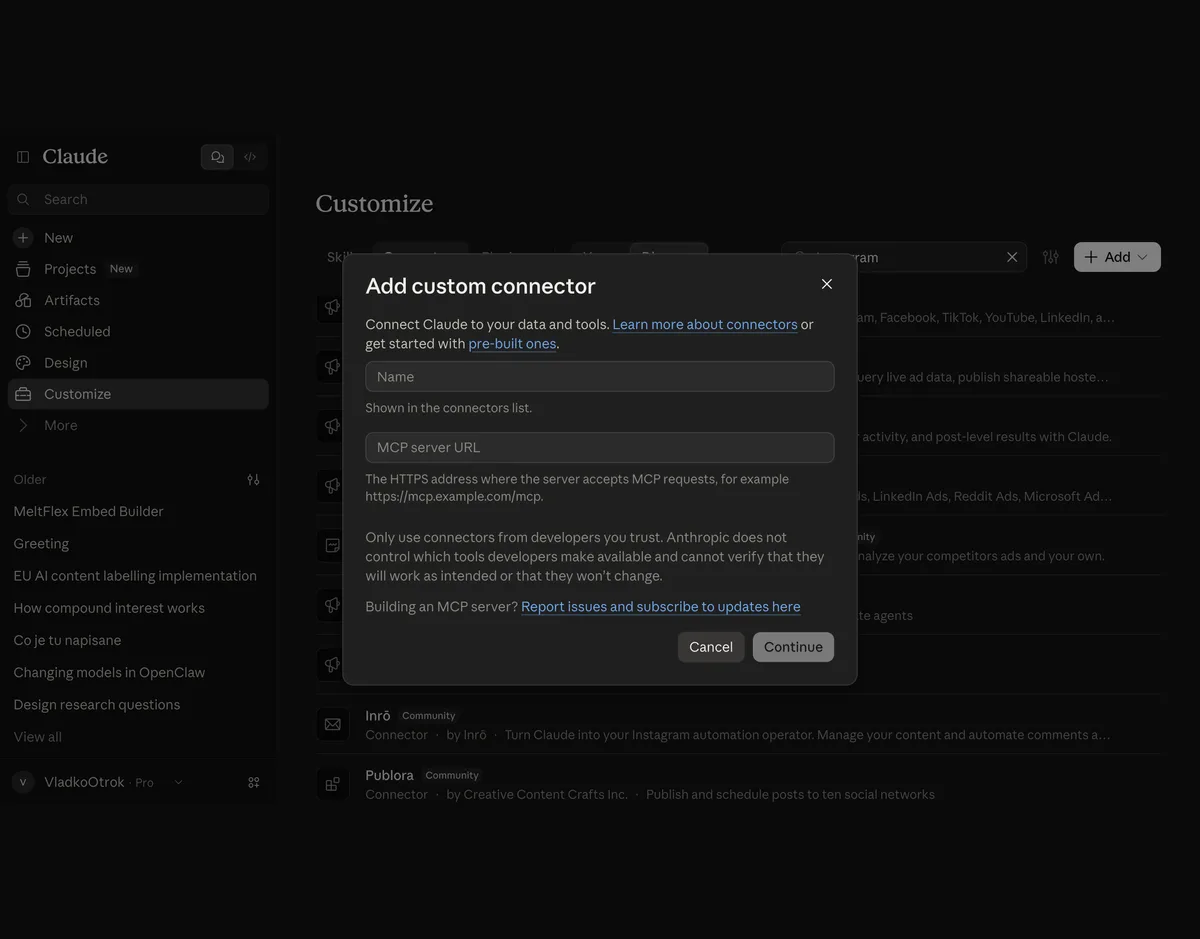
The dialog is the same for all three. In claude.ai or the desktop app, open Customize, Connectors, Add, then Add custom connector, give it a name and paste the remote MCP server URL. Anthropic's support article says custom connectors are available on Free, Pro, Max, Team and Enterprise plans, with Free limited to one, and that on Team and Enterprise an owner has to enable them. TikTok's own Claude page lists a Claude account on the Pro or Max plan as a prerequisite, which is TikTok's statement, not Anthropic's.
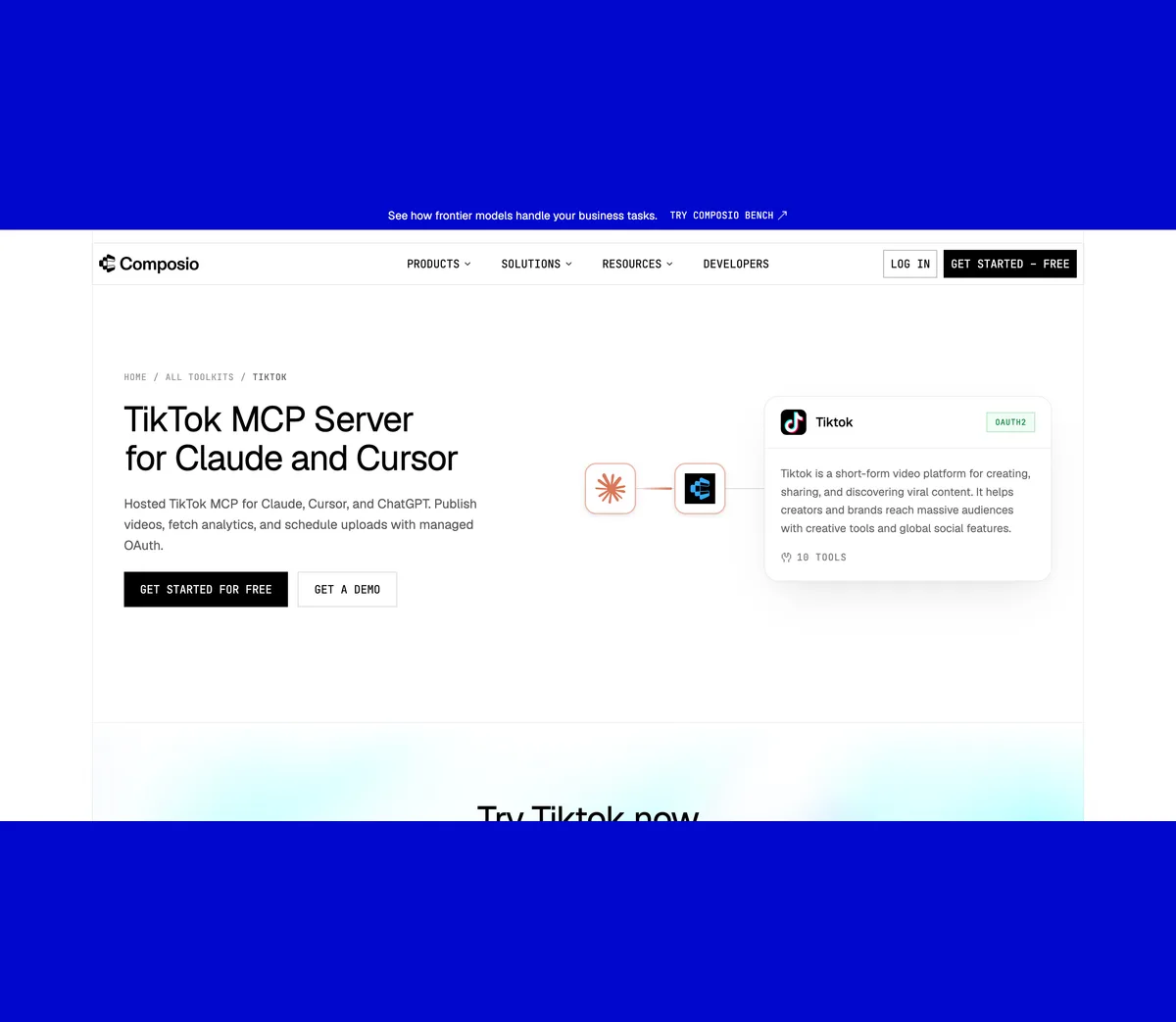
Composio is the generic bridge. Its TikTok toolkit page lists 10 tools: Publish video (pulls from a public URL), Upload video, Upload videos (batch), Post photo (1 to 35 images), Fetch publish status, Get user stats, List videos, and three that belong to the Marketing API. Its pricing FAQ says the free Hobby plan includes 100,000 tool calls per month with no credit card. The important sentence is in the description of its photo tool, and it is a sentence Composio took from TikTok.
IMPORTANT: Photo URLs must be from your TikTok-verified domain. Unverified domains will return 403 Forbidden. Unaudited apps can only post with privacy='SELF_ONLY'. Rate limit: 6 requests per minute per user access token.
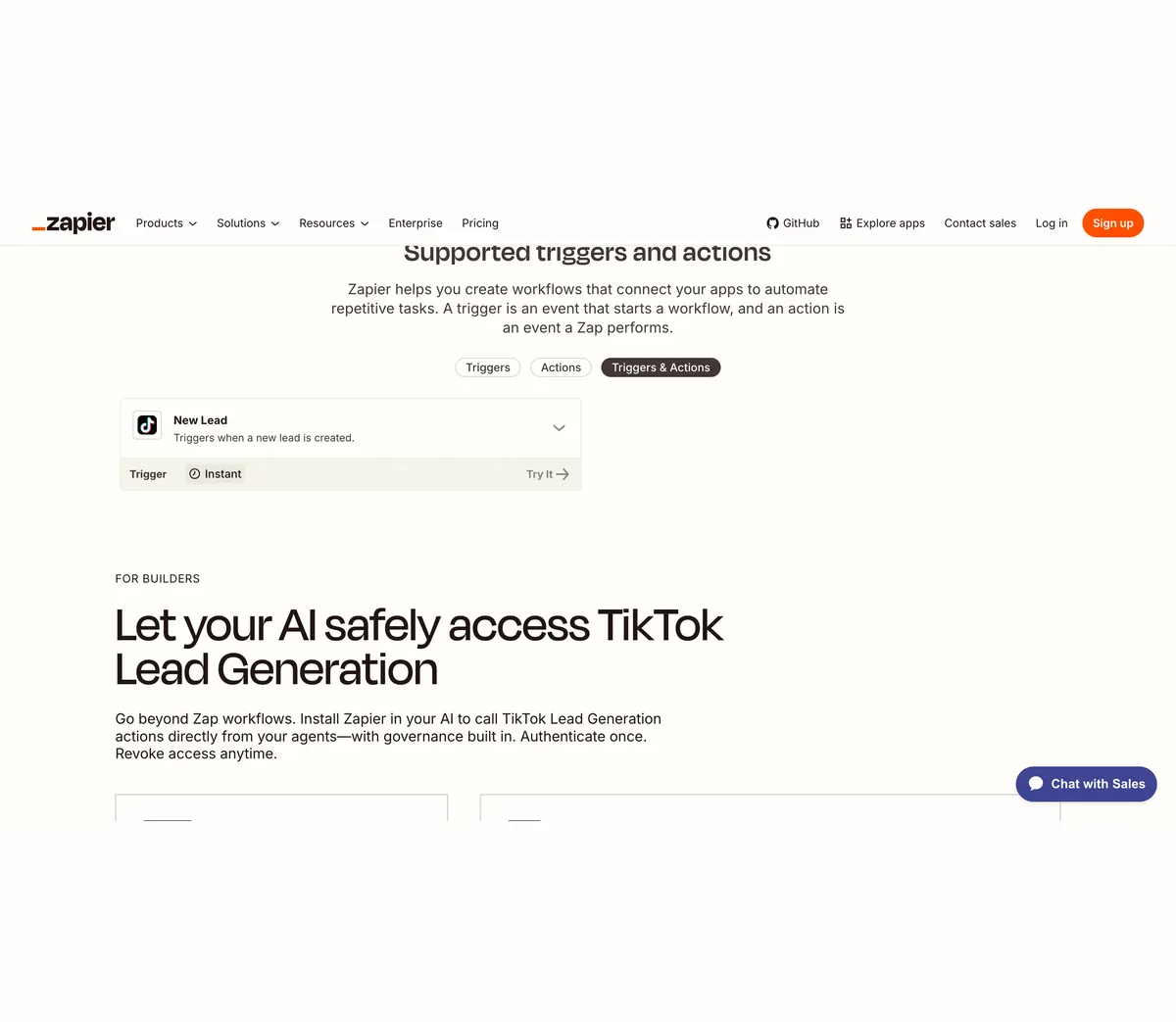
Zapier is the surprise. Its only TikTok app is TikTok Lead Generation, with a single trigger, New Lead, and no action at all. Zapier MCP can call actions, and an app with no action gives Claude nothing to call. There is also a TikTok Conversions app for ad measurement. So Zapier, which posts to Instagram and LinkedIn through Claude, does not post to TikTok. If a guide tells you to connect Claude to TikTok with Zapier, it has not read Zapier's page.
The schedulers are the route that actually posts publicly for a small business, because they hold audited apps: Blotato (mcp.blotato.com/mcp, API and MCP on paid plans from 29 dollars a month on its own pricing), Postiz, Publora (free Starter), Markifact, Socialync and Taisly all publish their MCP URLs. The video below is from Postiz's own channel and shows the connector added, a skill file loaded, and slideshows sent to TikTok.
What the transcript shows: a Postiz account with TikTok connected, the MCP link pasted into Claude's connectors, a skill file for slideshows, and posts going out three times a day. One claim in it does not come from TikTok. The presenter says the posts were sent to TikTok drafts because TikTok does not like autoposting content and that when you auto post the content, a lot of times TikTok can shadowban you. TikTok's Content Posting API has two documented products, Direct Post and Upload to inbox, and no page we found says a direct post reaches fewer people. Choosing the inbox route is a fine habit for adding a trending sound, which the API cannot select, but the reason given is the presenter's, not TikTok's. It is also a vendor video for a vendor product, which is true of every tutorial in this section.
Route 3: How do I connect Claude Code to my own TikTok app?
This is the route where TikTok differs most from Instagram and LinkedIn, so read the whole section before starting. You can build it in an afternoon, and it will post, but only to a private account, only privately, and only for five users a day, until an audit that TikTok's own pages say is not meant for a tool that posts to your own accounts. We did not create an app for this article, because our account was not signed in to TikTok for Developers on 10 October 2026, so what follows is TikTok's own numbered procedure from its Create an App page, with the parts that matter for Claude pulled out.
- Create a developer account and an organization. TikTok's Create an App page: Create a TikTok developer account from our signup page using your email, then create or join an organization. Registering the app under an individual account is allowed but, in TikTok's words, not recommended for real app integrations.
- Connect an app and add the products. Manage apps, Connect an app, choose the owner, fill in the app details, then Add products: Login Kit, which gives you user.info.basic, and Content Posting API with the Direct Post configuration enabled. Add the scope video.publish, and video.upload if you want inbox drafts.
- Verify a URL property. If Claude will hand the server a URL rather than a file, the Media Transfer Guide requires that the media URL belongs to a path you own, verified by a DNS signature for a domain or a signature file for a URL prefix. Unverified URLs fail with url_ownership_unverified. Photos can only be sent by URL.
- Use Sandbox mode first. The app page has a Production and a Sandbox toggle. Sandbox lets you try the integration without a review, and TikTok's page says URL verification is only required there for the Content Posting API.
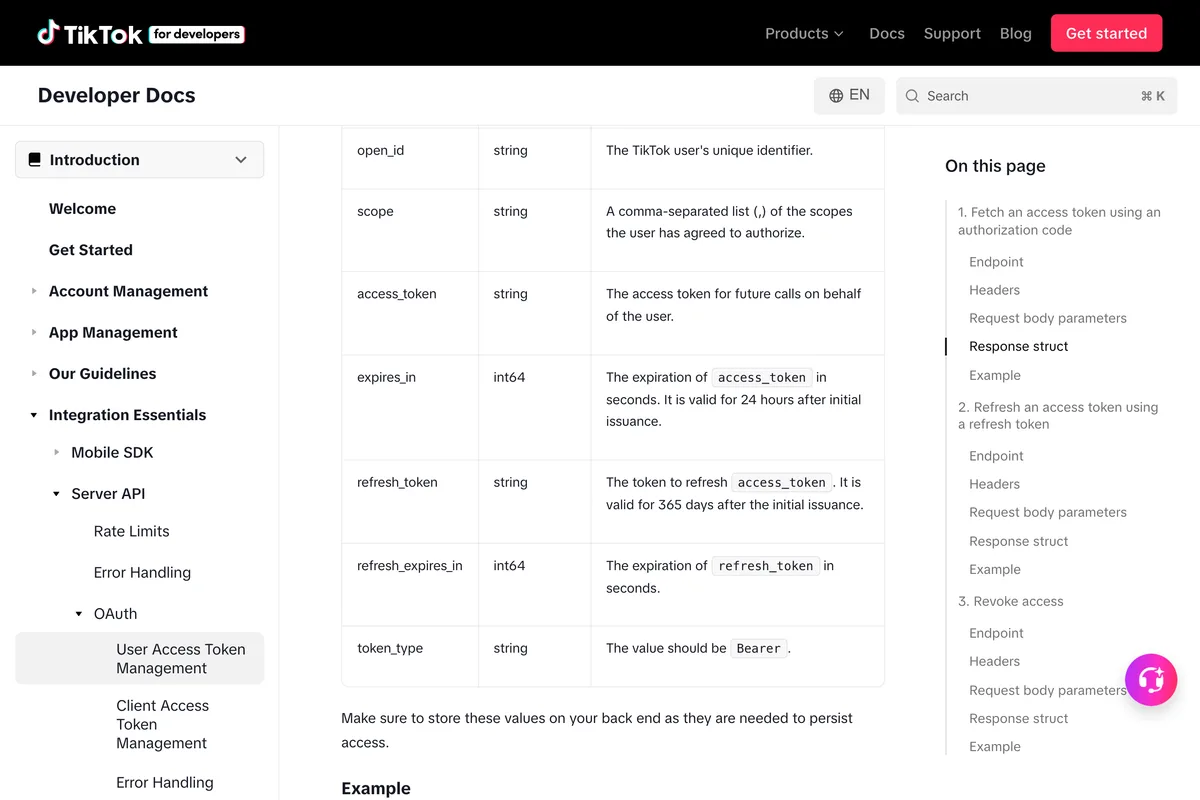
- Run the OAuth flow once. Authorize at www.tiktok.com/v2/auth/authorize/, exchange the code at open.tiktokapis.com/v2/oauth/token/. The response carries an access token valid for 24 hours and a refresh token valid for 365 days, so the server has to refresh daily.
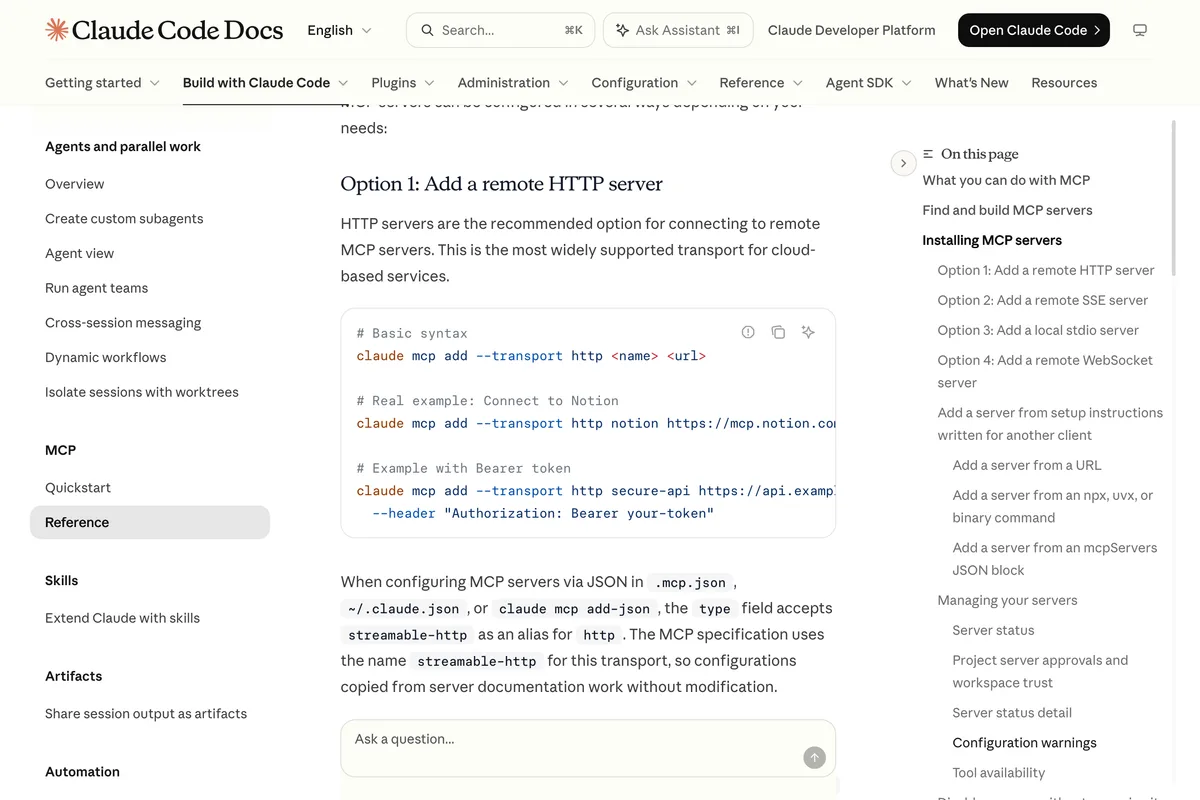
- Register the server in Claude Code. For a local server: claude mcp add tiktok -- npx <package>, with the client key, client secret and tokens as environment variables. For a remote one: claude mcp add --transport http tiktok https://<your-server>/mcp. Then claude mcp list to check it connected.
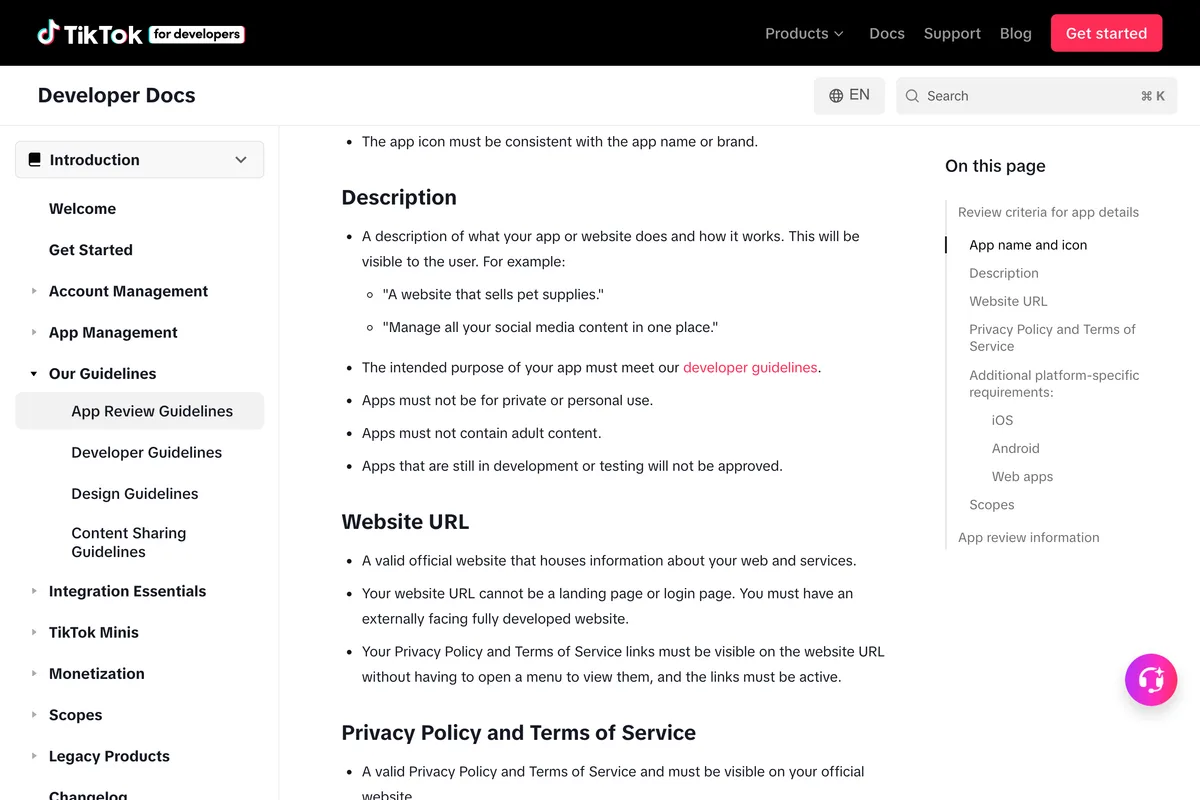
Now the audit. TikTok's App Review Guidelines ask for a custom app name that does not reference social media companies, a description, an externally facing website with visible privacy policy and terms links, a redirect URI for web apps, and in the App review section a detailed explanation of each product and scope plus at least one demo video of the complete end to end flow, up to five videos of 50 MB each, recorded in the sandbox if the app has never been approved. Two sentences on that page settle whether a personal Claude to TikTok bridge can pass.
Apps must not be for private or personal use. ... Apps that are still in development or testing will not be approved.
The open source servers reflect this. We searched GitHub for tiktok mcp and read the READMEs of the top results on 10 October 2026. The star counts point the wrong way again: the biggest repository is a downloader and scraper, the publishers with traction are vendor clients that hold the vendor's app, and the one server that publishes through your own developer app has two stars and ships with dry run on by default.
| Repository | Posts a video? | Stars | Last push | How it reaches TikTok |
|---|---|---|---|---|
| Evil0ctal/Douyin_TikTok_Download_API | No, downloads and scrapes | 20,565 | 2 Oct 2026 | Browser cookies or a headless browser minting guest identities |
| taisly/agent | Yes, through Taisly's app | 217 | 3 Oct 2026 | Taisly's hosted platform, confirmed: true required on each post |
| Seym0n/tiktok-mcp | No, search, details, subtitles | 201 | 19 Aug 2026 | TikNeuron's third party API, installable as a Claude Desktop bundle |
| ndesv21/socialclaw | Yes, through SocialClaw's app | 95 | 24 Aug 2026 | SocialClaw workspace, trial or paid plan required |
| yap-audio/tiktok-mcp | No, hashtag search | 77 | 3 Apr 2025 | Playwright browser automation with an ms_token to avoid bot detection |
| AdsMCP/tiktok-ads-mcp-server | No, ads, read only | 51 | 9 Oct 2026 | Your own TikTok for Business app and Marketing API |
| publora/skills | Yes, through Publora's app | 50 | 7 Oct 2026 | Publora's hosted MCP, directory or API key |
| davidmosiah/tiktok-agent-publisher | Yes, through your own app | 2 | 29 Aug 2026 | Content Posting API with your client key, secret and tokens, dry run by default |
No tutorial we could verify shows a self built TikTok app being audited and then posting publicly from Claude Code. The closest honest demonstration of the Claude Code route uses a vendor's server instead, and we embed it for the terminal steps, not for the app.
Alexandra Spalato generates ten clips with a skill, picks three, and asks Claude Code to post them to TikTok and YouTube. The posting goes through Blotato's MCP, installed with the setup command Blotato prints, and the transcript shows the TikTok posts scheduled three hours apart. The server is Blotato's, so the audit is Blotato's and the account is the presenter's. The one line to treat as her view rather than TikTok's is the reason for spacing the posts, to avoid any problem of shadowban; TikTok's documented cap is around 15 posts a day per creator, and nothing on its pages describes a penalty for posting faster than that within the cap.
What can Claude post once it is connected?
Whatever the route, the post arrives at TikTok through the same two endpoints, and TikTok's pages set the limits. The table lists what the Content Posting API accepts on 10 October 2026 for a direct post; a scheduler may add its own ceilings on top.
| Post type | Does the API accept it? | Limits on TikTok's pages | Where it is written |
|---|---|---|---|
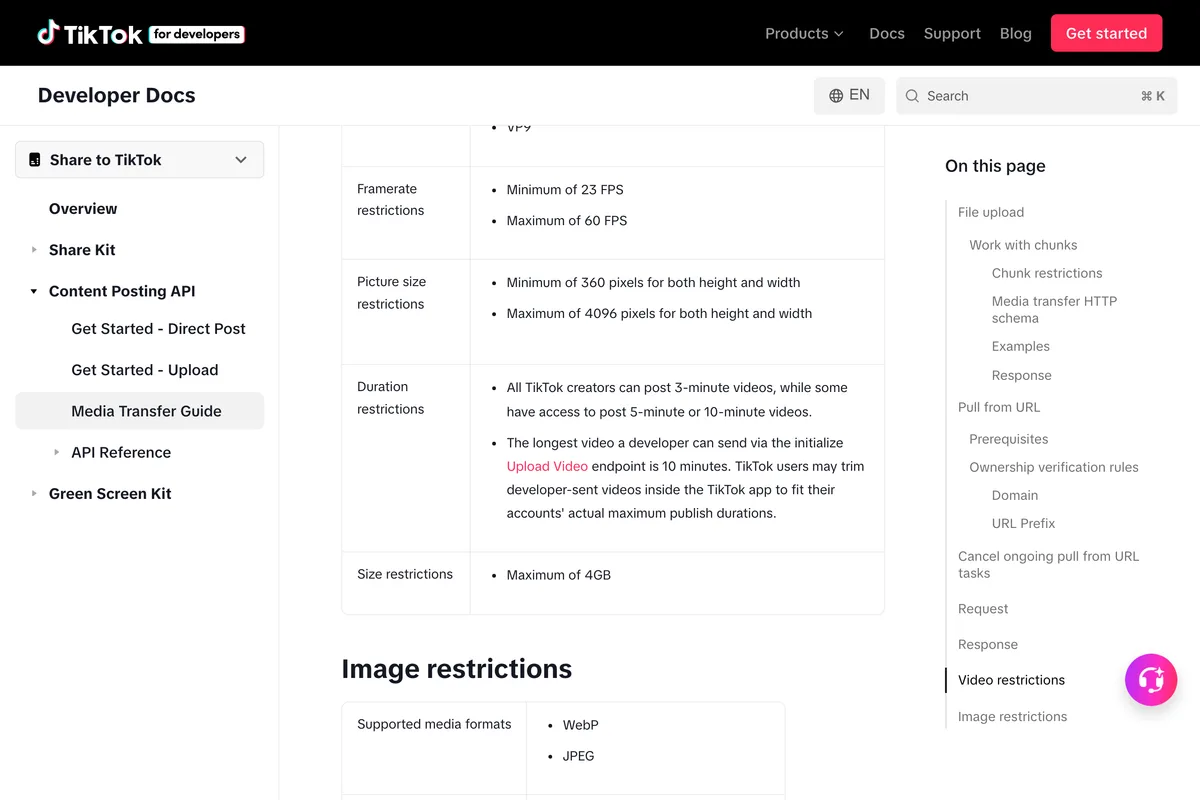
| Video | Yes, direct post or inbox draft | MP4, WebM or MOV; H.264, H.265, VP8 or VP9; 23 to 60 fps; 360 to 4096 px each side; up to 4 GB; up to 10 minutes via the API, trimmed in the app to the creator's own limit | Media Transfer Guide |
| Photo post | Yes, direct post or inbox | Up to 35 images by URL from a verified domain; WebP or JPEG; up to 1080p; 20 MB each; title up to 90 characters, description up to 4,000 | Photo reference, Media Transfer Guide |
| Caption on a video | Yes | Up to 2,200 UTF-16 characters; hashtags and mentions are parsed | Direct Post reference |
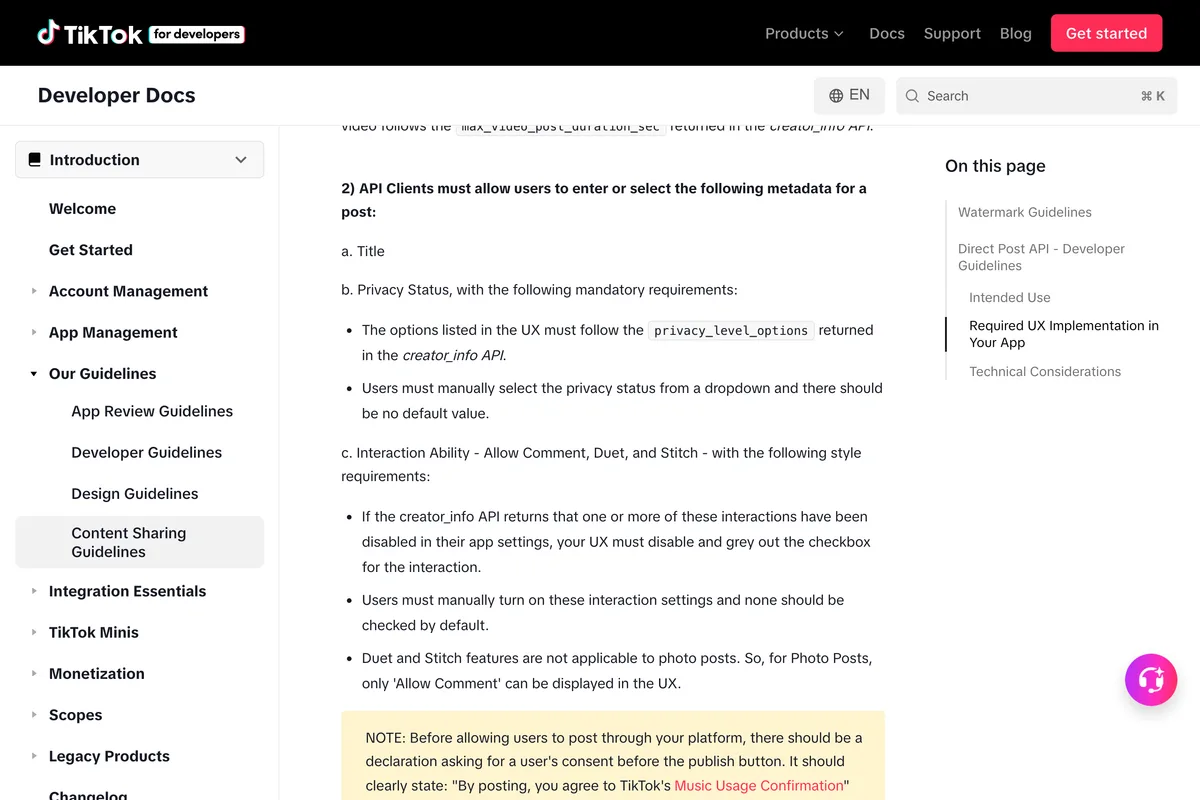
| Privacy level | Required, user chosen | Must match the creator's own options, no default allowed, SELF_ONLY while unaudited | Direct Post reference, Content Sharing Guidelines |
| Comments, Duet, Stitch | Yes, as switches | Off by default in your UI; Duet and Stitch do not apply to photos | Content Sharing Guidelines |
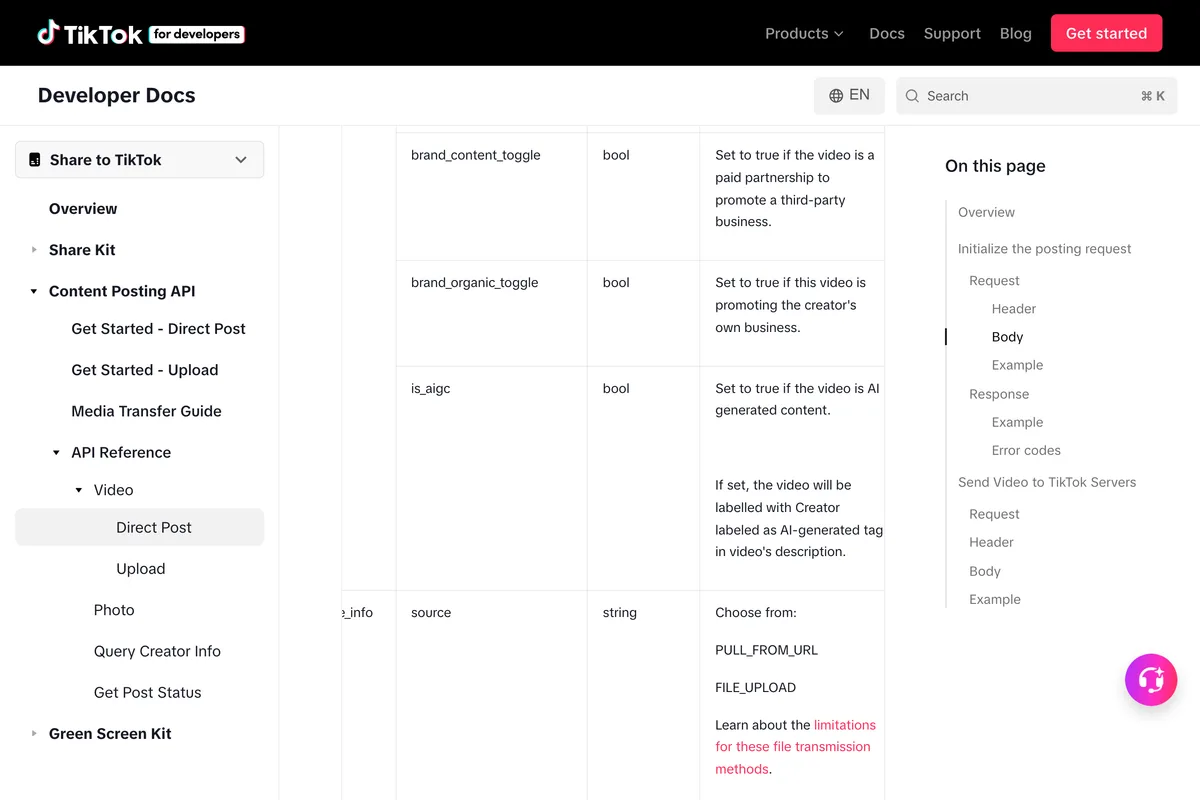
| AI generated label | Yes | is_aigc true adds the AI-generated tag | Direct Post and Photo references |
| Branded content and own brand | Yes | brand_content_toggle and brand_organic_toggle; branded content cannot be private | Content Sharing Guidelines |
| Music | Only auto_add_music on photo posts | No parameter selects a specific sound | Photo reference |
| Scheduling, editing, deleting | Not in the API | Schedulers hold the post and publish later; no endpoint edits or deletes a published post | Content Posting API references |
| Text only post | No | Every init call needs a video or photo source | Direct Post and Photo references |
What do the other guides get wrong?
We read the vendor and community pages that rank for connect Claude to TikTok and tiktok mcp, and checked each claim against TikTok's, Anthropic's and Zapier's pages on 10 October 2026. The table lists the ones that do not match. The pattern is the one from the LinkedIn guide: pages written before August 2026 say the directory has no TikTok entry, pages selling a scheduler describe the audit as a wall only they can climb, and tutorials describe penalties TikTok never wrote down.
| The claim | Who says it | What the source says |
|---|---|---|
| Claude's connectors directory has no TikTok entry | Carly, as of July 2026; Composio; Blotato | TikTok for Business, by TikTok, is in the directory, Added August 2026. It is an ads connector, so the claim was true for organic posting and is now wrong as written |
| There is no self-serve path to public posting for anyone, Claude included | Carly | TikTok's audit is open to any app that meets the review guidelines. What is closed is an audit for a tool limited to your own accounts, which TikTok lists as not acceptable |
| The audit takes 2 to 4 weeks and rejections are common | Carly | TikTok publishes no turnaround and no rejection rate on the App Review Guidelines or the Content Sharing Guidelines |
| TikTok's MCP server launched on June 30, 2026 | Zernio | TikTok announced it at TikTok World on 13 May 2026; the 30 June blog post announces the Agentic Hub and the Claude listing, and says the server had already seen a 200 percent rise in advertisers since launch |
| TikTok's MCP server has not shipped yet | Data Bloo | It is documented, in Claude's directory, and connected from our Claude Code on 10 October 2026 |
| TikTok recommends the 400 tool flat URL for Claude | mcpplaygroundonline and several directories | TikTok's own Claude page recommends the Connector Directory listing, which uses a layered endpoint, and documents the flat URL as the manual option |
| Connect Claude to TikTok with Zapier | Several how-to pages | Zapier's only TikTok app is Lead Generation, with one trigger and no action, so Zapier MCP has nothing to post with |
| TikTok shadowbans accounts that auto post, so send drafts instead | Postiz video; echoed as spacing posts to avoid shadowban in the Blotato tutorial | TikTok documents Direct Post and Upload as two products and names no reach penalty for either; the posting cap is around 15 a day per creator |
| Claude just released an upgrade that lets you connect your Claude to TikTok | Robert Benjamin | The video connects a research tool called ContentBuddy as a custom connector. It reads trends and competitor posts and never touches a TikTok account |
| A Claude Code system for viral TikTok videos | Oleg Melnikov | The transcript shows an Apify scraper of competitor profiles plus Gemini analysis, with no posting and no TikTok API |
| Photo posts accept PNG | Publora skill file | TikTok's Media Transfer Guide lists WebP and JPEG as the supported image formats |
| A pipeline that publishes to TikTok via the Content Posting API | Vanszs/tiktok-viral-factory README | The same README's roadmap shows the Content Posting API integration unchecked |
| Custom connectors need a paid Claude plan | Minter.io | Anthropic's article lists Free, with one custom connector, among the supported plans |
What have we learned publishing to TikTok ourselves?
Should a small business connect Claude to TikTok at all?
If you run TikTok ads, yes, and the official connector is the one to use: it is free, it is TikTok's, Anthropic lists it, and the worst it can do is what your ad account can already do, so keep the permissions on ask for anything that creates or changes a campaign. If you want Claude to publish organic videos or photo posts, the honest answer is a scheduler with an audited app, chosen from the directory or added as a custom connector, because TikTok's own rules close the self built route to a tool that only serves your accounts. Expect the scheduler to cost money, expect photo posts to be converted to WebP or JPEG and served from a URL, expect no scheduling, editing or music selection inside the API itself, and expect to pick the privacy level each time because TikTok forbids a default.
What we would not do is run a server that drives TikTok through cookies or a headless browser, however many stars it has. The Community Guidelines name automation tools and scripts as grounds for an account ban, and the account at risk is the one your customers follow. For what TikTok says you can and cannot do with other people's content, our guide to whether scraping social media is legal and our review of TikTok scrapers read the same pages. For the sound and the label that the API cannot set for you, see the TikTok Commercial Music Library and the AI-generated label guides, and for when to send what Claude made, the best time to post on TikTok.
Frequently asked questions
Does TikTok have an official MCP server?
Yes. TikTok for Business MCP Server, documented on business-api.tiktok.com, packages around 400 TikTok API for Business endpoints as MCP tools at two URLs, business-api.tiktok.com/open_mcp/tt-ads-mcp-flat and tt-ads-mcp-layer. It needs a TikTok for Business account, no developer app, authorization lasts 30 days, and it is listed in Claude's directory as TikTok for Business. It manages advertising and has no tool that publishes an organic post.
Can Claude post a video to my TikTok profile?
Only through a third party MCP server that wraps TikTok's Content Posting API, such as a scheduler's connector or your own app. TikTok's pages say posts from an unaudited app are restricted to private viewing, that unaudited apps may let at most 5 users post in 24 hours, and that a tool whose purpose is uploading to accounts you manage is not acceptable for the audit. Public posting for a small business therefore runs through a vendor that holds an audited app.
Can I connect Claude to TikTok on the free plan?
Anthropic's support article says custom connectors are available on Free, Pro, Max, Team and Enterprise, with Free limited to one custom connector, and directory connectors such as TikTok for Business sit alongside. TikTok's own Claude connection page lists a Pro or Max plan as a prerequisite, so TikTok and Anthropic do not say the same thing; we have only tested on Max.
Does Zapier connect Claude to TikTok?
Not for posting. On 10 October 2026 Zapier's only TikTok app was TikTok Lead Generation, with a single trigger, New Lead, and no actions. Zapier MCP exposes actions to Claude, so there is nothing for Claude to call. A separate TikTok Conversions app handles ad measurement.
How many posts a day can Claude make through the API?
TikTok's Content Sharing Guidelines give a posting cap of typically around 15 posts per day per creator account, shared across all API clients, plus a 24 hour active creator cap per app. The Direct Post reference limits each user access token to 6 requests per minute, and the inbox Upload endpoint allows at most 5 pending drafts in any 24 hour period.
What formats can a TikTok MCP send?
Video as MP4, WebM or MOV with H.264, H.265, VP8 or VP9, 23 to 60 fps, 360 to 4096 pixels per side, up to 4 GB and up to 10 minutes via the API. Photo posts take up to 35 WebP or JPEG images at up to 1080p and 20 MB each, pulled from a URL on a domain you have verified. There are no text only posts.
Does posting through the API hurt reach or get accounts shadowbanned?
TikTok's developer pages document two posting products, Direct Post and Upload to inbox, and name no reach penalty for either. The claims about shadowbans in tutorials are the presenters' own. What TikTok does prohibit, in its Community Guidelines, is automation tools, scripts, or other tricks designed to bypass our systems, which describes cookie based and browser driving servers rather than the official API.
Can I build my own TikTok MCP server for Claude Code?
Yes, and it will post privately. You need a developer account, an app with Login Kit and the Content Posting API, the video.publish scope, a verified domain for URL uploads, and a server that refreshes the 24 hour token with the 365 day refresh token. To post publicly the app must pass TikTok's audit, and TikTok's App Review Guidelines say apps must not be for private or personal use, while the Content Sharing Guidelines list a utility tool for your own accounts as not acceptable.
How we researched this
- Every rule about what TikTok's API accepts was read on TikTok for Developers on 10 October 2026: the Content Posting API Get Started, Direct Post, Upload, Photo and Media Transfer pages, the Content Sharing Guidelines, the App Review Guidelines, the Create an App page, the Scopes overview and the User Access Token Management page. The rules about the official MCP server were read on TikTok API for Business the same day: the MCP Server overview, the ready made agent and Claude connection pages, the unavailable tools page and the available tools list. The two rules about automation were read in TikTok's Terms of Service and Community Guidelines. The sentences we rely on are photographed under the quotations.
- The Claude screenshots are of our own Max account, taken on 10 October 2026: the connector directory searched for TikTok, and the directory entry for TikTok for Business. The Claude Code output is from running the commands on our own machine, version 2.1.296, against TikTok's own server URL, with the server removed afterwards.
- We did not create a TikTok developer app for this article. Our account was not signed in to TikTok for Developers on 10 October 2026, so the steps in the do it yourself section are TikTok's own numbered steps, quoted from the Create an App and App Review pages, and the app form itself is not photographed. The video we embed for that route shows a scheduler's server being set up in Claude Code, because no tutorial we could verify shows a self built app passing TikTok's audit.
- The three videos were chosen after reading their transcripts, not their titles. We rejected the most viewed results because they scrape TikTok through Apify or a logged in browser, because they connect a research tool and call it connecting Claude to TikTok, or because they do not show a post being made. Where a video says something TikTok's pages do not, we say so under it.
- The GitHub figures are star counts and last push dates from the GitHub API on 10 October 2026. We read each README but did not run any of these servers. The most starred ones download TikTok videos with cookies or a headless browser, which is the behaviour TikTok's Community Guidelines name.
- We read the vendor and community pages that rank for these searches, from Blotato, Markifact, Composio, Carly, Publora, Postiz, Socialync, Windsor.ai, Minter.io, Zernio, Data Bloo and others, and list in a table the claims that contradict TikTok's or Anthropic's pages. Our own product publishes to TikTok through the same Content Posting API, in photo mode, and the section on what we learned is first hand, with the limits of that said plainly.
Sources
- 1Content Posting API: Get Started, Direct Post
- 2Content Posting API reference: Direct Post
- 3Content Posting API reference: Upload
- 4Content Posting API reference: Photo
- 5Content Posting API: Media Transfer Guide
- 6Content Sharing Guidelines
- 7App Review Guidelines
- 8Create an App
- 9Scopes Overview
- 10User Access Token Management
- 11When Tools Become Prompts: Why Multi-Turn MCP Systems Break Traditional Security Assumptions
- 12TikTok for Business MCP Server
- 13How to connect a ready-made agent to TikTok for Business MCP Server
- 14How to connect Claude to TikTok for Business MCP Server
- 15Unavailable tools in the TikTok for Business MCP Server on Claude Connector Directory
- 16Available tools in TikTok for Business MCP Server
- 17Evolving TikTok For Business MCP: New AI platforms To Streamline Your Ad Workflows
- 18Terms of Service (rest of world)
- 19Community Guidelines: Integrity and Authenticity
- 20Get started with custom connectors using remote MCP
- 21Connect Claude Code to tools via MCP
- 22Connector directory: TikTok for Business
- 23TikTok Lead Generation integrations
- 24TikTok toolkit
- 25Evil0ctal/Douyin_TikTok_Download_API
- 26Seym0n/tiktok-mcp
- 27taisly/agent
- 28yap-audio/tiktok-mcp
- 29AdsMCP/tiktok-ads-mcp-server
- 30publora/skills
- 31davidmosiah/tiktok-agent-publisher
- 32How To Connect TikTok Ads To Claude (TikTok Official MCP)
- 33My Claude AI System for VIRAL TikTok Slideshows (Claude + TikTok Automation)
- 34Claude Code Generates 10 TikToks in One Command + post them
- 35How to install the official TikTok Ads MCP in Claude
- 36Claude Just Made it EASY To Automate Growing on TikTok in 2026
- 37My Claude Code System For Viral TikTok Videos
- 38Claude + TikTok integration
- 39How to Post to TikTok with Claude (No API Setup)
- 40How to Post to TikTok with Claude
- 41How to connect multiple Tiktok accounts to Claude
- 42How to Integrate Claude with TikTok Ads (2026 Guide)