How to connect ChatGPT to Instagram: the plugins and MCP routes that actually post, tested in our own account
Meta has no Instagram app or MCP server for ChatGPT, but ChatGPT can still publish to Instagram two ways: a plugin from ChatGPT's own directory, or a custom MCP server you add by URL. We searched the directory, added Meta's own MCP server to a Free account, read OpenAI's and Meta's pages, and list where they and the vendor guides disagree.

ChatGPT cannot post to Instagram on its own, and neither OpenAI nor Meta makes an Instagram plugin for it. What ChatGPT can do since it renamed its apps to plugins is call tools on a server somebody else runs, and some of those servers hold a token to your Instagram account and pass ChatGPT's request on to Meta's publishing API. That API is the same one every scheduling tool uses, with the same rules: a professional account, a JPEG at a public web address, and a daily limit.
Our articles are still written by humans!
Get human written articles in your Google feed.
There are two ways in. A plugin from ChatGPT's own directory, which is a plus button and a sign in, or a custom MCP server that you add by pasting its address. We tried both doors in our own Free ChatGPT account on 12 October 2026, read what OpenAI and Meta write about each, and checked the vendor guides that rank for this search against them. If you use Claude rather than ChatGPT, the same question is answered in how to connect Claude to Instagram.
| Your question | Short answer | Where it is written |
|---|---|---|
| Is there an official Instagram app for ChatGPT? | No. Meta's MCP servers cover ads, developer apps and WhatsApp | Meta for Developers, MCP overview |
| Can ChatGPT post to Instagram at all? | Yes, through a plugin or custom MCP server that wraps Meta's API | ChatGPT plugin listings, Meta Content Publishing guide |
| Which ChatGPT plan do I need? | A directory plugin: any plan. A custom server: OpenAI's pages disagree; our Free account could add one | chatgpt.com/pricing, OpenAI Help Center |
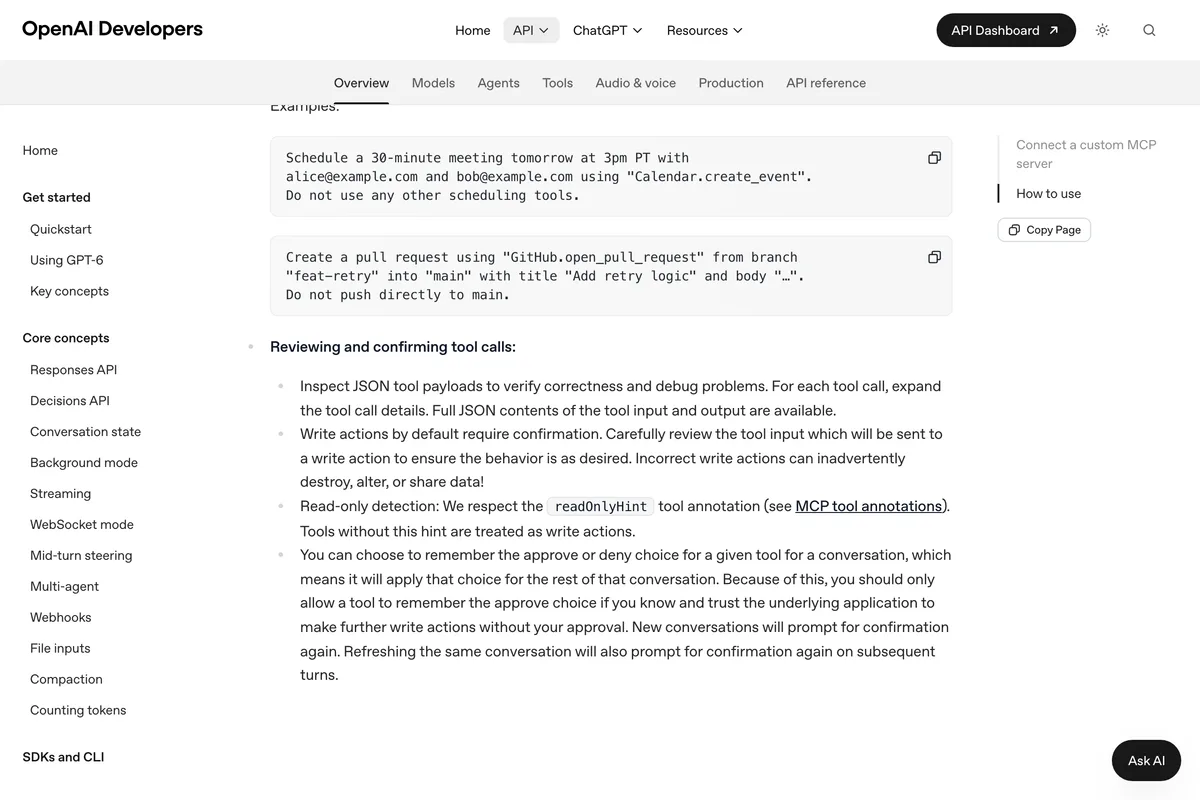
| Will ChatGPT post without asking? | Not by default. Write actions ask first unless you allow them | OpenAI, Add custom MCP server guide |
| Does it work in the ChatGPT phone app? | No. MCP apps are web only | OpenAI Help Center, developer mode article |
| How many posts a day? | 100 API-published posts per 24 hours per Instagram account | Meta Content Publishing guide |
| Can it post PNG files? | No. JPEG is the only image format Meta's API supports | Meta Content Publishing guide |
| Do I need a Facebook Page? | Not with Instagram Login. Yes with Facebook Login, which many tools use | Meta Platform Overview |
Is there an official Instagram app or MCP server for ChatGPT?
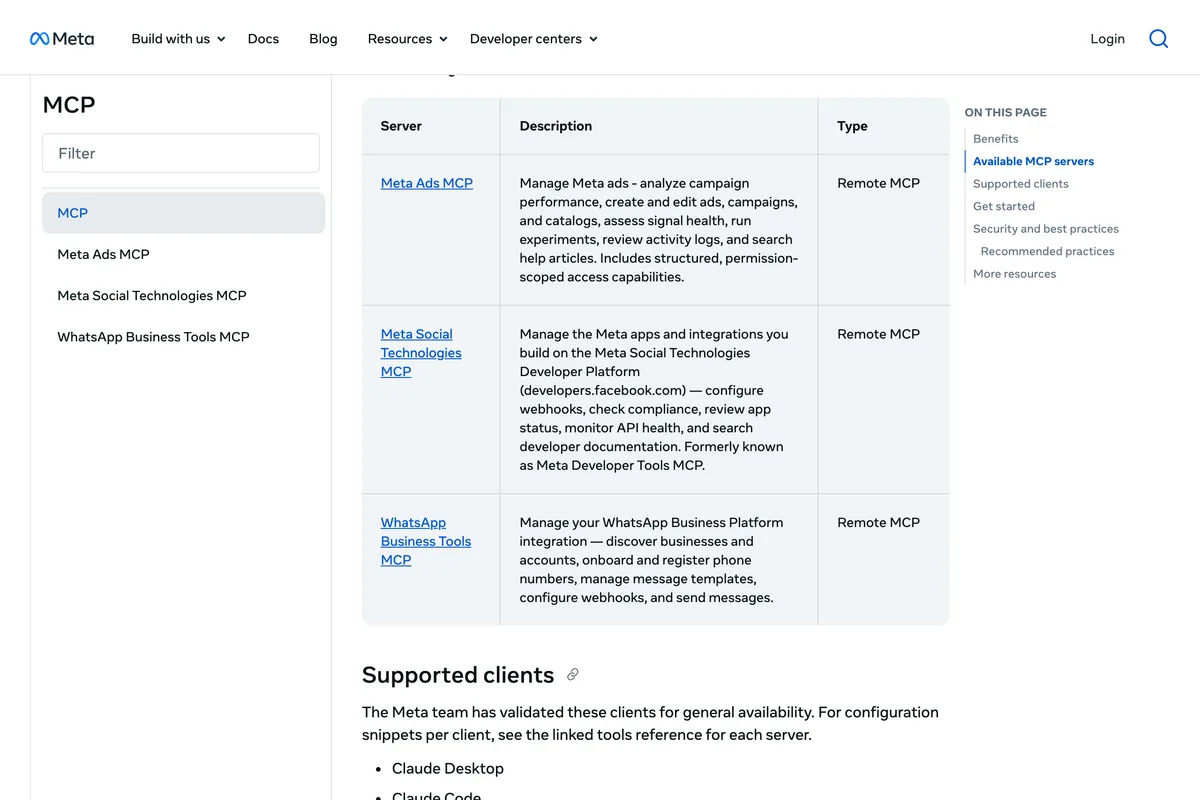
No. Meta does publish MCP servers, and it names ChatGPT on the web as one of the clients it has validated, but none of them posts to an Instagram feed. Meta's MCP overview lists exactly three: the Meta Ads MCP for campaigns, the Meta Social Technologies MCP for managing the apps developers build on Meta's platform, and the WhatsApp Business Tools MCP. Organic Instagram publishing is not on the list.
We wanted to see what adding a Meta made server to ChatGPT looks like, so we did it, in our own Free account, with the ads server at the address Meta's Business Help Centre gives: mcp.facebook.com/ads. ChatGPT accepted it, created a plugin called Meta Ads under our name, and opened the screen below. We stopped there, because the next button signs in to Meta and the server has no tool for feed posts, and deleted the plugin. ChatGPT confirmed it with Plugin not found.
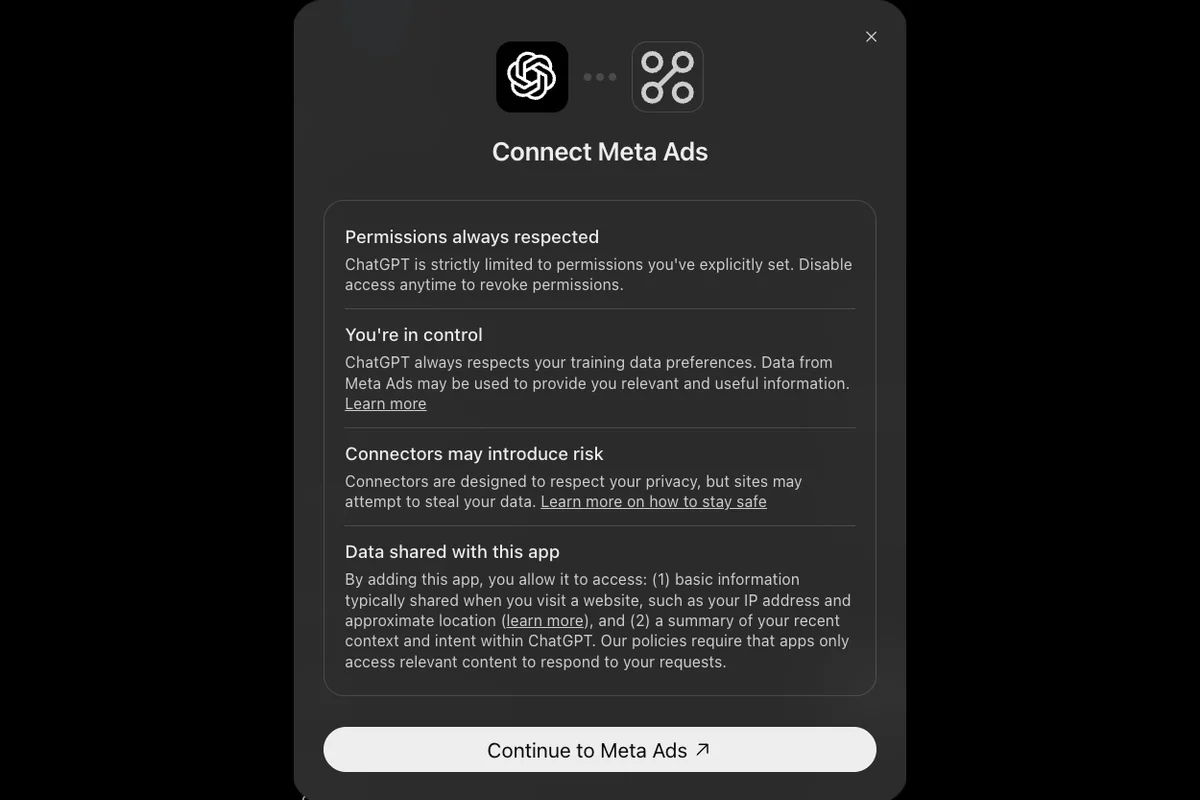
So the phrase ChatGPT Instagram integration always means a third party: a company, or a program you run, that holds a token for your Instagram account and calls Meta's API with it when ChatGPT asks. Its rules apply to every route below, so they come first.
What does every ChatGPT to Instagram route connect to?
Meta's Content Publishing guide. Publishing is two calls, one that creates a container from a media URL and a caption, and one that publishes it. The rules that decide whether ChatGPT's request goes through are these, in Meta's words:
Instagram accounts are limited to 100 API-published posts within a 24-hour moving period. Carousels count as a single post.
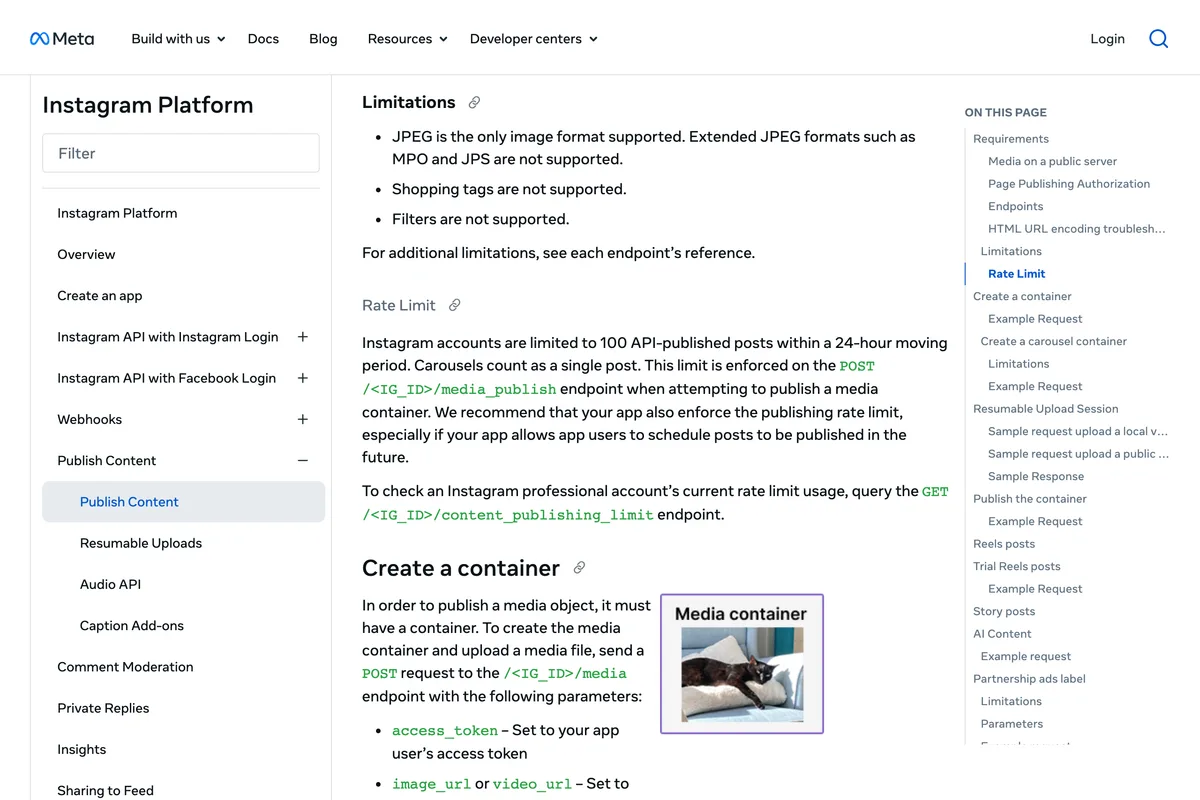
- JPEG only. Meta's page says JPEG is the only image format supported. An image ChatGPT generates usually downloads as a PNG, so something in the chain has to convert it. Ask the plugin's page whether it does before you count on it.
- A public URL. Meta fetches the file itself, so it has to be hosted on a publicly accessible server at the time of the attempt. An image that only exists inside your ChatGPT chat, or a private Drive link, cannot be posted until a plugin uploads it somewhere public. The Metricool video below makes the same point.
- A professional account. Business or creator. A personal account has no publishing API, so a tool that promises to post to one is switching it or using your password.
- Carousels of up to 10, captions of up to 2,200 characters, and a container that is not published within 24 hours expires.
- The limit is per account. If ChatGPT posts through SocialClaw and your scheduler posts through Metricool, both draw on the same 100.

Route 1: Which Instagram plugins in ChatGPT can actually post?
Open Plugins in ChatGPT's left sidebar and type Instagram into the search box. On 12 October 2026, in our Free account, it returned seven plugins. Only two of them say in their own listing that they publish to Instagram, and the most visible name in the category says the opposite of what its own website says.
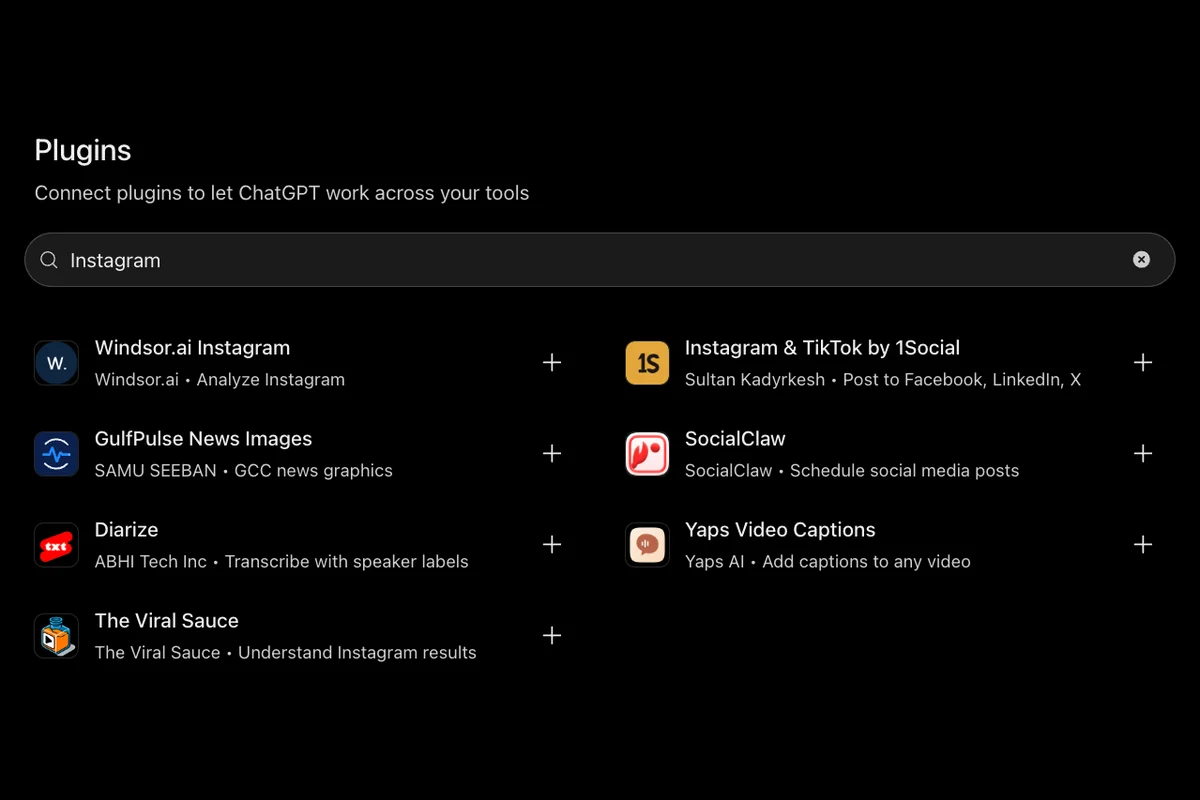
| Plugin | Posts to Instagram? | What its ChatGPT listing says |
|---|---|---|
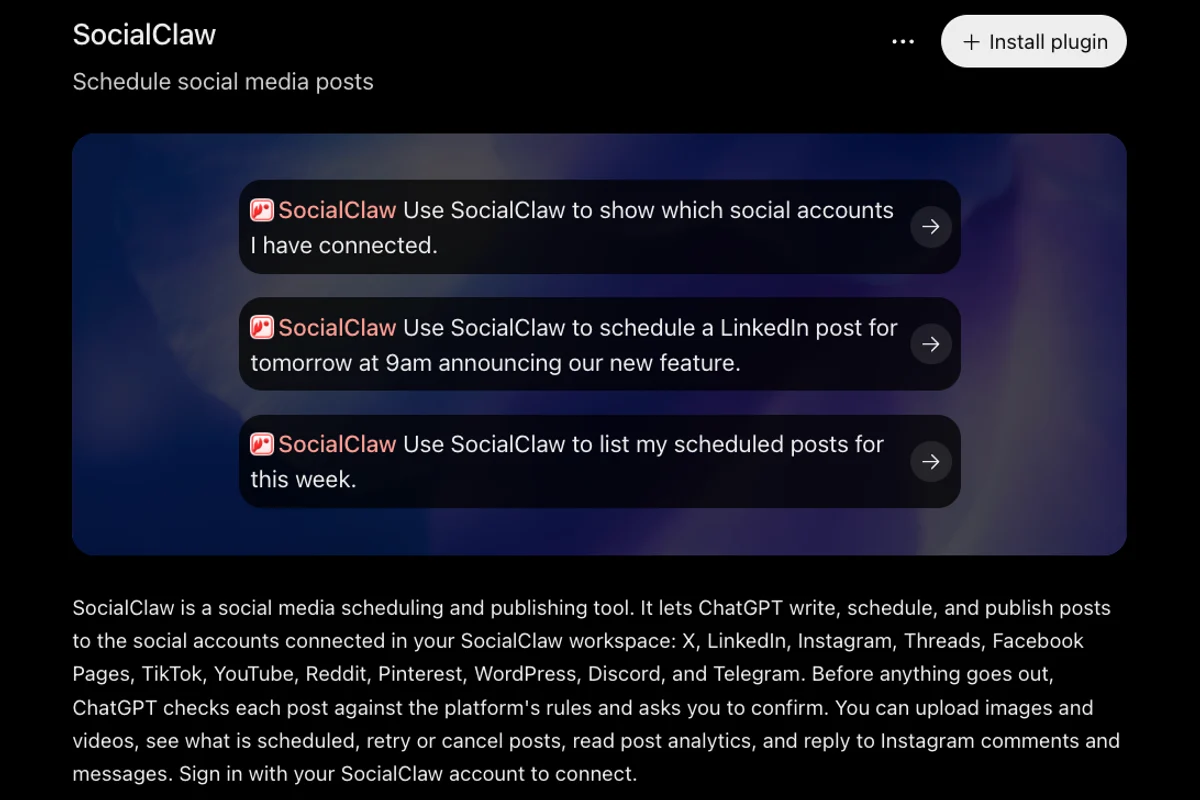
| SocialClaw | Yes | Write, schedule and publish to Instagram and 11 other networks; asks you to confirm; capabilities Read, Write |
| Instagram & TikTok by 1Social | Yes | Schedule and post to Instagram, TikTok, Facebook, LinkedIn, X, Threads and Bluesky, up to 30 days ahead |
| Metricool | Yes, schedules | Retrieve analytics, review scheduled content, and create or update posts |
| Postiz | Yes, schedules | Create drafts or scheduled posts for Instagram and other channels |
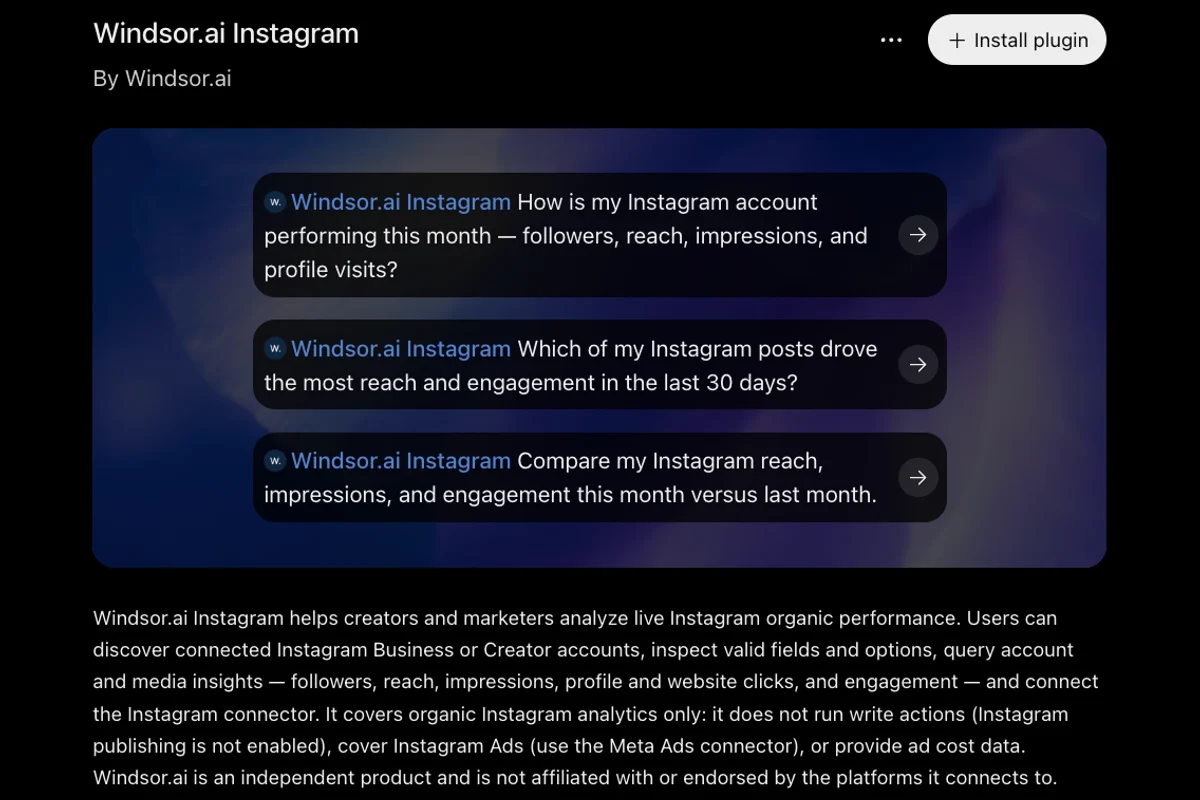
| Windsor.ai Instagram | No | Organic analytics only: it does not run write actions (Instagram publishing is not enabled) |
| The Viral Sauce | No | Discuss Instagram performance stored in your TVS account |
| GulfPulse, Diarize, Yaps | No | News graphics, transcription and video captions; matched on the word Instagram |
Windsor.ai is the odd one. Its own page for this exact search, published on 3 October 2026, says the Instagram connector is no longer read-only and that you can ask ChatGPT to publish a feed image, a carousel, a Reel or a Story, with no developer mode. Nine days later its listing inside ChatGPT said this:
It covers organic Instagram analytics only: it does not run write actions (Instagram publishing is not enabled), cover Instagram Ads (use the Meta Ads connector), or provide ad cost data.
Installing any of them is the plus button, then a sign in to the vendor's own service, where you connect Instagram with Meta's login. Most need their own account, and publishing is usually on a paid tier of that service, not of ChatGPT. Metricool's own video shows the whole route in three minutes, including the moment it matters most: the file has to be on a public link before ChatGPT can schedule it.
We chose it after reading the transcript. It shows a real account, uses the plugin from ChatGPT's directory rather than a pasted URL, and the post lands in a calendar rather than going out unseen, which is how we would run it. It is a vendor video, so it shows the vendor's best case.
One sentence sits at the bottom of every plugin listing, and it is worth reading once: When connected to SocialClaw, ChatGPT may share relevant chats and memories with this app to help provide context for your requests. A plugin that can post for you also reads some of what you tell ChatGPT.
Route 2: How do I add a custom MCP server to ChatGPT?
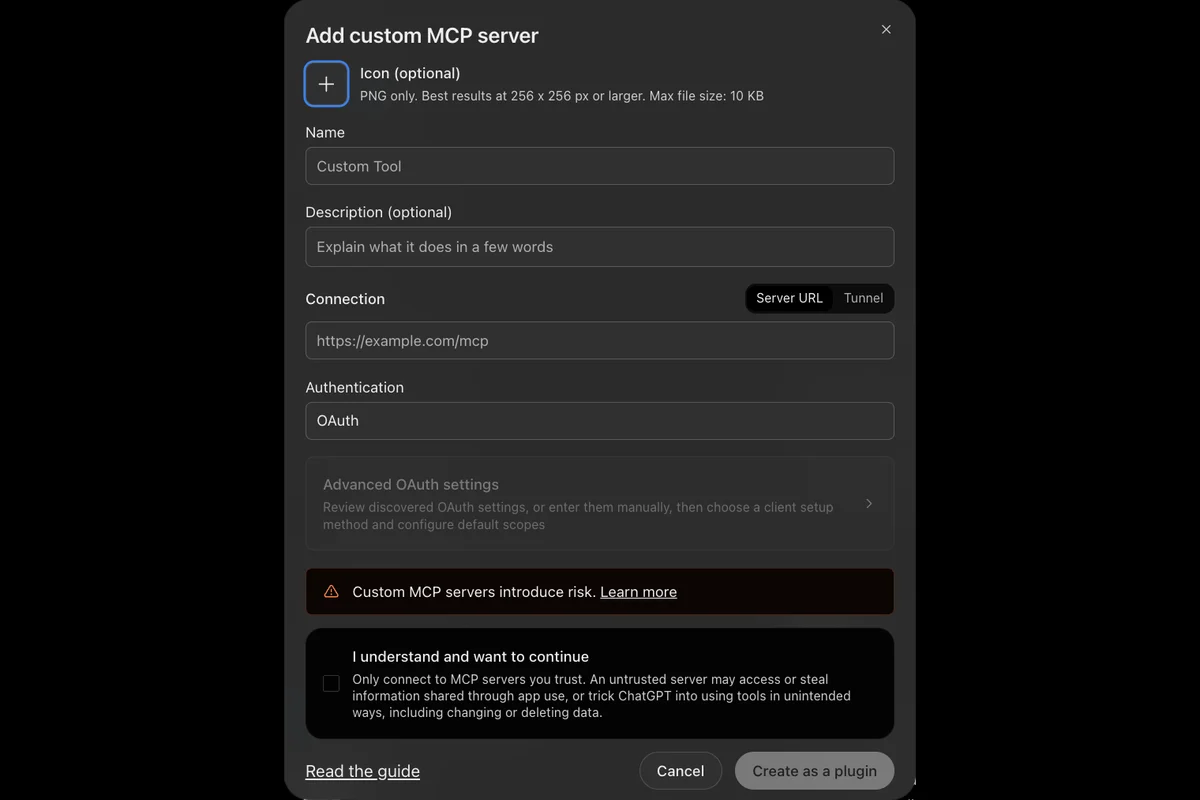
If the tool you want is not in the directory, such as Composio, Zapier, or a scheduler that gives you an MCP address, you add it by URL. OpenAI's Add custom MCP server guide gives the steps, and they matched our account exactly:
- Open chatgpt.com/plugins in a browser. The phone app cannot do this.
- Click Add at the top right, then Add custom MCP server. The same menu offers Create plugin and Upload plugin archive.
- Give it a name, paste the server's address under Server URL, and pick the authentication: OAuth, No authentication, or OAuth or no authentication. There is no field for an API key, so a server that only accepts a key needs a different route.
- Tick I understand and want to continue and click Create as a plugin. If the server uses OAuth, ChatGPT then shows a Connect screen and sends you to the vendor to sign in.
Which ChatGPT plan can add a custom MCP server?
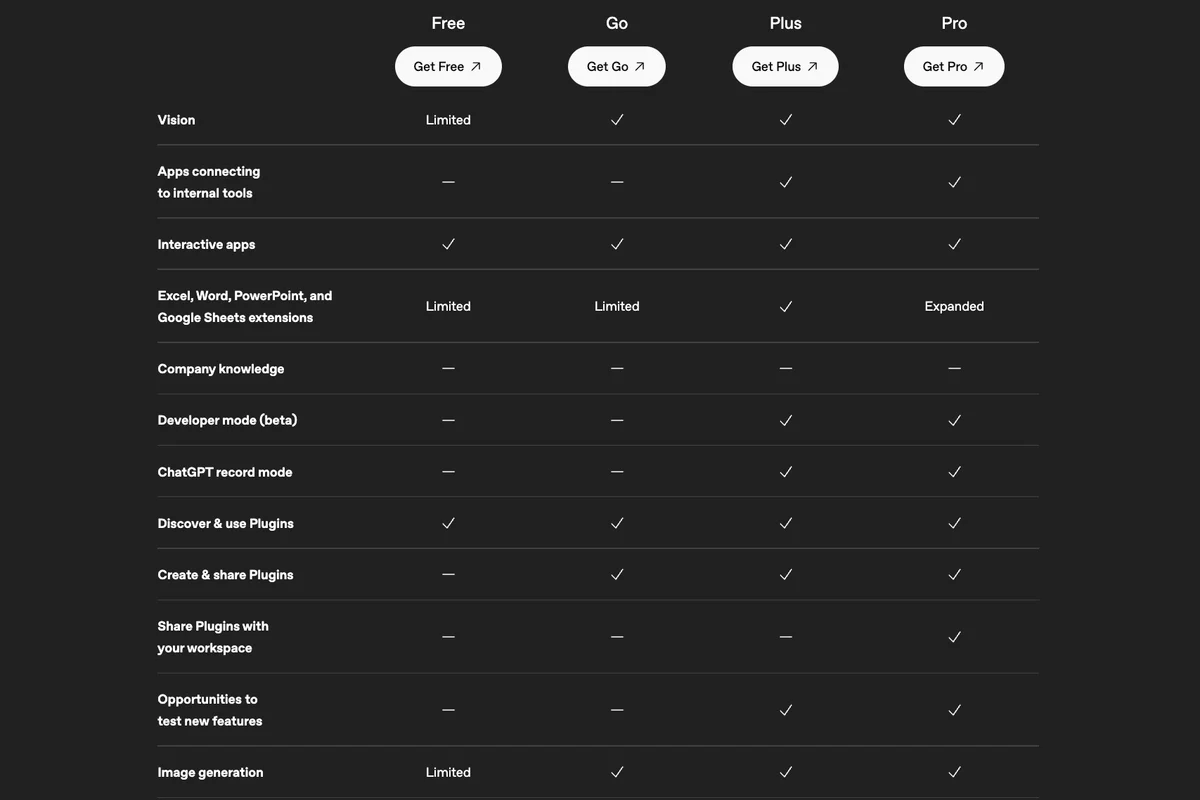
This is where OpenAI's own pages disagree with each other, and with what our account did. The personal plans table on chatgpt.com/pricing has a row for Developer mode (beta) with a dash for Free and Go and a tick for Plus and Pro:
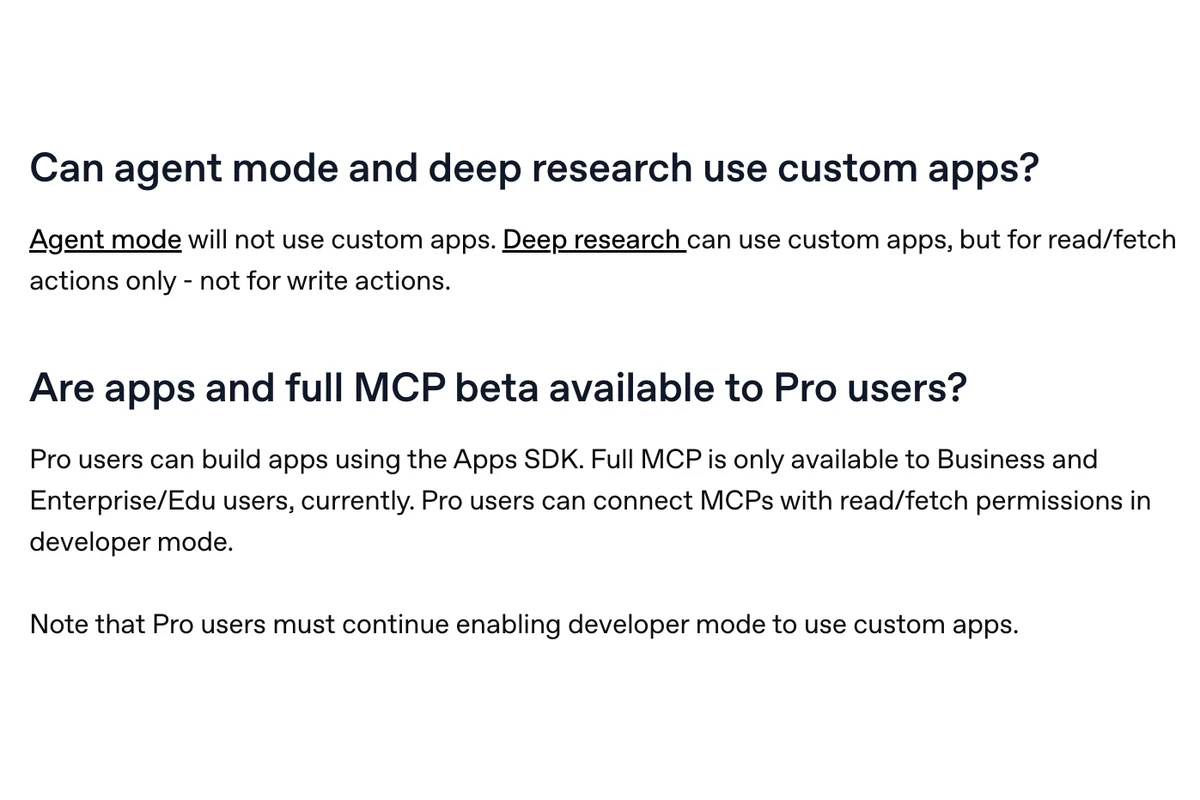
The Help Center article on developer mode and MCP apps, updated four days before we read it, says something narrower. Full MCP with write actions is described for Business, Enterprise and Edu, Plus is not mentioned at all, and Pro gets this:
Pro users can build apps using the Apps SDK. Full MCP is only available to Business and Enterprise/Edu users, currently. Pro users can connect MCPs with read/fetch permissions in developer mode.
And our Free account, which according to the pricing table has no developer mode, had Add custom MCP server in its menu, accepted Meta's server and offered to connect it. What we did not do is sign in and ask it to post, so we cannot tell you whether a Free account would then be allowed the write. Our reading of the three: adding a server is now open more widely than the pricing table says, and whether a write tool runs is decided after that, by plan and by the plugin's permissions. If posting matters, test one harmless post before you build a habit on it.
The warning in the dialog is the one to take seriously. In OpenAI's words, an untrusted server may access or steal information shared through app use, or trick ChatGPT into using tools in unintended ways, including changing or deleting data. OpenAI's own MCP guide recommends choosing official servers hosted by the service providers themselves; for Instagram publishing there is no such server, so the next best is a company you could name in a complaint. Grant only the publishing scopes at Meta's consent screen, not everything it offers.
Route 3: Can I run my own Instagram MCP server with ChatGPT?
Yes, with one difference from Claude. ChatGPT on the web connects to remote servers only; the Help Center answers the question about local servers with Not directly. So an open source Instagram server running on your laptop needs either OpenAI's Tunnel option in the dialog above or the ChatGPT desktop app, which, according to OpenAI's MCP page, has its own Settings, MCP servers, Add server, with STDIO or Streamable HTTP.
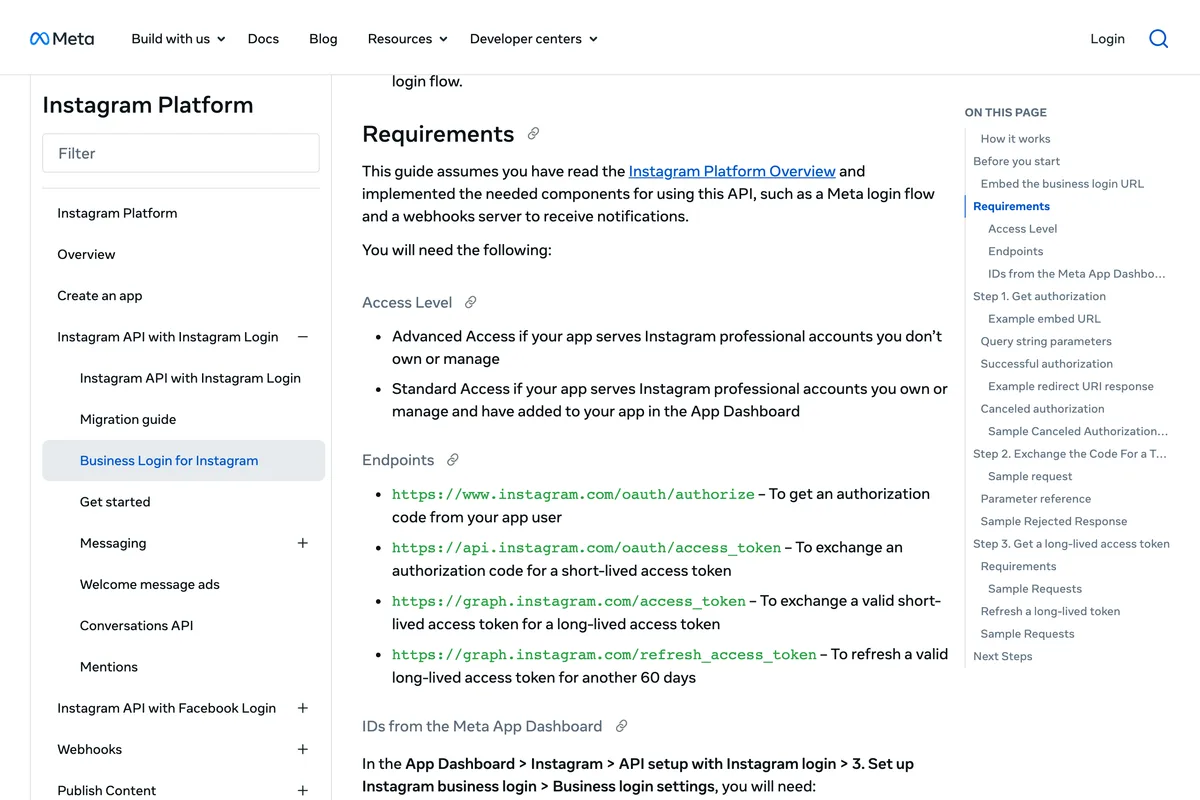
The Meta side is the same as for any other client, and it is lighter than most guides say. For an account you own, Meta's Business Login page puts you on Standard Access, which needs no app review and no business verification:
Standard Access if your app serves Instagram professional accounts you own or manage and have added to your app in the App Dashboard
With Instagram API with Instagram Login there is no Facebook Page either. The token you generate in the App Dashboard lasts 60 days and must be refreshed while it is still valid; a server you run yourself has to do that, or it stops working in month three. Which open source servers are worth reading, and which two of the most starred ones use your password instead of Meta's API, is set out in our Claude version of this guide. The server does not care which chatbot calls it.
What do the other ChatGPT to Instagram guides get wrong?
We read the pages that rank for connect ChatGPT to Instagram, how to connect Instagram to ChatGPT, ChatGPT Instagram integration and ChatGPT MCP, and checked each claim against OpenAI's pages, Meta's pages and our own account. Several are vendor pages selling the route they describe, which is fine; the problem is the numbers they copied.
| Claim | Who says it | What the source says |
|---|---|---|
| Windsor's ChatGPT connector publishes posts, reels and stories | Windsor.ai, 3 Oct 2026 | Windsor's own listing in ChatGPT, 12 Oct: Instagram publishing is not enabled |
| There is no official ChatGPT Instagram integration, so build a custom GPT with an Action | Carly, DM Daddy | True of Meta, but ChatGPT's directory lists plugins that post; Actions are not needed |
| The Graph API supports only accounts connected to a Facebook Page | Carly, Chrombyte | Meta: Instagram API with Instagram Login needs no Page |
| You must pass Meta App Review | Carly | Meta: Standard Access covers accounts you own or manage, no review |
| Meta restricts publishing via the API for most account types | DM Daddy | Meta: any business or creator account can publish through the API |
| The free ChatGPT tier cannot add custom MCP connectors at all | TimeToPost | Our Free account added one on 12 Oct 2026; whether writes then run, we did not test |
| Developer mode is on the free tier, no paid plan needed | Chrombyte | OpenAI's pricing table says Plus and Pro; the menu item was there on Free anyway |
| Custom MCP connectors come with developer mode on Plus and Pro | SocialClaw, Hjarni, Upload-Post | OpenAI Help Center: Pro gets read and fetch only, Plus is not named; full MCP is Business, Enterprise, Edu |
| Meta's only official MCP is the Ads MCP | Porter Metrics | Meta lists three, ads, developer apps and WhatsApp; none posts to Instagram |
| ChatGPT desktop MCP support is still rolling out | DM Daddy, Sociahive | OpenAI documents MCP servers in the desktop app and custom servers on the web |
What have we learned publishing to Instagram ourselves?
Should a small business connect ChatGPT to Instagram?
For reading, yes, and it takes ten minutes: Windsor, Metricool or The Viral Sauce pulling your reach and best posts into a chat is a genuinely useful way to plan next week. For publishing, the plugin is the easy part. ChatGPT still has to hand over a JPEG at a public address with a caption, it will ask you before each post, it does not run from the phone app, and the writing and the picture are still yours to get right. Our tested ChatGPT prompts for Instagram reels and the Instagram post size guide cover those two halves.
If what you want is finished, on brand posts going out on a schedule, the connection is the wrong end to start from. We built AI Social Media Now to make the posts from your website and publish them through this same Meta API, with no token, plugin or server address to manage. If you want a ChatGPT workflow you control, a directory plugin with Read, Write capabilities is the sensible start, and if a post refuses to go out, why you can't schedule Instagram posts and Meta Business Suite not posting to Instagram are where most of the causes are written down.
Frequently asked questions
Can ChatGPT post to Instagram?
Yes, through a plugin or a custom MCP server that wraps Meta's Instagram API. On 12 October 2026 ChatGPT's directory listed SocialClaw, Instagram & TikTok by 1Social, Metricool and Postiz as able to post or schedule. ChatGPT asks for confirmation before a write action by default.
Is there an official Instagram app or MCP server for ChatGPT?
No. Meta's MCP overview lists three servers, for ads, for managing developer apps and for WhatsApp Business, and validates ChatGPT on the web as a client, but none publishes organic Instagram posts. Every Instagram plugin in ChatGPT is made by a third party.
How do I add an MCP server to ChatGPT?
Open chatgpt.com/plugins in a browser, click Add, then Add custom MCP server. Enter a name and the server URL, choose OAuth or no authentication, tick I understand and want to continue, and click Create as a plugin. ChatGPT then asks you to sign in to the service if it uses OAuth.
Can I connect ChatGPT to Instagram on the free plan?
Directory plugins can be discovered and used on every plan, including Free. OpenAI's pricing table lists developer mode for Plus and Pro only, but our Free account could add a custom MCP server on 12 October 2026. We did not test whether a Free account can then run write actions.
Does ChatGPT Plus or Pro allow posting through a custom MCP server?
OpenAI's pages disagree. The pricing table lists developer mode for Plus and Pro, while the Help Center says full MCP with write actions is for Business, Enterprise and Edu, and that Pro users can connect MCPs with read and fetch permissions only. Directory plugins with write capability are the safer route on a personal plan.
Does it work in the ChatGPT mobile app?
No. OpenAI's Help Center answers the question Are MCP apps available on mobile with No, web only. Set up and use Instagram publishing from ChatGPT in a browser, or in the desktop app, which has its own MCP server settings.
Can ChatGPT post an image it generated straight to Instagram?
Not directly. Meta's API accepts only JPEG files hosted at a public URL, and ChatGPT's images stay inside the chat until something uploads them. A plugin has to convert the image and host it, or you upload it yourself and give ChatGPT the link.
How many posts a day can ChatGPT publish to Instagram?
Meta limits each Instagram account to 100 API-published posts in a rolling 24 hours, with a carousel counting as one. The limit is shared by every tool posting to the account, so ChatGPT and a scheduler draw on the same allowance.
How we researched this
- The ChatGPT screenshots are of our own Free account, taken on 12 October 2026: the plugin directory searched for Instagram, the listing pages of SocialClaw and Windsor.ai Instagram, the Add custom MCP server dialog, and the Connect screen ChatGPT showed after we added Meta's ads server. We stopped at that screen, did not sign in to Meta, and deleted the plugin straight afterwards. We did not install any third party Instagram plugin, so nothing here says how well one publishes over weeks.
- Every rule about what ChatGPT allows was read on OpenAI's own pages on 12 October 2026: the Help Center article on developer mode and MCP apps, the articles on connected apps and on plugins, the developer guides Add custom MCP server and Building MCP servers, and the personal plans table on chatgpt.com/pricing, photographed logged out. Where they disagree with each other, and they do, we quote both and say what our account did.
- Every rule about what Instagram accepts comes from Meta's Content Publishing guide, re-read on 12 October 2026, and from the Business Login and token pages we photographed for our Claude version of this guide on 10 October. Meta's list of its own MCP servers was photographed on 12 October.
- The video was chosen after reading its transcript. The vendor pages that rank for connect ChatGPT to Instagram and the related searches were read in full on 12 October 2026; Google answered two of our six queries, so the ranking for the other four is DuckDuckGo's. Reddit threads could not be read and are not cited.
- Our own product publishes to Instagram through the same Meta API every route here ends at. The section on what we learned is from our own code, and the call to action at the end is ours, so read it knowing that.
Sources
- 1Developer mode and MCP apps in ChatGPT
- 2Connected apps in ChatGPT
- 3Plugins in ChatGPT
- 4Add custom MCP server
- 5Building MCP servers for plugins and API integrations
- 6Model Context Protocol
- 7ChatGPT pricing, personal plans
- 8Connect AI agents to Meta with MCP
- 9Manage ads from an AI agent with Meta ads AI connectors
- 10Instagram Platform: Content Publishing
- 11Business Login for Instagram
- 12Instagram Platform: Overview
- 13How to Connect Instagram to ChatGPT + 3 Ways to Use It
- 14Instagram to ChatGPT integration
- 15Instagram for ChatGPT
- 16ChatGPT Instagram integration
- 17ChatGPT MCP servers
- 18Instagram ChatGPT tutorial
- 19Post to Instagram from ChatGPT
- 20Can ChatGPT post to social media?
- 21Connect ChatGPT and Claude to Instagram DMs
- 22How to connect ChatGPT to your social media accounts
- 23ChatGPT social media
- 24How to use MCP with ChatGPT
- 25Connect ChatGPT to social media