How to go LIVE on TikTok in 2026: the steps, the rules and LIVE access
Four taps if your account qualifies, a grey checklist if it does not. We read every page TikTok publishes on going LIVE, photographed the rules where they stand, and found four official pages that give four different answers to who is allowed.

If your account qualifies, going LIVE on TikTok takes four taps and no setup. If it does not, the same taps lead to a screen called Get access to go LIVE with a checklist on it, and the items you have not met shown in grey. Most of the confusion around this, and most of the searches, come from people looking at that grey list and not being told what it means.
Our articles are still written by humans!
Get human written articles in your Google feed.
TikTok has written the rules down, though not in one place, and not consistently. We read every page it publishes on going LIVE on 4 October 2026: the Help Center, LIVE Studio's help pages, the LIVE Creator Hub, the Creator Academy and the Community Guidelines. Below are the steps, every requirement with a photograph of where TikTok states it, the reasons the button goes missing, and what a business can do with a LIVE once it has one.
| Your situation | What decides it | What to do |
|---|---|---|
| You see LIVE and Go LIVE | Nothing, you qualify | Add a title, check settings, tap Go LIVE |
| You see Get access to go LIVE | The checklist on that screen | Tap it, read the grey items, meet them, reapply |
| You are asked to confirm your age | Being 18, proven to TikTok | Use one of the methods offered; without it you cannot go LIVE |
| No LIVE option at all | Your country, or a restriction on your account | Check your inbox and system notifications for a restriction |
| You want to stream from a computer | LIVE access in LIVE Studio | Download LIVE Studio, log in, check Your LIVE access |
| LIVE Studio access disappeared | A trial that lapsed, or a suspension | Reapply once you meet the requirements again |
How do you go LIVE on TikTok?
On a phone, from the TikTok app. TikTok's Help Center gives four steps:
- In the TikTok app, tap the Add post + button at the bottom.
- Tap LIVE at the bottom. The page warns that you may need to scroll across, because LIVE sits at the end of the row of camera modes.
- Add a title, use LIVE tools or adjust your LIVE settings.
- Tap Go LIVE to start.
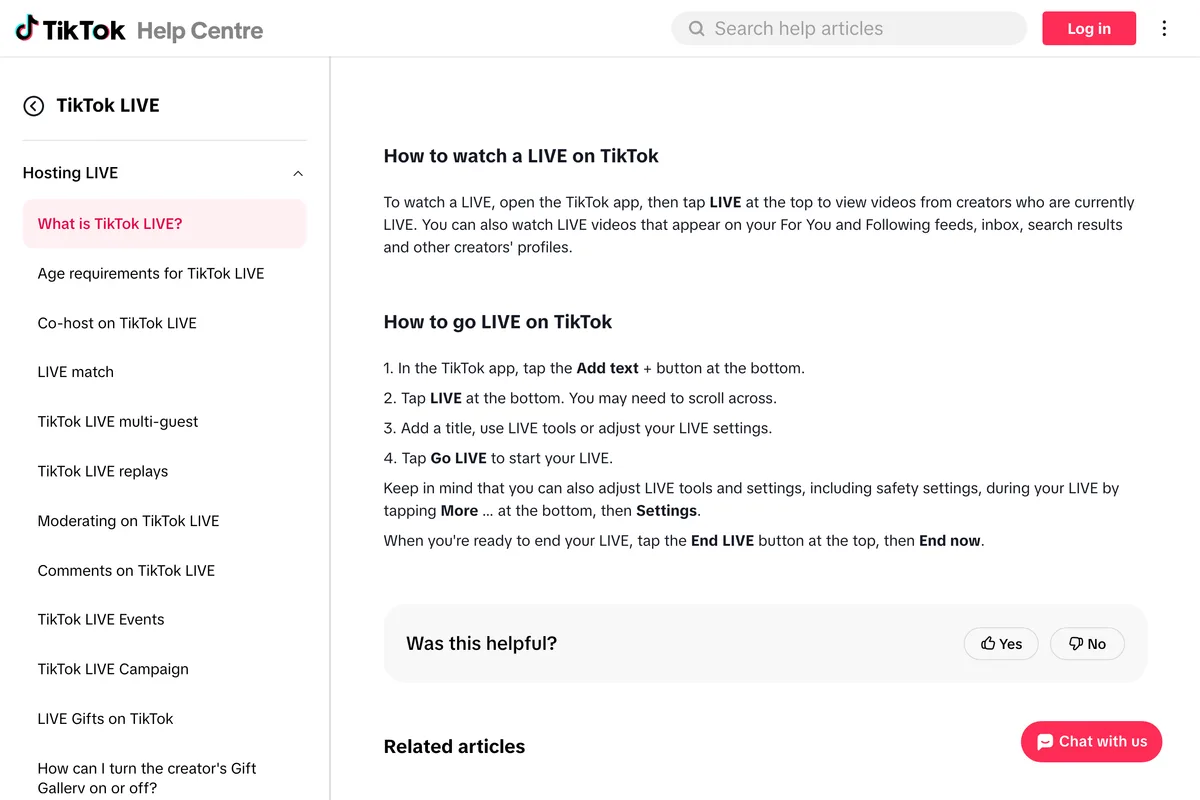
Settings, including safety settings, can also be changed during the stream: tap More at the bottom, then Settings. The Creator Academy adds that you can appoint up to 20 moderators once you are LIVE, and that choosing a cover image belongs to step three.
That is the whole route for an account that qualifies. If yours does not, step two looks different, and TikTok describes that screen only in its LIVE Studio FAQ, updated on 19 August 2026:
Swipe left to go to the LIVE section, tap Get access to go LIVE, and check if you meet the access requirements. If you meet the requirements, simply tap Get access. If not, the unmet requirements will be displayed in gray at the top, and you can reapply after fulfilling them.
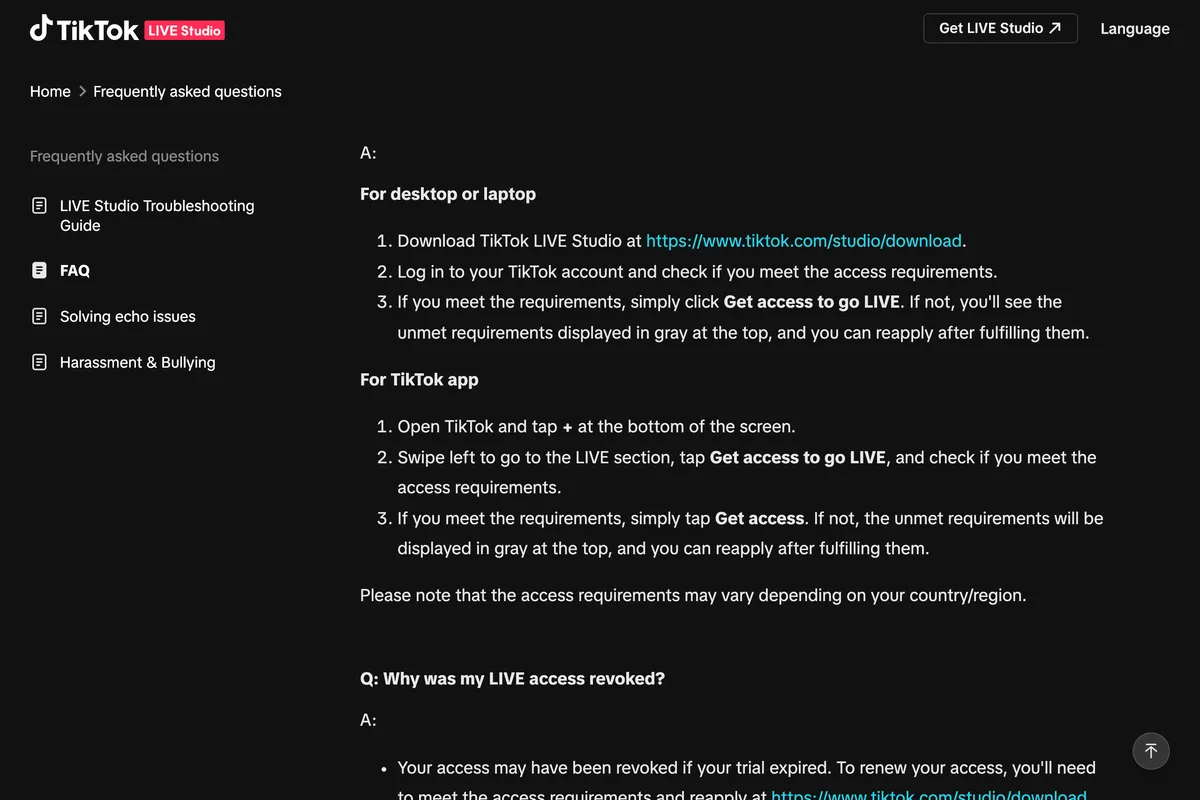
That grey list is the most useful thing in this article, because it is specific to your account and your country and it is current. Everything below explains what tends to be on it.
Who can go LIVE on TikTok?
The Help Center lists three conditions under Who can use LIVE on TikTok:
Be at least 18 years old to go LIVE. Be at least 18 years old (or 19 in South Korea) to send or receive Gifts during a LIVE. Have 1,000 followers to go LIVE (may vary across regions).
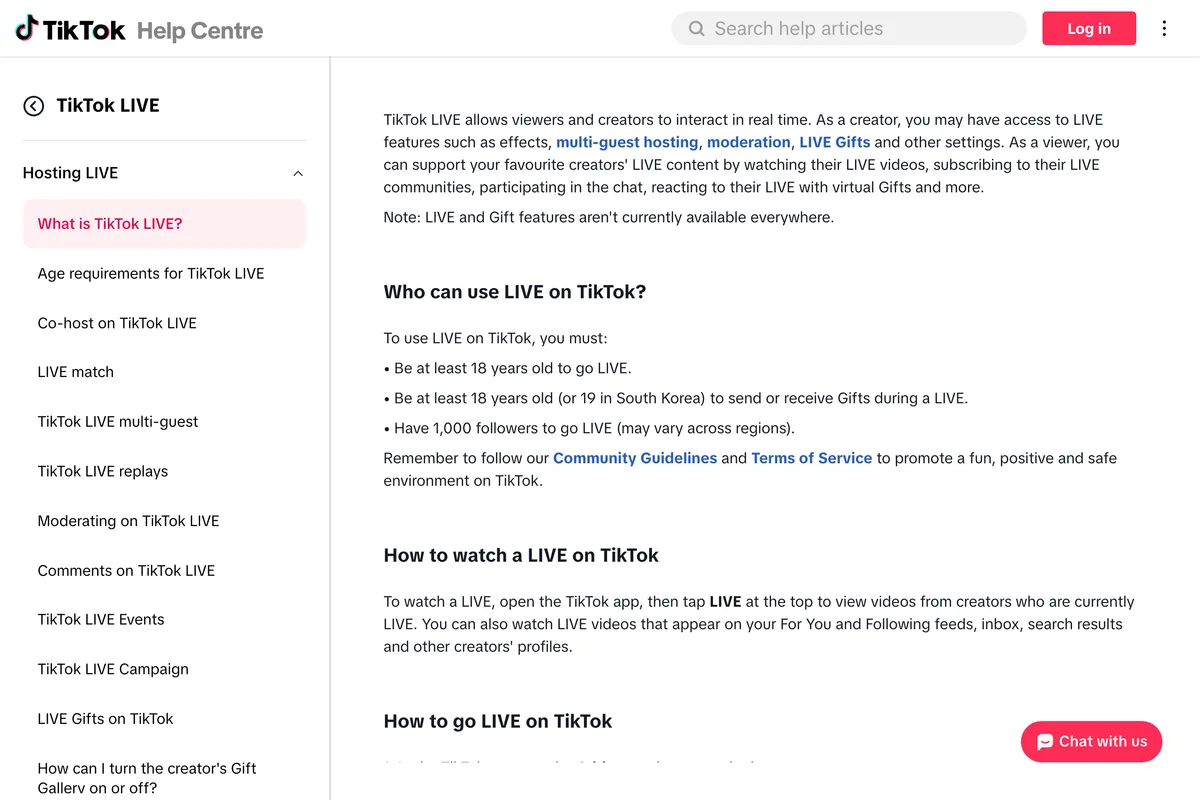
Two words in that list carry a lot: may vary. TikTok does not publish the figure for any other country, so 1,000 is the only threshold it states for going LIVE from the app. The note above the list matters too. Where LIVE is not offered, no follower count changes that.
The age rule is the stricter one, because TikTok checks it. Its page on age requirements for LIVE says it may ask you to confirm your age when you start a LIVE, and spells out what happens next:
If we can't confirm your age, you won't be able to go LIVE.
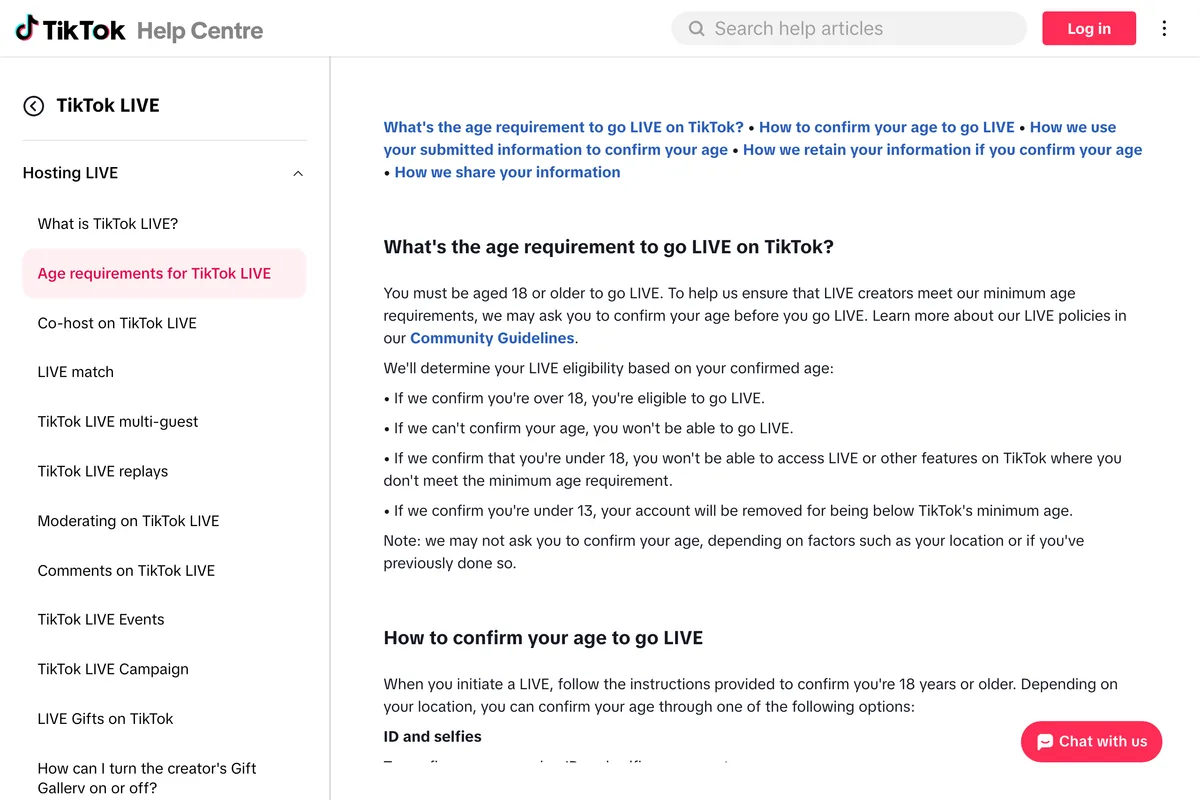
Depending on where you are, TikTok offers one or more of four ways to confirm: photos of a government ID plus three selfies from different angles; a live selfie with your ID through a company called Incode, which gives you 15 minutes and makes you wait 15 more if you quit halfway; a credit card authorisation with a small temporary charge that is refunded; or a facial age estimate from a live selfie, which a third party assesses and then deletes. If your age is confirmed as 18 or over, TikTok updates the date of birth on your account.
The Creator Academy words the age rule differently from the Help Center. Its Going LIVE! article, last updated on 18 August 2026, says:
If you're eager to go LIVE on TikTok, you must be 18 years old or meet the age of majority in your country.
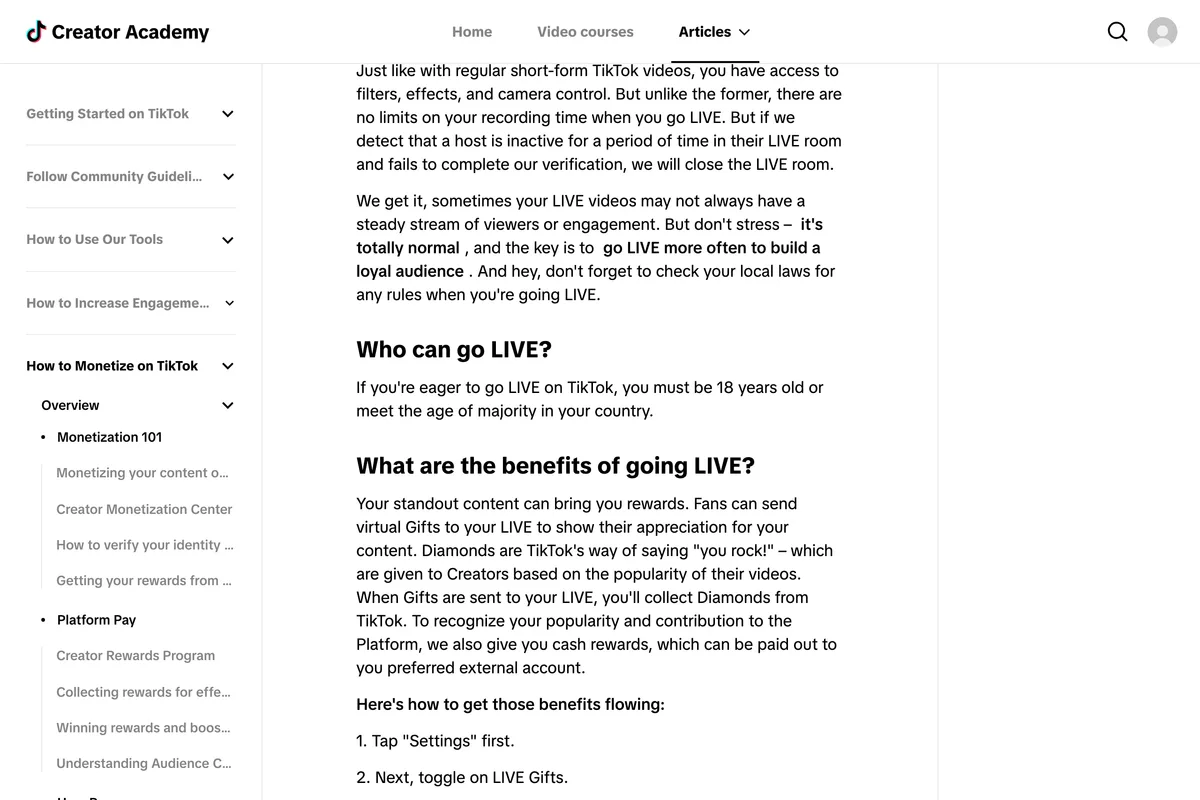
Where the age of majority is above 18, that reads as the higher number applying. The same article never mentions followers.
How many followers do you need to go LIVE on TikTok?
1,000, in every place TikTok writes a number down. But TikTok's own pages do not agree on whether there is one, and the disagreement is worth seeing in full before you trust any single page, including this one:
| TikTok page | Followers it states | Dated |
|---|---|---|
| Help Center, What is TikTok LIVE? | 1,000, may vary across regions | Undated, read 4 Oct 2026 |
| LIVE Studio Help, Apply for LIVE access | A certain number, varies by country; its screenshot shows at least 1,000 | Updated 11 Feb 2025 |
| LIVE Creator Hub, LIVE Studio access | 1,000 for gaming creators, 10,000 for everyone else, for LIVE Studio | 4 Sep 2024 |
| Creator Academy, Going LIVE! | None mentioned | Updated 18 Aug 2026 |
The 10,000 line is the one to be careful with, because it is still live on TikTok's site and still quoted. It comes from a September 2024 post announcing LIVE Studio, and it applied to the desktop app, not to going LIVE from a phone:
Non-gaming creators need a minimum of 10,000 followers to have access to LIVE Studio.
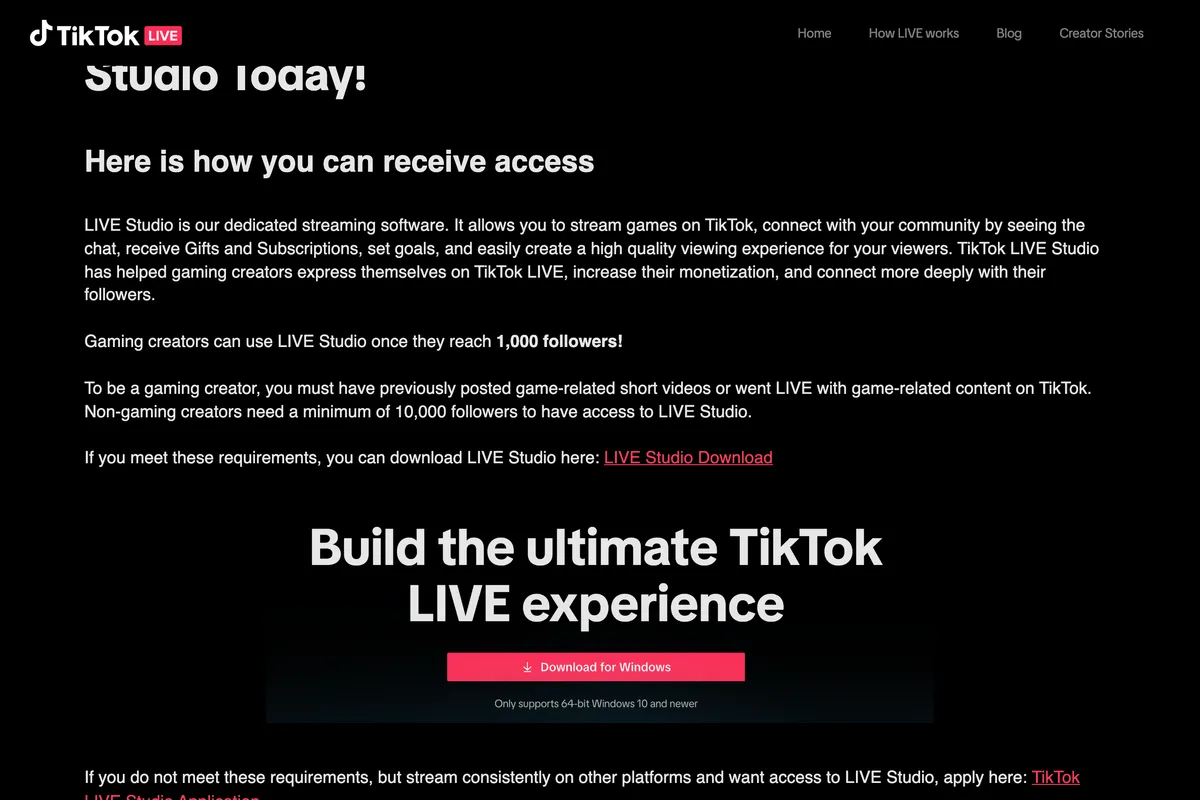
The newer LIVE Studio help page, updated in February 2025, no longer separates gaming from anything else. It says a certain number of followers and that the requirements vary by country or region. The screenshot TikTok uses on that page to show the access window lists the follower requirement as at least 1,000. Together with the Help Center, that is the best evidence we found that 1,000 is the current number on the phone and on the desktop, at least in the markets TikTok writes its English pages for.
And yet people go LIVE with fewer. On Reddit, in a thread started by someone with 70 followers, one reply says they got a notification, applied, and were approved with 135; in another thread a user says they were approved with 5. Others, with 160 and 200 followers, say they were refused, one of them for LIVE Studio specifically. We cannot verify any single account, but the pattern fits what TikTok does say: the requirements may vary, they are checked per account, and the screen tells each person their own. Treat 1,000 as the rule and anything less as TikTok's discretion, not a method.
What is LIVE access on TikTok?
LIVE access is TikTok's name for permission to go LIVE. It is granted against a checklist, and it can be withdrawn. The clearest description is on the LIVE Studio help page. For someone already streaming on TikTok, it lists five conditions for instant access:
- Your TikTok account was created a certain number of days ago.
- You have gone LIVE for a certain amount of time recently.
- You have a certain number of followers.
- Your LIVE access has not been suspended recently.
- No current access suspension or revocation.
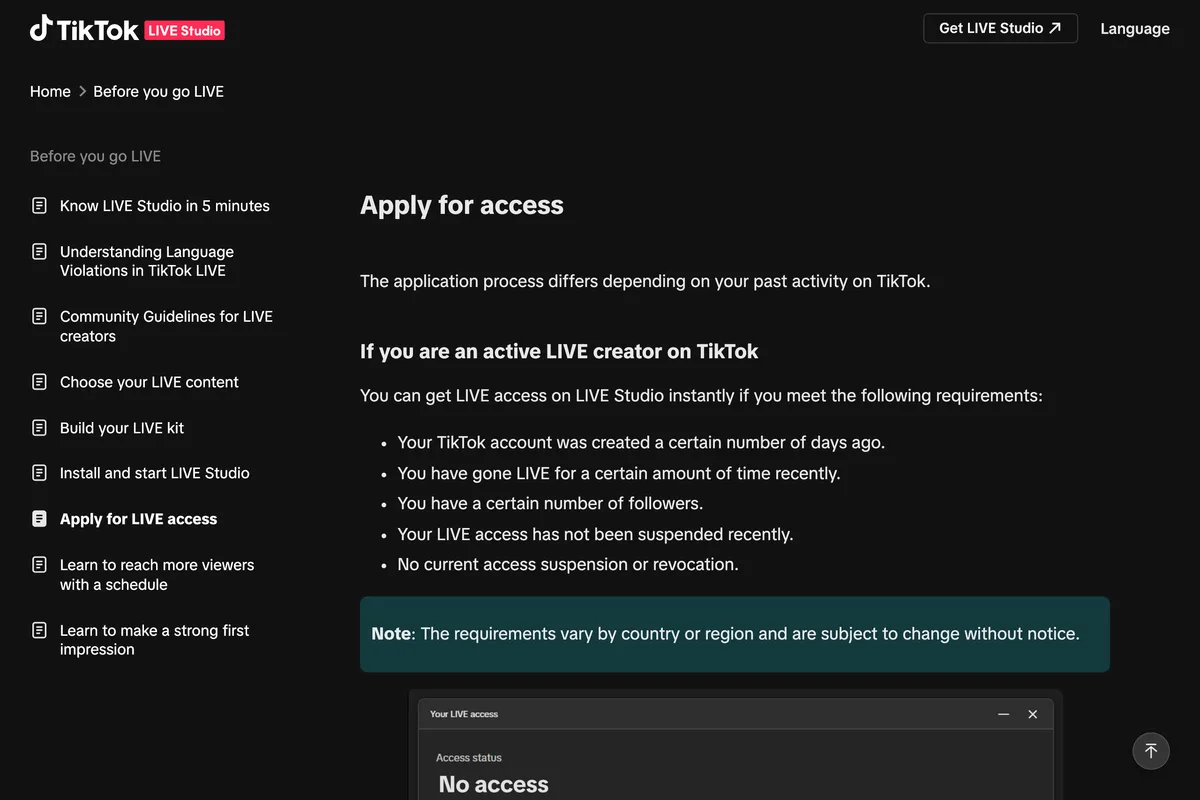
The page hides its numbers, but its pictures do not. TikTok illustrates the access window with a screenshot of a real one, and it shows how LIVE Studio hands out access in three stages:
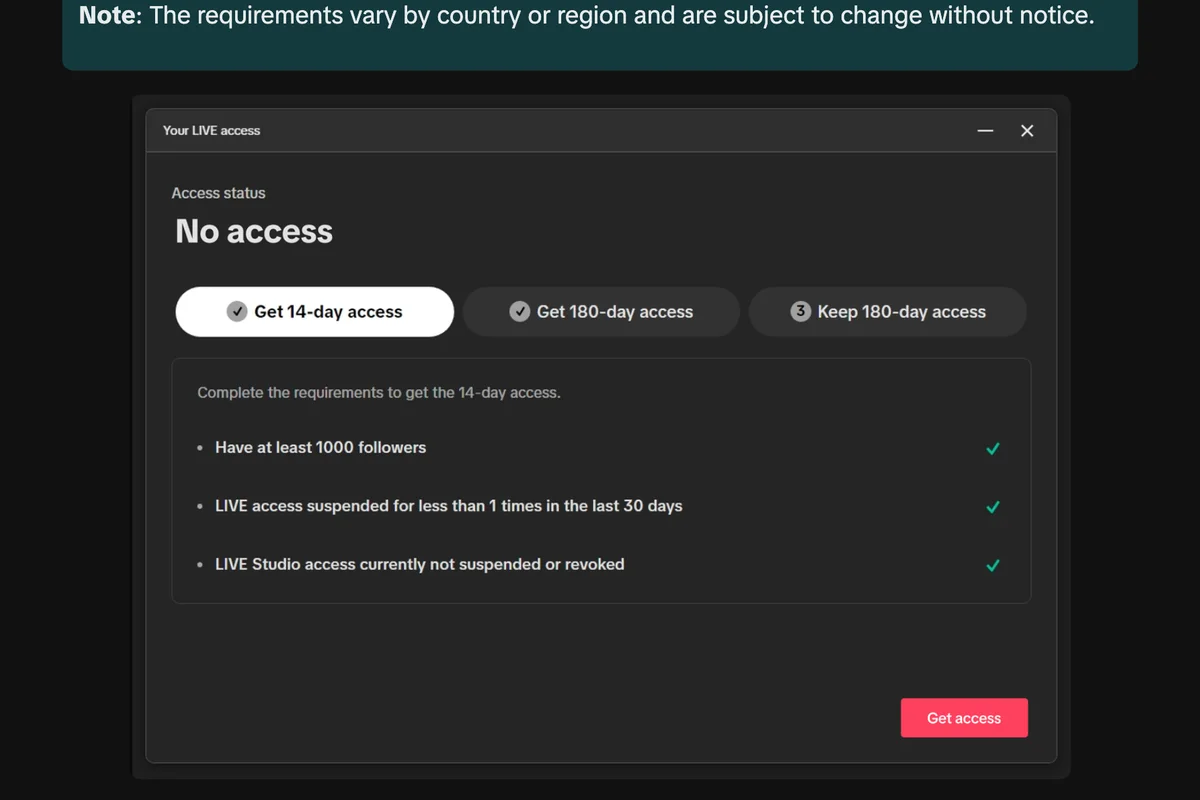
- Get 14-day access: at least 1,000 followers, LIVE access suspended fewer than once in the last 30 days, and LIVE Studio access not currently suspended or revoked.
- Get 180-day access: no suspension or revocation during a 7 day period, completed before the 14 days run out.
- Keep 180-day access: no suspension during the 180 days. The page says access is renewed automatically for longer periods if there has been none recently.
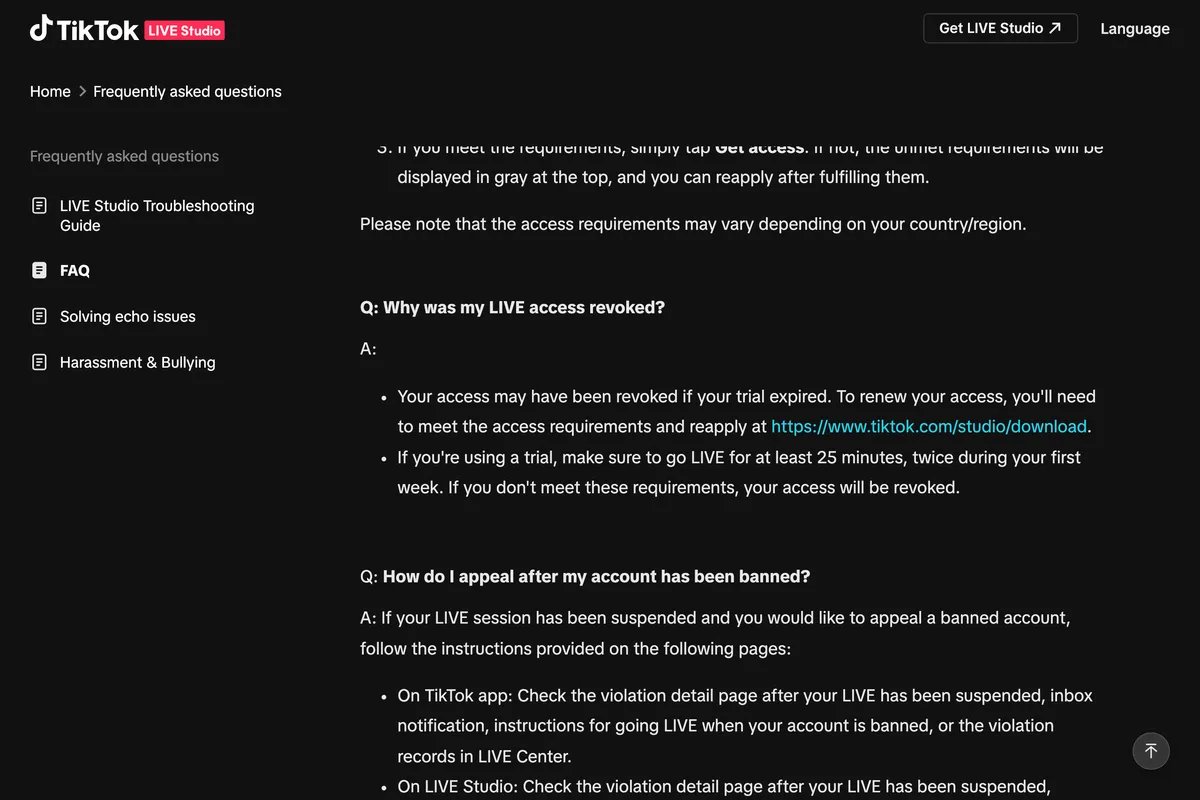
There is also a trial, and it has a condition people miss. From the LIVE Studio FAQ:
If you're using a trial, make sure to go LIVE for at least 25 minutes, twice during your first week. If you don't meet these requirements, your access will be revoked.
If you stream on Twitch, YouTube or elsewhere but not on TikTok, the same help page offers a separate route: an application form about your channel on the other platform, which it says can take days to review, with the answer arriving as a notice in the TikTok app.
Why can't I go LIVE on TikTok?
Start with the grey list on the Get access to go LIVE screen, because it names your reason. If you cannot see that screen, or want to know what each item means, these are the causes TikTok's pages give, roughly in the order they catch people:
- Under 1,000 followers, or under whatever your region requires.
- Age not confirmed. Under 18 on the account, or 18 but not yet proven when TikTok asked. Unconfirmed counts as no.
- LIVE is not offered where you are. The Help Center says LIVE and Gift features are not available everywhere.
- A recent suspension. The access checklist wants fewer than one suspension in the last 30 days, which means none.
- A restriction on LIVE features. TikTok's LIVE feature guidelines say restricted features may be greyed out or unavailable, and that you are told in your inbox and system notifications, with the reason and how long.
- A lapsed LIVE Studio trial, if the problem is on a computer.
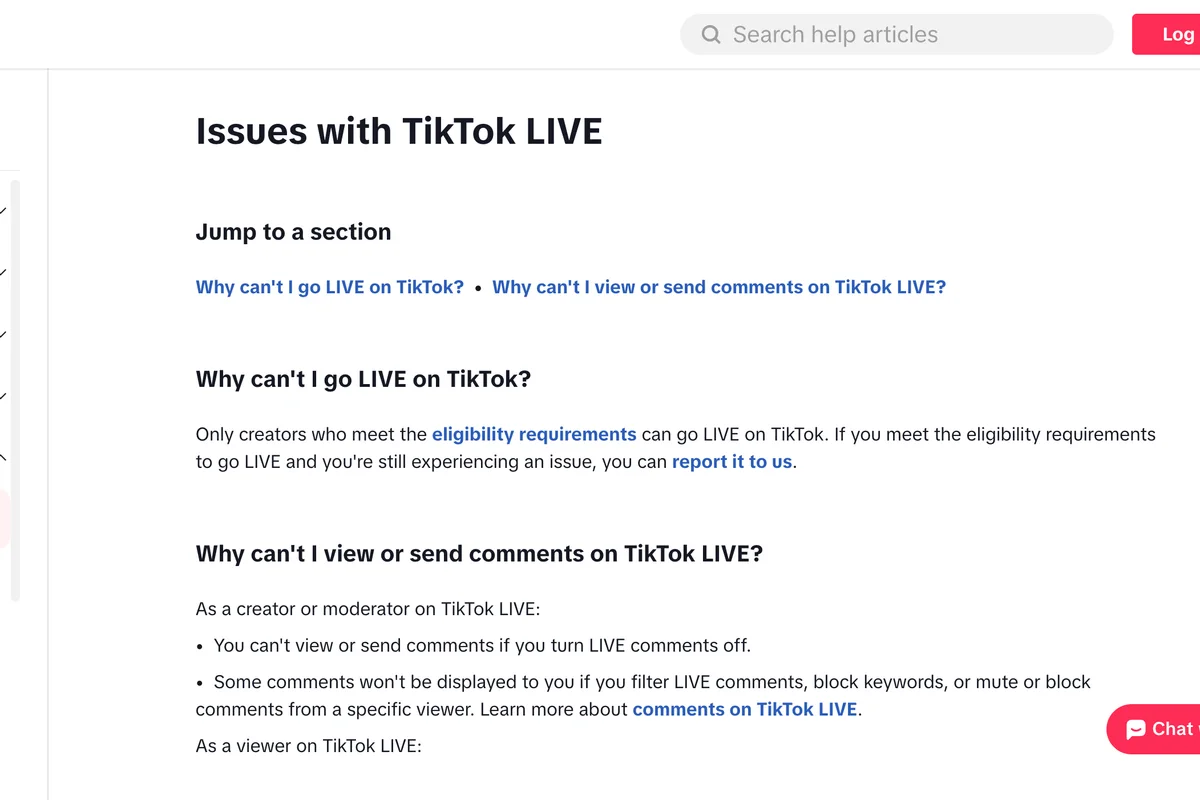
TikTok's own Help Center page titled Why can't I go LIVE on TikTok? is two sentences long, and the second one matters more than it looks:
Only creators who meet the eligibility requirements can go LIVE on TikTok. If you meet the eligibility requirements to go LIVE and you're still experiencing an issue, you can report it to us.
That is why the most repeated tip online does not work. Several guides suggest going to Settings and privacy, Report a problem, and telling support you could go LIVE before, in the hope that someone switches it on. Hootsuite's guide says plainly that they tried it and it did not work, and SocialPilot's says it only helps eligible creators with a real technical fault. The report form is for people who already qualify. If you do, use it; if you do not, it is a message to a queue that will check the same list you were shown.
If a restriction is the reason, the appeal sits in those system notifications. The LIVE Studio FAQ says a violation can be appealed only once and the result normally arrives within 24 hours: lifted, kept, or the ban period adjusted.
What will not help: reinstalling the app, clearing the cache or logging out and in. Those are the first tips on most pages we read, and none of the causes TikTok lists is a cache problem. Updating the app is worth doing once, because the LIVE screen is part of it.
Can you go LIVE on TikTok without 1,000 followers?
Not by any route TikTok documents. Its pages state 1,000 or a certain number, and publish nothing lower for any country. Two routes come up in every guide, and both are narrower than they sound.
Joining someone else's LIVE as a guest. The multi-guest page explains how: during their LIVE, tap Multi-guest, then Request, and once they accept, tap Go LIVE. It also warns the option may not be available for everyone. What it does not say is who may be a guest. Enough people report seeing the message LIVE access is needed to go LIVE as a guest that it is a search of its own, which suggests guests need some form of access too. Some pages put the guest threshold at 200 followers; TikTok publishes no figure, and we could not confirm one.
Applying as a streamer from another platform. This is real, and it is for LIVE Studio on a computer. It needs an existing channel elsewhere to point to.
What is left is the slow route, which for a business is also the useful one: post enough that 1,000 people follow the account. Our guide to what a small business should post and the four studies on the best time to post on TikTok are where we would start.
Should you pay an agency to unlock LIVE?
Offers to unlock LIVE with zero followers turn up in every thread on this question, some from accounts calling themselves agencies partnered with TikTok. TikTok does run a program for LIVE agencies, called Creator Networks, and its own pages say what that partnership amounts to:
TikTok LIVE Creator Networks are independent third-party businesses that operate on the TikTok platform on their own behalf. TikTok does not endorse, sponsor, or assume any responsibility for the business activities or conduct of any Creator Network.

TikTok publishes nothing about agencies granting access, and none of its pages describe a paid route. One reply in a Reddit thread on the question puts the sensible rule well: "If they charge to 'unlock' it, i'd assume scam." Buying followers to reach 1,000 is the other shortcut on offer, and it trades a LIVE button for an account full of followers who will never watch.
What other guides get wrong
We read eleven of the guides that rank for these searches. Most get the basics right. These are the claims we found that TikTok's current pages contradict, so you know which advice to drop:
| What a guide says | Who says it | What TikTok's pages say |
|---|---|---|
| You must be 16 to go LIVE | Hootsuite, Later, Buffer | 18, on every TikTok page we read, and 19 in South Korea for Gifts |
| You need at least 50 followers | Shopify | 1,000, may vary across regions; TikTok states no 50 anywhere |
| TikTok does not save your LIVE | Restream | Replays are kept for 30 days to view, download or clip |
| End the LIVE with the X at the top left | Hootsuite, Later | End LIVE at the top, then End now |
| Non-gaming creators need 10,000 for LIVE Studio | Shopify | TikTok's 2024 figure; the 2025 LIVE Studio page shows 1,000 |
| Both host and guest need 1,000 followers | DemandSage | The guest page sets no follower number either way |
| Report a problem to unlock LIVE | Several guides | Reports are for creators who already meet the requirements |
The 16 is the one that matters most. It was TikTok's minimum years ago and is still printed in guides that carry this year's date, so a 17 year old reading them will spend an afternoon looking for a setting that does not exist for them.
How do you go LIVE on TikTok from a computer?
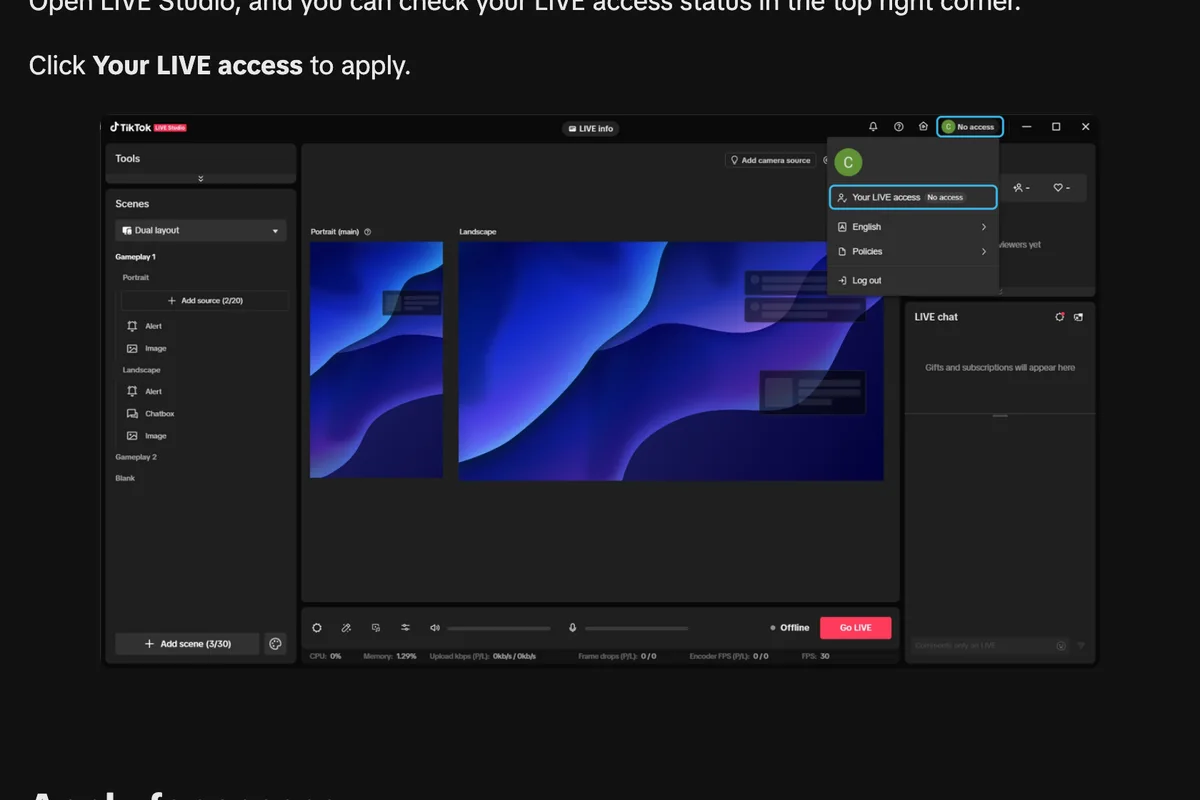
With LIVE Studio, TikTok's own streaming app for Windows and macOS. The FAQ gives the route: download it from tiktok.com/studio/download, log in with your TikTok account, and check the access requirements. Your status sits in the top right corner under Your LIVE access.
Your computer has to keep up. The FAQ lists these minimums:
| Minimum | For co-host, multi-guest and effects | |
|---|---|---|
| Windows CPU | Intel Core i3 9th Gen or AMD Ryzen 5 3000 | Intel Core i5 11th Gen or AMD Ryzen 5 6000 |
| Windows GPU | NVIDIA GTX 10 series or AMD Radeon | NVIDIA RTX 20 series or AMD RX 5000 |
| Windows memory | 8 GB | 16 GB |
| Mac | Apple M1 with 8 GB, or an Intel iMac or Mac mini with i7 or i9 from 2019 on with 16 GB | Apple M2 Pro or higher with 16 GB, TikTok's recommended tier |
For gaming, TikTok's Community Guidelines also allow third party tools to share a screen, and the FAQ says TikTok will not alter your traffic because you use LIVE Studio or a tool like OBS.
How long should a TikTok LIVE be?
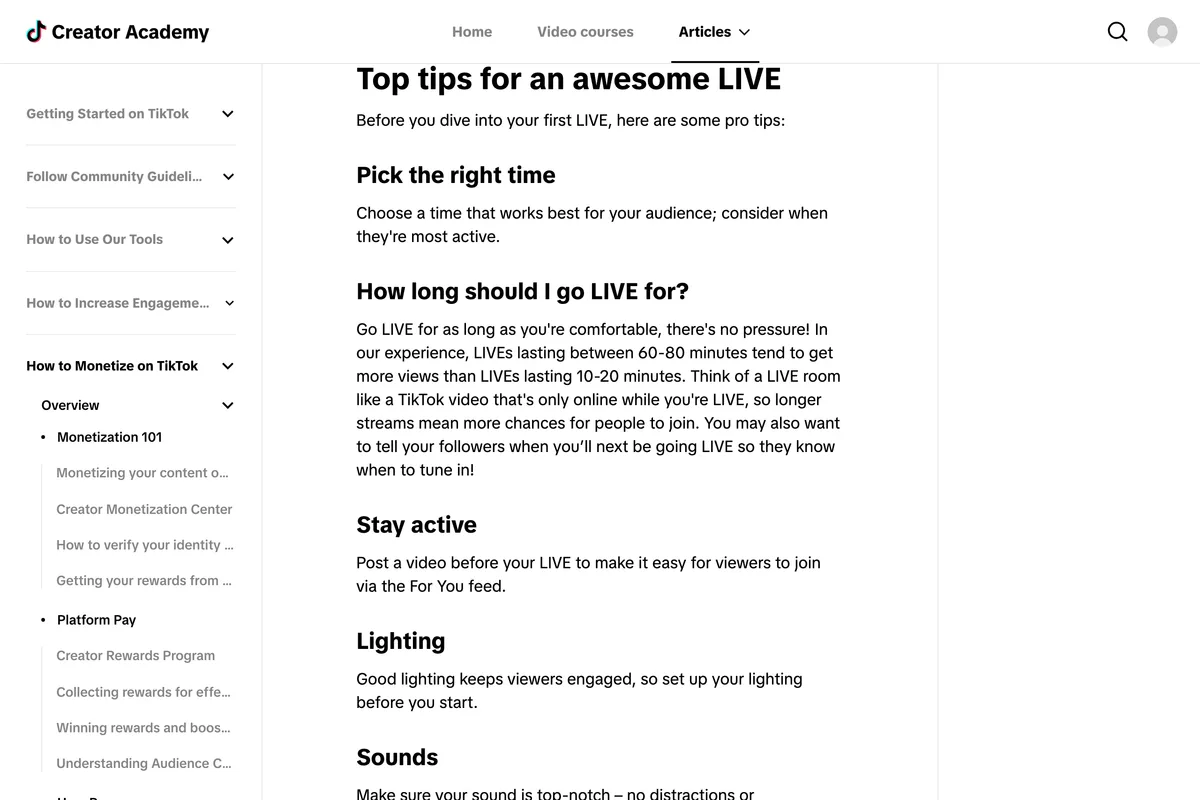
Longer than most people's first one. The Creator Academy gives the only number TikTok publishes on this:
In our experience, LIVEs lasting between 60-80 minutes tend to get more views than LIVEs lasting 10-20 minutes.
Two warnings come with it. The same article says that if a host is inactive for a while and fails TikTok's verification, the LIVE room is closed, and that static or looping visuals count against you. And it suggests posting a regular video shortly before you go LIVE, so viewers can reach the stream from the For You feed. Our piece on Instagram Reels prompts has short video ideas that work as that trailer on TikTok too.
Going LIVE as a business
Most of what is written about TikTok LIVE is about Gifts, which are a creator's income and of little use to a plumber or a café. TikTok has a separate article for businesses, updated on 1 October 2026, and it is about something else: collecting leads during a LIVE.
Go to Profile > Service+ > Get Leads to set up lead generation, then add your lead generation anchor in LIVE Settings before you go LIVE.
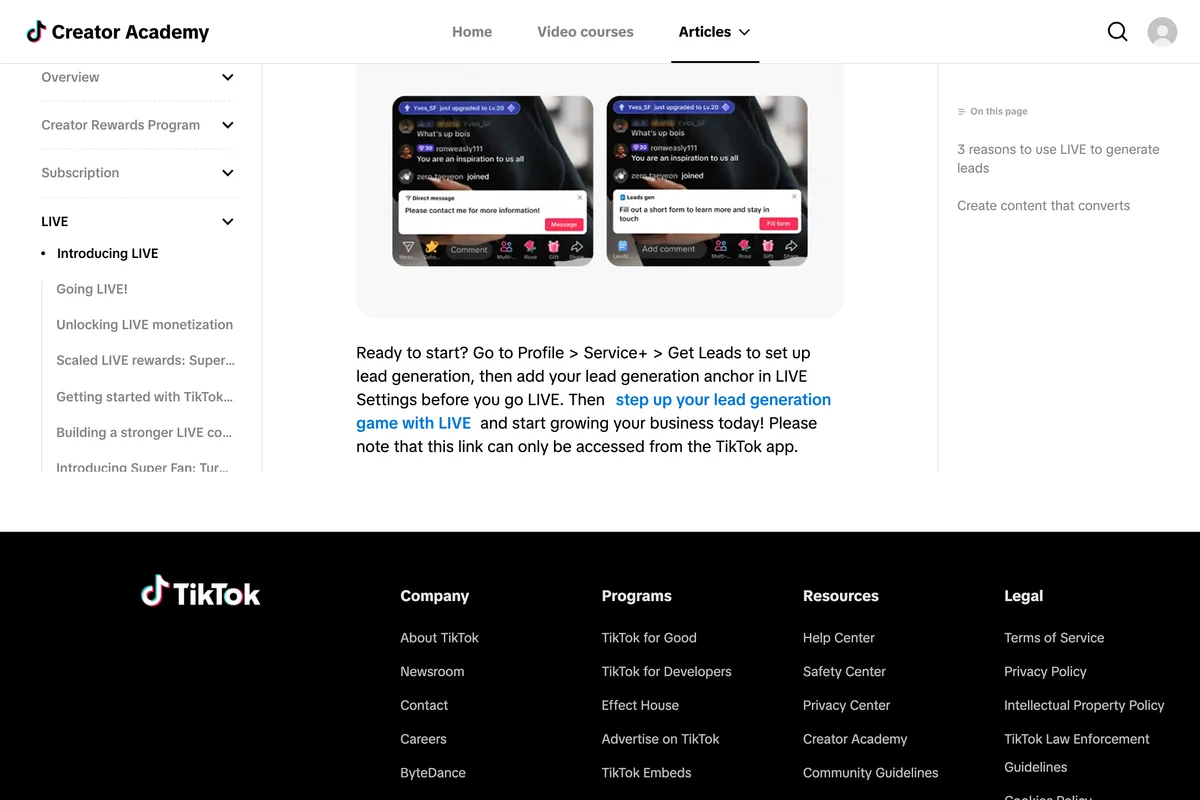
Two conditions come with it: you need a privacy policy to set up the form, and only one anchor can run per LIVE. The article suggests five formats that move a viewer towards contacting you: knowledge sharing, a free consultation, a product or service demo, a Q&A, and behind the scenes. All five are things a small business can do with a phone and a ring light.
Two rules in the Community Guidelines decide whether that LIVE is seen. Commercial content on LIVE must be disclosed with the commercial disclosure toggle. And sending viewers to buy elsewhere costs reach where TikTok runs its own shop:
we reduce visibility of content directing users to purchase products off-platform in markets where TikTok Shop is available.
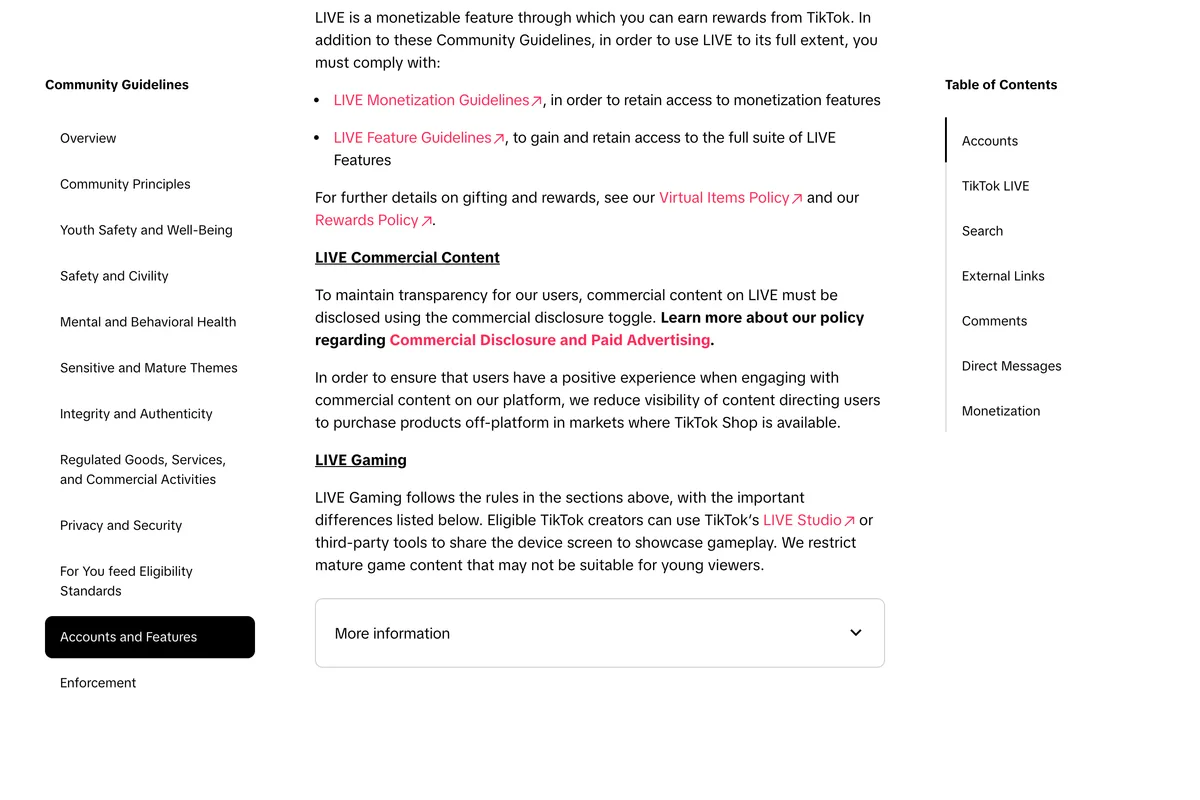
So in the US, the UK and the other TikTok Shop markets, a LIVE that ends in buy it on our website works against itself, and one that collects a lead or sells through TikTok Shop does not. Whether you can open a shop at all is a separate set of rules, covered in why you don't have TikTok Shop. And any music in the background has to be cleared for business use, which our guide to TikTok's Commercial Music Library explains.
Where to find your LIVE after it ends
TikTok keeps a recording for 30 days. Per the replays page: tap Profile, the menu button at the top, TikTok Studio, LIVE at the top, then LIVE recordings. From there you can download a replay, delete it, or clip a section and post the clip as a normal video, which is the cheapest way to turn one LIVE into a week of posts. Download anything you want to keep before the 30 days are up.
Before your first LIVE, in order
- Tap + and swipe to LIVE. If you see Get access to go LIVE, read the grey items; they are your account's actual blockers.
- Have an ID or a card ready, in case TikTok asks you to confirm you are 18.
- If you are under 1,000 followers, there is no documented shortcut. Spend the effort on posts, not on workarounds.
- On a computer, use LIVE Studio, and on a trial, stream for 25 minutes twice in the first week.
- Post a short video before you go LIVE, and plan for an hour, not ten minutes.
- As a business, set up the lead form first, switch on the commercial disclosure toggle, and do not send viewers to an outside checkout in a TikTok Shop market.
- Afterwards, clip the best minute from your LIVE recordings within 30 days.
Frequently asked questions
How do you go LIVE on TikTok?
In the TikTok app, tap the plus button at the bottom, swipe across to LIVE, add a title and adjust your settings, then tap Go LIVE. To end, tap End LIVE at the top, then End now. If your account does not qualify yet, you will see Get access to go LIVE instead, with the requirements you have not met shown in grey.
How many followers do you need to go LIVE on TikTok?
1,000, according to TikTok's Help Center, which adds that this may vary across regions. TikTok's own screenshot of the LIVE Studio access window shows the same figure. An older 2024 TikTok post says non-gaming creators need 10,000 for LIVE Studio, but the February 2025 LIVE Studio help page no longer says that.
Why can't I go LIVE on TikTok?
The most common reasons in TikTok's own pages are fewer than 1,000 followers, being under 18 or not having confirmed your age, LIVE not being offered in your country, a suspension in the last 30 days, or a restriction on LIVE features. Tap plus and swipe to LIVE: the Get access to go LIVE screen shows your unmet requirements in grey.
What does LIVE access mean on TikTok?
It is permission to go LIVE, granted against a checklist and withdrawn after suspensions. On a computer, TikTok's LIVE Studio access window shows three stages: 14-day access, which needs at least 1,000 followers and no suspension in the last 30 days, then 180-day access, then keeping 180-day access by avoiding suspensions. A LIVE Studio trial is revoked unless you stream for 25 minutes twice in the first week.
Can you go LIVE on TikTok without 1,000 followers?
TikTok documents no way to. It publishes no lower threshold for any country. Joining someone else's LIVE as a guest is possible, but many users report a message saying LIVE access is needed to go LIVE as a guest, and TikTok does not publish the guest requirement. Streamers with a channel on another platform can apply for LIVE Studio access separately.
How old do you have to be to go LIVE on TikTok?
18. TikTok's Creator Academy adds: or the age of majority in your country. You must also be 18, or 19 in South Korea, to send or receive Gifts. TikTok may ask you to prove your age with an ID and selfies, a selfie with ID, a credit card check or a facial age estimate, and if it cannot confirm your age you cannot go LIVE.
Can you go LIVE on TikTok at 16?
No. Every TikTok page we read on 4 October 2026 says you must be 18 to go LIVE, and 18, or 19 in South Korea, to send or receive Gifts. Guides from Hootsuite, Later and Buffer still say 16, which is out of date.
Does reporting a problem to TikTok unlock LIVE?
Not if you do not meet the requirements. TikTok's Help Center says only creators who meet the eligibility requirements can go LIVE, and that the report option is for those who meet them and still have an issue. Hootsuite tested the report trick and says it did not work.
How do I go LIVE on TikTok from my computer?
Download TikTok LIVE Studio for Windows or macOS from tiktok.com/studio/download, log in with your TikTok account, and open Your LIVE access in the top right to check or apply for access. TikTok's FAQ lists an Intel Core i3 9th Gen or Ryzen 5 3000 with 8 GB of memory, or an Apple M1, as the minimum.
How long should a TikTok LIVE be?
TikTok's Creator Academy says that in its experience LIVEs of 60 to 80 minutes tend to get more views than LIVEs of 10 to 20 minutes. It also warns that a LIVE room can be closed if the host is inactive and fails verification.
How we researched this
- Every rule here was read on TikTok's own pages on 4 October 2026: three Help Center articles, two LIVE Studio help articles, a LIVE Creator Hub post, two Creator Academy articles, the Community Guidelines and the LIVE feature guidelines. Each passage we rely on is photographed in place, most by our capture script and the LIVE Studio interface images by a second script that centres on the image rather than the text.
- The pictures of LIVE Studio's access window are TikTok's own screenshots, published on its LIVE Studio help page, and shown here inside that page. We did not log in to TikTok, apply for access or go LIVE ourselves, so what an individual account sees can differ, which TikTok itself says more than once.
- We also read eleven of the guides that rank for these searches, from Hootsuite, Later, Buffer, Sprout Social, Shopify, Restream, SocialPilot, DemandSage, QuickFrame, OneStream and Insta360, plus Reddit threads, to see what they claim. Where they state a number TikTok does not, we say so rather than repeat it. Reddit reports are quoted as what users say happened to them; we could not verify any individual account.
- TikTok edits these pages often and dates most of them. We give the date each one showed. If the wording you find is different, trust the page and tell us.
Sources
- 1What is TikTok LIVE?
- 2Age requirements for TikTok LIVE
- 3TikTok LIVE multi-guest
- 4TikTok LIVE replays
- 5Apply for LIVE access
- 6FAQ
- 7Go LIVE from Your Desktop Computer with LIVE Studio Today!
- 8Going LIVE!
- 9LIVE for Your Business: Engage, Convert, and Grow
- 10Accounts and Features
- 11Issues with TikTok LIVE
- 12How to Get LIVE Access on TikTok LIVE Studio
- 13How to Go Live on TikTok (With or Without 1,000 Followers)
- 14How to Go Live on TikTok: The Definitive 2025 Guide
- 15How to Go Live on TikTok (+ Why You Should)
- 16How to Go Live on TikTok: Requirements & Steps (2025)
- 17How to go live on TikTok: The ultimate guide
- 18How To Go Live on TikTok With or Without 1000 Followers
- 19How Many Followers on TikTok to Go Live [2026 Guide]
- 20How do you go live on TikTok?
- 21LIVE feature guidelines