Instagram reel size: 1080 x 1920, and the three crops of it you need to plan for
An Instagram reel is 1080 x 1920 pixels, 9:16. That part is easy. What catches people is that four Meta documents give four different specs, the profile grid shows only the middle 3:4 of every reel, and the cover has its own rules. Here is each number with the page it came from.
An Instagram reel is 1080 pixels wide by 1920 tall, a 9:16 vertical. That fills the phone screen with nothing cut. The number everyone quotes is right. What most size guides leave out is that a reel is seen through three different windows, and only one of them shows the whole frame: the full screen player, your profile grid, and the cover. Each takes a different piece of the same 1080 x 1920.
Our articles are still written by humans!
Get human written articles in your Google feed.
What size is an Instagram reel, according to Meta?
Meta publishes reel specs in four places, written for four audiences, and no two of them say the same thing. Here is all four side by side, read on 3 November 2026.
| Spec | Instagram help | Meta's API (scheduling apps) | Ads Guide (Reels ads) |
|---|---|---|---|
| Shape | Between 1.91:1 and 9:16 | 0.01:1 to 10:1, 9:16 recommended | 9:16 |
| Pixels | At least 720 | At most 1920 wide | 1440 x 2560 |
| Frame rate | At least 30 fps | 23 to 60 fps | Fixed frame rate |
| Length | Up to 20 minutes recorded in the app | 3 seconds to 15 minutes | Up to 15 minutes |
| File size | Not stated | 300 MB | 4 GB |
| Cover | 420 x 654 (1:1.55) | 9:16, JPEG, 8 MB | Not stated |
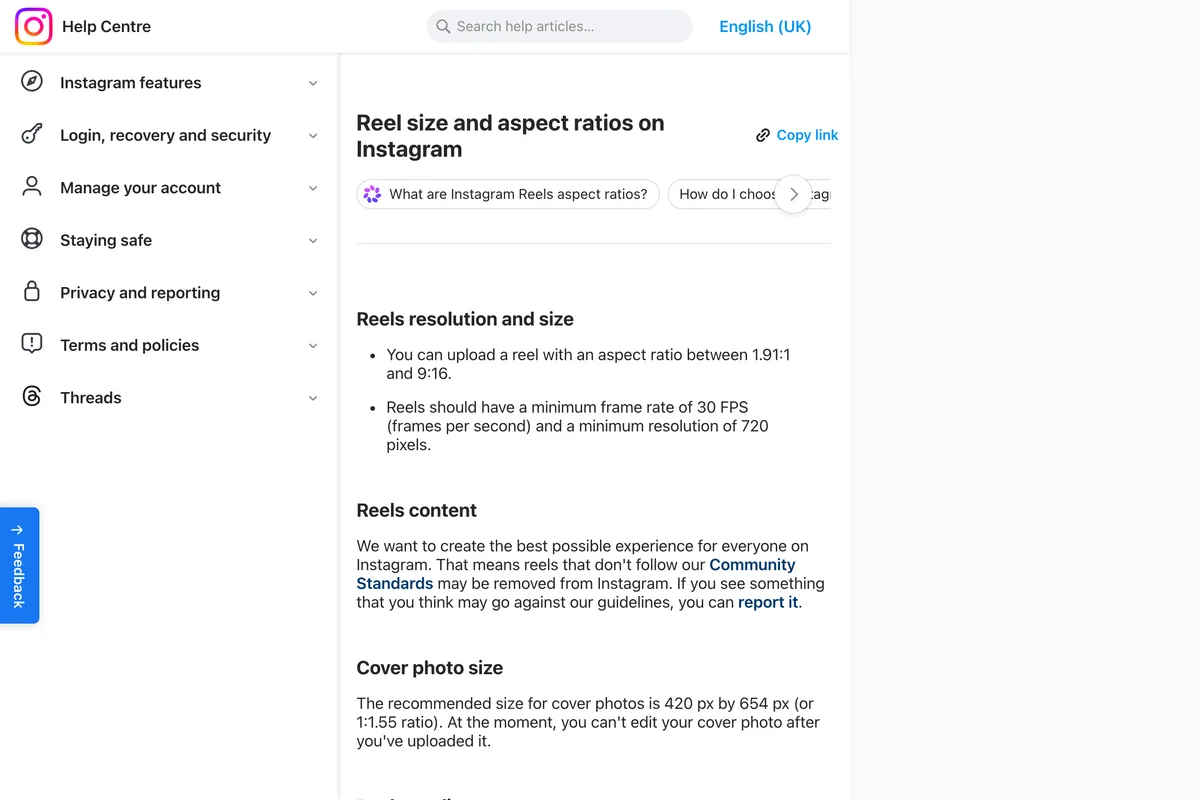
Three of the four point to 9:16; Instagram's help page only gives a range. That page is the one people quote, so here is exactly what it says about size:
You can upload a reel with an aspect ratio between 1.91:1 and 9:16. Reels should have a minimum frame rate of 30 FPS (frames per second) and a minimum resolution of 720 pixels.
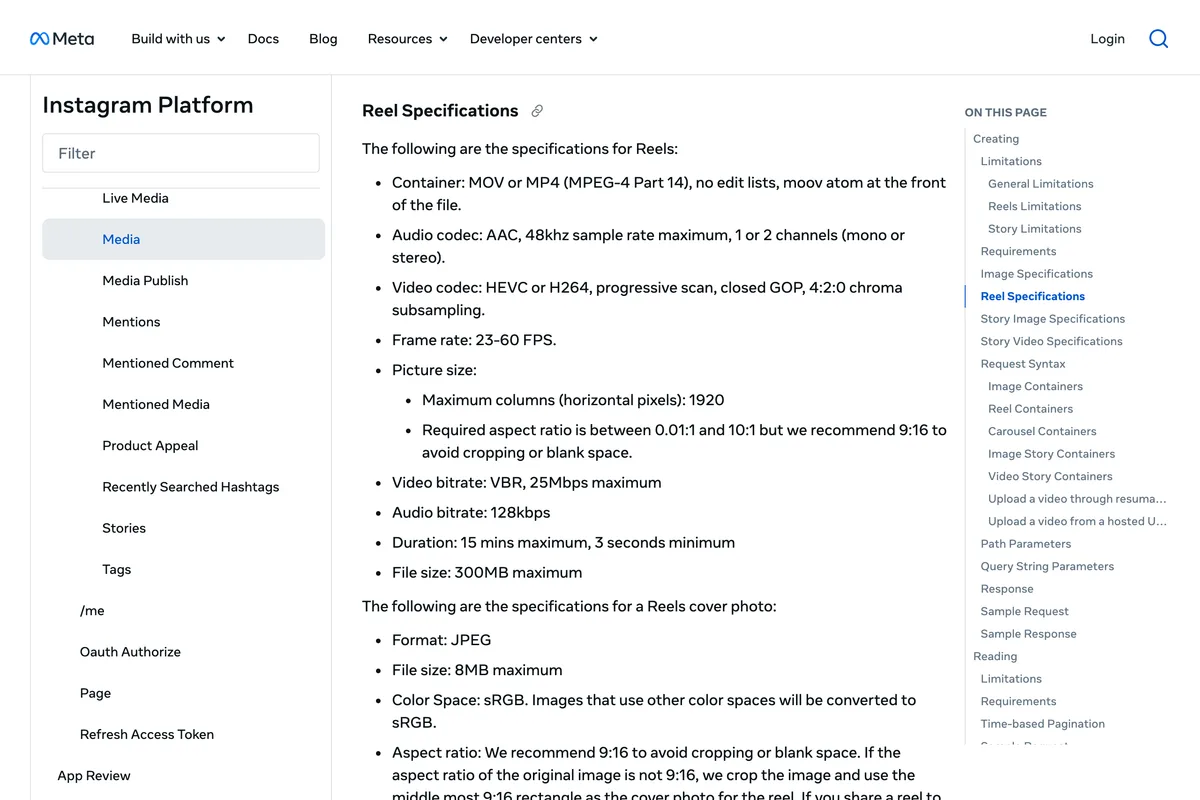
So where does 1080 x 1920 come from? From the shape and from the width. 9:16 at 1080 pixels wide is 1920 tall, and 1080 is the width every phone-first tool exports by default. Meta's API page, which is what scheduling apps publish through, puts the ceiling at 1920 pixels across and recommends 9:16 to avoid cropping or blank space:
The Ads Guide is the odd one out on resolution. For a Reels ad it recommends 1440 x 2560, the same 9:16 at a higher resolution, and allows up to 15 minutes and 4 GB:
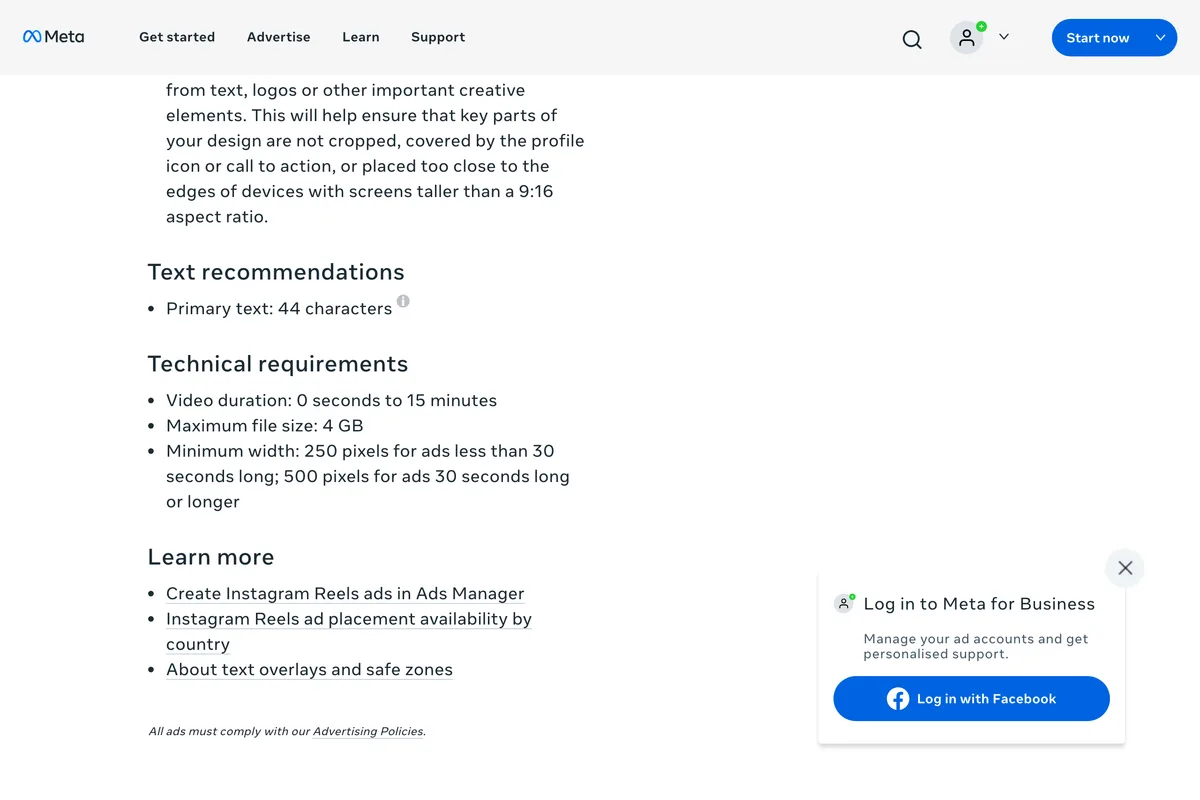
Which one should you follow? For an ordinary reel, export 1080 x 1920 at 30 frames a second as an MP4 with H.264 video and AAC audio. That clears the help page's minimums and sits inside the API's limits, so it works whether you post in the app or through a scheduler. For a paid Reels ad, export 1440 x 2560 if your footage has that much detail. Both are 9:16, so the layout does not change.
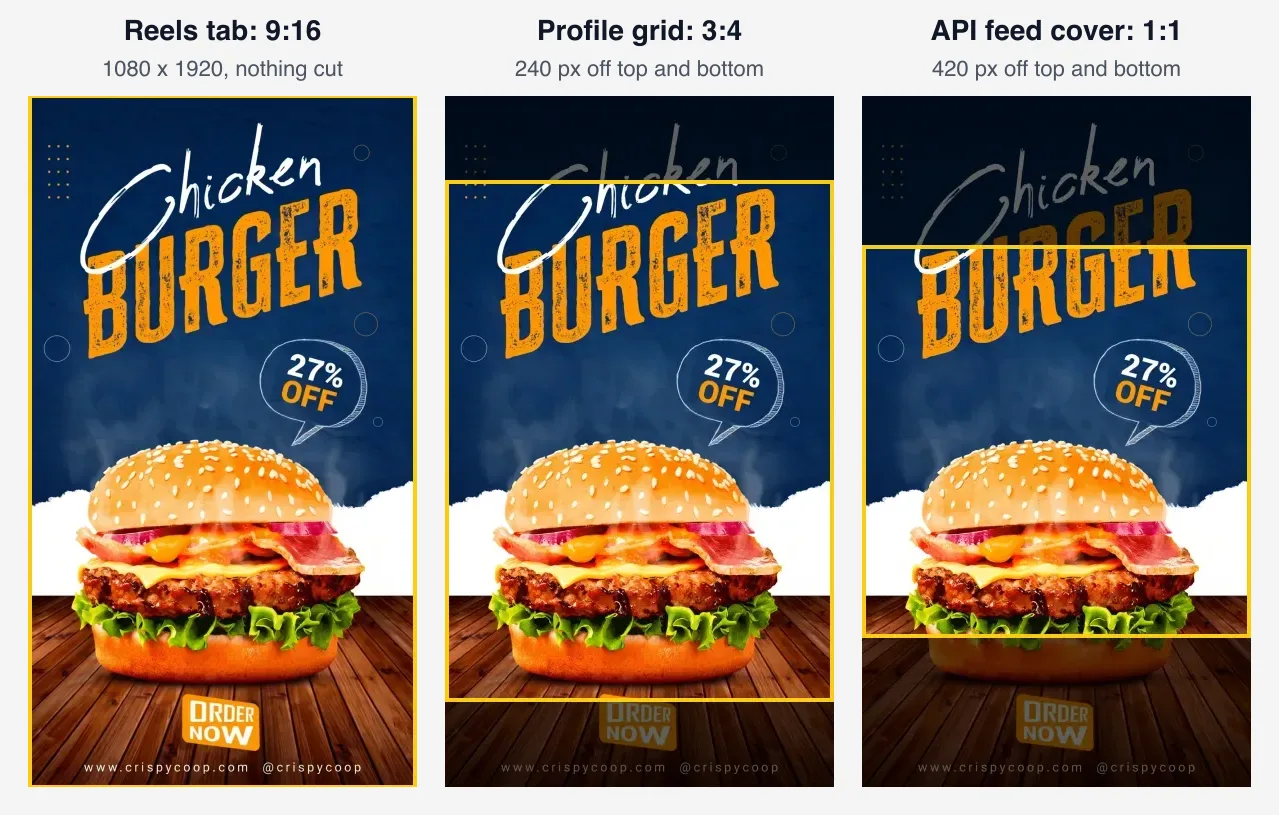
What does the profile grid crop off a reel?
The top and bottom. Since January 2025 the Instagram profile grid has shown every post as a 3:4 rectangle, reels included. We checked on 3 November 2026: on Instagram's own @creators profile, opened in a desktop browser, every tile in the grid measured 271 x 361 pixels, reel or photo, which is 3:4.
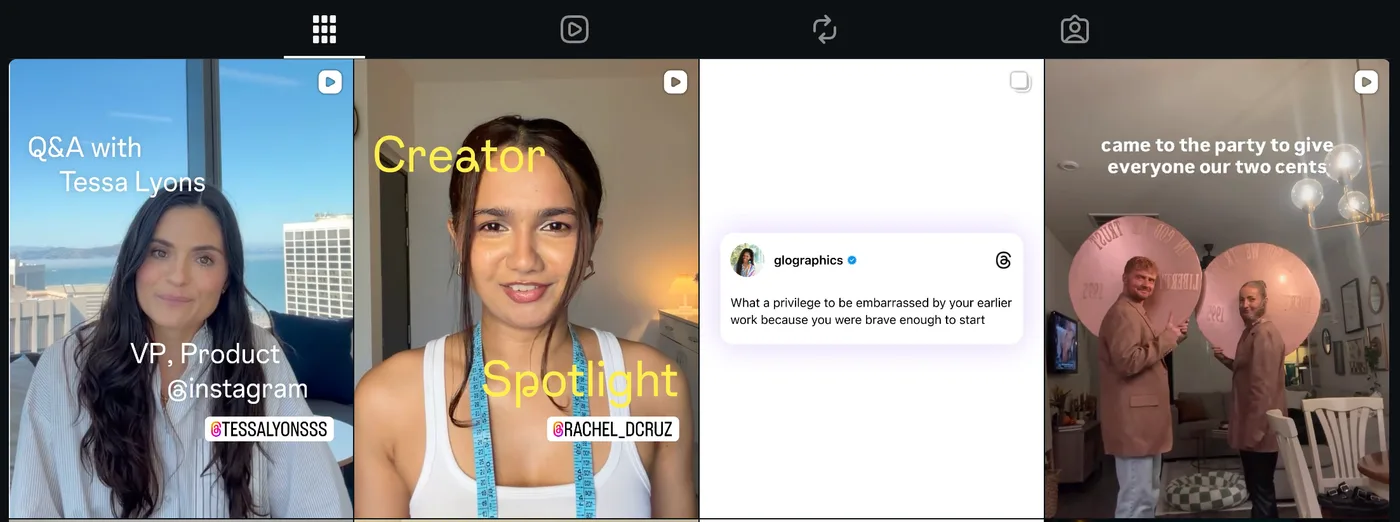
On a 1080 x 1920 reel, a 3:4 window is 1080 x 1440, so 480 rows do not make it onto your profile. We assume a centred crop, which is how Meta's API describes its cover crops; that is 240 pixels off the top and 240 off the bottom. Anything you put in those strips, a title, a logo, a date, is on the reel and missing from your profile.
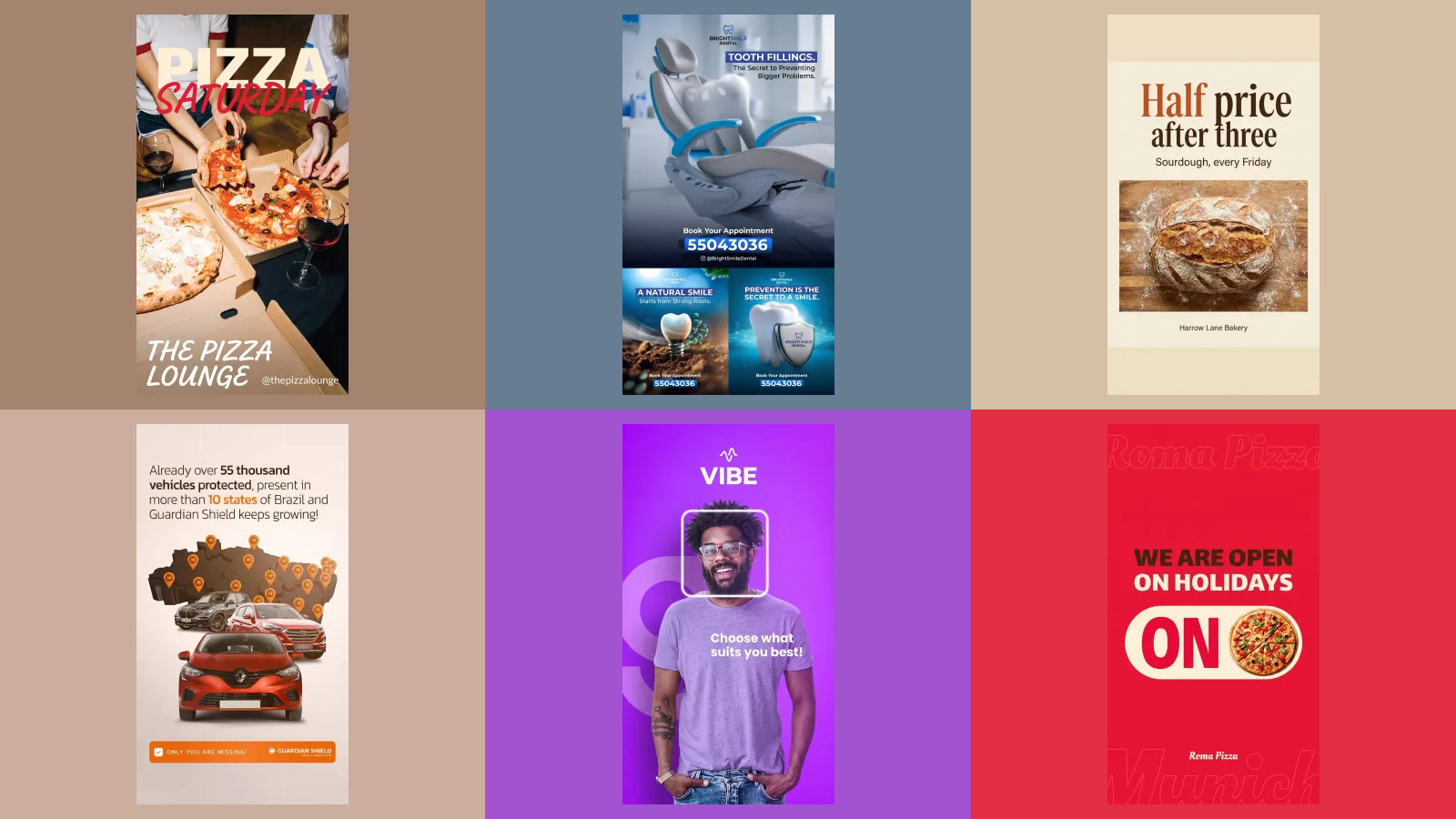
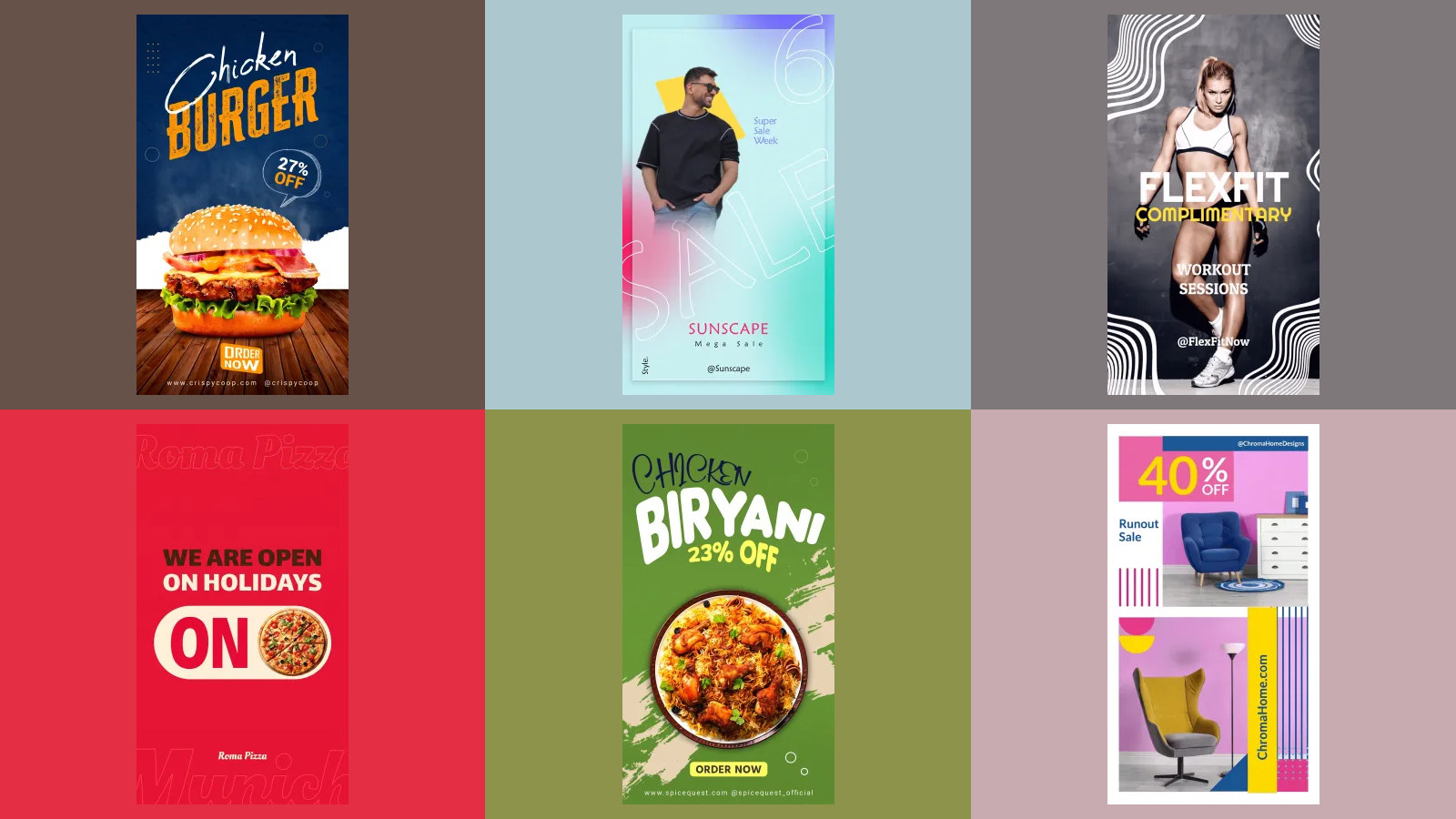
Here is the same 3:4 window over five more of our 9:16 posts. Four of the five lose words: a handle, a web address, an Order now button, the top line of a headline, and on the pizza poster the restaurant's own name, which sits in both strips. The fifth, FlexFit, keeps its text and loses only the model's feet. None of these are bad designs. They were laid out for the full screen, and the grid is a different window.

What size should a reel cover be?
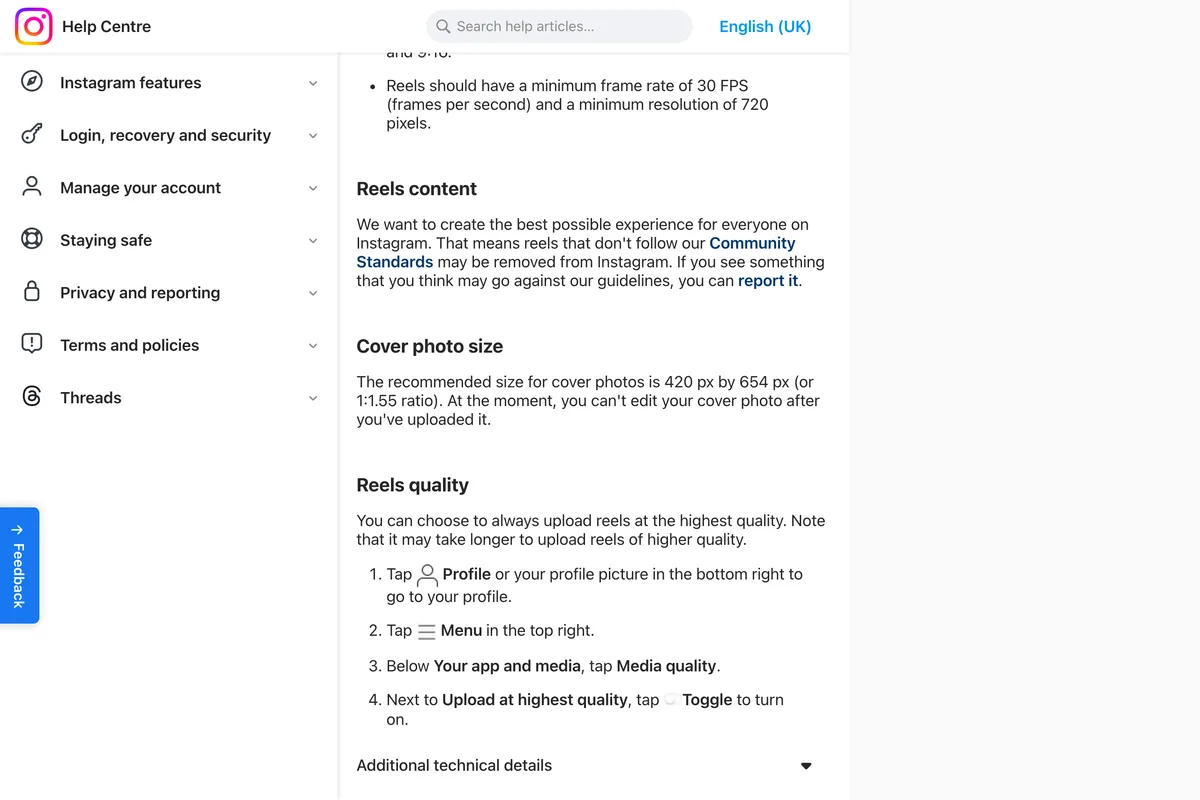
This is where Meta's documents disagree most. Instagram's help page gives a size that matches nothing else on this page:
The recommended size for cover photos is 420 px by 654 px (or 1:1.55 ratio). At the moment, you can't edit your cover photo after you've uploaded it.
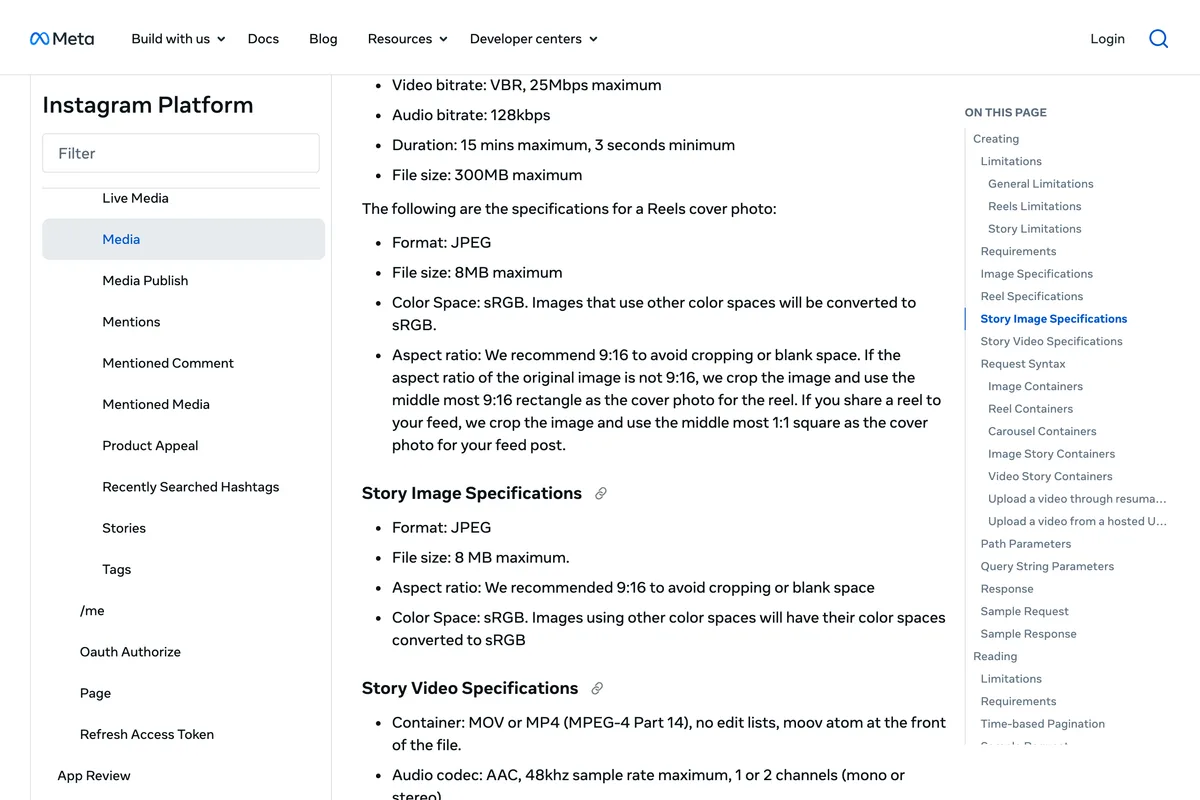
Meta's API page says something different and more useful, because it explains what happens to a cover that is not 9:16:
If the aspect ratio of the original image is not 9:16, we crop the image and use the middle most 9:16 rectangle as the cover photo for the reel. If you share a reel to your feed, we crop the image and use the middle most 1:1 square as the cover photo for your feed post.
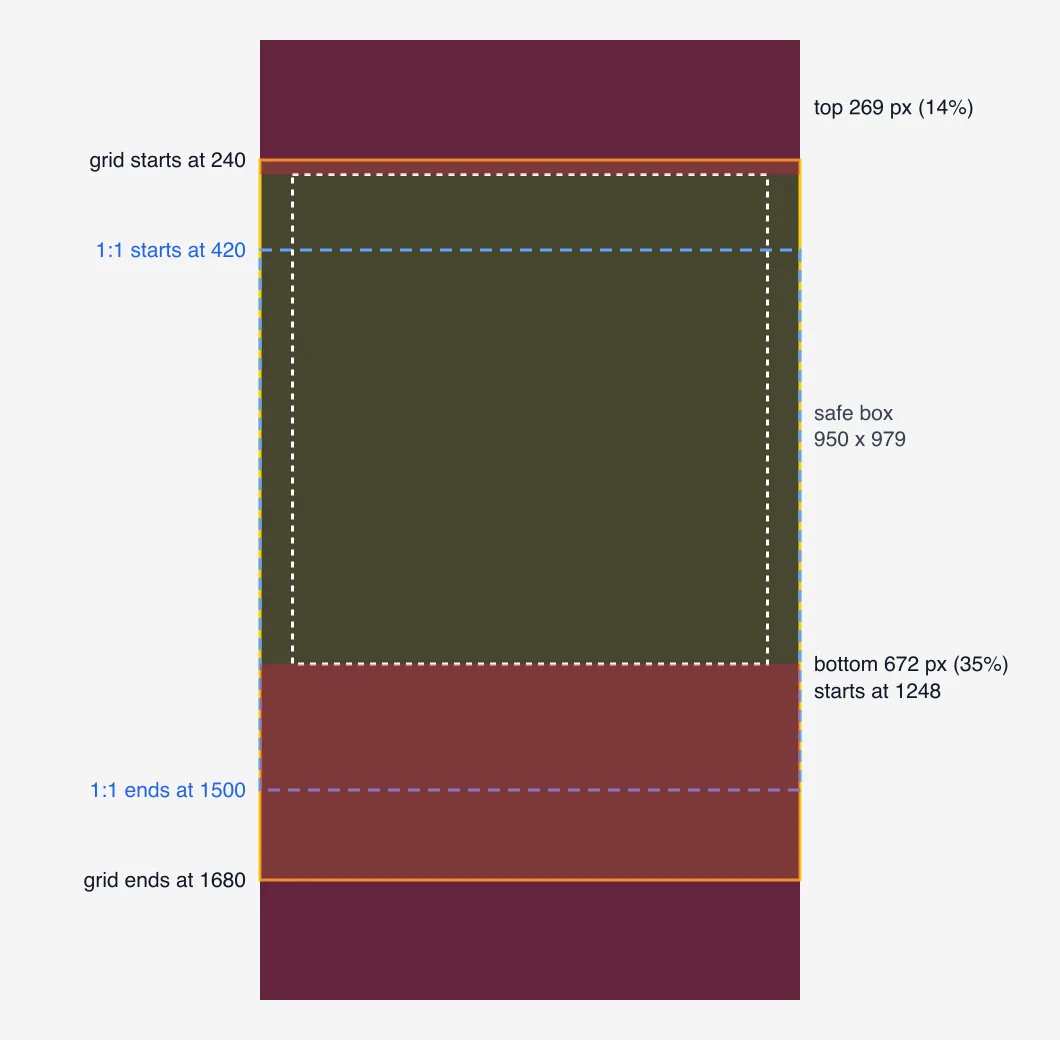
Our recommendation: make the cover the same 1080 x 1920 as the reel, and keep every word of it between 420 and 1248 pixels from the top. From 420 down is inside the square the API describes and the 3:4 grid window; above 1248 is clear of the bottom band where the caption sits in the player. That keeps the title in every version Instagram might show. The space above and below can hold the picture.
On editing a cover after posting: the help page said, on the day we read it, that you cannot. Instagram changes this kind of control often and not every account gets a change at once, so check your own app before you rely on either answer. If your app has no option, the safe course is to pick the cover before you share.
Where does the interface cover a reel?
The grid is not the only thing that hides part of a reel. In the full screen player, your name and caption sit along the bottom and the like, comment and share buttons run up the right side. Meta's Ads Guide gives the only official numbers: keep 14% of the top, 35% of the bottom and 6% of each side free of text and logos. At 1080 x 1920 that is 269 pixels at the top, 672 at the bottom and 65 on each side. We covered those numbers, with free overlay files, in the Instagram safe zone guide.
Put the grid window and the safe zone on one frame and you get the map below. The area that is safe in both is from 269 to 1248 pixels down, and 65 pixels in from each side. Add the square feed crop and the top of it moves to 420.
What happens if your video isn't 9:16?
Instagram accepts anything from 1.91:1 landscape to 9:16, so a square or 4:5 video will upload. It will not fill the screen. The player is 9:16, so a shorter video sits in the middle with empty space above and below, which is the blank space Meta's API page warns about. How much depends on the shape:
| Video shape | Height at 1080 wide | Empty space at top and bottom |
|---|---|---|
| 9:16 | 1920 | None |
| 4:5 | 1350 | 285 px each |
| 1:1 | 1080 | 420 px each |
| 16:9 | 608 | 656 px each |
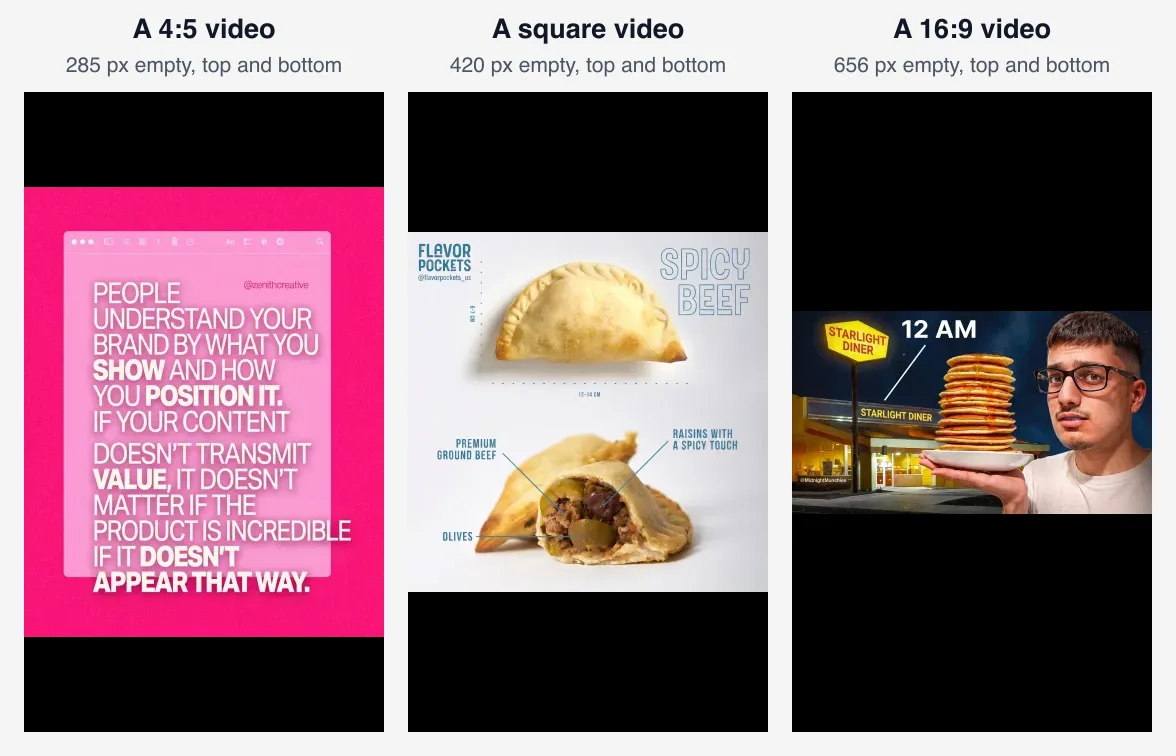
If all you have is a 4:5 or square video, reframe it to 9:16 rather than posting it as it is, and if it is a still, our free Instagram resizer puts it on a 1080 x 1920 frame over a blurred version of itself. Meta's help on ad placements also notes that on phones taller than 9:16, an ad may be zoomed to fill the screen, which can crop what sits outside the safe zone. Another reason to keep the middle for what matters.
How long can an Instagram reel be?
In the app, up to 20 minutes. But Instagram attaches a condition that matters more than the limit:
Reels over 3 minutes won't be recommended to new audiences.
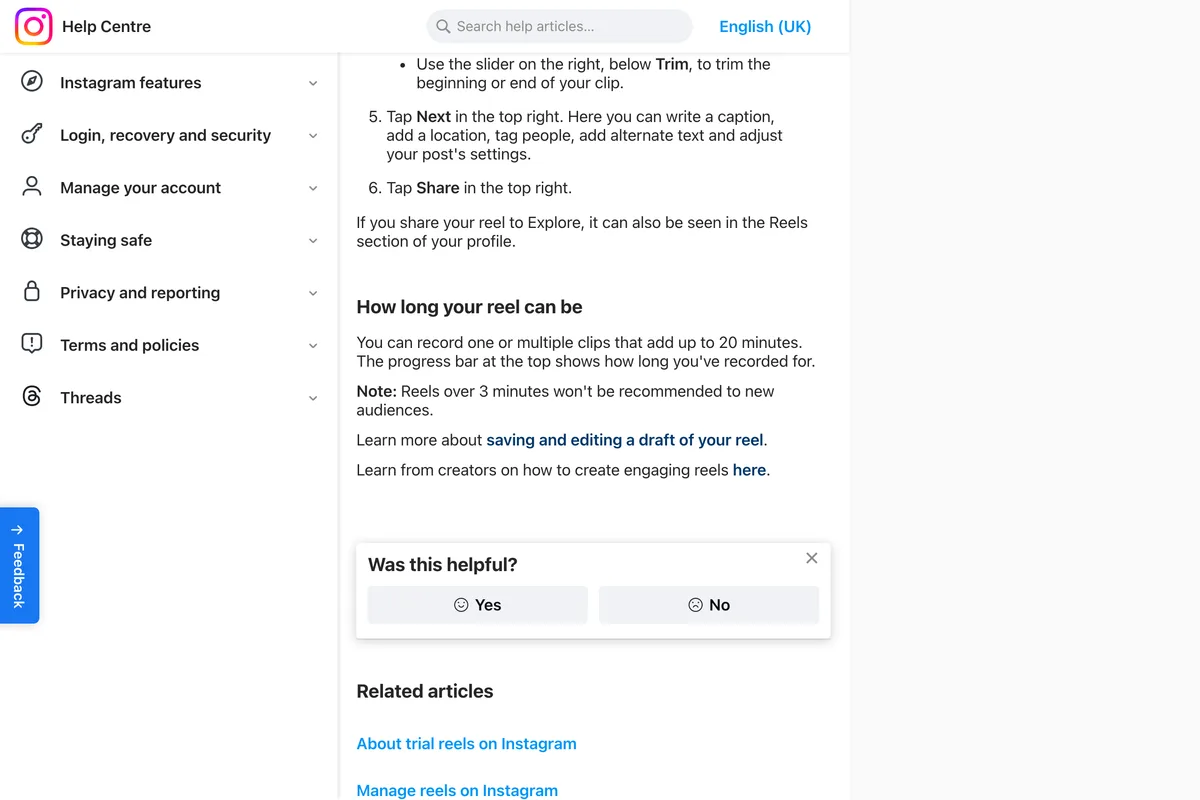
The 3 minute line arrived in January 2025, when Instagram announced creators in the United States could publish reels up to 3 minutes and have them recommended; before that, only reels up to 90 seconds were. If the point of a reel is to reach people who do not follow you yet, which is the point of most business reels, keep it under 3 minutes. Apps that post through Meta's API have their own window of 3 seconds to 15 minutes, so a 20 minute reel has to go up from the app.
What size is a Facebook reel?
The same file. Meta's guidance to Facebook creators is to record in 9:16, so reels and longer videos fill the full screen player Facebook is moving every video to. Meta's own table of ad placements lists 9:16 as the recommended shape for both Instagram Reels and Facebook Reels. Export once at 1080 x 1920 and post it to both.
The same 1080 x 1920 file also works as an Instagram story, a TikTok and a YouTube Short. The differences between those are in where each app puts its buttons, not in the size; our story size guide covers the story side and the full social media size guide the rest.
Frequently asked questions
What size is an Instagram reel?
1080 x 1920 pixels, a 9:16 vertical. Instagram's help page accepts anything from 1.91:1 to 9:16 at a minimum of 720 pixels and 30 frames a second, but only 9:16 fills the screen. For a paid Reels ad, Meta's Ads Guide recommends 1440 x 2560, the same shape.
What is the aspect ratio of an Instagram reel?
9:16. Instagram's help page accepts reels from 1.91:1 to 9:16 without recommending one, and Meta's API accepts a wider range but recommends 9:16, because any other shape leaves empty space in the player or gets cropped.
What size is an Instagram reel cover?
Instagram's help page says 420 x 654 pixels, a 1:1.55 ratio. Meta's API says to use 9:16 and that anything else is cropped to its middle. In practice, make the cover 1080 x 1920 and keep the words between 420 and 1248 pixels from the top, which survives the 3:4 grid, a square feed crop and the full screen player.
Does the Instagram grid crop reels?
Yes. The profile grid has shown posts as 3:4 rectangles since January 2025, so a 1080 x 1920 reel shows only 1080 x 1440 of itself on your profile. Centred, that is 240 pixels cut from the top and 240 from the bottom.
How long can an Instagram reel be?
Up to 20 minutes recorded in the app, but Instagram says reels over 3 minutes won't be recommended to new audiences. Apps that publish through Meta's API can post reels from 3 seconds to 15 minutes, and Reels ads can run up to 15 minutes.
Is a Facebook reel the same size as an Instagram reel?
Yes. Both are 9:16, and 1080 x 1920 works for each. Meta recommends 9:16 for Facebook Reels and Instagram Reels alike, and the same file also works for stories, TikTok and YouTube Shorts.
How we researched this
- The specs on this page come from Meta's own pages, listed in the sources below, each read in full and photographed on 3 November 2026. The four that set reel specs are Instagram's help page on reel size, Instagram's help page on recording a reel, the Instagram Platform API reference that scheduling apps publish through, and the Meta Ads Guide page for Reels ads. Where they disagree, we say so and say which one we would follow.
- The profile grid measurement is ours. On 3 November 2026 we opened Instagram's own @creators profile on instagram.com in a desktop browser and read the size of the tiles from the page: 271 x 361 pixels each, reels and photos alike, which is 3:4. That is one profile on one screen size; the ratio is what carries over, not the pixel count.
- The crop figures are our arithmetic on a 1080 x 1920 frame, drawn over finished 9:16 posts from our gallery. Those posts are Behance designs redrawn by our image model under invented brand names, the same pipeline as the rest of the gallery. They are stills, not videos, which is fine for showing what a crop removes and is not evidence of how any video performs.
- We did not upload test reels for this article. Instagram's in-app cover and grid controls change often and vary by account, so anything here about what the app lets you adjust is limited to what Meta's pages say.
Sources
- 1Reel size & aspect ratios on Instagram
- 2Record a reel on Instagram
- 3Instagram Platform: IG User Media reference (Reel specifications)
- 4Video ad specs on Instagram Reels
- 5Aspect ratios supported by placements in Meta Ads Manager
- 6Finding success on reels in 2025
- 7How to continue succeeding with video on Facebook
- 8@creators profile grid, measured in a desktop browser