Instagram post size in 2026, and the grid change most guides missed
Every Instagram dimension that still matters, and the one that changed: the profile grid now previews at 3:4, which quietly crops the 4:5 posts almost every design tool still makes by default. With the crop measured, and real posts shown at each ratio.

Upload your Instagram post at 1080 pixels wide. For the height, use 1440 for a 3:4 portrait or 1350 for a 4:5 portrait. Those are the two ratios worth using in 2026, and 3:4 is the taller of the two, the tallest Instagram accepts, and the only one that fills the profile grid without losing anything off the sides. That is the whole answer, and the rest of this page is why the second half of it is newer than most guides you will find.
Our articles are still written by humans!
Get human written articles in your Google feed.
What is the biggest Instagram post size?
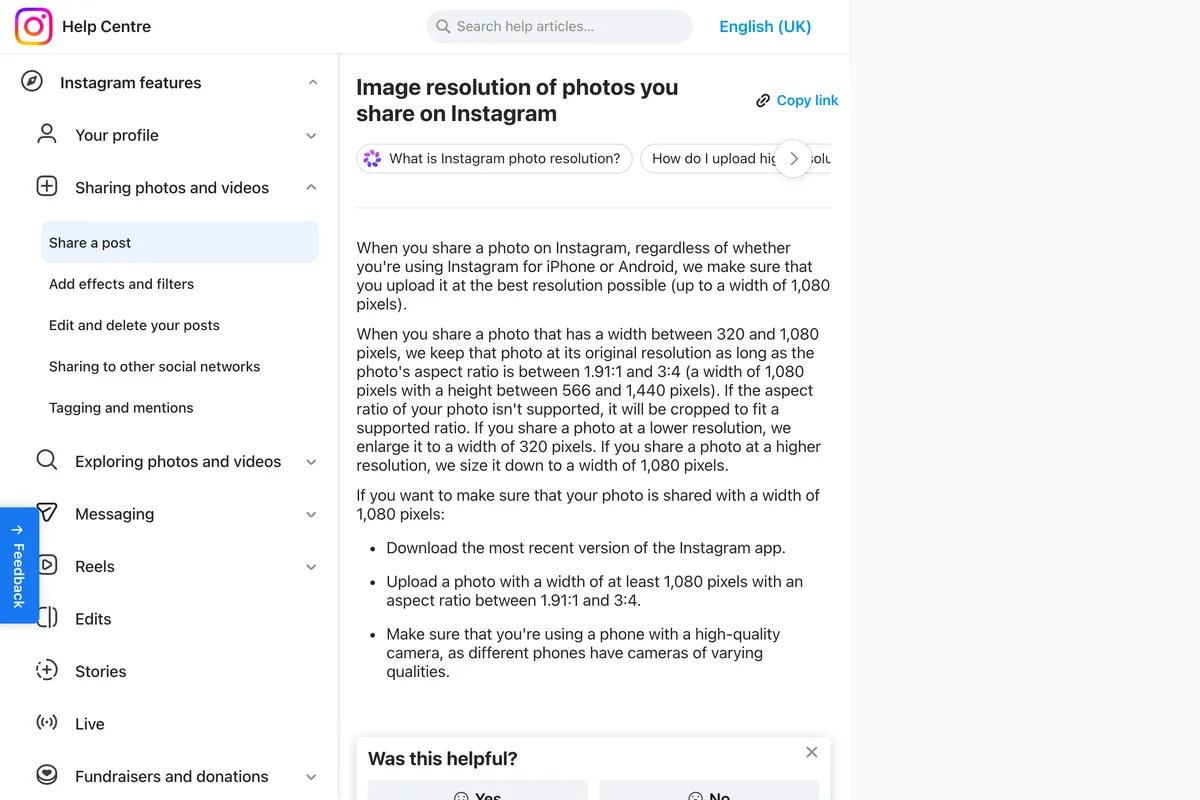
1080 x 1440 pixels, a 3:4 ratio. That is the tallest feed photo Instagram keeps without cropping, and 1080 pixels is the widest it displays. Instagram's help centre states the range in one sentence:
When you share a photo that has a width between 320 and 1,080 pixels, we keep that photo at its original resolution as long as the photo's aspect ratio is between 1.91:1 and 3:4 (a width of 1,080 pixels with a height between 566 and 1,440 pixels).
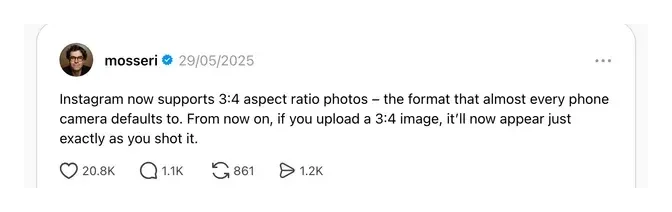
The 3:4 end is new. Until May 2025 the tallest was 4:5, and the change was announced by Adam Mosseri, the head of Instagram, in his own post on 29 May 2025. He wrote that Instagram now supports 3:4 aspect ratio photos, the format that almost every phone camera defaults to, and went on:
From now on, if you upload a 3:4 image, it'll now appear just exactly as you shot it.
One exception is worth knowing before you make 3:4 your only size. Apps that publish to Instagram for you do it through Meta's API, and Meta's developer documentation still gives the allowed range as 4:5 to 1.91:1. A 3:4 file uploaded by hand is fine; the same file sent by a scheduling tool may be refused. If you schedule through a third party, 1080 x 1350 is the safe tall size. Why a scheduled post fails is covered in Meta Business Suite not posting to Instagram.
Every Instagram size that still matters
| Where it shows up | Upload at | Ratio | What to know |
|---|---|---|---|
| Feed post, tallest | 1080 x 1440 | 3:4 | Accepted since May 2025. Matches the grid exactly. |
| Feed post, portrait | 1080 x 1350 | 4:5 | The old maximum. Still common, slightly cropped in the grid. |
| Feed post, square | 1080 x 1080 | 1:1 | Smallest in the feed, heaviest crop in the grid. |
| Feed post, landscape | 1080 x 566 | 1.91:1 | Takes the least vertical space of anything. Avoid. |
| Story or reel | 1080 x 1920 | 9:16 | Full screen. Interface covers the top and bottom. |
| Profile grid preview | not an upload | 3:4 | A crop of your post, not a size you send. |
| Profile photo | 320 x 320 | 1:1 | Displayed as a circle, so corners are lost. |
The change that dates most Instagram size guides
For years the advice was simple and correct: use 4:5, because 1080 x 1350 was the tallest image Instagram would accept without cropping it. Two things happened in 2025 that make that advice incomplete rather than wrong.
In January 2025, Instagram replaced the square profile grid with a 3:4 rectangle. Your profile stopped showing square thumbnails and started showing tall ones. Then in May 2025, Adam Mosseri announced that the feed itself would accept 3:4, the ratio almost every phone camera shoots at by default. His wording was that a 3:4 image would now appear, in his phrase, exactly as you shot it. Before that, 4:5 was the ceiling and anything taller was cropped or letterboxed.
So 3:4 went from being impossible to being both the tallest feed ratio and the grid ratio. That is why a guide written in 2024 and lightly refreshed since will still tell you 4:5 is the maximum. It was, and it is not.

So should you use 3:4 or 4:5?
If you are starting fresh, 3:4. It is taller in the feed, which means it occupies more of a phone screen for longer as somebody scrolls, and it survives the grid untouched. There is no case where 4:5 beats it on either count.
If you already have a library of 4:5 templates, do not rebuild them. The grid crop is about 3% a side, which is invisible on a photograph and only matters if you habitually push text or a logo right to the edge. Keep the important part of the frame away from the outer few percent and 4:5 will keep working. That is a cheaper fix than redoing a template set. For stories and reels Meta does give exact margins, 14% at the top, 35% at the bottom and 6% at the sides, drawn out in our Instagram safe zone guide. If you do want them at 3:4, the free Instagram resizer crops a 4:5 file to 1080 x 1440 and shows how much comes off each side before you download.

Why square posts stopped being a safe default
Square was the right answer for most of Instagram's life. It is now the weakest of the feed options, and for two separate reasons that compound. In the feed it takes the least vertical space of any portrait-capable format, so it scrolls past fastest. In the grid it loses a quarter of its width. A logo centred in a square is fine; a square laid out edge to edge is going to lose its edges.
There is still a reason to make squares, and it is a practical one rather than an Instagram one. A square crops cleanly to almost anything else, so if the same artwork has to go to a Facebook page, a Google Business post and a print flyer, starting square saves you three exports. If Instagram is the only place it goes, do not start there.

Stories and reels: 1080 x 1920, and the part you cannot use
Stories and reels are 9:16, which is 1080 x 1920. The dimension is the easy part. The part that catches people is that the interface sits on top of your image at both ends: your profile name and the close button at the top, the reply box or the caption and buttons at the bottom. Roughly the top and bottom 250 pixels of that 1920 are borrowed, and on a reel the right-hand column of buttons takes a strip as well.
Backgrounds can run to the edges, but anything a person has to read should not. How much room the interface takes has one official answer, Meta's 14% top, 35% bottom and 6% sides for ads, set out in pixels in the Instagram safe zone guide, and an organic margin on a page of its own. For the ideas rather than the pixels, we wrote a longer piece on story ideas for a business.

Resolution, file size and the quality question
Instagram does not display a feed image wider than 1080 pixels, and neither does Facebook, which is one reason almost every network collapses into two files. Uploading a 4000 pixel wide file does not give you a sharper post; it gives Instagram a bigger file to compress down to 1080, and the compression is not always kind. Export at 1080 wide and you have made the resizing decision yourself instead of handing it over.
- Width: 1080 pixels. More is discarded, less is upscaled and looks soft.
- Format: JPEG for photographs, PNG when there is flat colour or crisp text and you can afford the file size.
- Colour: sRGB. A file in a wider colour space can come out visibly duller after Instagram converts it.
- File size: under about 1MB is a sensible ceiling. Past that you are mostly buying heavier compression.
What happens if you get it wrong
Not much, which is worth saying plainly because size guides tend to imply catastrophe. Instagram will accept an odd size and fit it. The failure modes are ordinary: a landscape photo takes so little vertical space that it scrolls past, a square loses its edges on your profile, an upload wider than 1080 comes back a little mushier than the file you made. None of these are the reason a post did not work. If you want the reasons a post did not work, what a small business should actually post about is a better use of your afternoon than this page.
You can see the full set at whatever ratio each one came out as in the gallery, which is where every image on this page came from. Every one of them was drawn by an AI model, and what Instagram does with a file like that is in why Instagram labelled your post AI info. If you want the posts made for you at the right size without thinking about any of this again, that is the thing we build, and what an AI social media manager actually does is the honest description of it. Getting the shape right matters more than the hour, though the hour is not nothing: the four studies of when to post on Instagram disagree by twelve hours, and where three of them overlap is worth knowing.
Frequently asked questions
What is the biggest Instagram post size?
1080 x 1440 pixels, a 3:4 ratio. Instagram's help centre says a photo keeps its original resolution when its aspect ratio is between 1.91:1 and 3:4, a width of 1,080 pixels with a height between 566 and 1,440 pixels. 3:4 has been supported since Adam Mosseri announced it on 29 May 2025.
What is the tallest aspect ratio on Instagram?
3:4 for feed photos, since May 2025; before that it was 4:5. Stories and reels are 9:16. One caveat: Meta's API documentation, which scheduling apps publish through, still gives 4:5 to 1.91:1, so a 3:4 image sent by a scheduler may be refused.
What is the best Instagram post size in 2026?
1080 x 1440 pixels, a 3:4 portrait. It is the tallest ratio Instagram accepts in the feed and it matches the profile grid exactly, so nothing is cropped. 1080 x 1350 (4:5) is the next best and still perfectly usable.
Is 1080 x 1080 still a good Instagram size?
It works, but it is now the weakest option. A square takes the least vertical space in the feed of any portrait-capable format, and the 3:4 profile grid crops 12.5% off each of its sides. Use it only when the same artwork has to go somewhere else too.
What size is the Instagram grid now?
The profile grid previews posts at 3:4. It changed from square in January 2025. It is a crop of the post you already uploaded, not a separate size you upload, so a 3:4 post fills it exactly and anything wider loses width from both sides.
Should I upload images larger than 1080 pixels wide?
No. Instagram does not display a feed image wider than 1080 pixels, so a larger file is downsized on upload and compressed in the process. Exporting at 1080 wide means you control the resize instead of Instagram doing it.
Does Instagram reduce image quality?
It compresses everything. You limit the damage by exporting at exactly 1080 pixels wide, using sRGB colour, and keeping the file under about 1MB. Sending a much larger file usually makes the compression more aggressive, not less.
What is the safe area for an Instagram story?
Stories are 1080 x 1920, but the interface covers roughly the top and bottom 250 pixels, and reels add a column of buttons on the right. Keep anything that has to be read inside the middle band, around 1080 x 1420.
How we researched this
- The pixel dimensions in this article are the sizes Instagram renders at, not the sizes a design tool offers in a dropdown. Where the two disagree, and for square posts they now badly disagree, the article says so.
- The two changes that date most existing guides are Instagram moving the profile grid from square to a 3:4 rectangle in January 2025, and adding support for 3:4 feed photos in May 2025. Both were announced by Adam Mosseri, the head of Instagram. We first linked a report of the May announcement, opened on 31 August 2026; on 24 September 2026 we replaced it with Mosseri's own post and Instagram's help page, both photographed below.
- One limitation on sourcing, since we link a platform help centre below. Those pages build their text through scripting and we could not read them to quote from, so nothing here is presented as a quotation from the platform. The help centre is linked because it is the canonical page for a reader to check, not because we lifted wording out of it.
- The crop percentages are arithmetic on the aspect ratios rather than measurements taken off a screen, and the working is shown in full so you can check it. A frame with a ratio of 0.75 showing an image with a ratio of 0.80 has to lose the difference from somewhere, and the width is where.
- The finished posts shown at each ratio came out of our own generator and are in our public gallery. They are here because they are ours to publish at full size, not because they prove anything about which ratio performs better. Nothing in this article claims a ratio gets more engagement, because we have not measured that and neither has anyone who states it as confidently as it usually gets stated.
- We sell a tool that makes these posts. That is disclosed in the section where it becomes relevant, along with the ratio our own generator defaults to and what that default costs you.
Sources