How to see who reposted your post on Instagram, and what Instagram will not tell you
Instagram's help page explains how to repost, find your own reposts and turn reposts off. It never says how to see who reposted you. Here is what does show it, what only shows a number, and the share to a Story, which Instagram says you cannot see for reels.

To see who reposted your post on Instagram, open the app, go to Home and tap the heart in the top right. Reposts normally appear in your notifications as a line like reposted your post, with the account's name, and you can tap it to open their profile. If you have a professional account, View insights on the post shows how many times it was reposted, but not by whom. There is no screen that lists everyone.
Our articles are still written by humans!
Get human written articles in your Google feed.
That answer comes from people filming the app, not from Instagram. Instagram's own page on reposting explains how to repost, how to find your own reposts and how to stop other people reposting you. It never says how to see who reposted you, and it does not mention a notification at all. So the rest of this page separates what Instagram documents from what the app is shown to do, and covers the share most people mean when they say repost, which for a reel Instagram says you cannot see.
Repost, share, send: which ones you can see
Most of the confusion on this question is three different actions with one word. Instagram added a real repost button in August 2025, which shows as two arrows in the app, and since then a repost and a share to a Story are separate things with separate rules.
| What they did | Can you see who? | Where |
|---|---|---|
| Tapped Repost (the two arrows) | Yes, one at a time | Notifications by name; a count in Insights; their profile's Reposts tab |
| Shared your reel to their Story | No, says Instagram | Only if they mention you in it |
| Shared your photo post to their Story | Not documented | One March 2026 video shows View Story Reshares on a professional account |
| Sent it in a direct message | No | Insights counts shares, never names |
| Screenshotted it or uploaded it again | No | It is a new post. Only a tag or a search finds it |
How to see who reposted your post or reel
There are three places, and they answer three different questions: who, how many, and whether one particular person did.
Who: your notifications
- Open Instagram and go to Home.
- Tap the heart in the top right.
- Look for reposted your post or reposted your reel.
- Tap the notification to open the repost or the person's profile.
This is the only place the app shows reposters by name, and it is a feed of activity, not a list per post: you scroll for it, and nothing gathers one post's reposts in one place. For a post from months ago that is a long scroll. Two of the videos also hedge that the notification appears only where Instagram offers it for that account, which fits the line at the top of Instagram's own page: This feature may not be available to everyone.
The video above, from August 2026, does both halves on one post: View insights first, where the Engagement section shows a repost count of one and nothing else, then back to Home and the heart for the name. We read the full transcript before choosing it, and it sells nothing.
How many: Insights on a professional account
Open the post, tap View insights, and look under engagement or interactions for Reposts. It is a number. Tapping it does not open a list, and in one of the videos (Tech Guru Support, June 2026) tapping the repost count on the post reposts it instead. The same number is what tools and dashboards get from Meta: its developer documentation lists a `reposts` metric for feed posts, reels and stories, defined as the number of reposts on the media minus the number of deleted reposts, and Meta's April 2026 API update adds a matching Reposts Count field, the number of times a post or reel has been reposted by other users. Neither mentions names.
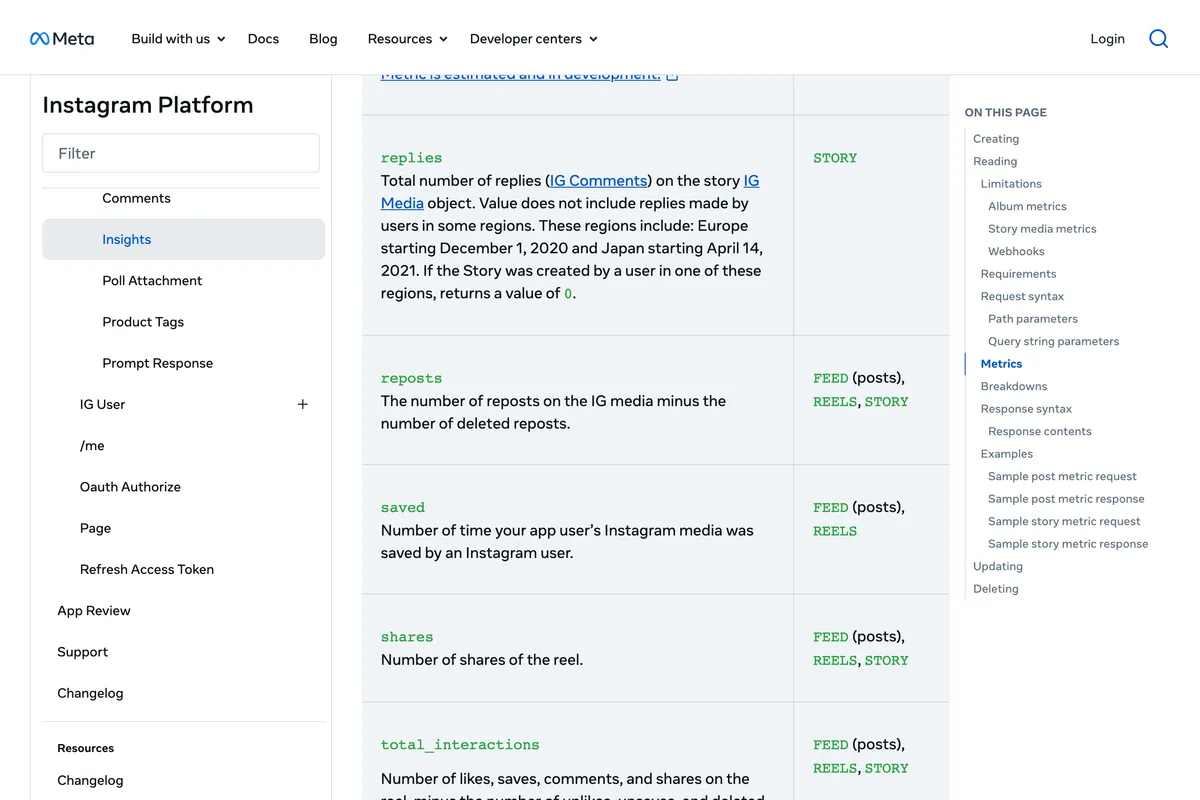
Net of deleted reposts matters if you watch the number: it can go down. Somebody who reposts and then removes it disappears from the count.
Whether one person did: their Reposts tab
Instagram's page says reposts will appear in a dedicated repost tab on your profile, meaning the reposter's profile. So to check one account, open their profile and tap the tab with the two arrows. That works for a public account, or a private one you follow, since the tab is part of the profile and who can see a profile depends on its privacy setting.
There is a fourth, smaller signal. When people you follow have reposted your post, the post itself can show them in the bottom left with any note they added, and you can reply. The second video shows it, from July 2026, using the creator's own second account:
What Instagram's help page actually covers
Instagram's page, Repost a reel or a post on Instagram, is short and worth reading once, because three of its rules explain most missing reposts:
- Only public reels and posts can be reposted, and only if the original creator allows reposts.
- You cannot repost a repost. Only content posted by the original creator can be reposted.
- It is app only. The page says the feature is not available on computers, so there is nothing to find on instagram.com in a browser.
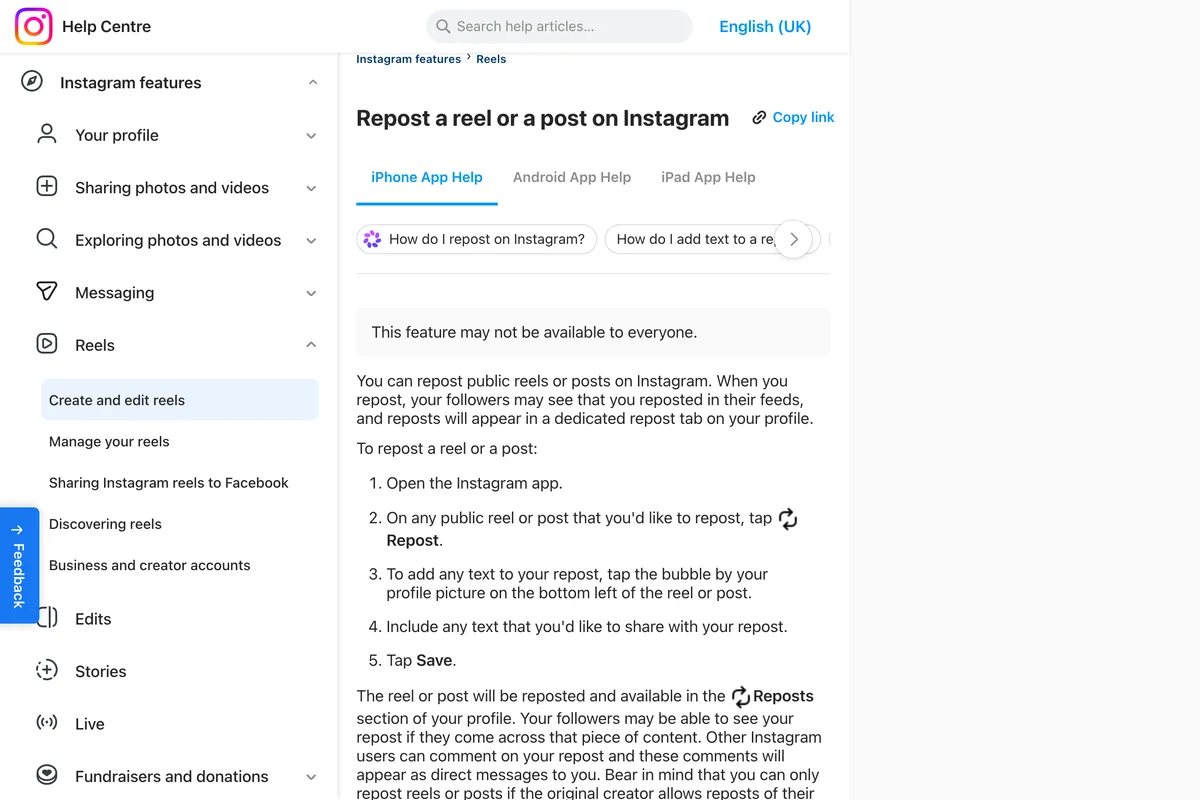
One more line on that page matters to a business: Other Instagram users can comment on your repost and these comments will appear as direct messages to you. Comments on a repost of your post go to the reposter as direct messages, so a conversation about your post can happen in someone else's inbox.
Shares to a Story: Instagram says you cannot see who
When someone taps the paper plane under your post and then Add to story, that is not a repost, and it does not land in a Reposts tab. Instagram's page on sharing a post to your story is blunt about what you get:
You won't be able to see who has reshared your reel or where they have shared it to, regardless of whether you have a private or public account.
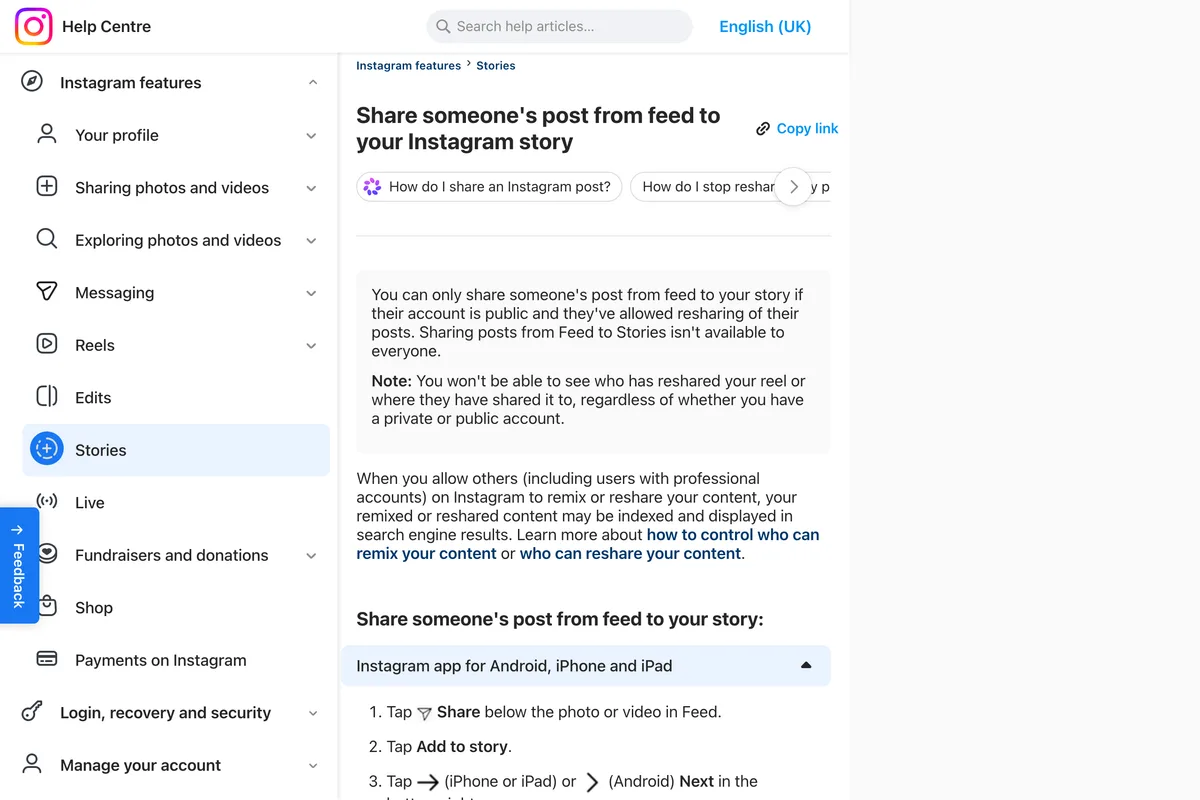
The usual way you find out is a mention: a Story that tags you normally shows up in your notifications and messages while it is live. Without a tag, a Story share shows up, at most, inside the shares number in Insights, which one of the videos describes as direct messages and Story shares together.
For photo posts, several guides send you to View Story Reshares in the post's menu, and one of the videos, from March 2026, still shows it on a professional account. Instagram's pages do not mention it, so treat it as something your app may or may not have, and do not expect it on a reel.
Should a business let people repost it?
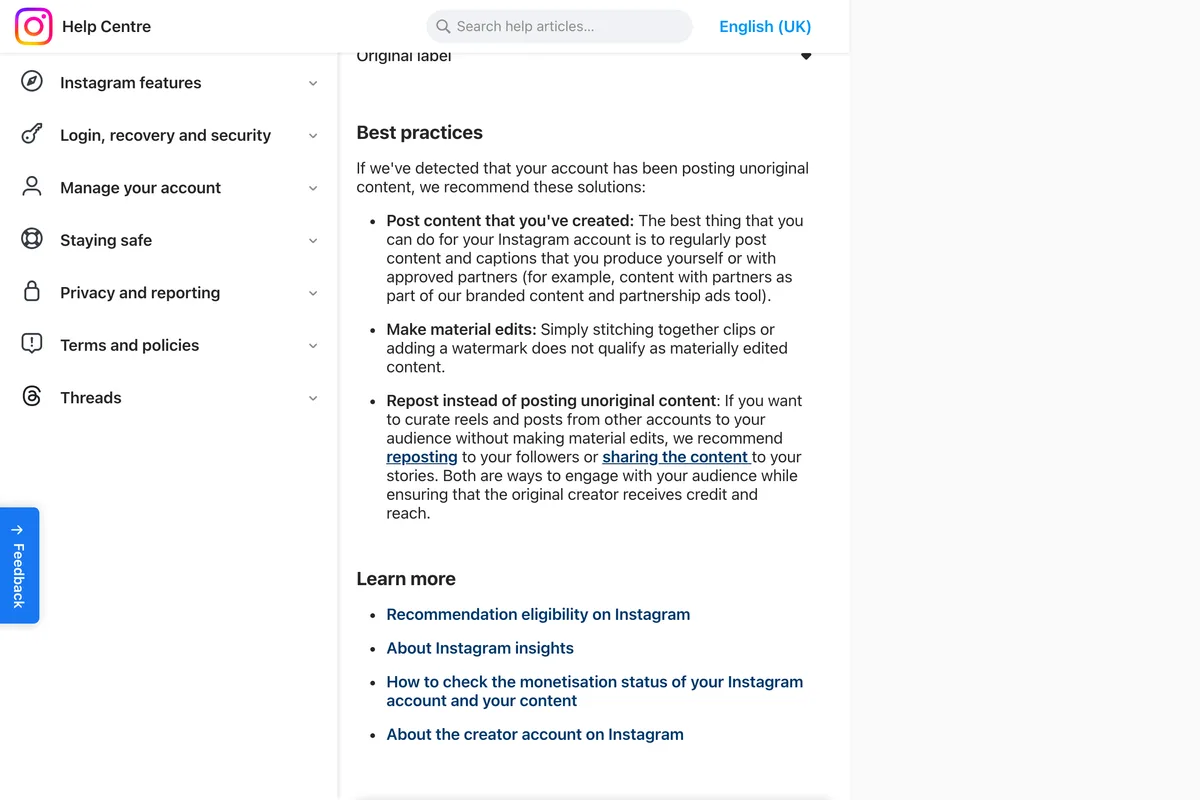
For most businesses, reposts should stay allowed. A repost puts your post, with your name on it, in front of the reposter's followers, and Instagram's page on original content recommends it over copying: accounts that want to share other people's posts without material edits should repost or share to stories, which it describes as ways to make sure the original creator receives credit and reach. A screenshot reupload gives you neither.
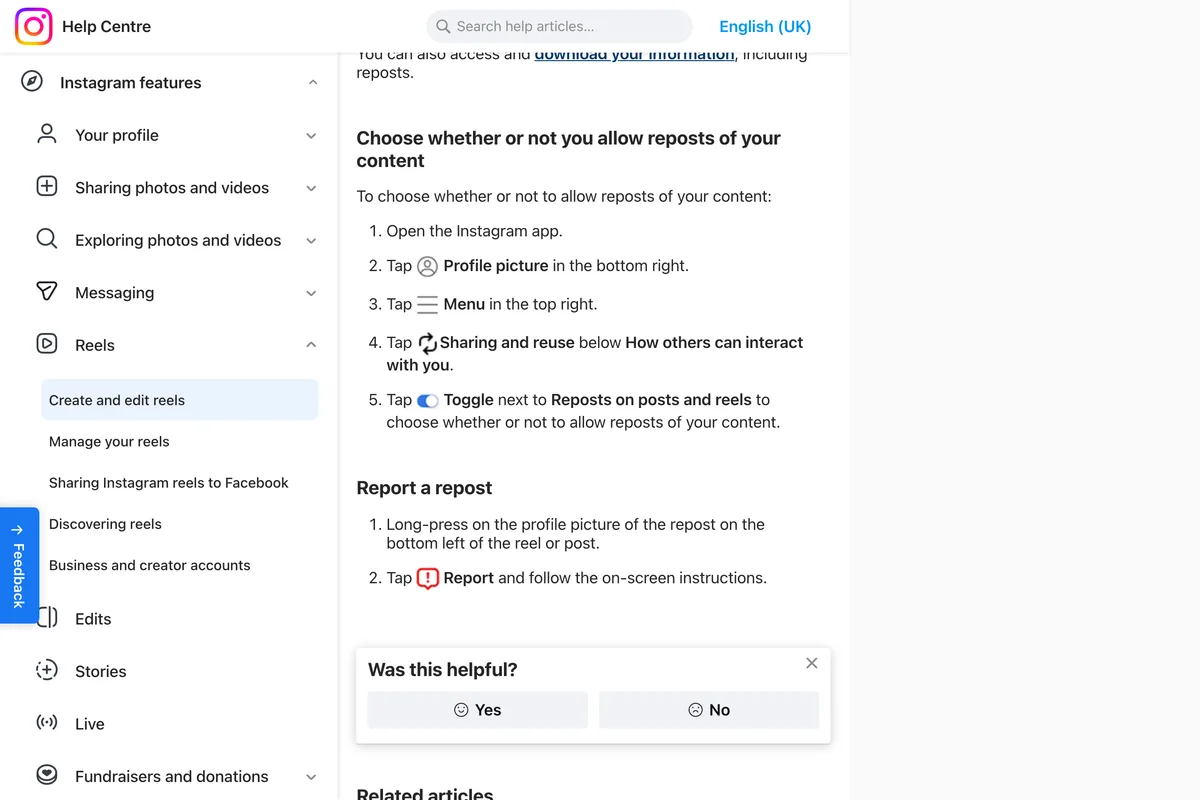
The reasons to turn it off are narrow: a post about a person who did not agree to wider reach, a time limited offer you do not want circulating after it ends, or a team photo. Instagram's page documents only an account-wide switch, so it turns reposts off for everything:
- Go to your profile and tap Menu in the top right.
- Tap Sharing and reuse, below How others can interact with you.
- Turn off the toggle next to Reposts on posts and reels.
How to see, remove or bulk delete your own reposts
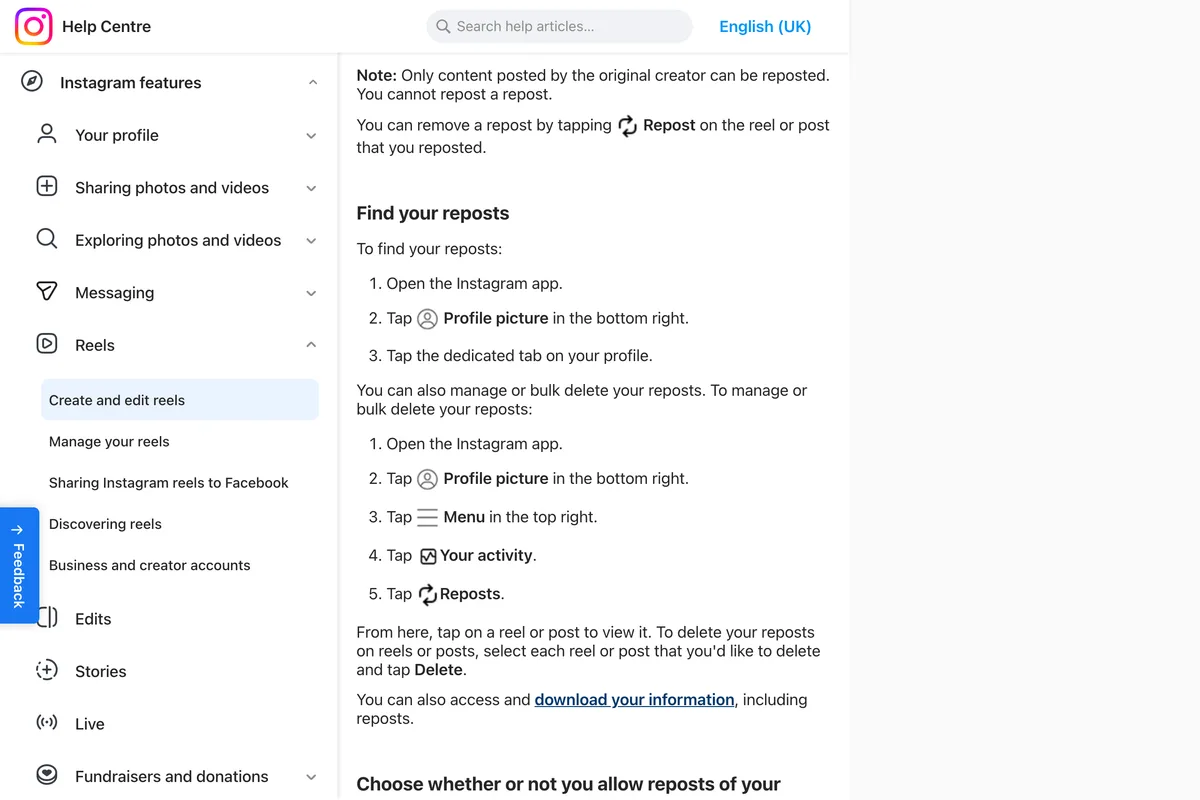
If what you are after is the list of things you reposted, Instagram documents that fully. Your reposts are in the tab with the two arrows on your profile. To remove one, open it and tap Repost again. To clear several at once:
- Go to your profile and tap Menu.
- Tap Your activity, then Reposts.
- Select each reel or post you want to remove and tap Delete.
Why a repost you expected is not there
- It was a share to a Story, not a repost. Most people still say repost for that. For a reel it shows nowhere unless you were mentioned.
- The notification is far back. Notifications are a feed, not an archive per post. If you know who it might be, check their Reposts tab instead.
- They removed it. The Insights count is net of deleted reposts, and the tab no longer shows it.
- Their profile is private and you do not follow them. You cannot open their Reposts tab.
- You reposted it yourself, or it was a repost of a repost. Instagram does not allow the second at all.
- Reposts are turned off on your account, so nobody could repost it. Check Sharing and reuse.
What other guides get wrong
We read eleven of the guides that rank for this search, in full, on 29 October 2026. One was written before the repost button existed, and several describe the share to a Story as if it were a repost.
| What the guide says | What Instagram's pages say | Guide |
|---|---|---|
| There is "no notification that says someone shared your post" | Eight of the ten videos show a reposted your post notification, and Panstag later says "Instagram does notify you" | Panstag, May 2026 |
| Instagram added native reposts "for Reels in 2023" | Reposts of public reels and feed posts launched on 6 August 2025, as TechCrunch reported that day | Panstag, May 2026 |
| Turn resharing off in "Settings → Privacy → Reels and Remix" | Menu, Sharing and reuse, Reposts on posts and reels | Panstag, May 2026 |
| Instagram "doesn't have a built-in 'repost' button for the feed" | "On any public reel or post you'd like to repost, tap Repost" | Ingram Story View, March 2026 |
| Your post's Reposts tab lets you "browse the accounts that reshared it" | The Reposts tab is on the reposter's profile and holds their reposts | Insviewers, September 2026 |
| A creator account lets you "see who posted your reel to their public stories" | "You won't be able to see who has reshared your reel" | Buzzvoice, January 2026 |
The guides that get it right, Instagram's own page among them, share one limitation: none of them can show you a complete list, because Instagram does not keep one you can see. Be wary of any app or site that offers to. Several "repost viewers" work the other way round, listing what a public account has reposted, which you can see in the app already; anything asking for your Instagram password to show who reposted you is asking for your account.
What our app shows about your posts
We make a tool that designs and publishes posts, so this is the honest version for our own customers. For posts published through it, our analytics reads reach, likes, comments and saves from Instagram. It does not read reposts yet, so the place to see who reposted a post we published is the same as for any other post: your notifications, and the post's insights in the app. A post published through our app is an ordinary post on your profile, and whether people can repost it is decided by your account's Sharing and reuse setting, as above.
Frequently asked questions
Can you see who reposted your post on Instagram?
Yes, one at a time. In the app, go to Home and tap the heart: reposts show in your notifications by name, such as reposted your post. Insights on a professional account shows how many times a post was reposted, but not by whom. Instagram has no screen that lists everyone.
Does Instagram notify you when someone reposts your post?
In the app as filmed by eight of the ten videos we checked, yes: a notification saying the account reposted your post or reel. Instagram's help pages do not document this notification, and there is no list that gathers one post's reposts.
Can you see who shared your post to their story?
Not for reels. Instagram's help page says you won't be able to see who has reshared your reel or where they have shared it to. You find out only if they mention you in the Story. Some professional accounts still see View Story Reshares on photo posts, but Instagram does not document it.
Where do reposts go on Instagram?
Into a dedicated Reposts tab, the two arrows, on the profile of the person who reposted, and possibly into their followers' feeds. It sits on the reposter's profile, not in a list on yours.
How do I see reposts in Instagram Insights?
On a professional account, open the post, tap View insights and look for Reposts under engagement or interactions. It is a count, net of deleted reposts, and tapping it does not show names.
How do I turn off reposts on Instagram?
Go to your profile, tap Menu, tap Sharing and reuse below How others can interact with you, and turn off the toggle next to Reposts on posts and reels.
How do I delete my reposts on Instagram?
Open the reel or post and tap Repost again to remove one. To remove several, go to Menu, Your activity, Reposts, select the ones you want and tap Delete.
How we researched this
- The rules on this page come from Instagram's own help pages, read on 29 October 2026 and photographed the same day: the page on reposting a reel or a post, the page on sharing a post to your story, and the page on original content. The photographs come from a browser that Meta served in UK English, so a few words differ from the US pages quoted in the text. The counts come from Meta's developer documentation for Instagram media insights, read the same day.
- Instagram's help pages do not say how to see who reposted your post, and they do not mention a notification for reposts. For that part we rely on videos by other people that show the app, and we say what each one shows. We did not repost anything or film the app ourselves.
- The section on what other guides get wrong comes from reading eleven of the guides that rank for these searches on 29 October 2026, in full, and comparing each claim with Instagram's pages.
Sources
- 1Repost a reel or a post on Instagram
- 2Share someone's post from feed to your Instagram story
- 3About original content on Instagram
- 4Who can see and share your reels on Instagram
- 5Instagram Platform: Instagram Media Insights
- 6Instagram API updates for partnerships, metrics, collaboration and engagement
- 7Instagram Feed AI system
- 8Instagram takes on Snapchat with new Instagram Map