Instagram carousel prompts that keep five slides consistent, tested
Copy and paste prompts for an Instagram carousel that looks like one piece of work, not five. We made the same five slides four ways on Nano Banana 2.1, Nano Banana Pro and Claude on 9 November 2026 and measured how far each slide drifted from the first.
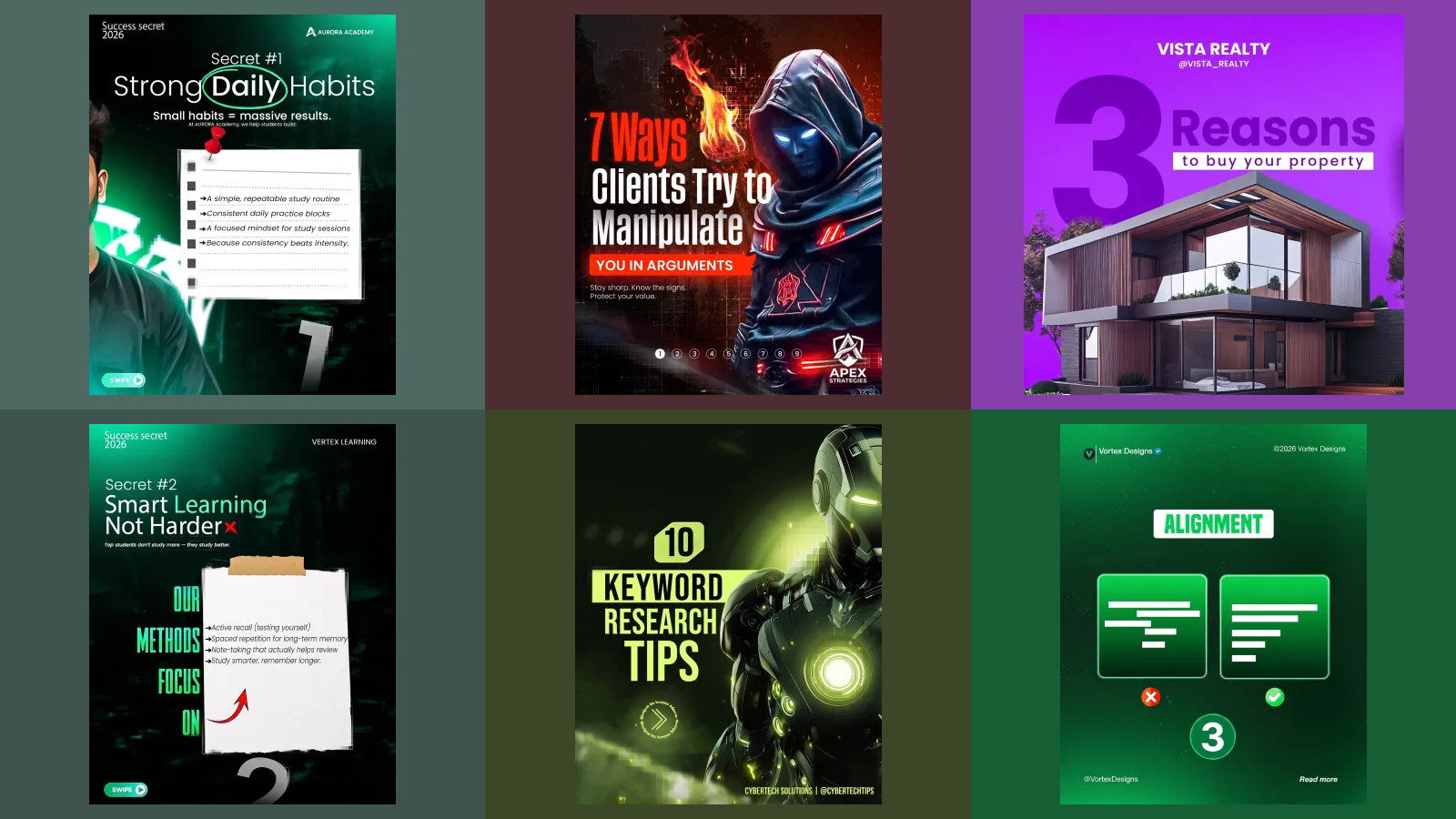
A carousel is five pictures that have to look like one piece of work, and that is exactly what image models are worst at. Each picture is made fresh, so the headline drifts, the photo box changes size and the colour wanders, and by slide four it looks like somebody else's post. We wrote one five-slide carousel for an invented plant shop, made it four ways on Nano Banana 2.1, Nano Banana Pro and Claude on 9 November 2026, and measured how far every slide moved from the first.
Our articles are still written by humans!
Get human written articles in your Google feed.
The short answer: design slide 1 with the full brief, then ask for every next slide in the same chat with "keep exactly the same background colour, fonts, sizes, margins, footer and layout as slide 1; change only the words and the picture". On Nano Banana 2.1 that held the headline, the footer and the picture box within 2 pixels across all five slides. The same method on Nano Banana Pro drifted by 66 pixels and added a sign we never asked for. If every colour and word must be exact, have Claude write the carousel as HTML and drop your own photos in.
Which carousel method should you use?
| Method | How consistent the five slides were | Words exact | Pictures | Use it when |
|---|---|---|---|---|
| One sentence, one request | Not a carousel: one image | Invented its own | Yes | Never |
| Gemini, one chat, slide by slide (Nano Banana 2.1) | Within 2 px; colour within Delta E 0.8 | All | Yes | You want finished slides with photos |
| Gemini, one chat, slide by slide (Nano Banana Pro) | Headline moved 66 px, one slide's photo shrank | All, plus a sign it added | Yes | Only with a check of every slide |
| Gemini, separate chats, same brief | Headline moved 18 px (2.1) and 89 px (Pro) | All | Yes | You lost the chat and need one more slide |
| Claude writes HTML | Identical frame; colour exact | All | No, placeholders | Brand colours must be exact and you have photos |
What does Instagram allow in a carousel?
Up to 20 slides, and every slide is cropped to the shape of the first one. Meta's developer documentation for publishing to Instagram puts both rules in one short list:
Carousels are limited to 20 images, videos, or a mix of the two. Carousel images are all cropped based on the first image in the carousel, with the default being a 1:1 aspect ratio.
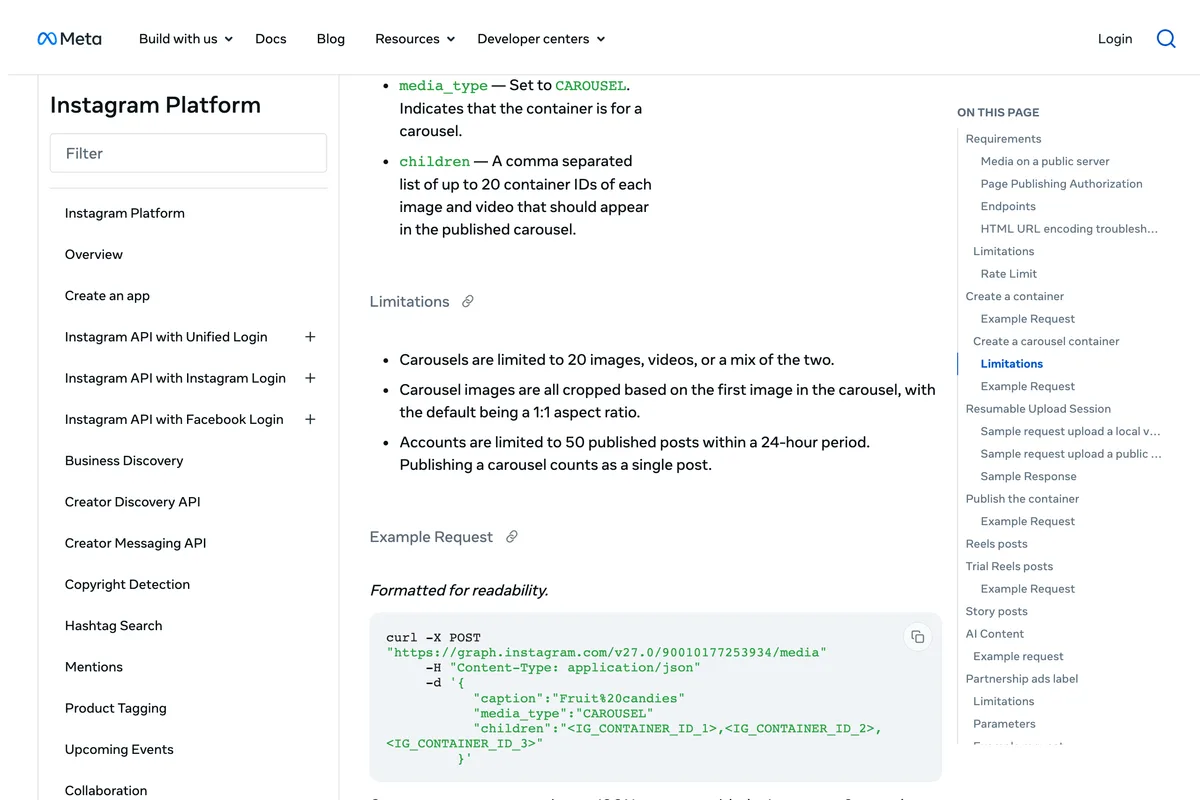
The second rule is the one that bites. If slide 1 is 4:5 and slide 3 came back square, slide 3 is cropped to 4:5 and loses its edges. So set the same shape for every slide in your tool's aspect ratio setting, not in the words, and use 4:5, 1080 by 1350 pixels, which takes the most room in the feed. Our Instagram post size guide explains why 4:5 beats square.
What happens if you just ask for a carousel?
Make an Instagram carousel about winter houseplant care for my plant shop.
An image model returns one image per request, so it has to decide what a carousel looks like in one picture. Nano Banana 2.1 drew four illustrated slides side by side on a single 1376 by 768 canvas: a cover reading "Winter houseplant care" and three tips. It signed the cover "By The Plant Shop", a name we never gave it, and wrote its own advice, including a rule to water only when the top 2 to 3 inches of soil are dry, and "Have questions? Ask us in the comments!". To post it you would have to cut the picture into four narrow panels, none of them 4:5. Nano Banana Pro skipped the slides altogether and returned a 1408 by 768 photograph of a fiddle-leaf fig by a snowy window, with no text.
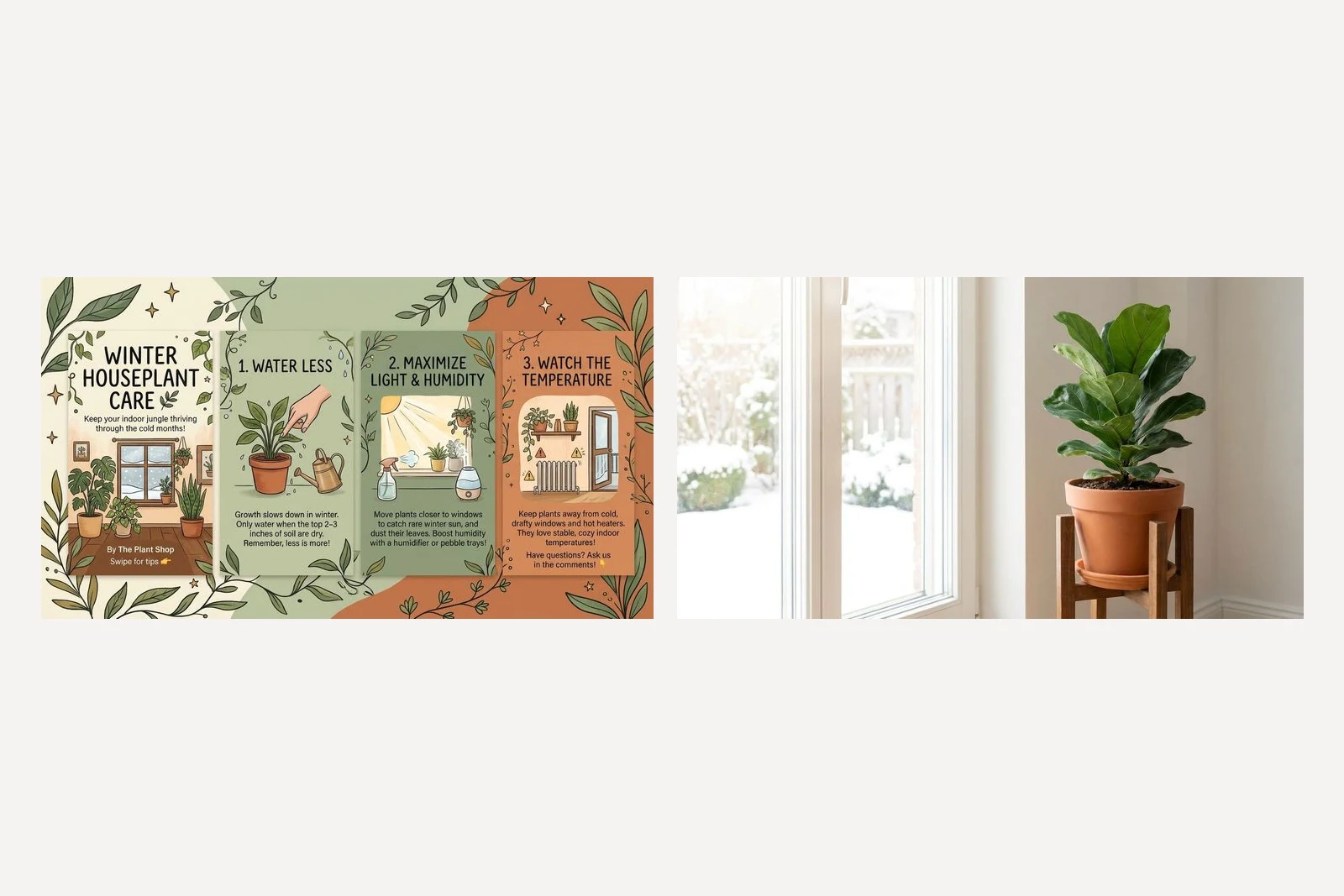
So a carousel has to be asked for one slide at a time, and the words have to be yours. The rest of this article is about the hard part: making five separate pictures look like one.
The brief that goes on slide 1
Everything that must stay the same goes into one style paragraph, written once and pasted into the first prompt. It fixes the background colour, the two typefaces and their colours, where the headline sits, where the picture sits, what goes in each bottom corner, and one accent colour with a single job. Then come the words for slide 1, each in quotation marks.
Design slide 1 of a 5-slide Instagram carousel for a plant shop called Pellow Plant Studio. Style for every slide: portrait 4:5. Background flat sage green #DCE5D3. Headline in a bold serif, deep green #1F3D2B, top left, large. Body text in a plain sans, charcoal #2B2B2B. One accent colour, terracotta #C8643B, used only for the slide number. In the bottom left corner, small: "Pellow Plant Studio". In the bottom right corner, small, in terracotta: the slide number. The picture sits in the lower half. Same margins on every slide. No logo, no phone number, no extra text beyond what is quoted. Slide 1 content: Headline: "3 ways to keep houseplants alive this winter". Body text: "Swipe for the list". Slide number: "1/5". Picture: a monstera in a terracotta pot beside a frosty window.
Three choices in it do most of the work. A flat background, because a gradient or a photo behind the text is redrawn differently every time. A slide number in a fixed corner, which tells the reader there is more and gives the eye a point that never moves. And one sentence that forbids extra text, because without it a model fills empty space with words of its own.
Method 1: one chat, one slide at a time
Send the brief above. When slide 1 is right, send this in the same chat for each next slide, changing only the content:
Now slide 2 of the same carousel. Keep exactly the same background colour, fonts, sizes, margins, footer and layout as slide 1; change only the words and the picture. Slide 2 content: Headline: "1. Water less". Body text: "Most houseplants need about half as much water in winter. Push a finger into the soil first: if the top 3 cm is damp, wait.". Slide number: "2/5". Picture: a small brass watering can next to a potted plant.
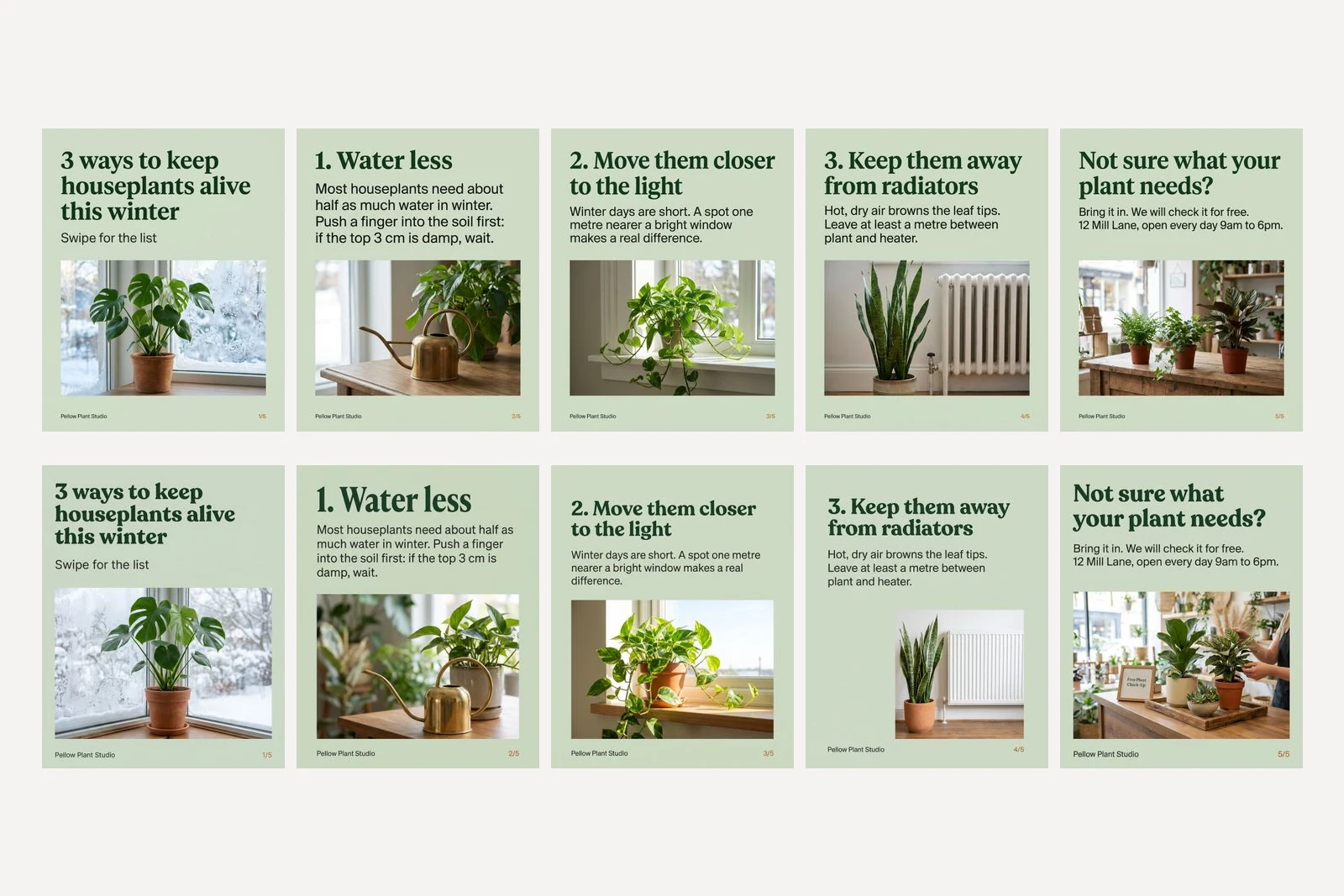
On Nano Banana 2.1 this was close to a template. Across the five slides the headline started between rows 84 and 86, the footer sat on row 1100 every time, and the top, right and bottom edges of the picture box moved by 2 pixels at most. The background stayed within Delta E 0.8 of itself from slide to slide. Every headline, body line, footer and slide number was set as typed. The one hiccup: slide 4 came back with no image on the first try, after 8 seconds, and the same message sent again worked.
Nano Banana Pro, given exactly the same turns, kept the words and lost the frame. Its headline started anywhere from row 68 to row 134, and the size of the type changed visibly: "1. Water less" on slide 2 is set much larger than the headline on slide 3. On slide 4 the picture shrank to about 60 percent of the width and moved to the right, and the footer rose 21 pixels. On slide 5 it added a framed sign on the counter reading "Free Plant Check-Up" and a shop assistant's hands, neither of which we asked for, in a prompt that said "no extra text beyond what is quoted". The sign happens to agree with the slide; a sign that did not would be a promise your shop never made.
Why does one chat help? The model can see slide 1 when it draws slide 2, so "the same as slide 1" refers to a picture rather than a description. It is also why you should not start a new chat halfway: the reference goes with it.
Method 2: separate chats with the same brief
This is what happens when you paste the full brief again for each slide, in a new chat or a new tool, so the model never sees the earlier slides. The only change to the slide 1 brief is the slide number and the content.
Both models got every word right. On Nano Banana 2.1 the frame drifted clearly more than in one chat: the headline moved 18 pixels between slides, the bottom of the picture box 54, and slide 5's photo came back a different size, with rounded corners. On Nano Banana Pro the headline moved 89 pixels, the top of the picture box 110, and slide 4's background came back noticeably lighter than the other four. Its picture box and footer were actually steadier than in Pro's one-chat run, so on Pro neither method produced a consistent set. Each slide on its own is fine; side by side they are five posts that resemble each other.
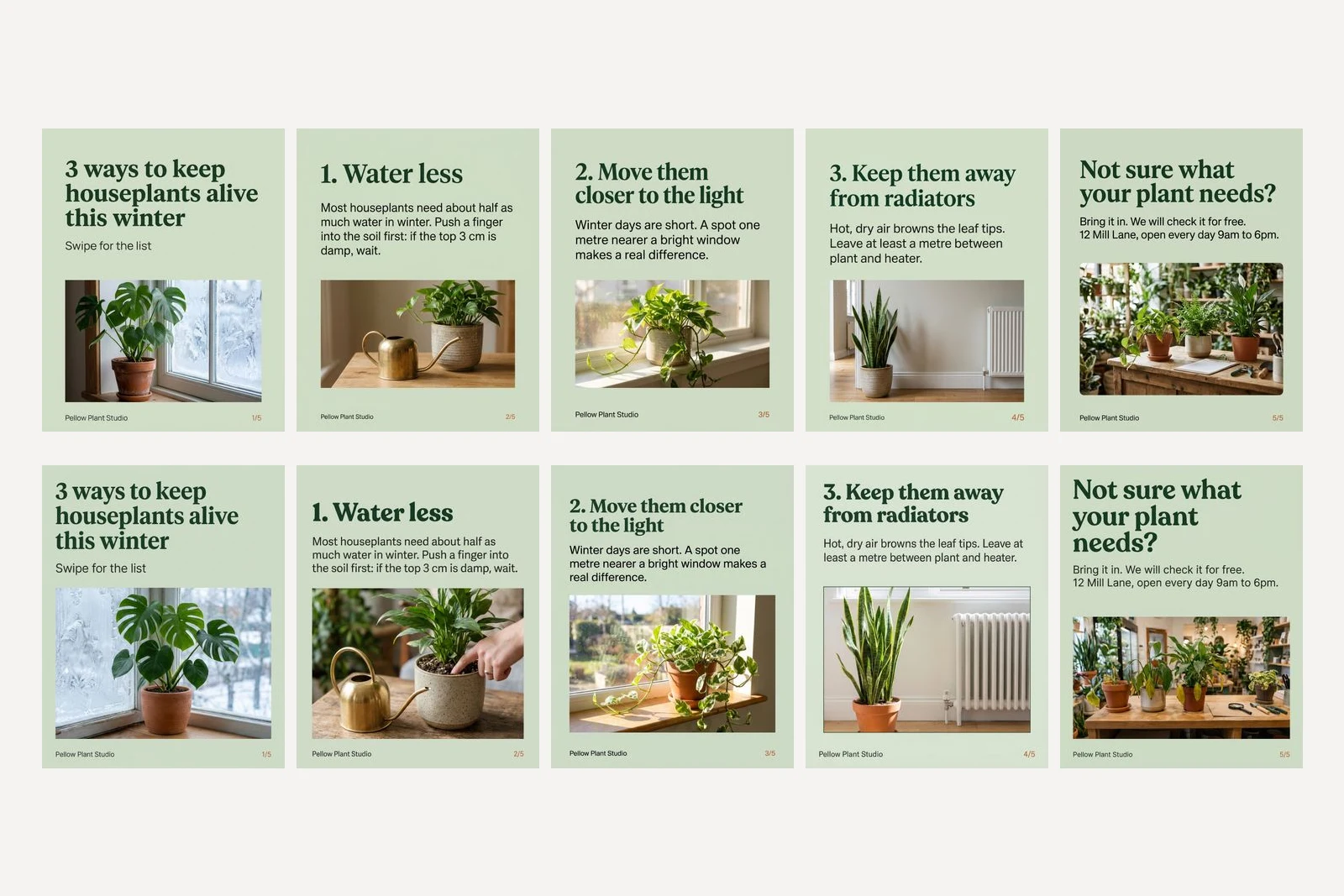
Use it only to patch one slide into a finished carousel when the original chat is gone, and then attach slide 1 as a reference image with "match the layout of the attached slide exactly". We did not test that variant here, so treat it as a sensible next step rather than a result.
Why is the green never quite right?
We asked for #DCE5D3 on all 20 Gemini slides and got it exactly on none, though one came within Delta E 1.2, too close to see. Every one came back slightly darker, from Delta E 1.2 to 6.7 away, the most common value being about #CFDBC5. On a phone, alone, nobody will notice. Next to your website or last month's posts in the same green, the larger misses will look like a different shade. In our Nano Banana tests a hex code landed far closer than a colour name did, so keep using hex codes; just do not expect an exact match from a picture model.
Method 3: Claude writes the carousel as HTML
Claude does not draw pictures. What it can do is write the slides as a web page, in exact colours and real fonts, which you open in a browser and screenshot. This is the usual way to make a carousel with Claude, and it trades the photos for precision. We sent the same style paragraph and the same five slides of copy, plus this:
Design a 5-slide Instagram carousel for a plant shop called Pellow Plant Studio as one HTML file I can screenshot. Each slide is a separate 1080 x 1350 px element with class "slide". [style paragraph] Where a picture goes, leave a clearly marked placeholder box with the description written inside it, because I will drop in my own photos. Use only Google Fonts or system fonts. Reply with the HTML document only, nothing else. [the five slides of copy]
Claude Sonnet 5.5 returned one HTML file in about 16 seconds. Rendered, every slide was exactly 1080 by 1350, the background was exactly #DCE5D3, the headline started on the same row and the footer sat on the same row on all five, in Playfair Display and Inter, and every word was as written, because HTML text is typed, not drawn. There were no pictures, only dashed boxes with the description inside, as we asked.
One real flaw: Claude placed each body paragraph at a fixed height by hand, 500, 230, 410, 410 and 410 pixels from the top. On four slides that left a gap of about 150 pixels under the headline; on slide 2, with its one-line headline, half that. As you swipe, the body text jumps. We sent the prompt again with one sentence added, and the second version kept the gap the same on every slide:
Put the headline and the body text in one block that flows from the top, so the gap between them is the same on every slide; do not position text by hand.
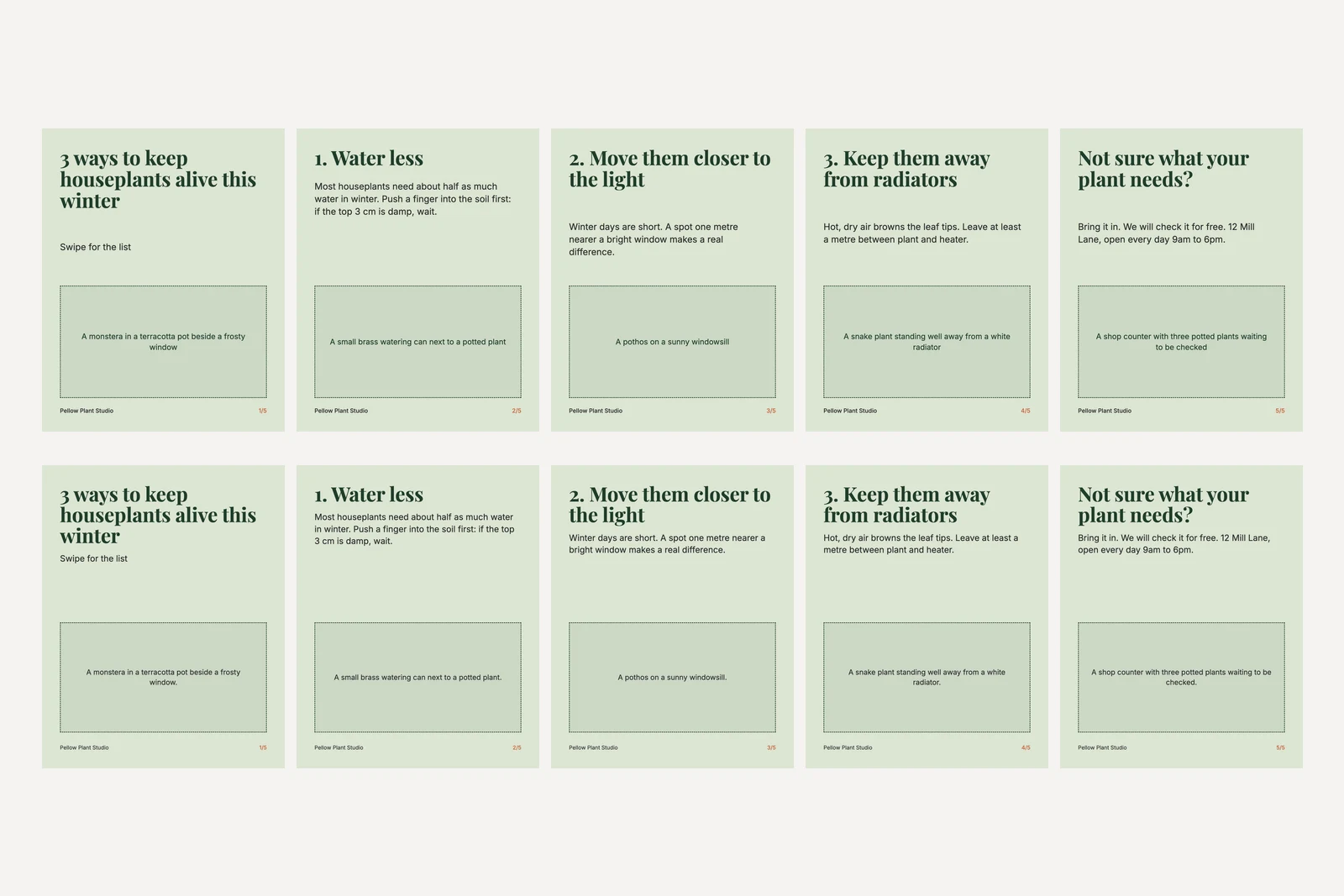
To finish it you need your own photos and a way to put them in: either open the file and ask Claude to swap each box for an image file you name, or screenshot the slides and drop the photos in with any editor. It is more work than Method 1, and it is the only method here where the colours and words cannot drift.
What about ChatGPT?
We did not test it for this article, and we would rather say so than guess. Our OpenAI API account had no credit on the day, and a run in the ChatGPT app was cut short before the first slide came back. The prompts above are plain text and paste into ChatGPT unchanged, and Method 1, one chat with slide 1 as the reference, is the one to try first there too. What we cannot tell you yet is how far its slides drift; when we have run it, the numbers go in this section.
How should the words on a carousel be written?
Slide 1 has to work alone in the feed and promise a number, because the number is the reason to swipe. Each middle slide carries one idea, headline first, in 25 words or fewer, as ours do. The last slide says what to do and where, which on a small business's carousel means an address or opening hours, typed by you. A model asked to write the copy as well as draw it will invent that last line, as Nano Banana 2.1 did with "Ask us in the comments".
Write the copy first, in a text chat, then paste it into the design prompt in quotation marks. Our Claude prompts for Instagram posts include an outline-then-write carousel prompt with a word cap per slide, and ChatGPT prompts for Instagram Reels has one that turns a Reel into a carousel.
Frequently asked questions
What is a good prompt for an Instagram carousel?
Write one style paragraph that fixes the background colour as a hex code, the typefaces and their colours, where the headline and picture go, and what sits in each bottom corner, then give slide 1's words in quotation marks. Ask for each next slide in the same chat with "keep exactly the same background colour, fonts, sizes, margins, footer and layout as slide 1; change only the words and the picture".
Can Gemini make an Instagram carousel?
One slide at a time, yes. Asked for a whole carousel in one sentence, Nano Banana 2.1 drew four slides inside one wide picture and Nano Banana Pro returned a single photo with no text. Made slide by slide in one chat, Nano Banana 2.1 kept the headline, footer and picture box within 2 pixels across five slides in our test.
How do I keep AI carousel slides consistent?
Make them in one chat so the model can see slide 1, use a flat background and a fixed position for the headline, picture and slide number, set the same aspect ratio for every slide, and forbid extra text. In our test that held on Nano Banana 2.1; on Nano Banana Pro the headline still moved by 66 pixels, so check the slides side by side.
Can Claude design an Instagram carousel?
Claude cannot draw images, but it can write the carousel as HTML that you open in a browser and screenshot. In our test the colours and words were exact and the frame identical on all five slides, with placeholder boxes for your own photos. Add a line asking for the headline and body to flow as one block, or the body text may sit at a different height on each slide.
How many slides can an Instagram carousel have?
Up to 20 images or videos, according to Meta's content publishing documentation, checked on 9 November 2026. Every slide is cropped to the shape of the first one, so make them all the same size, ideally 1080 by 1350 pixels at 4:5.
Which is better for carousels, Nano Banana 2.1 or Nano Banana Pro?
In our run, Nano Banana 2.1, by a wide margin on consistency: its headline moved 2 pixels across five slides made in one chat, against 66 on Pro, and Pro added a sign we had not asked for. Both set every quoted word correctly. It was one run per method, so check every slide whichever model you use.
How we researched this
- On 9 November 2026 we made the same five-slide carousel four ways. The bare prompt and the two Gemini methods were sent through Google's developer API to gemini-nano-banana-2.1 and gemini-3-pro-image, which Google calls Nano Banana 2.1 and Nano Banana Pro, at 4:5 and the default 1K size (the bare prompt with no shape set): 22 images in all. In the one-chat method each new slide was sent as a real second, third, fourth and fifth turn with the model's earlier replies included, as in a conversation in the Gemini app. The Claude method was run with Claude Sonnet 5.5 through Anthropic's Claude Code command line with no tools, and its HTML was rendered in Chromium at the size it set, 1080 by 1350 per slide.
- Every picture described is the one that came back. Nothing was regenerated to look better and nothing was retouched, with one exception we report where it happens: Nano Banana 2.1 returned no image for slide 4 of the one-chat run on the first try, and we sent the same message again, as anyone would. One run per method is a sample of one.
- The drift figures were measured on the files, not judged by eye: for each slide we found the first row of headline pixels, the last row of footer text, the edges of the picture box, and the background colour from a strip down the left margin, then compared the five slides. Colour differences are CIE76 Delta E against the #DCE5D3 we asked for; under about 2 is hard to see, over 5 is visible side by side. Every headline, body line and footer was read back with Tesseract OCR and compared with the prompt; the slide numbers were too small for OCR on several slides and were checked by eye.
- Pellow Plant Studio is a business we invented, and the plant tips are sample copy for the test, not horticultural advice. We did not test ChatGPT: our OpenAI API account had no credit on the day, and a run in the ChatGPT app was cut short before the first slide came back. The scripts are in our repository as scripts/_carousel-prompt-tests.mjs, scripts/_carousel-claude-html.mjs and scripts/_compose-carousel-tests.mjs.
Sources