How to add music to an Instagram post, including one you already published
Pick the photo, tap Audio, choose a song and the part of it that plays. It works for single photos and photo carousels in the phone app, but not in a carousel with a video in it. Since July 2026 you can also add or swap the song on a post that is already live, if the feature has reached your account. Here is each route, what Instagram's own pages say, and why the button is sometimes not there.
Instagram lets you put a song under a photo post the same way it does under a story: you pick the track and the part of it that plays, and the post plays it when someone stops on it. The control is easy to miss because it only appears after you have chosen the picture, and it does not exist at all in some places people look for it, such as Instagram on a computer.
Our articles are still written by humans!
Get human written articles in your Google feed.
This article covers the four situations people actually search for: a single photo, a carousel, a post that is already published, and the music button that is not there. The steps for new posts follow Instagram's help centre, linked in each section. The steps for published posts come from Adam Mosseri's announcement and a screen recording, because we found no help centre page for them.
How to add music to a single photo post
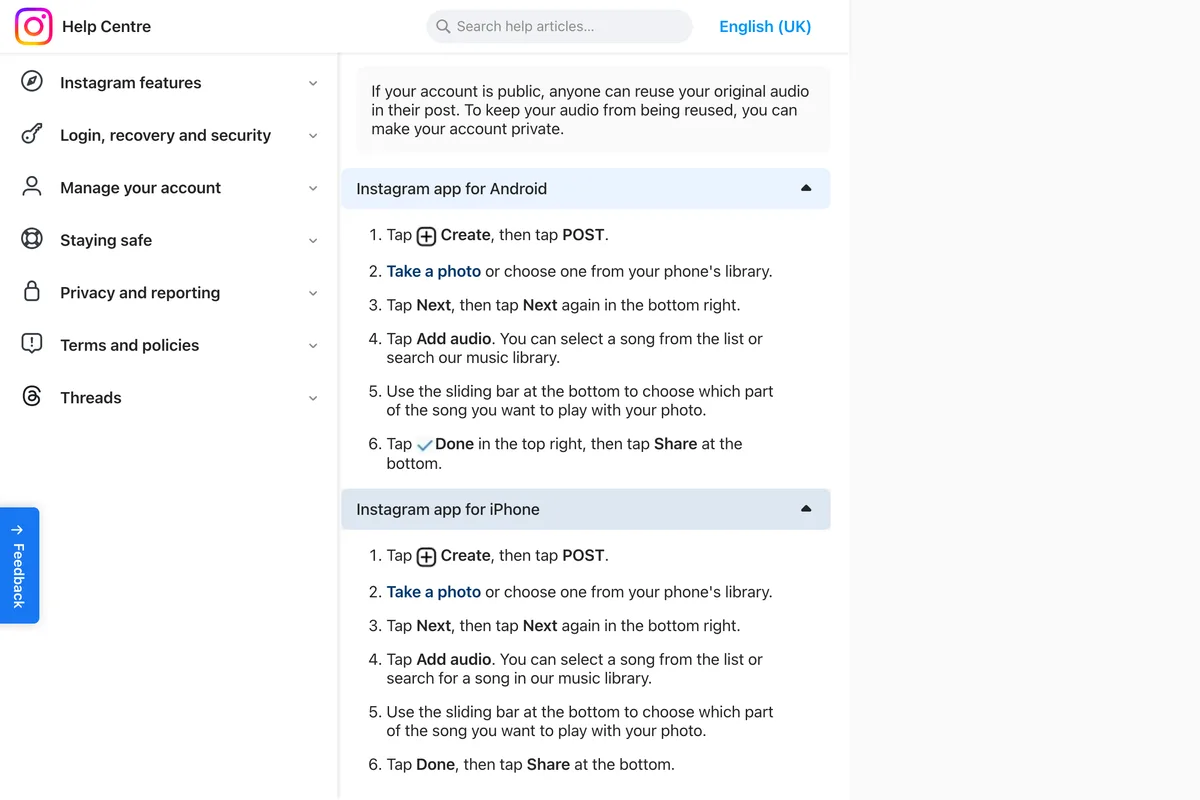
These are the iPhone steps from Instagram's help article Add audio to your post on Instagram. The Android steps on the same page are the same apart from small wording differences, such as where the Done button sits.
- Tap Create, then tap POST.
- Take a photo or choose one from your phone's library.
- Tap Next, then tap Next again in the bottom right.
- Tap Add audio. Pick a song from the list or search the music library.
- Use the sliding bar at the bottom to choose which part of the song plays with your photo.
- Tap Done, then tap Share.
The app has moved on a little from that page. In the HardReset.Info video below, filmed on an iPhone and published in September 2026, Audio sits in a row of tools along the bottom of the editing screen, next to Aa (text), Overlay, Filter and Edit, as soon as the photo is chosen, rather than two screens later. The song list opens on tabs called For you, Trending, Original audio and Saved. If your screen does not match the help page, look for that bottom row first.
One thing the help page adds that is easy to skim past: if your account is public, anyone can reuse your original audio in their own post. That only matters when the sound is your own recording rather than a song from the library, and Instagram's suggested fix is to make the account private, which a business account cannot be.
How to add music to a carousel
You add one song to the whole carousel. Instagram's article Add music to a post with multiple photos gives these steps:
- Tap Create at the top, or swipe right anywhere in Feed, then tap POST.
- Tap Select multiple and choose your photos.
- Tap Next, add filters if you want them, then tap Next again.
- Tap Add music, then choose from For you, browse, or search by name.
- Choose the part of the song to use, tap Done, finish the post and tap Share.
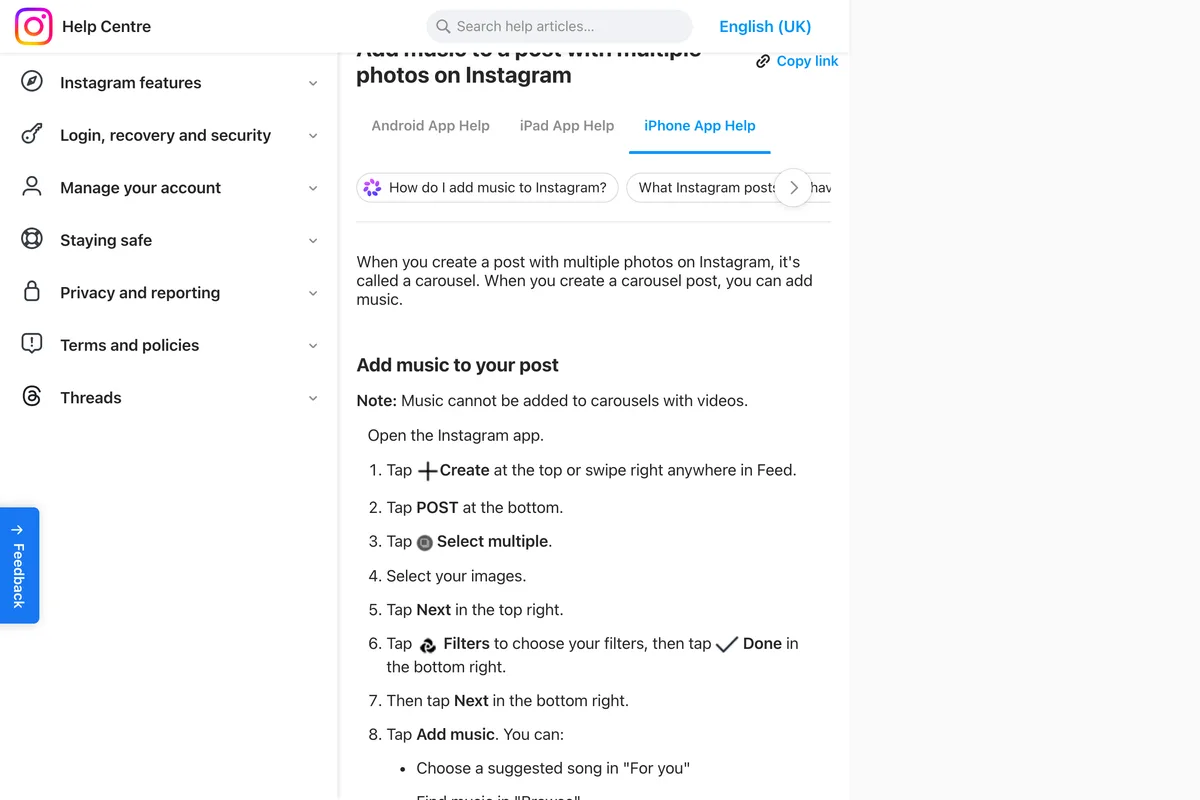
The note at the top is the one that catches people. If a single slide is a video, Instagram does not let you add music, and the help page does not say why. Either take the video out, or make the whole thing a reel. If you are building a carousel from one wide picture, our free Instagram carousel splitter cuts it into slides that line up, and you add the song in the app as above.
How to add music to a post after posting it
Until this summer the honest answer was that you could not: once a post was live, the only way to change its sound was to delete it and upload it again, losing its likes and comments. That changed on 21 July 2026, when Adam Mosseri, who runs Instagram, announced it in a post of his own.
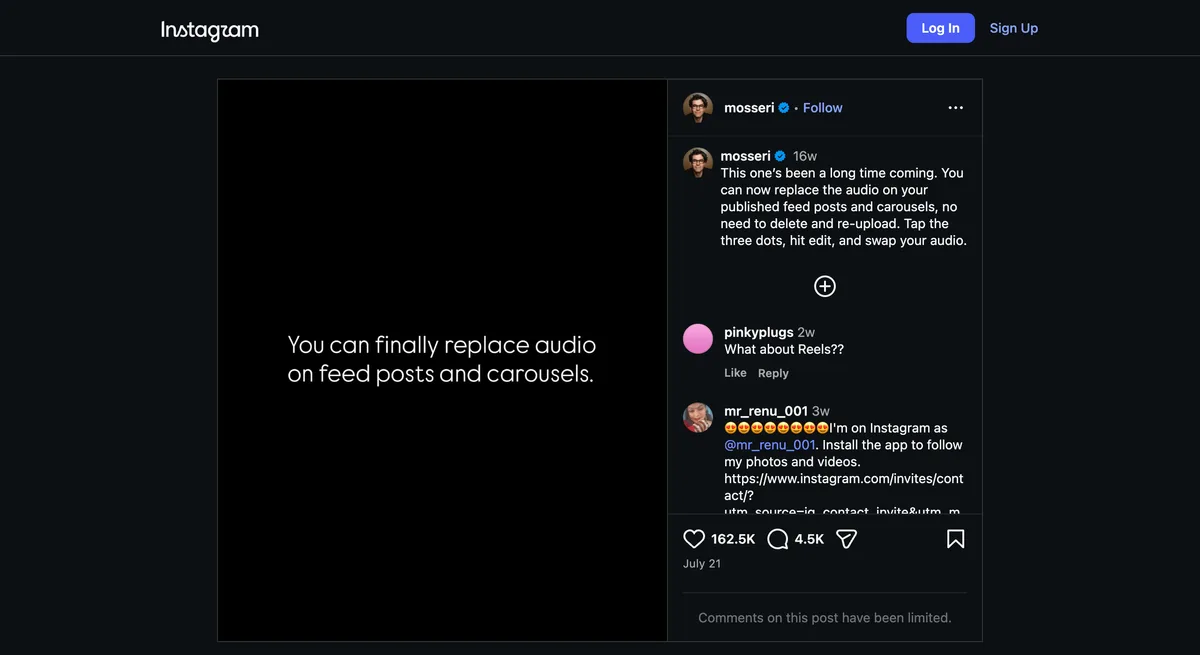
- Open the post on your profile and tap the three dots in the top right.
- Tap Edit.
- Tap Add audio if the post has no song yet. If it has one, swap it from the same screen, which is what Mosseri means by swap your audio.
- Choose the track and the part that plays, then tap Done, and Done again to save.
Mosseri's own wording is replace. Adding a song to a post that never had one is part of the same tool: PetaPixel's report of the launch says posts that had no music can now be given some, and the HardReset.Info video above shows exactly that at 2:20, an Edit info screen on an existing photo post with Add audio as its first line. PetaPixel also reports that you can swap the audio as many times as you like, and reports, citing Digital Trends and Instagram's Jimmy O'Keefe, that changing it will not boost the post's visibility.
Music on a video, which is a reel now
If the post is a video, the song is added in the Reels editor, where the control is in a different place. In Instagram's article Add music, effects and more to your reel, Music is the first item in the tool menu down the left side of the camera, and after you choose a song you can pick the part that plays and, where lyrics exist, how they show on screen. A reel can also keep its own recorded sound and mix a song underneath it, which Instagram covers in Add your own audio to your reel. For the shape and length of the video itself, see Instagram reel size.
Why you can't add music to your Instagram post
When the Audio button is missing, or the song you want is not in the list, these are the causes Instagram's help pages point to.
| What you see | The likely cause | What to do |
|---|---|---|
| Few songs, or the one you want is missing | A business account. Instagram says certain business accounts do not have access to the licensed music library, because it is for personal, non commercial use. | Meta's Sound Collection is cleared for business use in Reels and Stories. For a photo post, check whether the track is in the list at all, or read why business accounts can't use music. |
| No music option on a carousel | One of the slides is a video. Instagram: music cannot be added to carousels with videos. | Remove the video, or post the video as a reel with its own song. |
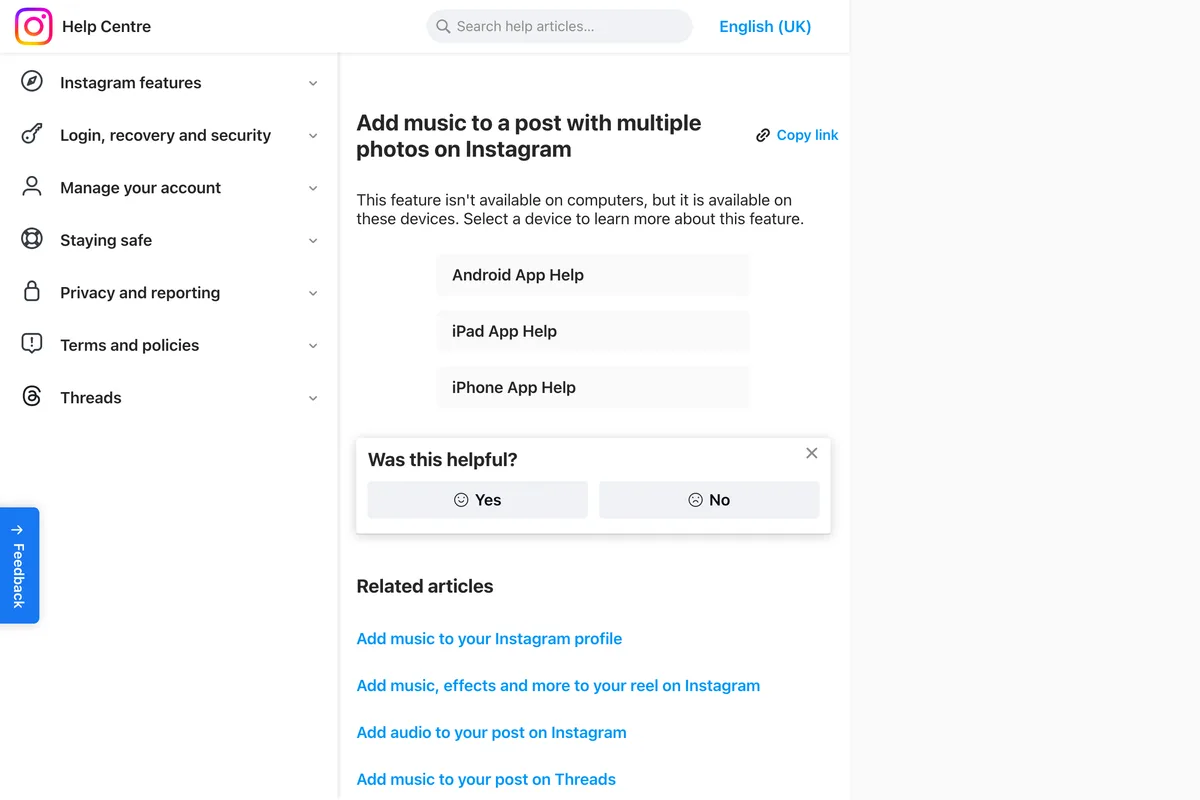
| No music option at all on a computer | Instagram's help centre says adding music to a carousel is not available on computers. | Post from the phone app. If your account has the edit feature, adding the song afterwards from the phone should also work, though we have not tested it on a post made from a computer. |
| No Add audio when you edit an old post | The edit feature from July 2026 has not reached your account yet. | Update the app and check again later, or delete and repost. |
| No music anywhere, on any post | Instagram's reels page says the music sticker isn't available to everyone, without giving reasons, and tells you to update the app. | Update the app from the App Store or Google Play first. |
| Audio unavailable on a post that used to play | The song was muted after a change in Instagram's licence with the rights holder. | Tap Audio unavailable, then Replace audio. Instagram says a muted track can be replaced only once. |
Which song, if the account is a business
Being able to add a song is not the same as being allowed to use it in an advert for your shop. Instagram's licensed music library page says the library is meant for personal, non commercial use, and the Meta Sound Collection is the part a business can use commercially. We went through what that means, and what a business can put under a post without trouble, in Why your Instagram business account can't use music.
A song also changes nothing about how the photo itself is cropped. If the picture is the wrong shape, Instagram trims it whatever plays underneath, so check the Instagram post size before you spend time choosing the track.
Frequently asked questions
How do I add music to an Instagram post?
In the Instagram app, tap Create, then POST, and choose your photo. Tap Audio (on the help page it is Next, Next, then Add audio), pick a song, drag the slider to the part you want to play, tap Done and then Share.
Can I add music to an Instagram post after posting it?
Yes, since 21 July 2026, if the feature has reached your account. Open the post, tap the three dots, tap Edit, then Add audio, or swap the song that is already there. It works on photo posts and carousels. If the option is not there, update the app; until it arrives, the only route is to delete the post and share it again with music.
Why can't I add music to my Instagram post?
The common reasons are a business account, which does not get the full licensed library, a carousel that contains a video, posting from a computer, or an old version of the app. Instagram's reels page also says the music sticker is not available to everyone.
Can I add music to an Instagram carousel?
Yes, one song for the whole carousel, chosen after the filters screen with Add music. Instagram says music cannot be added to carousels that contain a video.
Can I add music to an Instagram post on a computer?
No. Instagram's help centre says adding music to a carousel is not available on computers, and its single photo instructions are for the Android, iPhone and iPad apps. If your account has the July 2026 edit feature, adding the song afterwards from the phone should work, though we have not tested it on a post made from a computer.
How do I change the music on an Instagram post?
Open the post, tap the three dots, tap Edit and swap the audio for another track from the library. PetaPixel reports that you can change it as many times as you like and that changing it does not boost the post's visibility.
What does Audio unavailable mean on my post?
The song was muted, usually because Instagram's agreement with the rights holder changed. The post stays up. Tap Audio unavailable, then Replace audio, and choose another track. Instagram says a muted track can be replaced only once.
How we researched this
- The steps for new posts follow Instagram's help centre. On 13 November 2026 we read the Instagram Help Centre articles on adding audio to a post, adding music to a post with multiple photos, replacing muted audio and adding music to a reel, in the device versions each page offers, and photographed the passages we quote. The help centre served our screenshots in UK English, so a word or two in them may differ from the US app.
- The ability to change the song on a published post is not in any help centre article we found. It comes from a post by Adam Mosseri, the head of Instagram, dated 21 July 2026, which we opened and photographed on the same day, and from PetaPixel's report of the launch.
- We did not publish test posts for this article. To check that the help centre still matches the app, we watched a HardReset.Info tutorial filmed on an iPhone and published on 12 September 2026, which we embed below, and noted where the screens it shows differ from the written steps. Where we describe something we could not see in either place, the article says so.
- We sell a tool that designs Instagram posts. It does not add music to them, so nothing in this article points at it.
Sources
- 1Add audio to your post on Instagram
- 2Add music to a post with multiple photos on Instagram
- 3Replace muted audio on your Instagram post
- 4Add music, effects and more to your reel on Instagram
- 5Add your own audio or someone else's original audio in your Instagram reel
- 6Access to the licensed music library on Instagram
- 7You can now replace the audio on your published feed posts and carousels
- 8Now you can change the music on your Instagram post
- 9How to add music to a single photo Instagram post